Key Takeaways
- Search intent is the underlying purpose of a query, such as learning, reaching a destination, comparing options, or completing an action.
- The four practical intent categories are informational, navigational, commercial, and transactional, although queries can have mixed or ambiguous intent.
- Semantic search evaluates meaning and context, allowing differently worded queries and content to connect around the same underlying concept.
- Effective optimization aligns a page’s purpose, format, depth, organization, and calls to action with the dominant intent shown in current results.
Search intent refers to the underlying purpose behind a query entered into a search engine. It indicates whether the searcher wants to learn about something, reach a particular website, compare available options or complete an action.
Understanding intent matters because search engines aim to return results that best satisfy the user’s request. Google’s ranking systems guide explains that its systems evaluate numerous signals to identify helpful and relevant content.
A page may struggle to rank when its purpose, format or depth does not match the dominant search intent, even when it has backlinks or strong technical optimization. On the other hand, matching content with intent can attract visitors whose needs closely align with what the page provides. For example, an in-depth product comparison is generally more suitable for a commercial query than a basic definition page because it helps users evaluate available options.
Semantics and Semantic Search
Semantics: The study of meaning in words, phrases and sentences and how they relate to one another. It examines how context and the connections between words influence meaning.
Semantic Search: Semantic search considers the intended meaning and context of a query rather than relying only on exact keyword matches. It involves technologies such as natural language processing, machine learning, knowledge representations and vector embeddings to connect differently worded content with the same underlying concept. This can help search systems return more contextually relevant results even if the landing page uses synonyms instead of the exact terms.
For example, a page about “choosing a beginner camera” may be relevant to a search for “best camera for new photographers,” even though the wording is different.
The Evolution of Search Intent in the AI Era
Search systems are now capable of handling longer, more conversational and more complex queries. People can now search using complete questions, voice input, images and multi-part prompts instead of relying only on short keyword phrases.
Longer and More Conversational Queries
Today, AI-powered search allows several requirements to be combined into one request, such as:
“Compare three lightweight laptops for video editing under ₹80,000 that also have good battery life.”
In May 2026, Google reported that the average AI Mode query was approximately three times as long as a traditional search query. Google also describes the feature as suitable for tough and complex questions, comparisons and planning tasks.
At the same time, short queries have not disappeared completely. Searches such as “Gmail login” and “weather today” remain effective when the need can be expressed clearly in a few words.
AI Overviews and Zero-Click Searches
AI Overviews summarize information directly on the results page and provide links for further exploration. More broadly, AI-powered search can synthesize information and compare options, potentially shortening the journey from discovery and consideration to a decision.
AI Overviews can also satisfy simple informational intent without requiring a website visit, especially when the searcher wants a quick definition, explanation or factual answer.
On the other hand, commercial and transactional queries may involve further exploration because users often need to compare options, review details, confirm credibility or visit a website to complete an action. As a result, AI-generated results can change how different types of search intent lead to clicks and website visits.
Four Types of Search Intent
Andrei Broder’s influential taxonomy of web search, published in 2002, classified searches into three broad groups: informational, navigational and transactional. Many modern SEO frameworks add commercial intent as a practical fourth category for searches involving evaluation before a purchase.
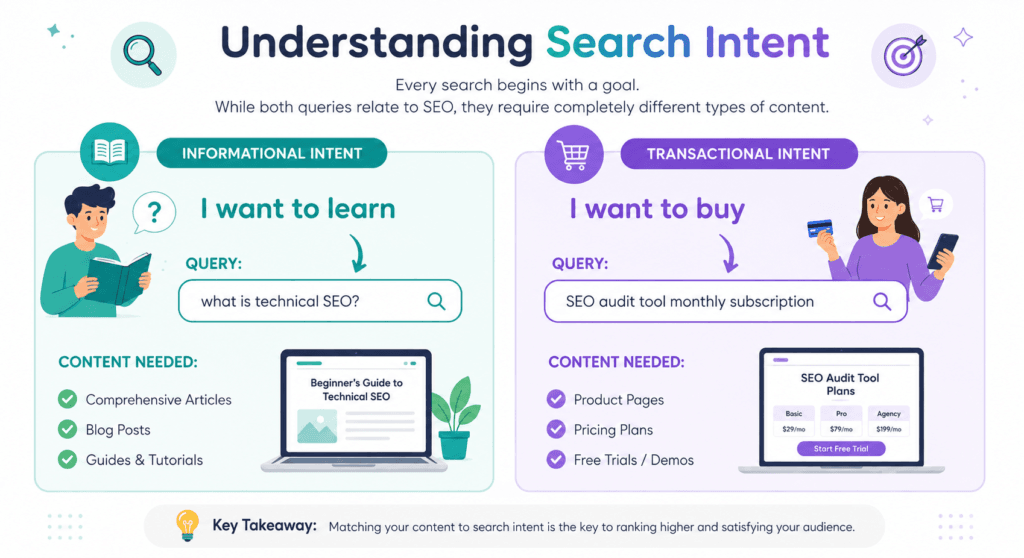
Informational Intent
The searcher wants an answer, explanation, instruction or greater understanding of a subject. Common wording may include what, why, how, guide, history or tips.
Example: “How is compound interest calculated?”
Navigational Intent
The user wants to navigate to a particular website, application, account page, brand or online destination.
Example: “Facebook login”
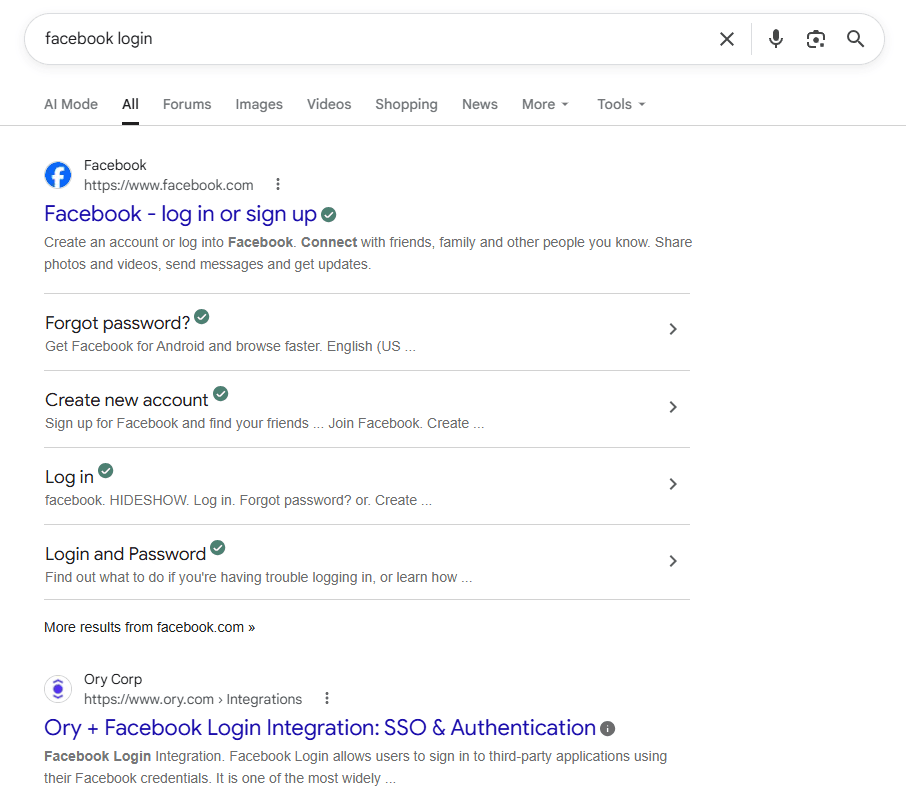
A navigational query does not always include a complete URL because the search engine is being used as a route to a known destination.
Commercial Intent
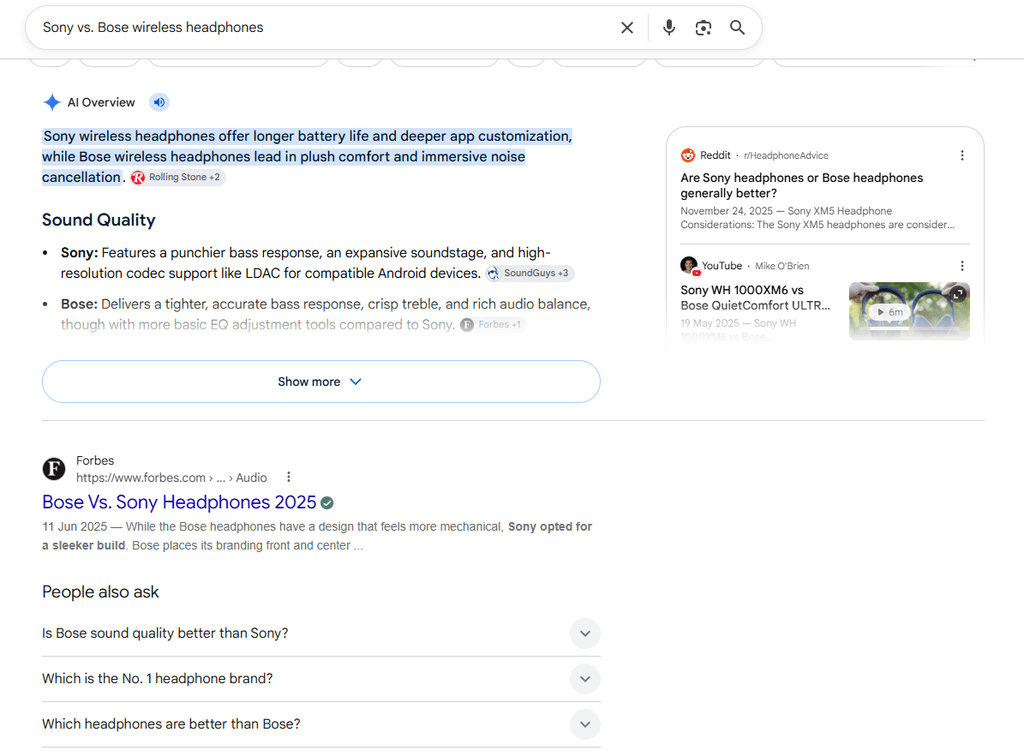
Commercial intent often involves comparing products, services or providers before making a decision. Results for these queries often include reviews, recommendations, alternatives, feature comparisons and buying guides. Common wording may include best, top, review, versus, compare or alternative.
Example: “Sony WH-1000XM5 vs. Bose QuietComfort Ultra”
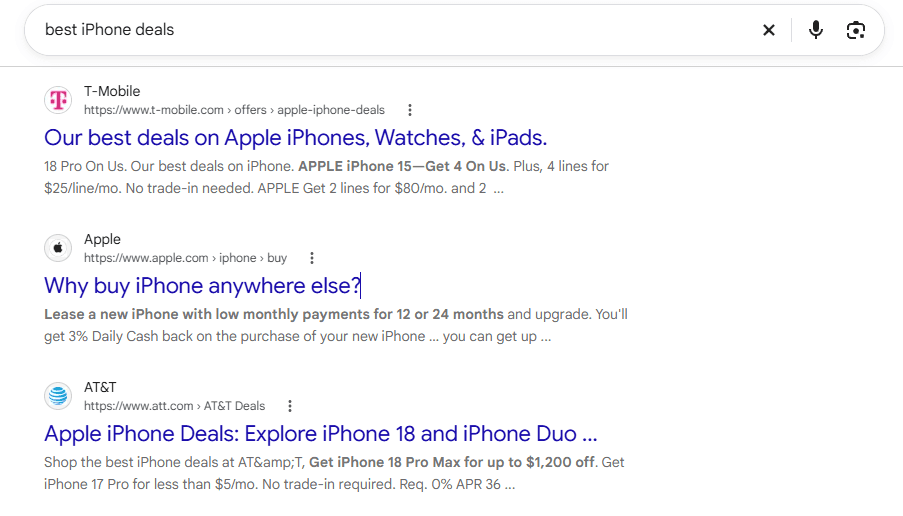
Transactional Intent
The searcher wants to complete an action, such as making a purchase, downloading a file, registering for an account, booking an appointment or subscribing to a service. Common wording may include buy, order, price, coupon, discount, book, download or subscribe.
Example: “Buy noise-canceling headphones online”
These words may provide useful clues, but do not determine intent by themselves. A query can contain mixed or ambiguous intent, and search engines may display several result types when more than one interpretation appears reasonable.
How to Identify a Keyword’s Search Intent
Search intent can be estimated by reviewing the current search results and using keyword research tools.
- Manual SERP Analysis: Type the keyword into a private/incognito browser window and analyze page one. The types of pages and search features appearing prominently provide useful evidence of the dominant intent Google currently associates with the query:
- If page one is full of blog posts, tutorials, and definitions, the intent is likely Informational.
- If page one displays pricing tables, product grids, and checkout pages, the intent is likely Transactional.
- If page one is dominated by listicles, product comparisons, and aggregate reviews, the intent is likely Commercial.
- If page one is full of official websites, login pages, account portals and brand-specific pages, the intent is likely Navigational.
Results can vary by location, language, device and time, so the analysis should reflect the audience being targeted.
- Use Keyword Research Tools: Some platforms provide automated intent labels, while others provide SERP data that can help users assess intent manually.
- Semrush Keyword Magic Tool: Assigns informational, navigational, commercial or transactional intent labels and allows keywords to be filtered by intent.
- Mangools KWFinder and SERPChecker: These help users inspect the pages ranking for a keyword and infer the dominant or mixed intent from the results.
- Ahrefs Keywords Explorer: Assigns search-intent attributes to keywords with available SERP data and allows keyword lists to be filtered by intent.
Automated intent labels are estimates and should be checked against the current search results before content is planned.
Optimizing Content for Search Intent
Optimizing content for search intent means shaping the page’s purpose, format, depth and presentation around what users are most likely trying to accomplish with a query.
Step 1: Map Intent to the Funnel Stage
Search intent can broadly align with different marketing goals, although users do not always move through a simple or linear funnel. Informational queries generally require useful explanations, while commercial queries need comparisons and transactional queries require pages that make the desired action easy to complete.
Step 2: Study the Results Page
Review the top-ranking pages to identify common content types, formats and angles. Also examine search features such as featured snippets, videos, local results, People Also Ask questions and product listings.
These features provide clues about the information and format users may find helpful. However, there is no fixed answer length or formatting method that guarantees a featured snippet or citation in an AI Overview. Google recommends applying established SEO practices rather than relying on special AI-search techniques. It specifically advises against unsupported optimization “hacks”.
Step 3: Find Content Gaps and Add Original Value
Do not simply reproduce the information already ranking. Look for unanswered questions, unclear explanations, outdated details or important perspectives that existing pages have missed.
Original research, expert experience, useful examples, clear tables and relevant visuals can make the page more valuable. Google recommends creating unique, reliable and people-first content rather than content produced mainly to influence rankings.
Step 4: Organize the Page Clearly
Use a clear main title and descriptive subheadings that follow a logical order. Headings should explain the page structure and help readers find the sections they need.
There is no need to use every heading level from H1 through H6. At the same time, it is important to use heading levels in a logical hierarchy that reflects the relationships between sections and subsections. The W3C explains that well-organized headings improve navigation and communicate how the content is arranged.
Step 5: Choose the Right Content Format
Match the format to the dominant intent:
- Informational: Explanations, guides, tutorials, definitions and educational videos.
- Commercial: Comparisons, reviews, alternatives, buying guides and pros-and-cons tables.
- Transactional: Product pages, service pages, pricing information, booking forms and clear calls to action.
- Navigational: Clear brand, product, account or support pages that help users reach the expected destination.
The format should follow the user’s needs rather than a rigid template.
Step 6: Improve Titles, Descriptions and Usability
Write a clear title that accurately represents the page and matches the main intent. The meta description should summarize the page persuasively without making misleading promises.
Similarly, use readable paragraphs, helpful lists, descriptive links and relevant visuals. Calls to action should suit the searcher’s stage rather than appearing aggressively on every page.
Adding structured data can make a page eligible for rich results, which may be more engaging and encourage users to interact with the search listing. However, correctly implemented structured data does not guarantee that a rich result will appear.
Step 7: Monitor Performance and Intent Changes
Use Google Search Console to review the queries generating impressions and clicks, along with changes in click-through rate and average position. Google recommends checking the affected queries and pages when performance changes.
A high number of impressions with relatively few clicks may justify reviewing the page title, search snippet, competing results, SERP features and alignment with the query. Analytics data can also indicate whether visitors engage with the content or complete the intended action.
Search intent can change over time, so important keywords and their search results should be reviewed periodically.