Key Takeaways
- Conversion rate measures the percentage of users, sessions, clicks, or other opportunities that complete a predefined valuable action.
- It is calculated by dividing conversions by the relevant opportunities during the same period, then multiplying by 100.
- There is no universal good conversion rate because performance varies by industry, traffic source, objective, device, audience, and conversion definition.
- Conversion rate optimization improves meaningful outcomes by addressing audience fit, user intent, landing-page relevance, friction, trust, calls to action, and testing.
Conversion rate is the percentage of users, sessions, clicks, or other measured opportunities that result in a predefined desired action. It shows how effectively a website, landing page, advertisement, email, or other marketing activity turns an audience into meaningful business outcomes.
A conversion is an action that a business has identified as valuable. Depending on the campaign or website, conversions can include purchasing a product, submitting a lead form, starting a subscription, registering for an event, booking a consultation, or downloading an ebook or another asset. The same action does not need to count as a conversion for every business.
In general marketing, “conversion” refers to any predefined valuable action. In GA4, important business actions are called key events, while conversions are used to measure and optimize advertising performance.
Conversion rate is central to digital marketing because traffic alone does not show whether marketing is achieving its objective. A website can attract thousands of visitors but generate very few leads or sales, while a smaller, highly relevant audience may generate much stronger results.
However, conversion rate should not be viewed in isolation. Revenue, profit, customer acquisition cost, lead quality, and customer lifetime value may also be needed to determine whether those conversions are commercially valuable.
How Is Conversion Rate Calculated?
Conversion rate is calculated by dividing the number of successful conversions by the total number of opportunities to convert during the same measurement period, then multiplying the result by 100.
The denominator depends on what is being measured. A website might use sessions or users, while an advertising platform may use clicks or other eligible ad interactions. Google Ads, for example, defines conversion rate as conversions divided by eligible ad interactions.
Suppose a targeted landing page receives 10,000 sessions during a month and 250 of those sessions result in completed lead forms. In this case, the conversion rate would be: (250 ÷ 10,000) × 100 = 2.5%
Note
In some advertising platforms, conversion rate can exceed 100% when multiple conversions can be counted from a single interaction.
Conversion Rate Benchmarks
There is no universal good conversion rate. Performance varies significantly according to industry, traffic source, campaign objective, product price, device, audience, conversion action, and where the visitor is in the buying journey.
Recent benchmarks illustrate these differences:
WordStream’s 2026 search advertising benchmark reports an overall conversion rate of 8.18%, but industry performance ranged widely. Animals & Pets reached 16.22%, for example, while Finance & Insurance averaged 2.64%.
The same variation appears in ecommerce. Shopify’s 2026 overview cites separate global ecommerce datasets reporting conversion rates of approximately 1.4% and 2.66%, while individual categories differ considerably. Shopify therefore recommends using industry and business context rather than treating a single global average as a performance target.
Organic search is even harder to reduce to one percentage. An informational glossary article, ecommerce product page, local service landing page, and branded pricing page serve very different search intents and should not be expected to convert at the same rate.
Why Conversion Rate Is Important for Digital Marketing
Conversion rate connects marketing activity with the actions a business actually wants people to complete.
- Reveals Traffic Quality: High traffic with very few conversions can indicate that the audience or search intent does not match the offer. However, informational content should be judged according to its intended role rather than expected to produce immediate sales.
- Improves Returns From Existing Traffic: Increasing conversion rate can generate additional leads or sales without requiring the same increase in traffic. If 10,000 visits produce a 1% conversion rate, there are 100 conversions. At 2%, the same traffic produces 200 conversions.
- Identifies User Experience Friction: Conversion performance can be compared across devices, pages, and funnel stages. A much weaker mobile conversion rate, for example, may justify investigating forms, checkout usability, responsive design, loading performance, or other mobile problems.
- Can Reduce Customer Acquisition Cost: If marketing costs remain similar while more visitors become customers, the average amount spent to acquire each customer can decrease.
- Supports A/B Testing: Conversion rate provides a measurable outcome when comparing alternative headlines, calls to action, forms, offers, landing-page layouts, or other campaign elements.
- Reduces Wasteful Advertising Spend: Campaigns generating many clicks but few conversions can be examined for problems involving targeting, keywords, ad messaging, offers, or landing pages.
- Connects Marketing With Business Outcomes: Rankings, impressions, and traffic measure visibility and reach. Conversion rate helps determine whether that visibility ultimately contributes to leads, purchases, registrations, or other meaningful actions.
Ways to Improve Conversion Rate
Conversion rate optimization (CRO) focuses on improving the proportion of visitors who complete meaningful actions rather than simply increasing traffic.
- Target the Right Audience: Build campaigns around people whose needs, characteristics, and buying intentions genuinely match the product or service.
- Match Content With User Intent: Content and landing pages should answer the need that brought the visitor to the site rather than targeting keywords only because they generate high search volume.
- Use Funnel-Based Content: Visitors at the awareness, consideration, comparison, and purchase stages require different information and calls to action.
- Address Customer Pain Points: Clearly explain the problem being solved, the value offered, and why the product or service is relevant.
- Optimize Landing Pages: Paid campaigns should direct visitors to focused landing pages that closely match the advertisement, audience, and intended conversion.
- Reduce Conversion Friction: Simplify unnecessary form fields, checkout steps, navigation barriers, and other obstacles where doing so does not remove information genuinely required by the business.
- Add Reviews and Testimonials: Authentic customer reviews, testimonials, case studies, and other relevant social proof can reduce uncertainty and strengthen trust.
- Use Clear Calls to Action: Visitors should understand what action to take and what will happen after clicking or submitting a form.
- Run A/B Tests: Meaningful alternatives can be tested to determine which headline, CTA, offer, form, or layout performs more effectively with the relevant audience.
Where to Track Conversion Rate
Several platforms can measure conversion performance, but their figures may differ because they use different attribution models, counting rules, time windows, and definitions.
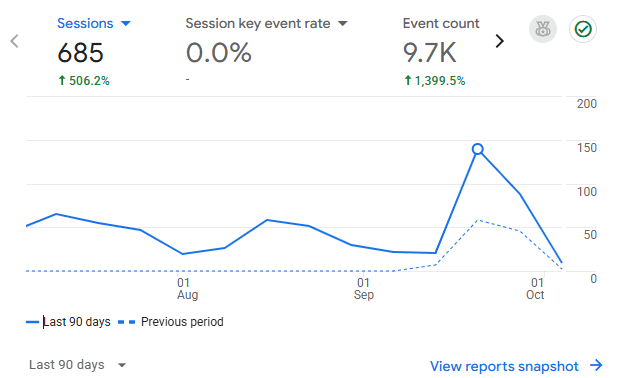
- Google Analytics 4: GA4 measures important actions as key events. Its Traffic acquisition report includes Session key event rate, which represents the percentage of sessions in which at least one key event occurred. GA4 Traffic acquisition metrics.
- Ecommerce Platforms: Shopify, WooCommerce, and similar platforms provide order, revenue, session, and store-performance reporting. Shopify refers to its store-level metric as online store conversion rate. Shopify conversion rate guidance.
- Advertising Platforms: Google Ads and Meta Ads Manager can measure conversion performance for paid campaigns when appropriate tracking is configured.
Conversion figures from GA4, an ecommerce platform, Google Ads, and Meta should therefore not be expected to match exactly.
How to Track Conversion Rate in GA4
GA4 can track important website actions and compare their performance across traffic sources such as organic search, paid search, social media, referral traffic, and direct visits.
Step 1: Install the Google Tag
Create a GA4 property and web data stream, then install the Google tag, which acts as the website’s analytics tracking script. It sends measured activity from the website to Google Analytics so GA4 can record pageviews, sessions, and configured events.
The tag can be installed directly in the site code, through Google Tag Manager, or through an appropriate CMS integration such as a WordPress analytics plugin.
Tracking Script
A tracking script is a small piece of code that allows a website to send measured activity to an analytics platform. The Google tag can collect information about pageviews and configured events so that GA4 can analyze website usage and important user actions.
Step 2: Create or Identify the Relevant Event
GA4 is event-based, so the action being measured must first exist as an event.
Navigate to:
Admin → Data display → Events → Create event
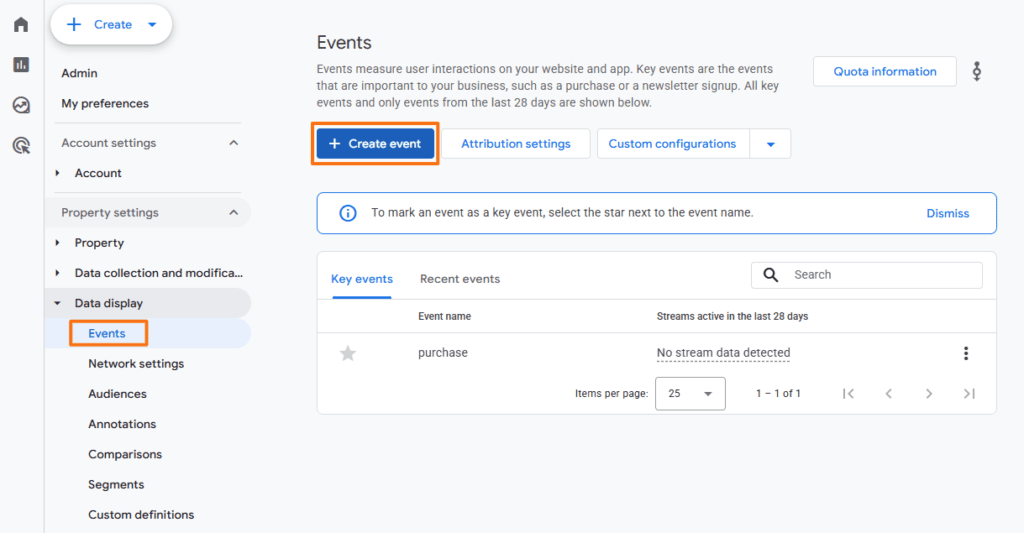
For example, if a successful lead submission sends visitors to /thank-you/, an event can be created when that page is viewed. Google recommends using predefined event names such as generate_lead where they accurately describe the action. GA4 key event setup tutorial
Step 3: Mark the Event as a Key Event
An event that represents an important business action can be marked as a key event.
Go to Admin → Data display → Events, locate the relevant event, and mark it as a key event. A new event can also be designated as a key event during creation.
Google currently distinguishes between key events in GA4 and conversions used for advertising measurement. Key events represent actions important to the business, while conversions can subsequently be created for Google Ads measurement where appropriate.
Step 4: Analyze Conversion Performance
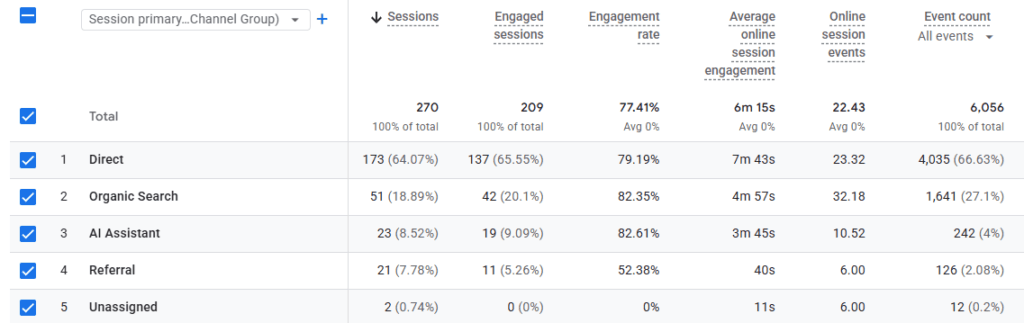
Navigate to Reports → Acquisition → Traffic acquisition
The report includes metrics such as sessions, key events, session key event rate, engagement rate, and revenue.
The Session primary channel group can then be used to compare performance from channels such as Organic Search, Paid Search, Organic Social, Referral, and Direct.
Frequently Asked Questions
Where can I check my website’s conversion rate for free?
Google Analytics 4 can measure key events and session key event rates for a website without requiring a paid analytics subscription. Ecommerce platforms such as Shopify or WooCommerce may also provide conversion-related reporting, while advertising platforms show conversion performance for campaigns run through their systems.
What is considered a good conversion rate for an online store?
There is no universal target because conversion rates vary by product category, price, traffic source, device, and customer behavior. Recent global ecommerce datasets cited by Shopify report figures of about 1.4% and 2.66%, although individual categories can perform substantially above or below these benchmarks.
Why is my website getting a lot of traffic but zero conversions?
Possible causes include poor audience targeting, mismatched search intent, an unclear offer, weak calls to action, pricing concerns, missing trust signals, difficult forms or checkout processes, technical problems, or incorrect conversion tracking. The first step is to confirm that tracking works before assuming that no visitors are converting.
How does a slow-loading website affect conversion rate?
A slow page creates additional friction before visitors can view an offer or complete an action. Some users may leave before the page, form, product information, or checkout becomes usable, so performance problems can contribute to lower conversion rates, particularly on mobile devices or slower connections.
What is a conversion tracking script and where does it go?
A conversion tracking script is code used to send information about important user actions to an analytics or advertising platform. The base analytics tag normally runs across the website, while specific conversion events are configured to fire when particular actions occur, such as completing a purchase, submitting a form, or reaching a confirmation page.