Key Takeaways
- A content audit systematically evaluates published pages for quality, relevance, performance, technical condition, and contribution to business and SEO goals.
- Audits should consider search data, user behavior, content quality, technical issues, internal linking, accessibility, seasonality, and multi-channel value.
- Each reviewed URL should receive a clear action—keep, update or optimize, merge or consolidate, or delete or prune—with documented reasoning.
- Traffic alone should not determine removal; search intent, backlinks, conversions, engagement, topical importance, and continuing user value also matter.
A content audit is a systematic review of a website’s published content to evaluate its quality, performance, relevance, technical condition, and contribution to broader business and SEO goals. It helps determine which pages should remain unchanged, which need improvement, which should be consolidated, and which no longer deserve to remain published.
For example, a website may contain hundreds of articles, landing pages, product pages, and glossary entries. Some may perform well, while others contain outdated facts, target the same search intent as another page, have weak internal links, receive little traffic, or no longer meet current editorial standards.
A useful content audit therefore looks beyond rankings. It may evaluate organic clicks and impressions, engagement, conversions, backlinks, search intent, content accuracy, internal linking, metadata, mobile experience, accessibility, and technical SEO issues.
The objective is not to remove every page that performs poorly. A content audit should identify why a page exists, whether it still provides value, and what action would make the website stronger overall.
For example, if two pages appear in Google Search for the same query, as in the Search Console example below, this can signal overlapping targeting or content.
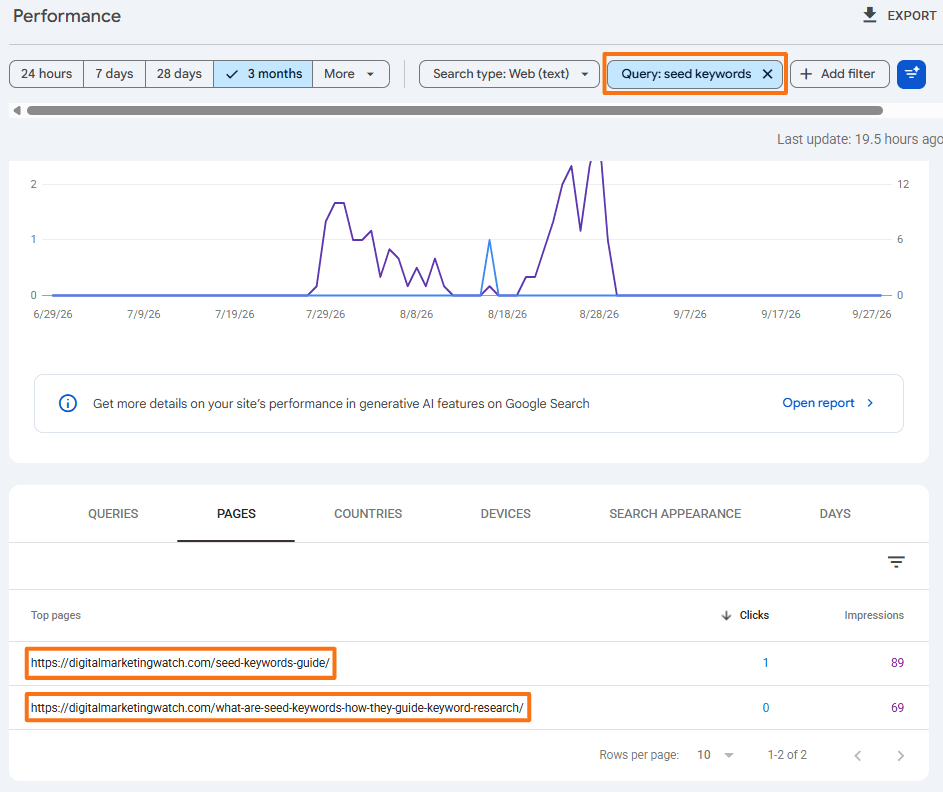
The audit should compare the pages’ search intent, purpose, content, rankings, impressions, clicks, and internal linking to determine whether both URLs serve distinct needs or whether they should be updated, differentiated, or consolidated into one stronger page.
Why Routine Content Audits Are Important for SEO
Websites change continuously. Content that was accurate, useful, and properly connected when published can gradually become outdated, duplicated, poorly linked, or technically inefficient.
Eliminate Technical Waste
A content audit can uncover broken links, redirect chains, unexpected status codes, obsolete sitemap URLs, orphan pages, duplicate content, and indexability problems.
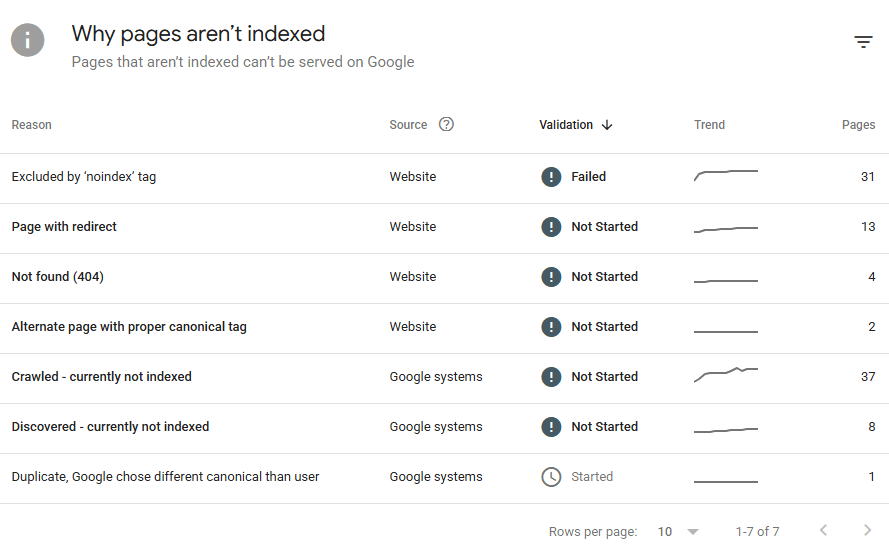
Not every small website needs to worry extensively about crawl budget, but removing unnecessary technical clutter makes the site’s structure easier to maintain and understand.
Resolve Structural Conflicts
As more content is published, multiple URLs can begin targeting the same or very similar search intent. Other pages may become disconnected from their categories or topic clusters.
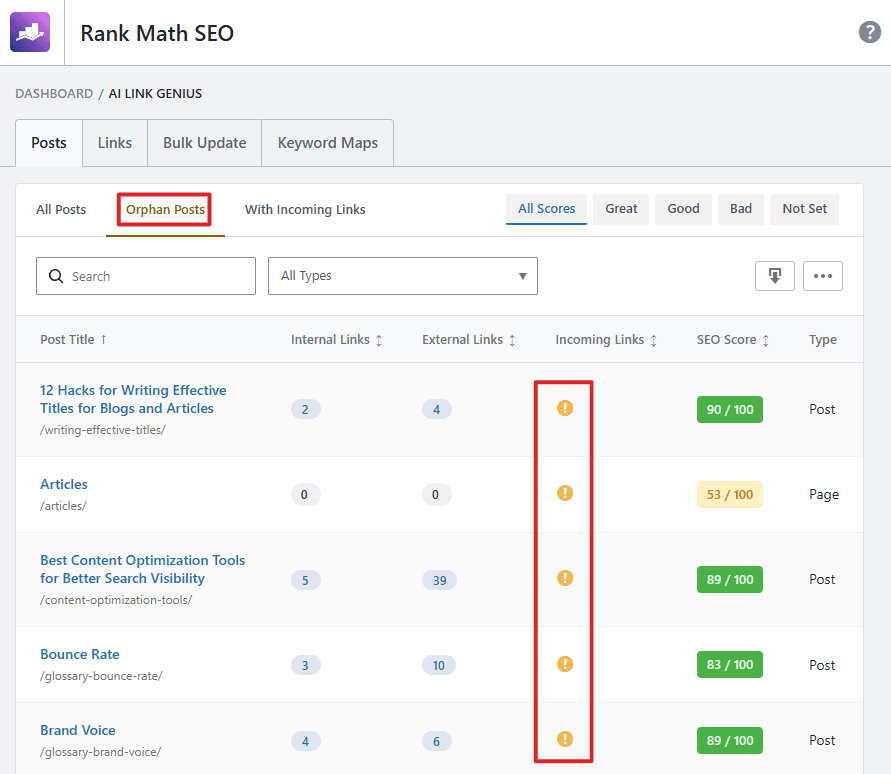
Auditing helps identify keyword cannibalization, overlapping pages, weak internal linking, orphan pages, misplaced content, and unnecessary categories or URLs.
Improve Overall Content Quality
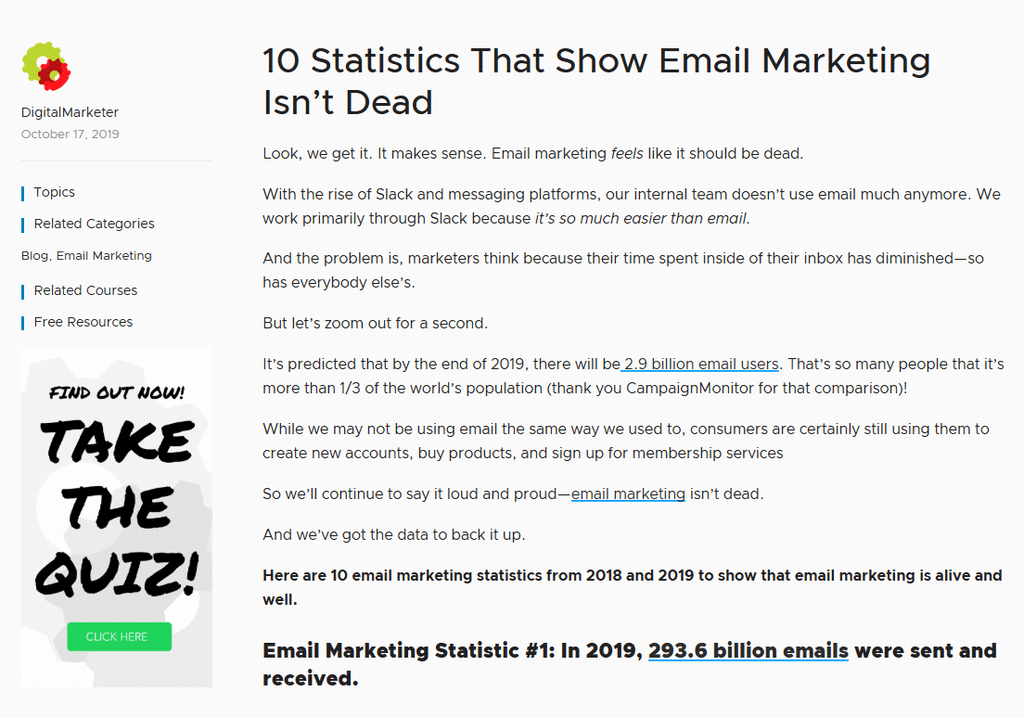
Older content may contain inaccurate facts, outdated recommendations, weak examples, poor sourcing, unnecessary repetition, or incomplete explanations.
Google advises avoiding quick fixes and instead making meaningful, sustainable improvements to content. It also says deleting content should generally be a last resort when that content cannot be salvaged.
Maintain Editorial Standards
A content audit can also review factual accuracy, grammar, sourcing, headings, sentence quality, metadata, accessibility, examples, internal and external links, and compliance with current editorial guidelines.
The Four Strategic Outcomes of a Content Audit
Every audited page should eventually lead to a clear decision.
Traffic alone should never determine the outcome. It is important to also consider search intent, backlinks, conversions, engagement, internal-link value, seasonality, topical importance, and traffic from channels other than search.
If multiple pages are consolidated, useful material can be incorporated into the preferred page and obsolete URLs permanently redirected when a genuinely relevant replacement exists. Google treats permanent redirects such as 301 and 308 as signals that the destination should become canonical.
If a page is permanently removed and has no suitable replacement, returning a proper 404 or 410 is normally preferable to redirecting it to an unrelated URL.
Step-by-Step: How to Conduct a Content Audit
A useful content audit combines technical inventory, search data, user behavior, editorial review, and a final action for every relevant URL.
1. Generate a Master Content Inventory
Begin with a complete picture of the website rather than immediately restricting the audit to successful 200 OK pages.
Run a full crawl using a tool such as Screaming Frog or Sitebulb, and combine that information with URLs from sources such as the XML sitemap, CMS (WordPress or Wix), Google Search Console, and analytics data.
Retain redirects, errors, noindex URLs, and other unusual pages in the technical inventory, because they may reveal problems. For the detailed editorial review, create a working subset containing the important canonical HTML pages returning 200 OK.
2. Add Search and User-Behavior Data
From Google Search Console, collect useful page-level metrics such as clicks, impressions, CTR, and average position. Search Console’s Performance report provides these metrics and allows performance to be analyzed at URL level.
From Google Analytics 4, consider metrics such as views, active users, average engagement time, engagement rate, and key events.
Scroll depth can provide additional context by showing how far users progress through a page. In GA4, the built-in scroll event records when approximately 90% of a page’s vertical depth becomes visible, while more detailed thresholds such as 25%, 50%, and 75% require custom tracking.
Bing Webmaster Tools can provide additional Bing-specific information including clicks, impressions, CTR, average position, crawl requests, crawl errors, and indexed pages.
3. Review Content and SEO Quality
Audit important pages for factual accuracy, freshness, search intent, completeness, originality, grammar, readability, keyword use, heading structure, and metadata.
Also review internal and external links, cannibalization, accessibility, structured data where relevant, mobile usability, and Core Web Vitals or page performance when these affect the page.
The goal is to check whether the page still gives readers useful, accurate, and complete information.
4. Assign and Record an Action
Give every reviewed URL one clear status: Keep, Update, Merge, or Delete.
Also record why the decision was made and what needs to happen next. This turns a spreadsheet of observations into an actionable content plan.
Important Things to Consider During a Content Audit
Content should not be removed simply because one metric looks weak. It is important to consider the page’s overall SEO, user, structural, and business value before deciding what to change.
- Protect Valuable Backlinks: Check external links before merging or deleting content. If a relevant replacement exists, use a permanent redirect. Do not redirect an unrelated URL simply to preserve presumed link value; Google publishes no fixed “95–99% link equity” transfer figure.
- Account for Seasonality: A page about Christmas shopping, tax deadlines, school admissions, or seasonal products may naturally receive little traffic during part of the year. Compare appropriate year-over-year periods before pruning it.
- Consider Multi-Channel Business Value: A page can receive little organic traffic while remaining valuable as an email landing page, paid-ad destination, customer-support resource, social destination, or high-converting sales page.
- Maintain Mobile Content Parity: When updating content, ensure important text, headings, links, metadata, images, and structured data remain available on mobile. Google uses the mobile version of content for indexing and ranking.
- Repair Internal Links After Changes: Deleting, consolidating, or redirecting pages can leave broken or unnecessarily redirected links in articles, menus, breadcrumbs, and footers. Update important internal links so they point directly to the preferred live URL.
- Preserve Search Intent When Merging: Two underperforming pages should not automatically be combined. Merge them only when their subjects and user needs overlap enough for one page to satisfy both effectively.
- Keep an Audit Record: Record the old URL, decision, redirect destination where applicable, implementation date, and reason for the change. This makes later performance changes easier to diagnose.
Tools for Conducting a Content Audit
A comprehensive audit may require a range of tools. These include several useful free options such as Google Search Console, Google Analytics 4, Bing Webmaster Tools, Google PageSpeed Insights, and Detailed SEO Extension.
Tools such as Screaming Frog, Ahrefs, Semrush, Grammarly, and others provide free versions or limited free access alongside paid plans.
Third-party metrics should be interpreted carefully. Authority scores, traffic estimates, keyword difficulty values, and similar proprietary metrics are not Google or Bing measurements and can differ substantially between tools.
Similarly, grammar, plagiarism, and readability applications are review aids rather than final judgments. Human editorial review remains necessary.
Frequently Asked Questions
How often should a website conduct a content audit?
There is no fixed schedule. Large or frequently updated websites may benefit from quarterly or semiannual reviews, while smaller, more stable sites may conduct a major audit once or twice a year and after migrations, redesigns, or substantial content changes.
What is the difference between content pruning and simply deleting content?
Content pruning is a decision-making process, not simply deletion. A page may be updated, consolidated, redirected, removed, or otherwise handled according to its continuing value and purpose.
Why does an SEO tool show zero organic traffic while GA4 shows thousands of views?
Third-party SEO tools estimate organic traffic using their own keyword databases and models. GA4 records tracked website activity across multiple traffic channels, so the two figures measure different things and should not be expected to match. Google Analytics itself separates traffic into channels such as Organic Search, Paid Search, Referral, Social, Email, and Direct.
What should be done with high-quality content that gets no organic traffic?
Check indexing, search demand, search intent, keyword targeting, internal links, SERP competition, seasonality, and non-search business value. A useful page may need better positioning, stronger internal support, or broader distribution rather than deletion.
Should thin or outdated pages with no backlinks or traffic be deleted?
Not automatically. First determine whether they still help users or support another business purpose. Update or consolidate useful content where appropriate, and remove pages only when they no longer have a worthwhile role.