Key Takeaways
- A session is a period of website or app activity that groups related interactions into one visit.
- One session can contain multiple pageviews, downloads, purchases, and other measured events.
- GA4 sessions typically end after 30 minutes of inactivity, while active sessions can continue across midnight or campaign-source changes.
- SEO analysis uses organic sessions alongside engagement, key events, landing pages, and revenue to evaluate traffic quality.
In web analytics and SEO, a session is a period during which a user interacts with a website or app. It is commonly understood as a visit and acts as a container for the activities that occur while that visit remains active.
For example, someone may find an article through Google, read it, open two related pages, download a PDF, and complete a contact form. Those actions can all belong to one session. If the same person returns later after the previous session has ended, the return visit can create another session. This means one user can generate multiple sessions over a day, week, or longer period.
Google Analytics 4 (GA4) defines a session as a group of user interactions that take place within a given time frame. A session starts when someone views a page or screen and no previous session is currently active.
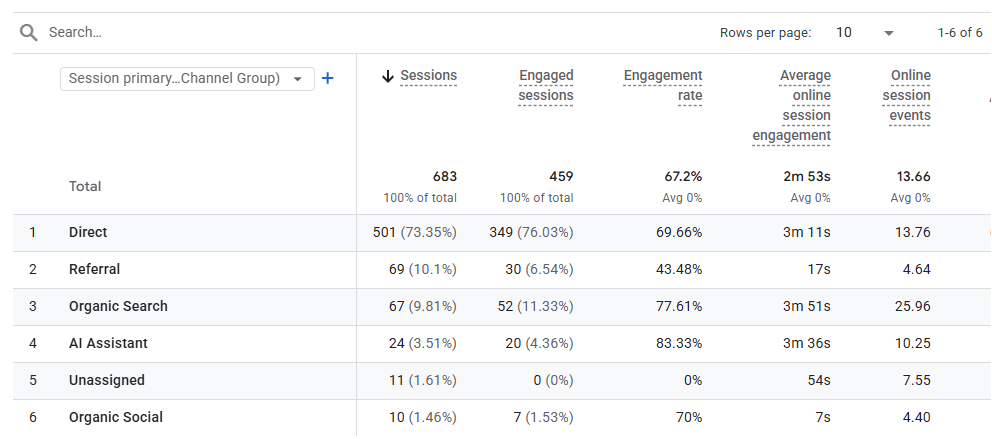
For SEO, sessions are particularly useful for understanding what happens after someone arrives from organic search. They can be compared with engagement, landing pages, key events, and revenue to evaluate whether search traffic is producing useful website activity.
Session vs. Event vs. Pageview
A session represents a period of activity on a website or app. An event records a specific measured interaction, such as a page view, download, purchase, or form submission. A pageview is one type of event that records a page being viewed. One session can therefore contain many events and multiple pageviews.
How Are Sessions Tracked?
Web analytics platforms collect signals from a website or app and use them to group related interactions into sessions.
First-Party Analytics Cookies
On websites using GA4, Google’s JavaScript tags typically use first-party cookies when analytics storage is permitted. A first-party cookie is stored in the browser by the website being visited rather than by an unrelated third-party site.
GA4 uses the _ga cookie to help distinguish users and _ga_<container-id> to persist session information.
Cookies are useful because they help the analytics system recognize that several interactions came from the same browser rather than treating every pageview as an unrelated visit.
Session ID and Session Number
When a new session begins, GA4 automatically collects a session_start event and generates two important values:
- Session ID (
ga_session_id): A value based on the timestamp, in seconds, when the session begins. Because the same timestamp could occur for different users, Google recommends combining the session ID with user_id or user_pseudo_id when a unique session identifier is needed outside GA4. - Session Number (
ga_session_number): Indicates how many sessions that user has started, such as the first, third, or fifth visit.
GA4 associates these values with events generated during the session so that the activities can be grouped together.
Events Within a Session
GA4 uses an event-based measurement model. Activities such as pageviews, downloads, purchases, and other configured interactions are recorded as events.
Some events are collected automatically, while others are available through Enhanced Measurement or require additional configuration. Therefore, GA4 does not automatically record every possible click or user action simply because the analytics tag is installed.
Tracking When Cookies Are Declined
Privacy choices can affect session measurement. When Google Consent Mode is properly configured and analytics consent is denied, data collection can be restricted.
In eligible implementations, GA4 may use cookieless signals and behavioral modeling to estimate some activity that cannot be observed directly. This is not an automatic replacement for cookies on every website; eligibility and implementation requirements apply.
How Does GA4 Determine a Session?
A single user can generate many sessions over time, so GA4 needs rules for determining when one visit ends and another begins.
When a Session Begins
A new GA4 session begins when a user opens an app or views a webpage and when there isn’t already an active session. GA4 then automatically records the session_start event and generates the session information used to associate subsequent activity with that visit.
The 30-Minute Inactivity Rule
By default, a GA4 session ends once 30 minutes have passed without any activity.
Suppose someone visits a website at 10:00 AM, reads several pages, and continues interacting with it. The session remains active. If the person then stops interacting for more than 30 minutes and returns later, GA4 can begin a new session.
The default timeout is configurable. For web properties, GA4 allows administrators to change the session timeout under the data stream settings. More importantly, a session does not have a maximum duration as long as activity continues. Google states that there is no limit to how long an active session can last.
Universal Analytics vs. GA4 Session Rules
Universal Analytics (UA) was the older version of Google Analytics that GA4 replaced. Standard Universal Analytics properties stopped processing new data on July 1, 2023, marking the transition to GA4 as Google’s current analytics platform.
Earlier, Universal Analytics could start a new session when the campaign source changed. It could also split an active session when midnight was reached according to the property’s time zone. GA4 no longer uses these rules. An active GA4 session can continue across campaign-source changes and midnight, provided it has not ended because of inactivity or another applicable session boundary.
Why Sessions Are Important for SEO
Sessions help connect organic search visibility with what visitors actually do after reaching the website.
- Measures Organic Visits: Sessions show the number of visits generated by organic search, while user metrics focus on the people represented by the analytics system. A returning visitor can therefore generate several organic sessions.
- Evaluates Traffic Quality: Sessions can be analyzed alongside pageviews, engagement time, key events, and revenue to understand whether visitors from search are interacting meaningfully with the website.
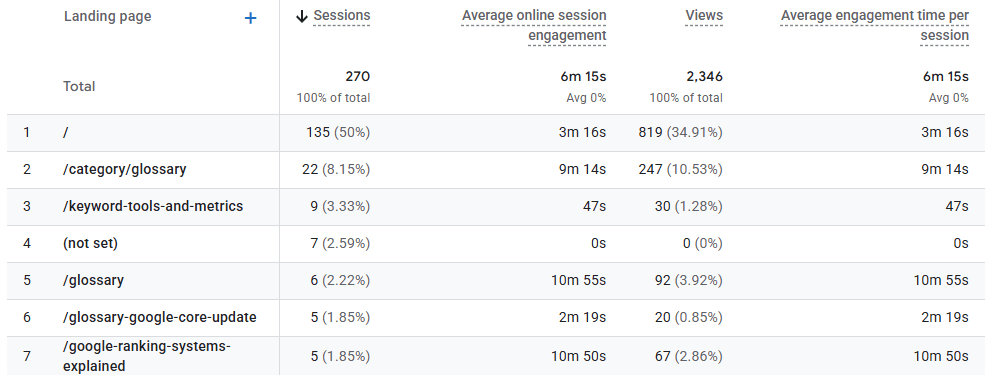
- Supports Conversion Analysis: Organic sessions can be compared with actions such as purchases, inquiries, registrations, downloads, or other key events to determine whether SEO traffic contributes to business objectives.
- Measures Engagement: By default, GA4 identifies an engaged session when it lasts longer than 10 seconds, contains at least one key event, or has at least two pageviews or screenviews. The engagement rate is the percentage of sessions that meet one of these conditions.
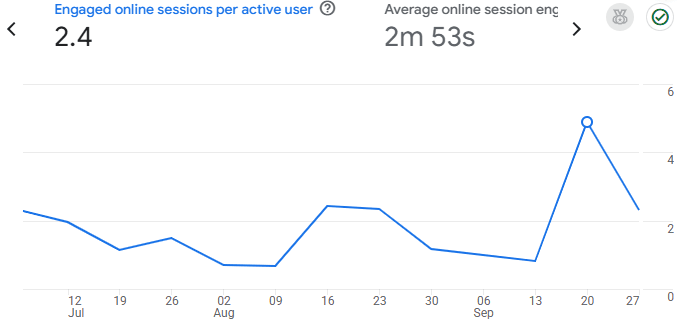
- Identifies Valuable Landing Pages: Comparing organic sessions, engagement, and key events by landing page can reveal which articles, guides, product pages, or other entry pages attract useful search traffic.
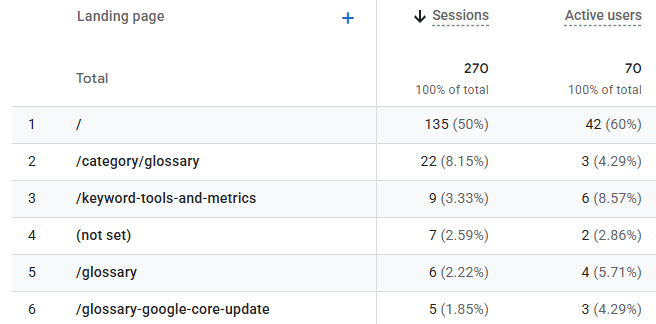
- Helps Investigate Traffic Changes: A significant decline in organic sessions can prompt investigation into ranking losses, reduced search demand, indexing issues, analytics implementation problems, or changes to the website.
GA4 automatically excludes traffic from known bots and spiders, which helps reduce obvious automated activity in session reports. However, this does not guarantee that every form of automated or unwanted traffic will be detected.
How to Track Sessions and Organic Search Traffic
Google Analytics 4 is one of the main platforms used to track website sessions. Privacy-focused analytics platforms such as Matomo can also measure website visits and related engagement data.
Step 1: Set Up Google Analytics 4
Create a GA4 property and add a web data stream for the website. The data stream connects the website with the Analytics property and provides the information needed to install the Google tag.
Google notes that data collection may take up to 30 minutes to begin after installation.
Step 2: Install the Google Tag
The tag can be installed in several ways:
- Manual Installation: Copy the Google tag provided by GA4 and add it immediately after the opening
<head>element on the website’s pages. - WordPress: Google’s free Site Kit plugin can connect a WordPress website with an existing Google Analytics property and configure Analytics without requiring manual placement of the tag.
- Google Tag Manager: Analytics can also be deployed through Google Tag Manager, which allows tags to be managed through a central interface rather than repeatedly editing website code.
- Website Builders and Ecommerce Platforms: Supported CMS and ecommerce systems can use their available Google Analytics integrations where appropriate.
Step 3: Verify Data Collection
After installing the tag, open the website and then navigate to Google Analytics → Reports → Realtime.
The Realtime report shows recent website activity and can help verify that the measurement code is successfully sending data. Google’s Realtime report covers activity from the previous 30 minutes.
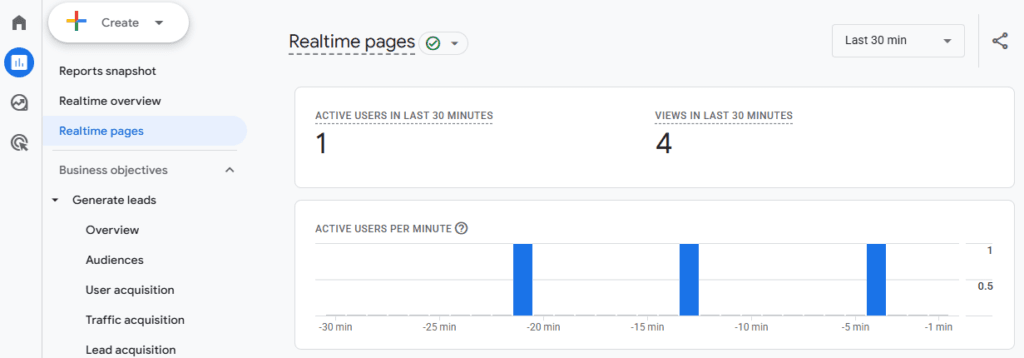
It should not be expected to show exactly one visitor or a precise physical location immediately, because processing delays, privacy settings, consent choices, ad blockers, and other factors can affect the data.
How to Isolate Organic Search Sessions
To examine sessions generated specifically by organic search, navigate to: Google Analytics → Reports → Acquisition → Traffic acquisition
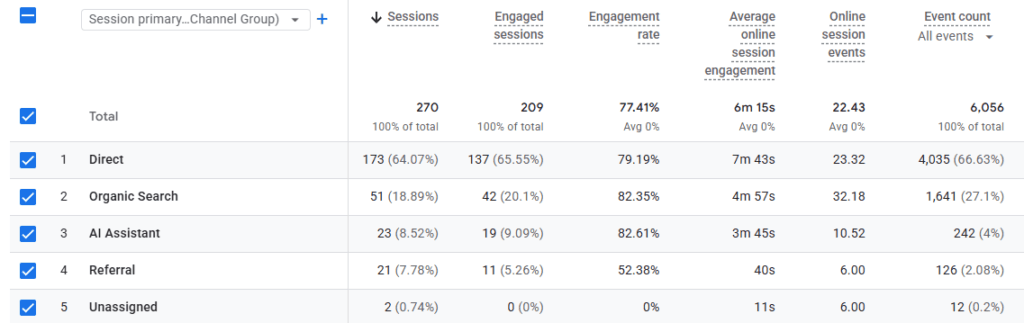
The Traffic acquisition report focuses on sessions and how those visits were acquired. Locate the Session primary channel group or corresponding session channel dimension and find the row labeled Organic Search.
The report can then be used to examine metrics such as:
- Sessions: The number of sessions that began on the website or app during the selected period.
- Engaged Sessions: Sessions meeting GA4’s engagement criteria.
- Engagement Rate: The proportion of sessions that were engaged.
- Average Engagement Time per Session: The average amount of time the website was actively in focus during each session.
- Key Events: Important actions that have been designated for measurement.
Google defines Organic Search as traffic arriving through non-ad links in organic search results, including Google’s AI Overviews and AI Mode.
Frequently Asked Questions
How does Google Analytics 4 determine when a session ends?
By default, a GA4 session ends after 30 minutes without user activity, although the session timeout can be changed. Unlike older Universal Analytics behavior, an active GA4 session is not automatically restarted merely because midnight occurs or the traffic source changes.
What is the difference between a session and a pageview?
A session represents an entire period of website activity, while a pageview represents one instance of a webpage being viewed. A visitor who reads five pages during one visit may therefore generate one session and five pageviews.
Why are Google Search Console clicks higher than Google Analytics sessions?
Search Console clicks and GA4 sessions are different metrics collected using different systems. A person can click a Google result but leave before the Analytics code successfully records a session, while JavaScript restrictions, consent settings, blocked tracking, time-zone differences, and other processing differences can also affect the totals. Google specifically notes that Search Console and Analytics data should not be expected to match exactly.
What qualifies as an engaged session in GA4?
GA4 considers a session engaged when it lasts longer than 10 seconds, includes at least one key event, or contains at least two pageviews or screenviews. GA4 calculates engagement rate by dividing engaged sessions by total sessions.
Can automated web scraping bots artificially inflate website session data?
Potentially. GA4 automatically filters traffic from known bots and spiders, but no automated filtering system can be assumed to identify every scraper or unwanted automated request. Unusual spikes in sessions, engagement, locations, or traffic sources may therefore require further investigation.