Key Takeaways
- Impressions measure search visibility or content exposure, not website visits, and may be recorded without a click or physical viewing.
- Each platform applies its own counting rules, so organic search, paid search, and social-media impressions are not always directly comparable.
- Impressions provide the denominator for click-through rate, calculated by dividing clicks by impressions and multiplying by 100.
- High impressions with few clicks can reveal optimization opportunities, while sharp declines may signal visibility, indexing, technical, seasonal, or demand-related changes.
- Google Search Console and Bing Webmaster Tools provide first-party impression data, whereas third-party platforms generally offer estimates based on their own methodologies.
An impression in SEO is recorded when a link or search result from a website appears, or is potentially shown, in a search engine’s results according to that platform’s counting rules. Impressions therefore measure search visibility, not website visits.
For example, if a page appears in Google Search for the query “content audit checklist,” it may receive an impression even when the searcher does not click the result. Depending on the type of Google search feature, the result may not even need to be physically scrolled into view. Google describes impressions as measuring how often someone saw a link to a site, with specific visibility requirements varying by result type.
Note
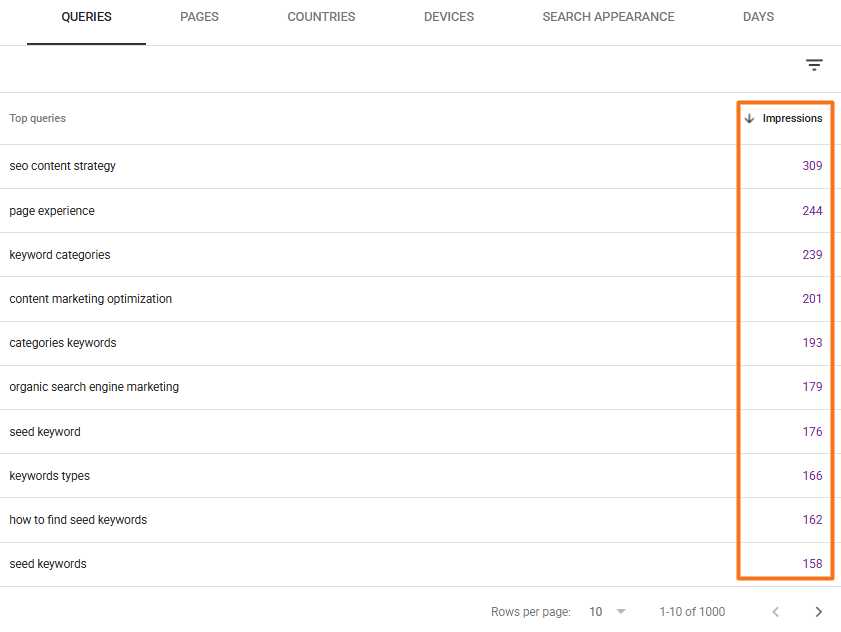
Search Console table rows may not always add up to the headline impression total. Some queries are anonymized for privacy, and chart and table totals can also differ because Search Console uses different aggregation methods depending on the selected dimension.
Impressions are reported through first-party platforms such as Google Search Console (GSC) and Bing Webmaster Tools. They help show how frequently pages receive search exposure, and are also needed to calculate click-through rate, which shows the percentage of impressions that resulted in clicks.
Example: 500 Clicks ÷ 10,000 Impressions × 100 = 5% CTR
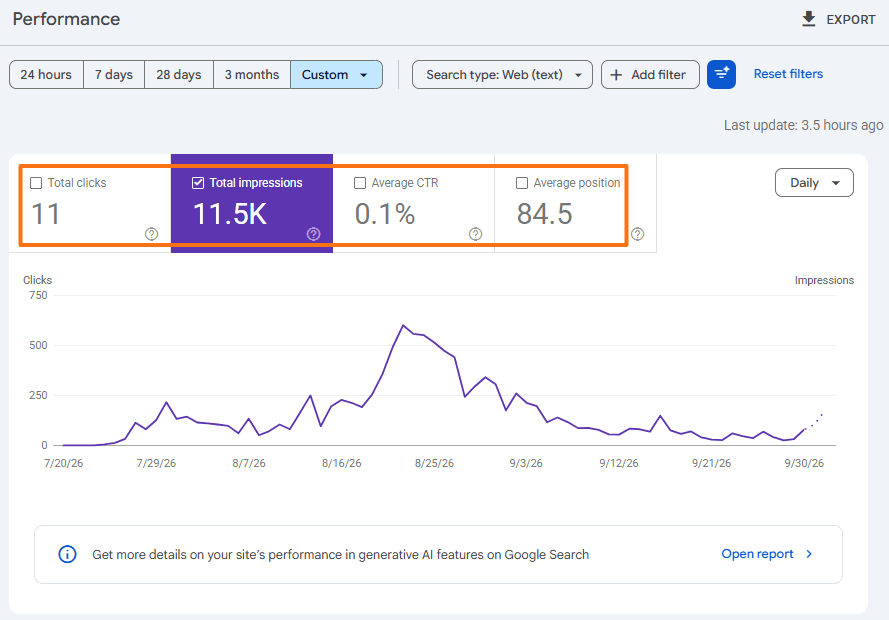
Google Search Console reports clicks, impressions, average CTR, and average position together because these metrics provide different views of search performance.
Impressions in Organic Search, Paid Search, and Social Media
Impressions are used across organic search, advertising, and social media, although each platform has its own rules for deciding exactly when an impression should be recorded.
- Organic Search: In Google Search Console, impressions show how often links or content from a website appear in Google Search. Bing Webmaster Tools similarly records impressions when links to a website appear across sources such as Web and Chat, News, Images, Videos, and Knowledge Panels.
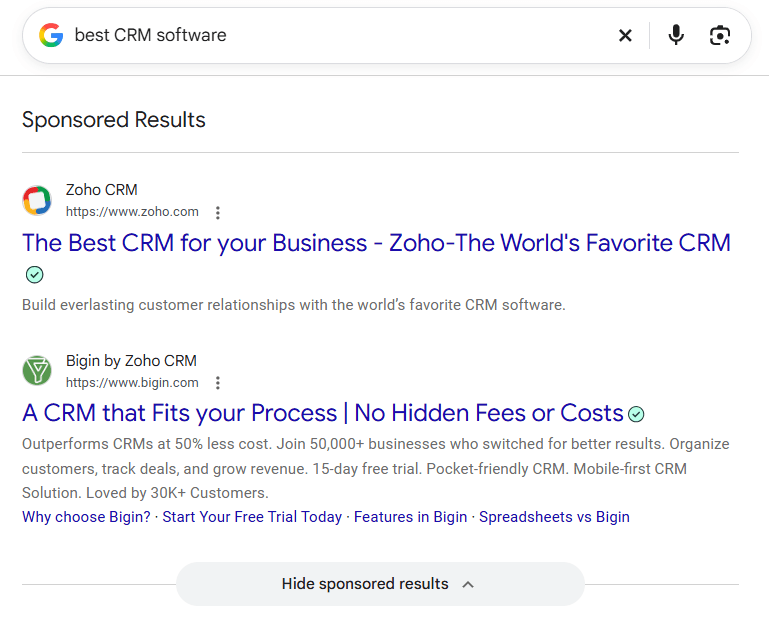
- Paid Search: Advertising platforms record impressions when ads are shown. Google Ads, for example, counts an impression each time an eligible ad is displayed across supported Google properties or partner locations.
- Social Media: Social-media impressions generally represent the number of times a post, advertisement, or other piece of content is displayed. The same person can generate more than one impression if the content is displayed to that person multiple times.
Impressions vs. Reach
Impressions measure how many times content was displayed, while reach generally measures how many unique people or accounts were exposed to it. One person can therefore generate several impressions while contributing only once to reach during a particular measurement period.
Why Impressions Are an Important SEO Metric
Impressions show how often a website is gaining visibility in search results, even when that visibility does not immediately lead to clicks.
- Measures Search Visibility: Rising impressions can indicate that pages are appearing for more searches, gaining stronger rankings, covering a broader range of queries, or benefiting from increased search demand.
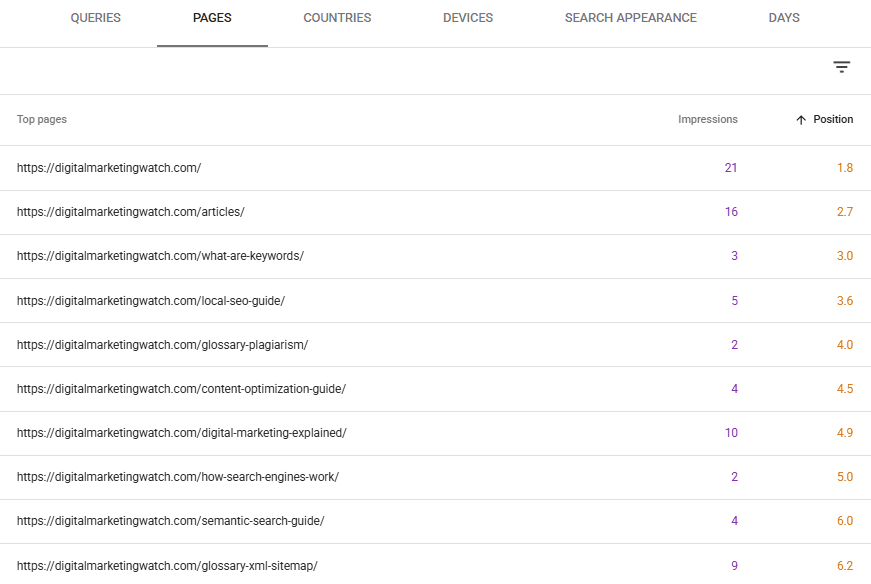
- Identifies Ranking Opportunities: Pages or queries receiving substantial impressions but relatively few clicks may provide useful optimization opportunities. Queries appearing just outside the strongest ranking positions can be especially worth reviewing.
- Reveals Click Opportunities: High impressions with weak clicks can show that a result is receiving exposure without attracting proportional traffic. Ranking position, search intent, title links, snippets, and competing SERP features can then be examined.
- Helps Detect Visibility Losses: A sharp decline in impressions can indicate that a site has lost search visibility. Possible causes include indexing problems, ranking changes,
noindexdirectives, server problems, migrations, seasonality, or reduced search demand.
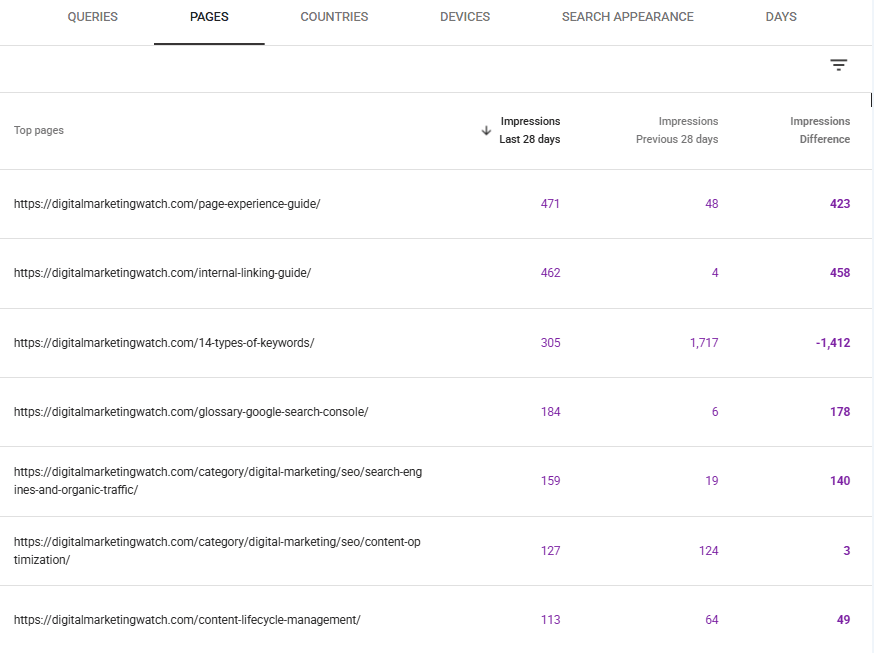
- Shows Early SEO Movement: Impressions can rise before clicks and organic traffic increase. This may indicate that pages are beginning to appear for additional queries or stronger positions, although impressions alone do not prove that an SEO change was successful.
These combinations should be treated as diagnostic clues rather than fixed conclusions. For example, high impressions and low clicks do not automatically mean that a title tag is poor; the page may simply appear in lower positions or on searches that are frequently satisfied directly on the SERP.
How Are Impressions Counted?
In first-party search platforms such as Google Search Console, impressions are recorded according to the platform’s counting rules rather than calculated from another metric. Metrics such as CTR are then calculated from the recorded impression and click data.
In Google Search Console, a standard search result can generally receive an impression when it appears among the search results shown for a query, even when the searcher does not scroll far enough to physically view it. Some search features work differently. Items inside independently scrolling carousels or certain infinitely scrolling interfaces may need to enter view before an impression is recorded.
This means an impression should not be interpreted as proof that someone carefully looked at a particular result.
Property and Page-Level Impressions
Google Search Console can count impressions differently depending on how performance data is grouped in the report:
- Grouped by Page: When performance data is grouped by individual page, each unique URL that appears in the search results can receive its own impression. This makes it possible to see how much visibility each page received separately.
- Aggregated by Property: When several URLs within the same GSC property appear for a single query, Google can count them together as a single property-level impression. This prevents multiple URLs from the same property from inflating the overall property total.
For example, suppose three URLs from the same website appear for one search:
- Page-level reporting: 1 impression for each of the three URLs
- Property-level reporting: 1 impression
Understanding this distinction helps explain why totals can differ when Search Console data is grouped or filtered in different ways.
Bing uses its own methodology. Bing Webmaster Tools states that when multiple webpages from the same website appear in one search result, each webpage counts as an impression.
How to Check Search Impressions
First-party webmaster platforms provide the most useful impression data for a website because they receive information directly from their respective search engines.
Google Search Console
Open Google Search Console → Performance → Search results. Here, the main chart displays Total Clicks, Total Impressions, Average CTR, and Average Position.
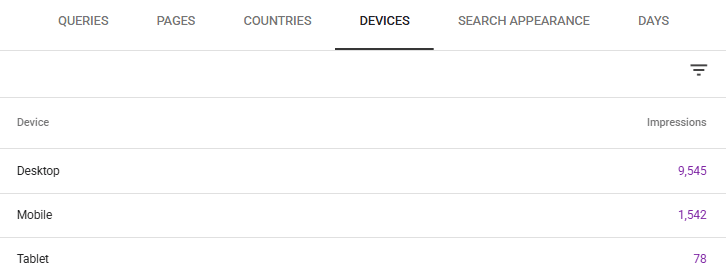
The report can then be analyzed using dimensions and filters such as queries, pages, countries, devices, dates, and search appearance. Search Console also offers hourly, daily, weekly, and monthly views for analyzing short- and long-term trends.
Bing Webmaster Tools
To check impressions and other search-performance metrics in Bing, open Bing Webmaster Tools, select the website, and then go to Search Performance.
The report provides impressions, clicks, CTR, and other performance information. Bing also separates performance across supported sources such as Web, Chat, News, Images, Videos, and Knowledge Panel, making it possible to examine where visibility originates.
Third-Party SEO Platforms
Third-party SEO platforms can provide useful estimates of search visibility, but their metrics should not automatically be treated as equivalent to first-party Google Search Console impressions.
For example, Ahrefs has an Impressions metric that estimates visibility by adding the search volumes of keywords for which a website ranks in the top 10. Ahrefs explicitly distinguishes this estimate from Google Search Console impressions. It can also show actual GSC impression data in Rank Tracker only for websites verified through a connected Google Search Console account.
For a website’s actual Google search-performance analysis, Google Search Console should therefore remain the primary source.
Frequently Asked Questions
Why are search impressions increasing rapidly while clicks are staying flat?
Impressions can rise when pages begin appearing for more queries, search demand increases, or rankings improve enough to generate additional exposure without reaching positions that attract many clicks. SERP features and zero-click searches can also increase the gap between impressions and clicks, so query-level position and CTR should be examined before drawing conclusions.
Why did the site’s impressions drop sharply?
A large decline can result from ranking losses, indexing problems, server outages, accidental noindex directives, canonical changes, migrations, seasonality, reduced search demand, or changes in the queries for which the site appears. Search Console recommends examining longer-term trends because daily fluctuations can otherwise make changes appear more significant than they are.
What is a zero-click search and how does it affect impressions?
A zero-click search occurs when a searcher does not click through to an external website after performing a search. A website can still receive an impression if its result qualifies for one under the search engine’s counting rules, even though no visit occurs.
Do zero-click searches artificially inflate impression metrics?
No. An impression measures search-result exposure rather than website visits, so an impression without a click is still performing exactly the function the metric is designed to measure. However, a high proportion of zero-click searches can contribute to impressions increasing more quickly than clicks.
How do you calculate click-through rate using impressions?
Click-through rate (CTR) is calculated by dividing clicks by impressions and multiplying the result by 100.
If a page receives 400 clicks from 8,000 impressions, its CTR is 5%. Google Search Console uses the same clicks-divided-by-impressions relationship when reporting CTR.