Key Takeaways
- A meta robots tag is an HTML element placed in a page’s section that gives search-engine crawlers page-level instructions for indexing, link following, and search-result presentation.
- Unlike robots.txt, which primarily controls crawling access, meta robots directives are read after a crawler accesses the page and can influence indexing and how the page appears in search results.
- The name attribute identifies the crawler or group of crawlers, while the content attribute specifies directives such as noindex, nofollow, nosnippet, and preview limits.
- Support for individual directives varies across search engines such as Google, Bing, and Yandex, so conflicting or unsupported instructions should be avoided.
A meta robots tag is an HTML element that gives search-engine crawlers page-level instructions about indexing, following links, and how content may appear in search results. It is mainly used when a page needs different search behavior from the website’s normal defaults.
The name describes exactly what the tag does. Meta refers to metadata—information about the webpage rather than its visible content. Robots refers to search-engine crawlers such as Googlebot and Bingbot. Tag refers to the HTML element that carries those instructions.
A meta robots tag is normally placed inside the page’s <head> section, where browsers and search engines expect to find page-level metadata:
<meta name="robots" content="index, follow">Here, index allows the page to be indexed, while follow allows crawlers to follow links from the page. These are generally default behaviors, so an explicit index, follow tag is usually unnecessary unless a CMS or SEO plugin outputs it automatically.
Meta robots tags are commonly used to keep particular pages out of search results, prevent crawlers from following links, restrict snippets or media previews, or control image indexing. Google supports a range of these page-level indexing and presentation rules.
Meta Robots Tag vs. Robots.txt vs. X-Robots-Tag
These controls sound similar but operate in different places and serve different purposes.
<head> of an HTML pageThe most important distinction is that robots.txt primarily controls crawling, while a meta robots tag can control indexing and serving behavior after the crawler accesses the page. If robots.txt blocks access, the crawler may never see a meta robots instruction placed inside that page.
The X-Robots-Tag is particularly useful when an HTML <head> does not exist. Google, for example, supports sending noindex and other robots rules through HTTP response headers for files such as PDFs and images.
Anatomy of a Meta Robots Tag
Consider this meta robots tag: <meta name="robots" content="noindex, nofollow">
Apart from the <meta> element itself, the tag has two key attributes: the name attribute and the content attribute.
The name Attribute
The name attribute identifies which crawler or group of crawlers the instructions are intended for. For example, name="robots"
Using robots makes the directives applicable broadly to crawlers that support the robots meta standard. However, it can also be used to target a particular crawler. For example, <meta name="googlebot" content="noindex">
Google also supports googlebot-news for instructions specific to Google News results. For example, <meta name="googlebot-news" content="noindex">
Similarly, Bing can be targeted with: <meta name="bingbot" content="noindex">
One can also provide different instructions to different search engines on the same page. For example:
<meta name="googlebot" content="noindex">
<meta name="bingbot" content="index">
This tells Googlebot to prevent the page from being indexed while leaving it eligible for indexing by Bingbot.
The content Attribute
The content attribute contains the actual instructions: content="noindex, nofollow"
Multiple compatible directives can be placed in one tag by separating them with commas: <meta name="robots" content="noindex, nofollow, noarchive">
Common directives include:
indexnoindexfollownofollownonenoindex, nofollow for Googlenosnippetnoimageindexnotranslatenoarchiveindexifembeddednoindexmax-snippet:[number]max-image-preview:[value]none, standard, or largemax-video-preview:[number]unavailable_after:[date]Google currently treats noarchive differently from some other search engines. Google’s cached-result feature no longer exists, so Google Search now ignores noarchive and nocache. Bing and Yandex still document noarchive support.
Common Meta Robots Tag Examples
Common meta robots tag examples show how different directives can be combined to control whether a page is indexed, whether its links are followed, and how it may appear in search results.
- Exclude a page but do not explicitly restrict links:
<meta name="robots" content="noindex, follow"> - Allow indexing but apply page-level
nofollow:<meta name="robots" content="index, nofollow"> - Limit the snippet while allowing a large image preview:
<meta name="robots" content="max-snippet:160, max-image-preview:large"> - Exclude a page from Google News specifically:
<meta name="googlebot-news" content="noindex">
How Search Engines Interpret Meta Robots Tags
Not every search engine supports exactly the same directives. This is especially important with advanced snippet and image controls.
noindexnofollownoarchivenosnippetnoimageindexmax-snippetmax-image-previewmax-video-previewGoogle explicitly notes that robots rules may not be interpreted identically by other search engines. Bing currently documents support for nosnippet and the three max-* preview controls, while Yandex documents a smaller core set of robots directives.
Advanced directives can also control how content is presented and reused in eligible search experiences. For Google, max-snippet, max-image-preview, and max-video-preview influence how much content can appear in eligible search previews. max-snippet can also limit how much page content Google may use directly in AI Overviews and AI Mode. Google also says that nosnippet prevents page content from being used directly to generate AI Overviews and AI Mode responses.
What Happens When Directives Conflict?
Conflicting tags should be avoided, but Google generally applies the more restrictive instruction.
For example:
<meta name="robots" content="index">
<meta name="robots" content="noindex">
For Google, the result is: noindex
Similarly:
<meta name="robots" content="max-snippet:50">
<meta name="robots" content="nosnippet">
Here, the result is nosnippet because allowing no snippet is more restrictive than allowing 50 characters. (Google for Developers)
Avoid Conflicting Robots Directives
Precedence rules should not be used as a configuration strategy. Search engines do not necessarily resolve every conflict in exactly the same way; Yandex, for example, documents different precedence behavior for some allow and prohibit directives.
How to Add and Check Meta Robots Tags
Meta robots tags can be added manually or managed through common content-management and SEO tools.
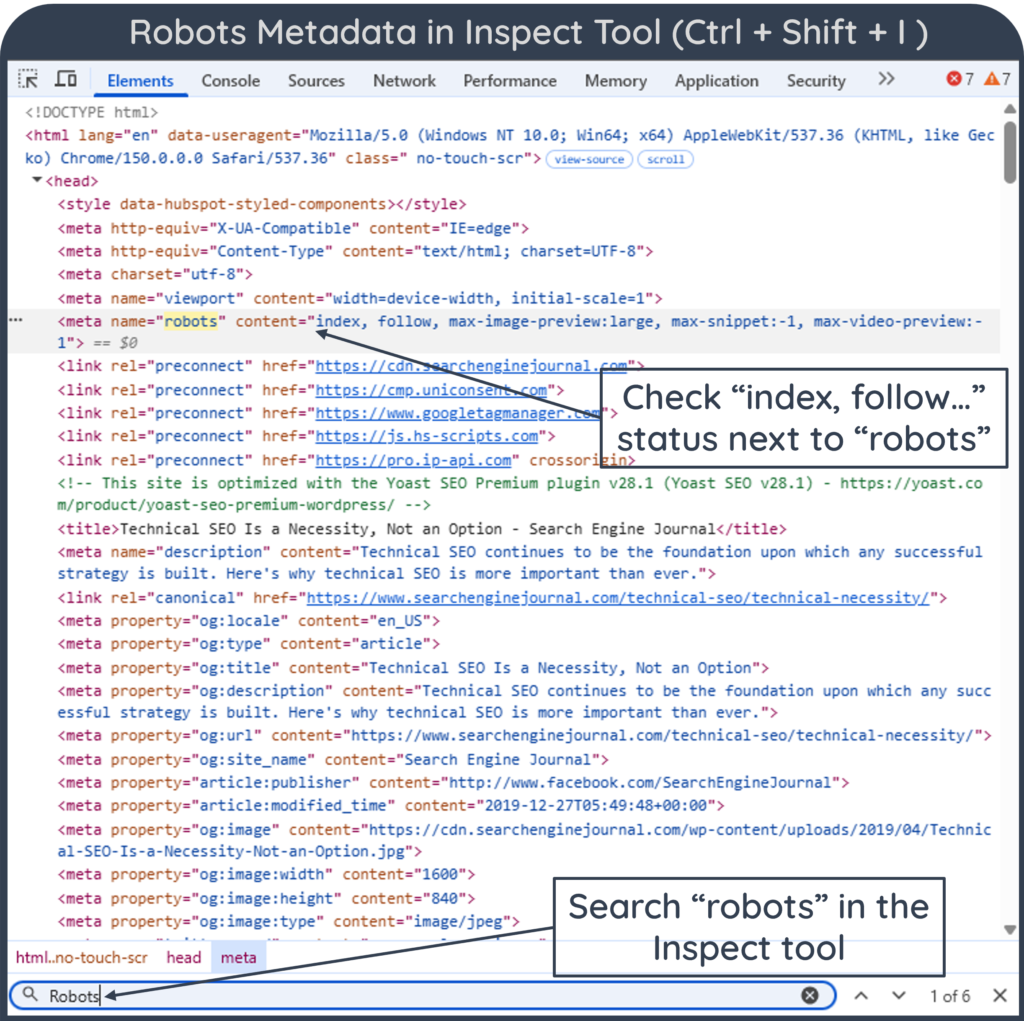
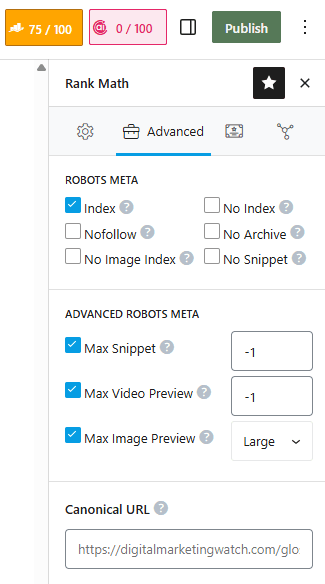
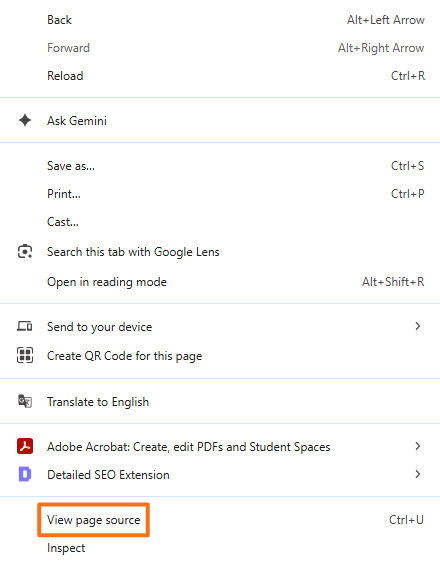
<meta name="robots" content="..."> inside <head> → View Page Source → search robotsRank Math provides both Robots Meta and Advanced Robots Meta controls, including snippet and preview settings. Yoast also exposes page-level indexing and advanced robots controls, and currently outputs separate robots information for Googlebot and Bingbot on public pages.
Wix supports adding additional meta tags through its Advanced SEO settings. For a direct code check, View Page Source makes it easy to confirm that the expected meta robots tag is actually present in the HTML rather than relying only on the CMS settings.
Meta Robots Tags: Dos and Don’ts
Following a few best practices helps keep meta robots directives clear, consistent, and easy for search engines to interpret correctly.
- Use
name="robots"for Broad Instructions: This is appropriate when the same rule should apply to supporting search crawlers rather than one named crawler. - Combine Compatible Directives: Multiple instructions can be placed in one tag, such as
content="noindex, nofollow". - Place the Tag in the
<head>: This is the standard location for page-level metadata and keeps crawler instructions clear and easy to audit. - Use Crawler-Specific Tags Only When Needed:
googlebot,googlebot-news, andbingbotcan be useful when different search engines genuinely require different treatment. - Use Preview Controls Deliberately: Directives such as
max-snippet,max-image-preview, andmax-video-previewcan fine-tune how content is presented in supporting search experiences. - Audit Important Pages: Template, CMS, or plugin changes can accidentally apply restrictive robots settings to pages that should remain searchable.
Avoiding common configuration mistakes is equally important because conflicting or misplaced directives can unintentionally block valuable pages from search:
- Don’t Block a Noindexed Page in Robots.txt: If the crawler cannot access the page, it may never discover the
noindexinstruction. - Don’t Create Conflicting Directives: Tags containing both
indexandnoindex, or incompatible snippet rules, create unnecessary ambiguity. - Don’t Assume Every Search Engine Supports Every Directive: Advanced Google controls such as
noimageindexare not necessarily supported elsewhere. - Don’t Keep Intentionally Noindexed URLs in XML Sitemaps: Sitemaps should generally contain canonical URLs intended for indexing.
- Don’t Use Meta Robots Tags as a Security Tool:
noindexdoes not prevent direct access to a page. Confidential content requires authentication or another access-control mechanism. - Don’t Use Them as a Substitute for Canonicalization: Duplicate or substantially similar URLs that should consolidate around one preferred version are generally better handled with a canonical tag.
Frequently Asked Questions
Are meta robots tags case-sensitive?
No. Google documents the tag values, crawler names, and applicable rules as case-insensitive. Therefore, robots and ROBOTS, or noindex and NOINDEX, are interpreted equivalently by Google.
What happens if no meta robots tag is added to a webpage?
For Google, normal unrestricted behavior applies by default. A page will be eligible for indexing and and its links can be used for discovery without an explicit index, follow tag.
Does a meta robots nofollow stop Google from indexing the linked pages?
No. nofollow tells Google not to follow links from that particular page, but the destination URLs may still be discovered through other webpages, external links, sitemaps, or other sources.
How can it be verified that Googlebot is reading a meta robots tag correctly?
The page source can be checked for the expected robots tag, and Google Search Console → URL Inspection → Test Live URL can be used to examine whether Google is allowed to index the page and whether restrictive directives are being detected.