Key Takeaways
- A noindex tag instructs search engines to exclude an accessible webpage or resource from their search indexes.
- HTML pages typically use a robots meta tag, while PDFs and other non-HTML resources use an X-Robots-Tag response header.
- Search engines must crawl a URL to detect its noindex directive, so blocking it with robots.txt can prevent proper processing.
- Noindex controls search visibility, not access; confidential or sensitive content requires authentication, password protection, or another security mechanism.
A noindex tag is a search-engine directive that tells crawlers not to include a webpage or other resource in their searchable index. Unlike a hint, it is an instruction or a rule: when Googlebot crawls a page and finds a valid noindex rule, the page is removed from Google Search results.
Indexing is the stage in which a search engine processes a discovered resource and stores information about it in its search index—a database from which results can later be retrieved. A page can therefore remain publicly accessible on the web while being excluded from search results with noindex.
For an HTML webpage, the directive is usually placed as a meta robots tag inside the <head> section:
<head>
  <meta name="robots" content="noindex">
</head>
The <head> contains information about the page for browsers, search engines, and other software rather than the main content displayed to visitors. Google specifically supports robots meta tags in this section.
Files such as PDFs do not have an HTML <head>. In these cases, the same instruction can be sent through the HTTP response header:
X-Robots-Tag: noindexGoogle and Bing both support X-Robots-Tag directives, making them useful for controlling the indexing of non-HTML resources.
How Search Engines Interpret Noindex
The basic process is:
noindex → Exclude URL from Search IndexGoogle must be able to crawl the URL before it can read the directive. If an already indexed page receives a noindex tag, it may continue appearing temporarily until Googlebot revisits it and processes the change. Once Google detects the rule, the page is removed from Google Search even if other websites link to it.
Bing follows the same basic principle. Its documentation defines noindex as an instruction not to index the page and specifically warns that Bingbot must be allowed to crawl the page to see the tag.
What Happens to Links on Noindexed Pages?
noindex does not automatically mean nofollow, but links on a noindexed page should not be relied on for long-term discovery or link signals.
In a 2024 Search Central discussion, Google’s John Mueller said Google may follow links before dropping a noindexed page, or it may remove the page without using them; the outcome is not guaranteed.
noindex should also not be treated as a crawl budget tool. In Google’s November 2022 SEO office hours, Gary Illyes said having many noindex pages does not, by itself, negatively affect how Google crawls and indexes a site.
Common Uses of the Noindex Tag
Noindex is most useful for pages or resources that need to remain accessible but provide little value as standalone search results.
- Internal Search Results: Search-result pages generated within a website generally do not need to compete with the site’s actual content.
- Thank-You and Confirmation Pages: Pages displayed after purchases, registrations, downloads, or form submissions usually have little value as search destinations.
- Login and Account Pages: Utility pages for signing in, managing subscriptions, or accessing customer accounts may not need search visibility.
- Temporary or Work-in-Progress Pages: Publicly reachable pages that are not ready for search can temporarily use
noindex. - Short-Lived Promotion Pages: Short-lived campaign pages that need to remain accessible but should not appear in search can use noindex. Permanently expired URLs may instead require a redirect, 404, or 410 depending on what replaced the content.
- Low-Value Utility Pages: Some necessary pages may serve visitors without providing enough standalone value for search.
- Downloadable Resources: PDFs, documents, images, and other non-HTML resources can be excluded through
X-Robots-Tag: noindex. - Administrative or Legal Pages: Certain utility policies or administrative pages may be noindexed when search visibility provides no benefit, although privacy policies and terms should not automatically be excluded.
Noindex Tag Is Not a Security Wall
A noindexed page is still publicly accessible to anyone with its URL. Confidential documents, staging environments, private customer information, and sensitive files should use authentication, password protection, or another access-control mechanism instead. Google recommends restricting access when content genuinely needs to remain private.
Noindex Tag vs. Robots.txt vs. Canonical Tags
These three SEO controls solve different problems.
Noindex Tag and Robots.txt
A common technical mistake is combining:
robots.txt: Disallow URL- Page itself:
noindex
If robots.txt prevents Googlebot from crawling the page, Google cannot read the noindex directive inside it. The URL may even appear in Google search results based on links or other information without Google having crawled its contents. Google therefore explicitly recommends allowing crawling when noindex is being used to prevent indexing.
The correct sequence is generally:
noindex → Search Engine Recrawls → URL Removed from IndexBlocking the URL in robots.txt afterward is usually unnecessary if continued exclusion from search is required.
Noindex vs. Canonical Tags
A noindex tag and a canonical tag serve different purposes: noindex keeps a page out of search results, while a canonical tag identifies the preferred URL among duplicate or substantially similar pages.
In simple terms, a canonical tag says, “Treat another URL as the preferred version of this content.”
A noindex directive says, “Do not index this URL.”
Using both to solve the same duplicate-content problem is usually unnecessary. If duplicate URLs should consolidate around one preferred version, use rel="canonical"; if the page itself should remain out of search results, use noindex. Google specifically recommends rel="canonical" rather than noindex when the goal is canonicalization, which involves selecting a representative URL from a group of duplicate pages.
How to Add and Check Noindex Tags
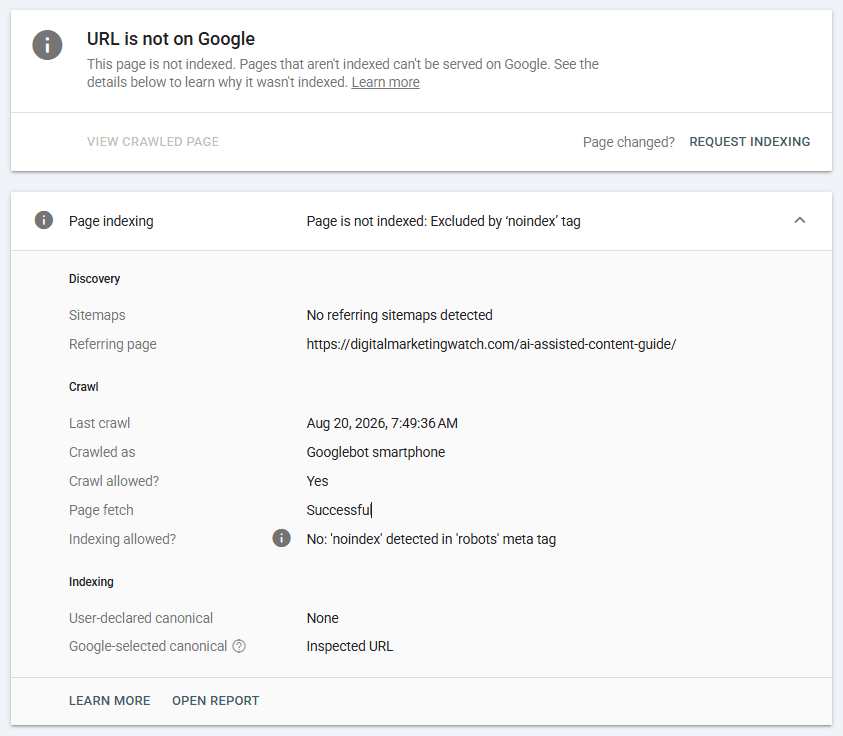
A noindex directive can be added through a meta robots tag, an X-Robots-Tag HTTP header, or SEO plugins such as Rank Math and Yoast SEO. Google Search Console can then be used to check whether Google detects the directive and whether indexing is allowed for the URL.
<meta name="robots" content="noindex"> inside <head> → View Page Source → search noindexX-Robots-Tag: noindex → inspect response headersThe appropriate method depends on whether the content is an HTML page, a non-HTML file such as a PDF, or whether the page or file is managed through a CMS or SEO plugin.
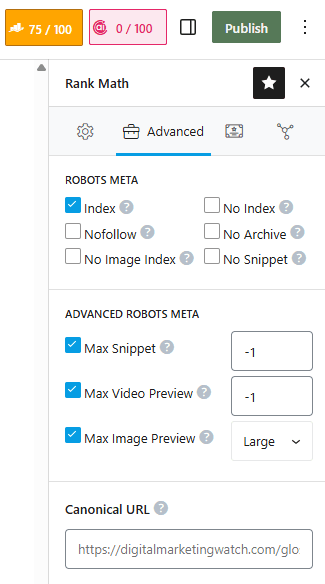
In WordPress, Rank Math provides a simple No Index option under the Advanced Robots Meta settings without requiring manual code changes.
Google Search Console does not create the noindex tag. It helps diagnose indexing status, inspect the live page, and check whether Google can access and process the directive.
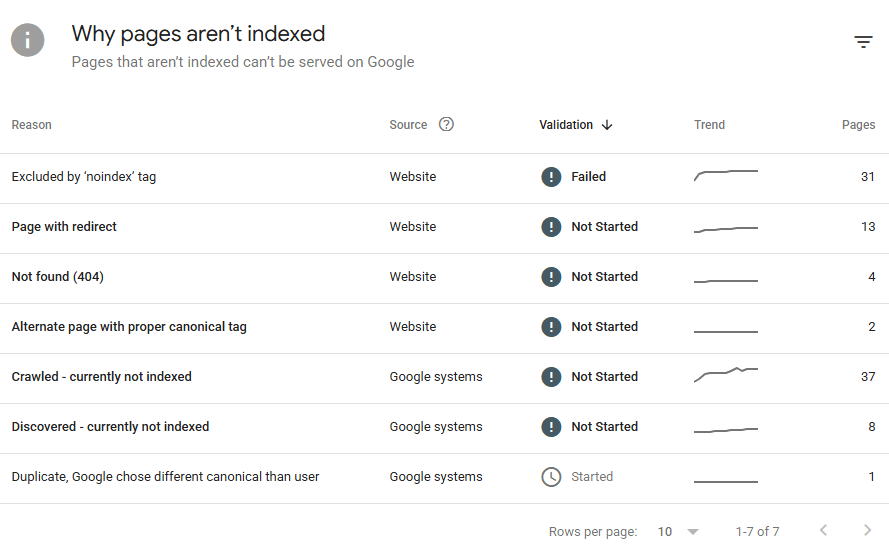
Urgent Removal
If a URL needs to disappear from Google Search quickly, Search Console’s Removals tool can temporarily hide it while noindex provides the longer-term indexing control.
Noindex Best Practices
In general, noindex should be used deliberately on pages that should remain accessible to users but should not appear in search results.
- Keep Noindexed Pages Crawlable: Do not block a URL with robots.txt when search engines need to read its
noindexrule. - Use Canonicals for Duplicate Pages: Canonicalization is generally preferable when duplicate URLs should consolidate around one preferred version.
- Audit Noindex Tags Regularly: Accidental template, plugin, or CMS settings can remove important pages from search.
- Protect Important Pages: Make sure homepages, important articles, major product or service pages, useful category pages, and key landing pages are not accidentally noindexed.
- Allow Time for Removal: Adding
noindexdoes not immediately erase an indexed result because the search engine usually needs to recrawl the URL. - Request Recrawling After Fixes: When an important page was accidentally noindexed, removing the directive and requesting indexing through URL Inspection can prompt Google to recrawl and reindex the URL.
- Use Proper Security for Private Content:
noindexcontrols search visibility, not access. - Do Not Use Noindex Tags to Save Crawl Budget: Its primary purpose is controlling indexing.
Frequently Asked Questions
Why is a noindexed page still appearing in Google?
Google may not have recrawled the URL since the directive was added. Once Googlebot accesses the page and processes a valid noindex tag, Google says the page will be dropped from Search.
Do noindex tags save crawl budget?
Not directly. Search engines normally need to crawl a URL to discover its noindex directive, and Google has stated that having many noindexed URLs does not inherently create a crawl-budget problem.
Can Google follow links from a noindexed page?
It may initially discover and follow them, but this should not be relied upon indefinitely. Google says a page may eventually be dropped from the index and information from it may stop being used.
Should a duplicate page use a noindex tag or a canonical tag?
A canonical tag is generally preferable when substantially duplicate pages should consolidate around one preferred URL. A noindex tag is more appropriate when a page itself should remain accessible but should not appear in search results.