Key Takeaways
- A nofollow link uses rel="nofollow" to signal that search engines should not treat the destination as a normal endorsement or ranking signal.
- Google treats nofollow as a hint, not a guaranteed crawling or ranking restriction, so the linked page may still be discovered or used.
- Nofollow qualifies an individual link, unlike robots.txt, page-level nofollow directives, or noindex, which control broader crawling or indexing behavior.
- Sponsored and ugc provide more specific labels for compensated and user-generated links, while nofollow remains useful when endorsement should not be implied.
A nofollow link is a hyperlink whose rel attribute includes the nofollow value, usually written as rel="nofollow" in the HTML code. It signals that the publisher does not want search engines to treat the link as a normal endorsement or pass ranking value to the destination page.
It is commonly used for paid links, user-generated content, and situations where websites do not want to endorse the destination page. However, Google prefers the more specific sponsored and ugc values for paid and user-generated links, although nofollow remains acceptable in relevant cases.
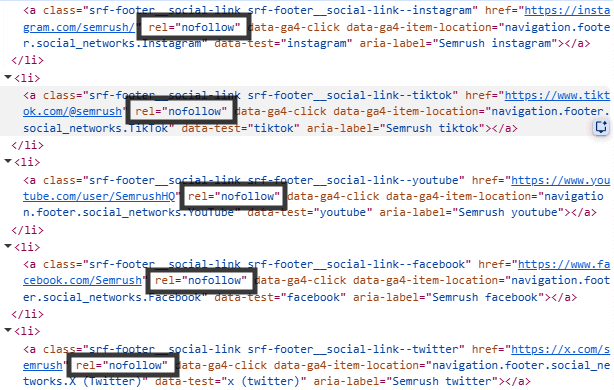
rel="nofollow" attributeThe nofollow value was introduced in January 2005 to combat comment spam, with Google, Yahoo, and MSN—the predecessor of Bing—supporting the initiative. The nofollow value is not specific to Google. Yandex also supports nofollow, ugc, and sponsored, although individual search engines may process these values differently.
Google treats nofollow as a hint rather than a strict command, meaning its systems may still use the link when analyzing the web. nofollow links remain fully clickable and can still generate referral traffic, brand exposure, and user engagement.
What Does “Nofollow” Exactly Mean for Crawling?
rel="nofollow" applies to a specific hyperlink, not to the destination URL as a site-wide crawl restriction. It signals that Google should not normally follow that particular link when crawling, —or, more precisely, that Google should not crawl the linked page from that particular link. However, the destination can still be discovered and crawled through other links, XML sitemaps, or other discovery methods.
Google therefore treats rel="nofollow" as a hint, not as a guaranteed crawl-blocking directive. This differs from a robots.txt Disallow rule, which is specifically intended to restrict crawling of matching URLs or paths.
A website owner can control the rel values of links published on their own pages but cannot add nofollow to a backlink located on another website. Only the owner or platform controlling the linking page can change that backlink.
For problematic incoming links, the receiving website can request removal or appropriate qualification from the linking site. In serious cases, Google’s disavow links tool may also be used, but Google states that most websites do not need it and recommends using it only with caution.
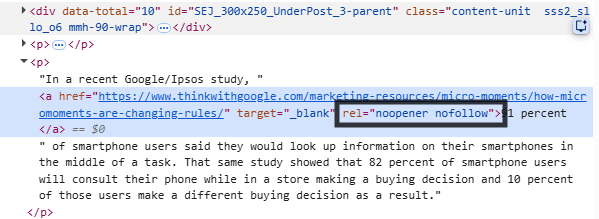
rel="noopener nofollow"Nofollow, Sponsored, and UGC Links
In 2019, Google introduced sponsored and ugc to provide more specific ways of describing the relationship between a website and a linked page.
rel="sponsored": Identifies links created through advertisements, sponsorships, affiliate arrangements, or other forms of compensation. Google prefers the sponsored value for paid links, althoughnofollowremains acceptable.rel="ugc": Identifies links added through user-generated content, including forum posts, blog comments, social posts, and other community submissions. Google also permitsnofollowfor these links.rel="nofollow": Acts as a general value for links that should not be treated as an endorsement whensponsoredorugcdoes not describe the relationship accurately.
Website owners can assign multiple values to outbound links when necessary, such as rel="ugc nofollow" or rel="sponsored nofollow".
Platforms Commonly Using Nofollow or UGC Attributes
Large platforms commonly apply nofollow or ugc attributes to links added by users to discourage automated link spam. However, link treatment can differ by platform, page type, and placement, so not every outbound link should automatically be assumed to use the same attribute.
- Social Platforms: Links posted on services such as Facebook, YouTube, and other social networks commonly use
nofollowor similar controls. - Community Platforms: User-posted links on forums and question-and-answer websites such as Reddit and Quora are commonly qualified as
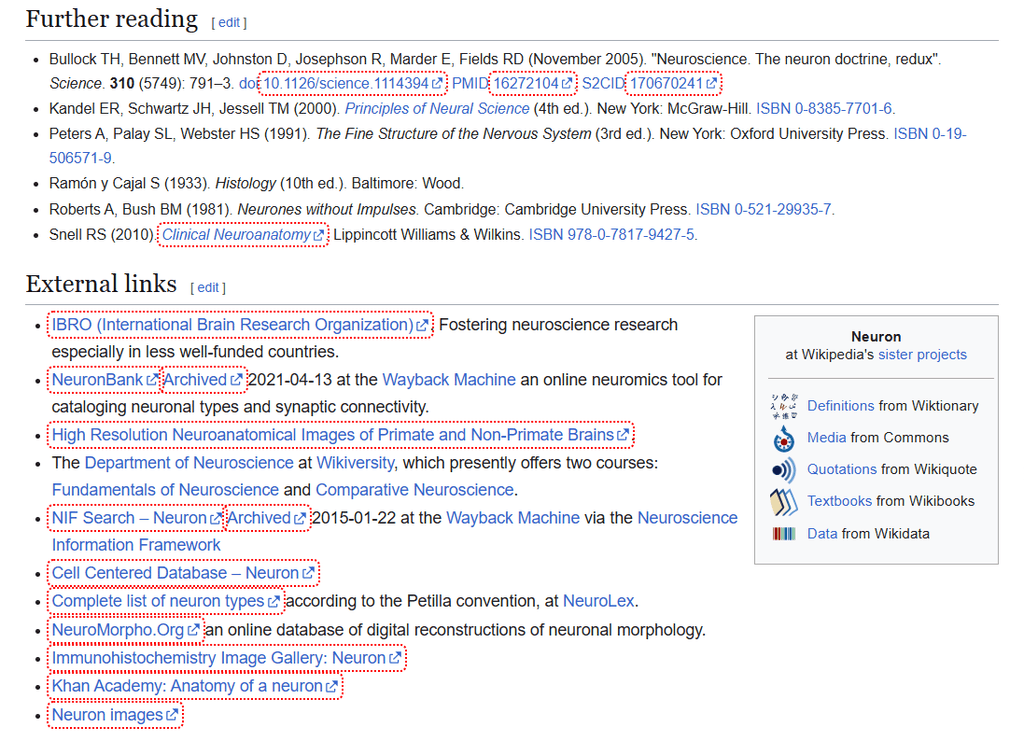
nofolloworugc. - Reference Websites: Wikipedia commonly applies
nofollowto external citation links.
nofollow link attributeDofollow vs. Nofollow vs. Noindex
These terms describe different ways of controlling how search engines interpret links and webpages.
- Dofollow Links:
dofollowis an informal SEO term for a standard hyperlink withoutnofollow,ugc, orsponsored. There is no officialrel="dofollow"attribute. These standard links may pass PageRank and other link signals to the destination page. - Nofollow Links: These links remain clickable, but
nofollowindicates that the link should not receive normal endorsement weight. Because Google treats the attribute as a hint, it does not guarantee that the link will be completely ignored. - Noindex Rule: A
noindexrule can be added through a robots meta tag or anX-Robots-TagHTTP header. It prevents the page from appearing in Google Search after Google crawls and processes the instruction.
dofollow) linknofollownoindexLink-Level vs. Page-Level Nofollow
rel="nofollow" qualifies an individual link. For example, if a page links to an untrusted website, only that specific link can be marked nofollow. A robots meta tag such as <meta name="robots" content="nofollow"> applies to links across the entire page. This is different from noindex, which controls whether the page itself can appear in search results.
Why Link Attributes Matter to Search Engines
Search engines use links to discover pages and understand relationships between websites. Without link attributes, paid placements and links added through comments or forums could be mistaken for genuine editorial recommendations.
Attributes such as nofollow, sponsored, and ugc help search engines distinguish normal editorial links from commercial, user-generated, or untrusted links. This distinction supports a more accurate link graph and reduces opportunities for link spam.
Do Nofollow Link Attributes Help with SEO?
Yes, but mainly indirectly. When nofollow was introduced, Google generally did not count outbound links marked nofollow as ranking signals. In September 2019, Google changed how it interprets nofollow, sponsored, and ugc, treating them as hints for ranking rather than strict directives. Beginning March 1, 2020, Google also began treating nofollow as a signal rather than a strict directive for crawling and indexing.
A nofollow backlink should not be expected to pass normal PageRank or directly improve rankings. However, it can still generate referral traffic and increase brand exposure.
When to Use and Avoid Nofollow Link Attribute
Nofollow link attribute is most useful when a link should remain accessible to readers but should not be treated as a normal editorial endorsement by search engines.
When to Use Nofollow Link
- Untrusted Public Content: Apply
rel="ugc"orrel="nofollow"to links placed in forums, guest books, comments, and other areas where users can submit links without full editorial review. - Paid Advertisements or Sponsorships: Compensated links should use
rel="sponsored".This links cover payments, sponsorships, affiliate arrangements, and products or services provided in exchange for linked coverage. - Links Without Endorsement: Use
nofollowwhen a page must reference another website but does not want the link interpreted as a recommendation.
When Not to Use Nofollow Link
nofollow should not be added automatically to internal links or to normal editorial links when you trust the destination and intend to reference or recommend it naturally.
- Standard Editorial References: Genuine editorial links to trustworthy studies, tools, resources, or articles generally do not need
nofollow,sponsored, orugc. - Internal Navigation and Content Links: Try not to use
nofollowon ordinary menus, breadcrumbs, category pages, or contextual internal links. - Crawl-Budget Management:
nofollowshould not be used as a general method for conserving crawl budget because Google may still discover or crawl the destination through other links. - Ordinary Informational Links: Apply
sponsoredornofollowto the actual compensated affiliate link, not automatically to every unpaid informational resource or the surrounding affiliate-disclosure text.
Implementation: Coding and CMS
nofollow and related link attributes can be added manually in HTML or through the available settings in a content management system.
Manual HTML Code Structure
To qualify a link manually, add the appropriate value to the rel attribute inside the opening anchor tag. A standard link does not require a rel="dofollow" attribute.
<!-- Standard link -->

<a href="https://example.com">Visit Resource</a>

<!-- nofollow link -->

<a href="https://example.com" rel="nofollow">Visit Resource</a>

<!-- Sponsored or affiliate link -->

<a href="https://example.com" rel="sponsored">Affiliate Product</a>
Implementation in WordPress (Block Editor)
Website owners using a CMS such as WordPress usually do not need to add rel values manually in HTML. They can apply options such as nofollow through the CMS or an SEO plugin and then use the browser’s Inspect tool to verify that the correct rel value has been added.
- Add the Link: Highlight the anchor text and press Ctrl + K on Windows or Command + K on macOS, then enter the destination URL.
- Open the Link Settings: Select the linked text and click the edit or pencil icon.
- Expand the Options: Open the Advanced section within the link settings.
- Apply Nofollow: Enable Mark as nofollow and save the link. The WordPress Block Editor adds
rel="nofollow"automatically. - Apply Sponsored or UGC: Settings for
sponsoredandugcmay be provided by an SEO plugin. When the required option is unavailable, the attribute can be added manually through the code editor.
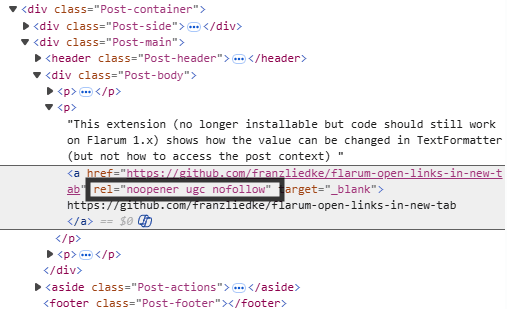
rel="noopener ugc nofollow"Checking and Managing Links
Regular checks help confirm that each link contains the intended attribute.
How to Check Any Link Instantly
- Inspect the Link: Right-click the link in a browser and select Inspect.
- Find the Anchor Element: Locate the highlighted
<a>element in the browser’s developer tools. - Review the Attribute:
rel="nofollow"identifies a nofollow link, whilerel="sponsored"andrel="ugc"identify paid and user-generated links. When no qualifyingrelvalue appears, the link functions as a standard link. - Use a Browser Extension: Browser extensions such as NoFollow are designed to check
nofollowattributes. They can automatically highlight nofollow links while webpages are viewed.
A link marked sponsored or ugc is not literally a nofollow link unless nofollow is also included. Google treats all three values as separate descriptions of the relationship between the linking and destination pages.
Nofollow Link Best Practices
A few simple practices can help ensure nofollow is used appropriately without unnecessarily restricting normal link signals across a website.
- Combine Attributes When Needed: Multiple values can be placed within one
relattribute and separated by spaces, such asrel="ugc nofollow"orrel="sponsored nofollow". Google officially supports combining link values. - Qualify Compensated Links: Links included in paid guest posts, sponsored reviews, advertisements, or affiliate arrangements should use
rel="sponsored"or, where necessary,rel="nofollow". Proper qualification helps the website comply with Google’s link-spam policies. - Audit Link Attributes: SEO crawlers such as Screaming Frog can identify internal links that have accidentally been marked as
nofollow. Important internal links should normally remain standard links so that search engines can discover pages and distribute link signals through the website. - Avoid Sitewide Nofollow Rules:
nofollowshould not be added automatically to every external or internal link. Each link should be classified according to whether it is editorial, paid, user-generated, or untrusted.
Frequently Asked Questions
Can Google still crawl or discover a link marked nofollow?
Yes. nofollow does not guarantee that Google will ignore the link entirely. The destination URL may still be discovered or crawled through other links, sitemaps, or sources.
When should nofollow, ugc, or sponsored be used?
Use nofollow when you do not want to imply endorsement and no more specific value applies. Use ugc for links within user-generated content such as comments or forum posts, and sponsored for paid, advertising, or compensated links.