Key Takeaways
- A web server combines hardware, software, or both to receive web requests and deliver content, responses, or error messages.
- HTTP defines browser-server communication, while HTTPS adds TLS encryption to help protect information during transmission.
- Web servers may deliver stored files directly or generate dynamic pages using application software, databases, and caching.
- Web servers can host multiple domains, but capacity depends on resources, traffic, caching, application complexity, and performance requirements.
The term web server can describe the physical machine that hosts website resources, the software that handles web requests, or the combined system working together.
When a visitor enters a URL, the browser identifies the appropriate server, establishes a connection, and sends an HTTP or HTTPS request. The web server processes that request and returns an HTTP response containing the requested content, an error message, or other information needed by the browser.
MDN uses the hardware-and-software distinction in its web-server explanation. In this distinction, the hardware is the physical computer that hosts website resources, while the software is the web server program that receives HTTP requests and sends the appropriate responses.
HTTP (Hypertext Transfer Protocol) is the set of rules browsers and web servers use to exchange requests and responses. HTTPS performs the same basic communication over an encrypted connection using TLS, helping protect information while it travels across the internet.
In simple terms:
A server may return stored HTML, CSS, JavaScript, images, and other files directly, or it may generate a page dynamically using application software and data stored in a database.
Web Server vs. Web Hosting Provider
A web hosting provider is a company that supplies the infrastructure and services needed to keep a website online. Depending on the service, this may include server resources, storage, networking, backups, security tools, monitoring, and technical support.
A web server, by contrast, is the hardware and/or software that actually receives web requests and serves the requested content.
Real Estate Analogy
A simple analogy helps separate the two concepts. The web server is like the apartment where the website lives, while the hosting provider is like the company that provides and manages the building and surrounding services.
Hosting arrangements are more complex in practice because multiple websites may share server resources or run across virtual and cloud infrastructure.
Examples of conventional hosting providers include Hostinger, SiteGround, Bluehost, WP Engine, Kinsta, and GoDaddy. DigitalOcean and Amazon Web Services (AWS) are broader cloud infrastructure providers, while Shopify and Wix provide hosted website-building platforms that also manage much of the underlying infrastructure.
Hostinger, for example, currently identifies LiteSpeed Web Server, CloudLinux, NVMe storage, and its global infrastructure as parts of its hosting technology.
The Physical Infrastructure Behind Web Servers
Behind every website is physical computing infrastructure that stores data, runs applications, and responds to requests from browsers. This infrastructure may consist of individual servers, virtual machines, cloud systems, or large data centers working together.
The Server Machine
Websites ultimately run on physical computing hardware, even when the service is described as cloud hosting, a virtual machine, or a container. Data-center servers commonly use rack-mounted hardware containing processors, RAM, storage, networking components, and redundant systems designed for continuous operation.
The basic components are similar to those in a personal computer, but server hardware is designed for greater reliability, scalability, remote administration, and sustained workloads.
How Many Websites Can One Server Host?
There is no fixed number of websites that one server can host. Web servers can use virtual hosting to serve multiple domains from the same machine or IP address, but practical capacity depends on CPU, memory, storage, traffic, caching, databases, application complexity, and performance requirements. Apache, for example, explicitly supports multiple virtual hosts on one server.
A powerful server may therefore host many lightweight websites, while a large ecommerce or social platform may distribute one website across many servers, databases, caches, storage systems, and load balancers.
Data Centers and Server Farms
Physical servers are commonly housed in data centers—specialized facilities containing racks of computing equipment along with networking, power distribution, backup power, cooling, fire protection, and physical security.
Some campuses operate at enormous scale. Switch’s Citadel Campus in Nevada was originally designed for more than 7 million square feet of data-center capacity and operates using renewable-energy procurement. Microsoft also operates and continues to expand data-center facilities around Quincy and Wenatchee, Washington.
Climate can influence cooling requirements, but data-center location also depends on electricity availability, network connectivity, latency, land, regulation, and other infrastructure considerations.
Technology Giants
Large technology companies use different infrastructure strategies. Some build extensive private data centers, others depend heavily on public cloud platforms, and many combine multiple approaches.
Google describes its hardware infrastructure as Google-controlled, while Meta explicitly says it builds and operates its own custom data centers. Pinterest documents its reliance on large-scale AWS infrastructure, including expanded use of AWS compute services, cloud-native infrastructure, and custom silicon to support its growing visual search, recommendation, and AI workloads.
OpenAI’s infrastructure is now notably multi-provider: its current partnerships include AWS and the expanding Stargate platform, while Anthropic describes a diversified strategy using AWS Trainium, Google TPUs, and NVIDIA GPUs.
How a Web Server Works
The browser-to-server process can be broken into seven stages.
1. The Visitor Requests a URL
A visitor enters a web address or selects a link. The browser first needs to determine which network destination is responsible for that domain.
2. DNS Resolves the Domain
The Domain Name System (DNS) translates a human-readable domain such as example.com into an IP address associated with the appropriate server or network infrastructure.
3. The Browser Establishes a Connection
Using the resolved address, the browser establishes a network connection. On an HTTPS website, a TLS-encrypted connection is also established before protected HTTP communication proceeds.

4. The Browser Sends an HTTP Request
The browser sends an HTTP request describing what it needs. An HTTP request identifies the target resource and includes a method such as GET for retrieving data or POST for submitting data.
5. The Web Server Processes the Request
Web-server software examines the request and determines how to respond. A static file may be returned directly, while a dynamic application may pass the request to additional software.
For example, a WordPress request may involve PHP running the application’s logic and retrieving posts, settings, or other information from a MySQL or MariaDB database before generating the final HTML.
6. The Server Sends an HTTP Response
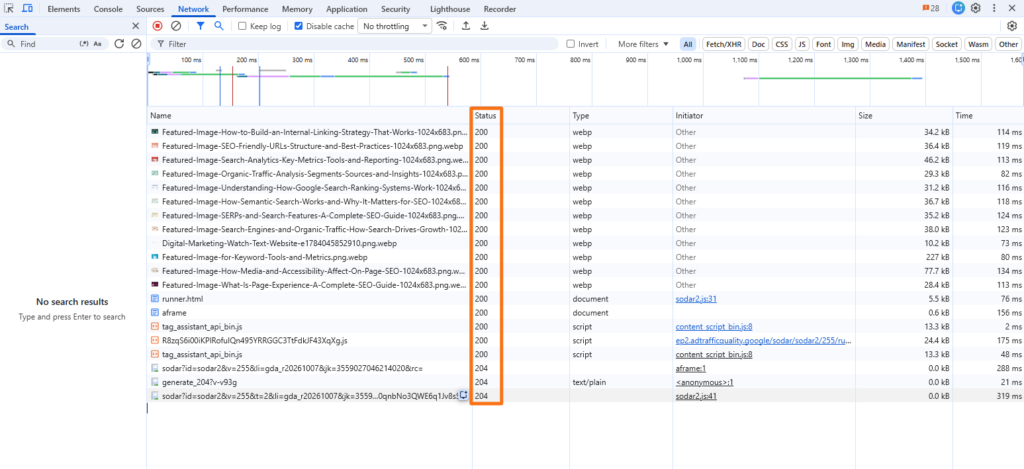
The server returns an HTTP response containing a status code and headers, and it may also include a response body containing the requested data. Examples include:
- 200 OK: The request succeeded, and the server returned the requested resource or response.
- 204 No Content: The request succeeded, but the server returned no response body.
- 404 Not Found: The requested resource could not be found.
- 500 Internal Server Error: The server encountered an unexpected condition that prevented it from completing the request.
The Network panel in Chrome DevTools shows requests made while a page loads, including the HTTP status code returned for each resource. This makes it useful for identifying successful requests, redirects, missing resources, and server errors.
7. The Browser Renders the Page
The browser receives the response, parses the HTML and CSS, executes relevant JavaScript, requests additional resources when necessary, and renders the final webpage.
In simple terms, the browser asks, the web server responds, and HTTP provides the rules that allow the two systems to communicate across the internet.
Most Common Web Server Software
Physical hardware needs server software capable of receiving and responding to HTTP requests. Several platforms are widely used for this purpose.
Apache’s first official public release appeared in April 1995, NGINX’s first public release was October 4, 2004, LiteSpeed 1.0 appeared in July 2003, and Microsoft announced IIS availability in February 1996.
Static vs. Dynamic Web Servers
A static web server returns stored resources largely as they exist on the server. A request for about.html, for example, can result in that file being read and sent directly to the browser. Static delivery is common for simple landing pages, documentation, portfolios, and pre-generated websites.
A dynamic web server adds application software and often a database. Instead of simply finding a stored HTML document, the application can generate the response according to content, user activity, products, account information, or other stored data.
According to MDN’s explanation of static and dynamic web servers, a dynamic web server adds application software and often a database.
For a typical WordPress site, the process can be simplified as:
PHP runs WordPress logic, while MySQL or MariaDB stores structured information such as posts, pages, users, and settings. Caching can save prepared output so the server does not have to repeat every processing step for each visitor.
Common Server Errors and Performance Issues
Web servers can encounter several types of problems while processing requests or communicating with other backend systems. When these issues prevent a request from being completed normally, the server may return an HTTP 5xx status code to indicate that the failure occurred on the server side.
Common server errors include:
- 500 Internal Server Error: A general server-side error when the server encounters an unexpected condition.
- 502 Bad Gateway: A gateway or proxy receives an invalid response from an upstream server.
- 503 Service Unavailable: The server is temporarily unable to handle the request, commonly because of overload or maintenance.
- 504 Gateway Timeout: A gateway or proxy waits too long for an upstream server to respond.
Critical Server Performance Issues
Server performance issues can slow page delivery, increase error rates, and reduce a server’s ability to handle normal traffic efficiently. These problems often arise when computing, memory, or network resources become overloaded or are used inefficiently.
- High CPU Utilization: Excessive processing demand can reduce the server’s ability to handle requests quickly.
- Bandwidth Saturation: Network demand can exceed available capacity, increasing latency and slowing transfers.
- Memory Leaks or Exhaustion: Applications can consume excessive RAM, potentially leading to degraded performance, application termination, or server instability.
Frequently Asked Questions
How does a web server manage sudden spikes in user traffic?
High-traffic systems can distribute requests through load balancers, multiple servers, CDNs, caching layers, and autoscaling infrastructure. This allows additional computing capacity to absorb demand instead of relying on one server to handle every request.
How does server-level caching improve website loading speeds?
Server-level caching stores a reusable version of frequently requested content so the server can return it without repeatedly running application code and database queries. This can reduce processing work and improve response times, particularly on dynamic websites.
Can a professional web server be run on a home computer?
Yes, technically, but a home computer is rarely suitable for an important production website. Reliable professional hosting also requires strong security, continuous power and connectivity, adequate bandwidth, backups, monitoring, stable network addressing, and ongoing maintenance.