Key Takeaways
- The Google Disavow Tool asks Google to disregard specified backlinks; it does not remove those links or hide them from backlink reports.
- Google recommends using the tool only for significant manipulative-link problems involving manual-action risk, not ordinary spam or unfamiliar domains.
- Low authority, unusual TLDs, small numbers of suspicious links, or ranking drops alone do not prove disavowal is necessary.
- Disavow files require precise formatting, and submitting a new file replaces the existing list; processing may take several weeks.
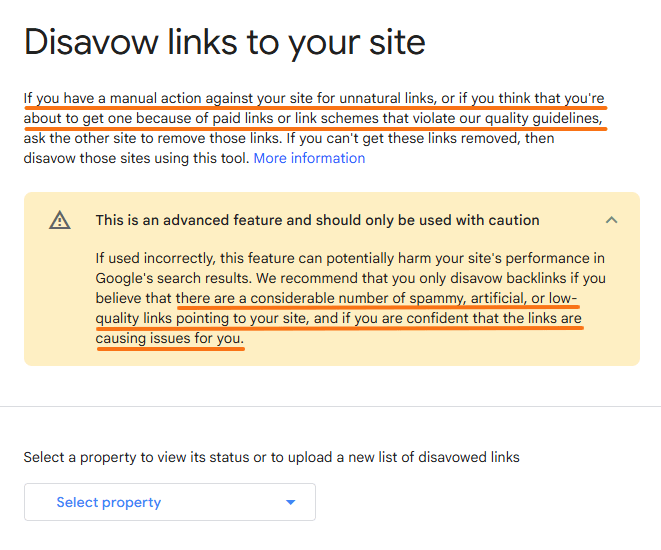
The Google Disavow Tool, officially referred to by Google as the Disavow links tool, is an advanced Google tool for eligible Search Console-verified properties that allows website owners to submit a list of backlinks or linking domains they want Google to ignore when evaluating links to their site.
Disavowing a backlink does not remove the link from the internet or make it disappear from backlink reports. Instead, it asks Google to disregard the specified URLs or domains when evaluating links to the site. Google warns that the tool should be used carefully because mistakenly disavowing legitimate backlinks can potentially harm search performance.
The tool emerged during Google’s efforts to combat manipulative link building. Google introduced the Penguin system in 2012 to fight link spam, and Penguin became part of Google’s core ranking systems in 2016. Google also introduced its Disavow Links Tool in 2012 to give site owners an advanced way to deal with problematic backlinks that they could not get removed.
Google says most websites do not need the Disavow Tool. Its systems can normally determine which backlinks to trust without extra input from the website owner.
What Types of Links Might Need to Be Disavowed?
The Google Disavow Tool is intended for significant manipulative backlink problems, not every unfamiliar, irrelevant, or low-authority link discovered in a backlink report.
Google’s link-spam policies identify several practices that can violate its guidelines.
- Purchased Ranking Links: Backlinks bought specifically to influence Google Search rankings can constitute link spam. Legitimate advertisements and sponsorships should instead use appropriate link qualifications such as
rel="sponsored"ornofollow. - Excessive Link Exchanges: Large-scale reciprocal linking arrangements created mainly to influence rankings can violate Google’s spam policies.
- Automated Backlinks: Links created through automated programs, backlink packages, or services used at scale to manipulate rankings can constitute link spam.
- Low-Quality Directory Links: Large-scale submissions to low-quality directories or bookmark websites primarily for backlink creation can constitute link spam.
- Manipulative Guest-Post Links: Guest posts are not inherently problematic, but large-scale campaigns built primarily around optimized backlinks can violate Google’s policies.
- PBN and Link-Farm Links: Private blog networks and link farms used mainly to create manipulative backlinks can form part of broader link schemes designed to influence rankings.
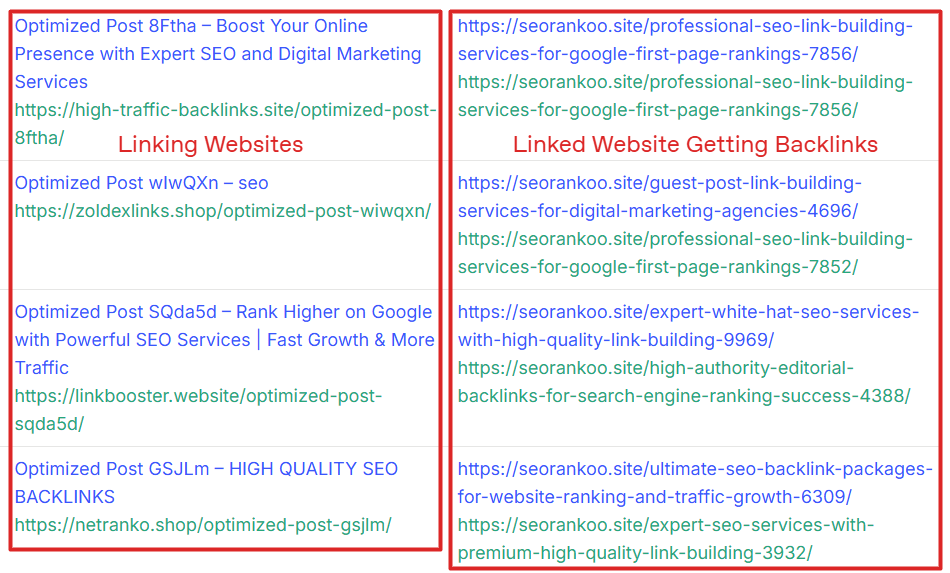
The central issue is why the links were created. Google defines link spam by its manipulative purpose rather than by a particular Domain Authority score, TLD, industry, or backlink quantity.
What About Negative SEO?
A competitor could theoretically attempt to create manipulative backlinks pointing to another website, a practice commonly described as negative SEO. However, an unexpected increase in spammy links does not automatically mean the attack has worked.
Google states that it works to ensure that actions taken on third-party websites do not negatively affect another site. This is one reason most websites do not need to disavow ordinary unsolicited spam backlinks.
The Two Conditions for Using the Google Disavow Tool
Google recommends disavowing backlinks only when both of the following conditions apply:
- A considerable number of manipulative or low-quality backlinks are pointing to the site.
- Those links have caused, or could result in, a manual action against the site.
This means an actual manual action does not always have to exist before the tool can be used, but there should be a genuine reason to believe that significant manipulative linking creates manual-action risk. A link-related manual action can be checked in Google Search Console → Security & Manual Actions → Manual actions.
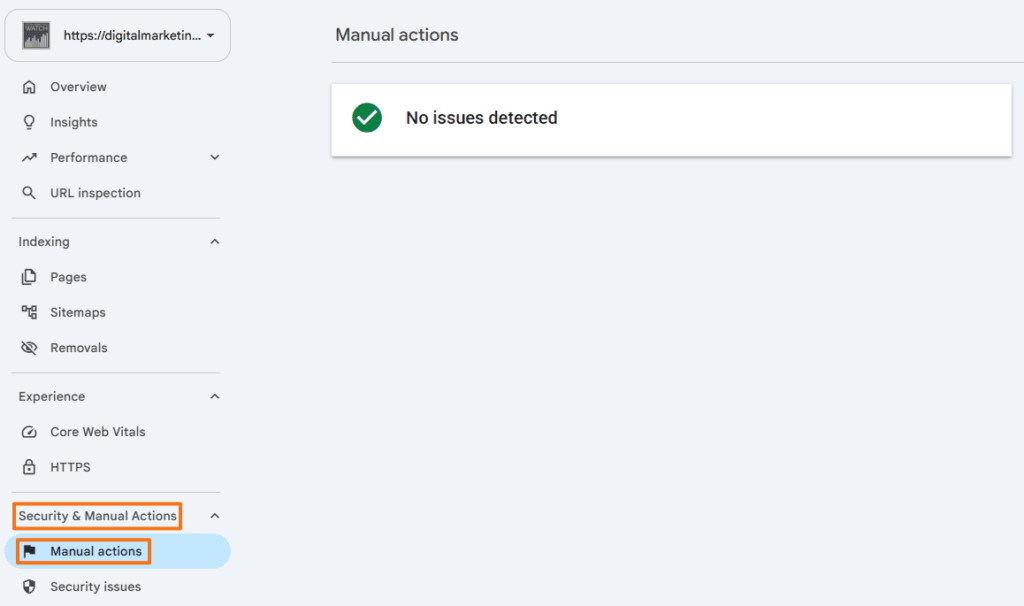
One relevant manual action is “Unnatural links to your site.” Google issues this when a human reviewer identifies a pattern of unnatural, artificial, deceptive, or manipulative backlinks pointing to a website. If such an action occurs, Google recommends first making a good-faith effort to remove problematic links. Links that cannot reasonably be removed can then be included in a disavow file before a reconsideration request is submitted.
What About an Inherited Spammy Backlink Profile?
Buying an established website or previously used domain does not automatically mean its historical backlinks should be disavowed.
If investigation reveals that a previous owner deliberately used large-scale paid backlinks, PBNs, automated link packages, or other manipulative schemes and those links create genuine manual-action risk, disavowal may be appropriate.
However, ordinary legacy spam, strange referring domains, or backlinks that simply look low quality are not sufficient reasons on their own.
When Not to Use the Google Disavow Tool
The Google Disavow Tool is not intended for routine backlink cleanup and should generally be avoided unless there is a serious risk of a manual action from manipulative links.
- Ordinary Automated Spam: Scraper sites, random automatically generated pages, and miscellaneous spam backlinks usually do not require disavowal.
- A Few Suspicious Backlinks: A small number of links from unfamiliar, unrelated, or foreign-language websites does not by itself establish a manual-action risk. Likewise, TLDs such as
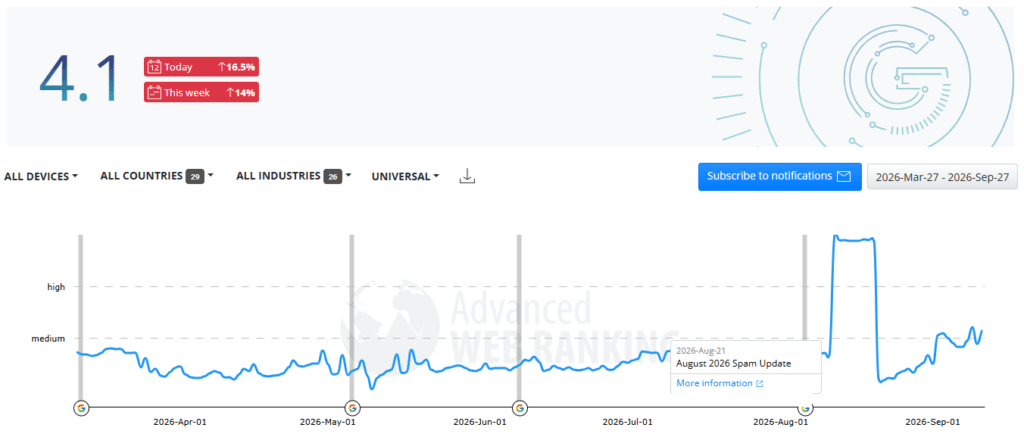
.xyz,.top, or.shopare not inherently spammy. - Immediately After a Ranking Drop: A decline in organic traffic should first be investigated for algorithm updates, technical problems, indexing issues, content decay, competitor improvements, search-intent changes, and other potential causes. Suspicious backlinks should not automatically be blamed.
How to Find and Evaluate Potentially Spammy Backlinks
Third-party backlink tools cannot confirm whether Google considers a particular link harmful. Backlink reports are best used to identify suspicious patterns for further investigation, rather than automatically disavowing every link assigned a high spam or toxicity score.
Google Search Console
In Google Search Console, navigate to Links → External links to review the websites linking to the site, the pages receiving the most backlinks, and the anchor text most commonly used in those links.
The report can help identify unusual patterns involving Top linking sites, Top linked pages, and Top linking text. Search Console does not provide a complete inventory of every backlink Google knows about, so its data should be considered alongside other sources.
Ahrefs
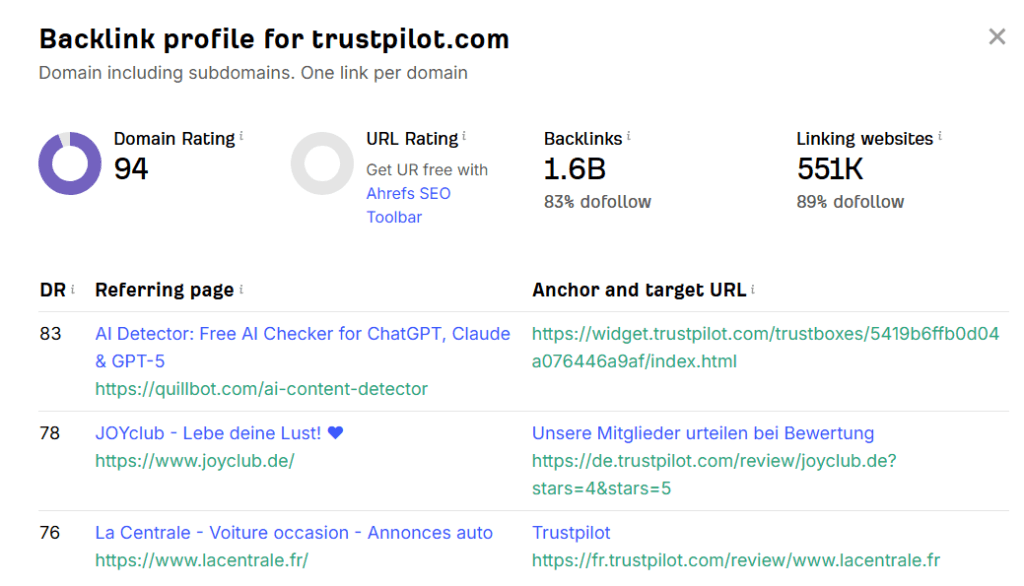
Ahrefs Site Explorer can be used to examine referring domains, individual backlinks, anchor text, new and lost links, and unusual changes in backlink growth. Ahrefs also provides a free Backlink Checker that offers a limited view of a website’s backlink profile, making it useful for quick checks without a paid subscription.
Semrush
Semrush Backlink Analytics and Backlink Audit can help investigate referring domains, anchor text, backlink patterns, and potentially suspicious links.
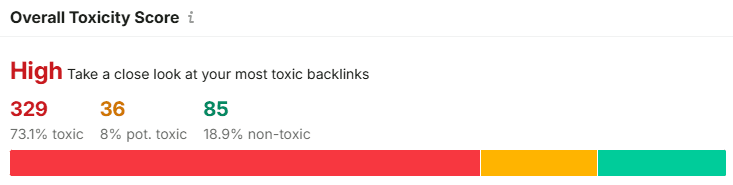
Semrush’s toxicity measurements are proprietary indicators, not confirmation that Google considers a particular backlink harmful or expects it to be disavowed.
Mangools LinkMiner
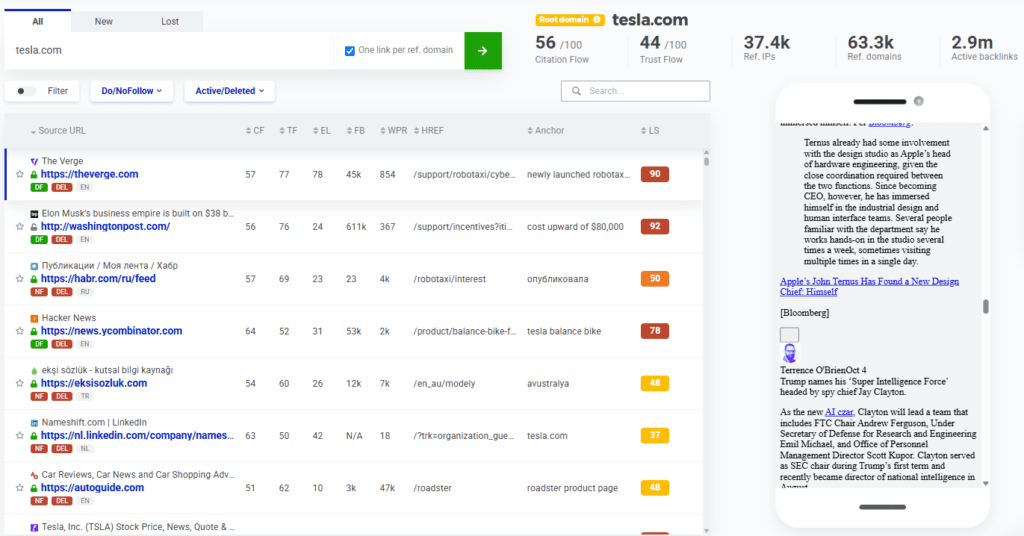
Mangools LinkMiner can be used to examine backlinks that may appear suspicious or low quality. It provides details such as link type, source-page metrics, anchor text, and whether a backlink is active or deleted. These indicators do not determine whether a link is spam, but they can help identify unusual patterns and prioritize backlinks for further review.
Warning Signs Worth Investigating
Patterns deserving closer inspection can include:
- large numbers of links from known link networks;
- repeated commercial exact-match anchor text;
- PBNs and link farms;
- backlinks known to have been purchased;
- automatically generated pages containing little except links;
- large-scale manipulative campaigns previously created by the website owner or a hired SEO.
A low DA, DR, Authority Score, unusual TLD, or unfamiliar domain alone does not prove that a backlink should be disavowed.
How to Format and Submit a Disavow File
Once it has been established that disavowal is genuinely necessary, Google requires a specific file format and submission process.
Step 1: Create the Disavow File
The list must be saved as a plain-text .txt file using UTF-8 or 7-bit ASCII encoding.
Google’s current file requirements include:
- one URL or domain instruction per line;
- a
.txtfilename; - a maximum URL length of 2,048 characters;
- no more than 100,000 lines, including comments and blank lines;
- a maximum file size of 2 MB;
- optional comments beginning with
#.
Step 2: Choose URL-Level or Domain-Level Disavowal
An individual URL can be listed directly: https://spam.example.com/paid-links/article.html
To disavow an entire domain or subdomain, use the domain: prefix, for example: domain:spam.example.com
A complete file might look like this:
# Manipulative links that could not be removed
https://spam-example.com/paid-links/article.html

# Entire manipulative linking domains
domain:badseo-network.biz
domain:cheap-backlinks-farm.example
Use domain-level disavowal when problematic links occur throughout an entire manipulative domain. Use an individual URL when the problem is restricted to particular linking pages. Google specifically recommends the domain: operator as a convenient option when multiple problematic links originate from the same domain during manual-action cleanup.
Step 3: Upload the File to Google
The Google Disavow Tool does not appear in the normal Search Console sidebar. It is accessed through Google’s separate Disavow Links Tool.
Select the appropriate Search Console property, upload the .txt file, and correct any validation errors before submitting it. The current tool does not support Search Console Domain properties (ones without the https:// or http:// prefix and path strings), and the user submitting the file must be an owner of the applicable property.
Uploading a new disavow file replaces the existing file for that property rather than adding to it. Any previous entries that should remain disavowed therefore need to be included in the replacement file.
Google also states that processing can take a few weeks while it recrawls and reprocesses the affected pages.
Frequently Asked Questions
Does using the Google Disavow Tool completely remove problematic backlinks?
No, the backlink remains on the external website and can continue appearing in backlink reports. Disavowal affects how Google treats the link rather than physically deleting it.
Can misuse of the Google Disavow Tool hurt a website’s rankings?
Yes, Google warns that incorrect use can harm a site’s performance in Search because legitimate backlinks may be excluded from Google’s link evaluation. This is why the tool is intended for advanced and unusual situations.
Does uploading a new disavow file add to or replace the existing list?
A new file replaces the existing disavow list for that property. Any previous URLs or domains that should remain disavowed must be included in the new file.
How long does a submitted disavow file take to have an effect?
Google says the process may take a few weeks because the affected pages need to be recrawled and reprocessed.
Should links be disavowed at the individual URL level or the domain level?
Use an individual URL when only particular pages contain manipulative links. Use domain: when problematic links occur throughout an entire domain and the whole source genuinely needs to be excluded.
Where is the Google Disavow Tool located in Google Search Console?
The Google Disavow Tool is not available through the standard Search Console navigation. The tool is accessed through Google’s separate Disavow Links Tool page, and it currently does not support Domain properties.
What file type and format does Google require for a disavow list?
Google requires a plain-text .txt file saved in UTF-8 or 7-bit ASCII encoding, with one URL or domain instruction per line. Comments can be added by beginning a line with #.