Key Takeaways
- A title tag, strictly the HTML title element, provides a title or a concise description of a webpage’s subject.
- Search engines commonly use title tags for clickable search-result titles, but may instead use the H1, visible content, og:title, anchor text, or other signals.
- Titles inside the title tags or title element appear in search results, browser tabs, bookmarks, and sometimes social previews when separate Open Graph titles are unavailable.
- Effective titles are unique, accurate, concise, naturally keyword-focused, aligned with search intent, and free from keyword stuffing or unsupported clickbait.
A title tag, technically the HTML <title> element, assigns a concise, descriptive title to a webpage. It is intended to provide a short and accurate description of the page’s content. A well-written title helps search engines understand the page’s subject and communicates what the page offers to potential visitors.
Search engines commonly use the title tag when generating the clickable title shown in search results. However, Google may generate a different title link using sources such as the visible page heading, prominent page content, og:title, anchor text, or other signals when its systems determine that another title better represents the page.
A title tag is important for SEO and user experience as it helps users understand the main subject of a webpage before opening it and gives search engines an important signal about the page’s topic and relevance. A clear and compelling title can therefore influence whether users choose to click a search result, making the title important for both search visibility and user engagement.
Meta Title, Title Tag, and Title Element
The term “meta title” is widely used for title tag in the SEO industry, but technically a webpage title is defined by the HTML <title> element, not by a <meta> tag. The title element forms part of the document’s metadata, but it is distinct from metadata supplied through <meta> elements, such as the meta description or robots directives.
SEO professionals also commonly refer to the <title> element as the title tag, SEO title, or meta title. The title element’s text can appear in the browser tab and bookmarks, and search engines may use it when generating the page’s title link in search results.
For example, a page about email marketing might use this title element:
<title>Email Marketing Guide: Strategy, Tools, and Best Practices</title>- Opening tag:
<title>— marks the beginning of the title element. - Closing tag:
</title>— marks the end of the title element. - Title element:
<title>Email Marketing Guide: Strategy, Tools, and Best Practices</title>— the complete HTML element, including the opening tag, title text, and closing tag. - Title: Email Marketing Guide: Strategy, Tools, and Best Practices — the text contained inside the title element; often called the page title, SEO title, or meta title in SEO.
- Title tag: In SEO, title tag commonly refers to the complete
<title>...</title>element. However, in strict HTML terminology,<title>and</title>are the individual tags, while the complete structure is the title element.
H1 Heading
The page’s visible H1 heading does not need to match the title exactly. It can use different wording as long as both accurately describe the same page and remain closely aligned with its main topic. For example: <h1>How to Build an Effective Email Marketing Strategy</h1>
In this case, the title is designed to represent the page in browser and search contexts, while the H1 introduces the topic to readers within the page itself.
Where Does the Title text in the Title Tag Appear?
The title text inside the title tag appears in:
- Search Engine Results Pages (SERPs): It commonly appears as the prominent, clickable title link for a search result.
- Browser Tabs: It is displayed on the tab at the top of the web browser, helping users find open pages.
- Social Media Shares: It may be used as the link headline on social platforms when a separate Open Graph (
og:title) or platform-specific title has not been provided. - Browser Bookmarks: It serves as the default name when a page is saved as a bookmark.
Open Graph Metadata System
Open Graph is a metadata system used to describe how a webpage should be presented when its link is shared on social platforms and other services that support the protocol. Open Graph properties are placed in the <head> of the page and can specify information such as og:title, og:description, og:image, and og:url. The Open Graph protocol therefore gives website owners more control over the title, description, and image used in a social preview.
og:title vs. <title>: The <title> element identifies the webpage itself and is commonly used by browsers and search engines, while og:title specifies the title intended for social-sharing previews.
Title element example: <title>What Is Keyword Research? Complete SEO Guide</title>
Open Graph title example: <meta property="og:title" content="Keyword Research Explained for Beginners">
How Is a Title Tag Different from an H1 Heading?
A title tag or title element is an HTML metadata element placed inside the <head> section of a webpage. Its primary purpose is to provide a concise title that identifies the document in browser tabs, bookmarks, search results, and other external contexts. Although there is no fixed character limit, titles of approximately 50 to 60 characters often display clearly in search results. A relevant primary keyword and brand name may be included when appropriate.
An H1 heading, on the other hand, is a visible HTML heading placed inside the <body> section of a webpage. It is usually the prominent headline near the beginning of the visible page content, acting as the introductory title for the content below it. The H1 heading is primarily designed to introduce the page to readers and establish its main subject and content structure. Google may also use the <h1> element when generating a title link for search results. It has no fixed character limit, although it should remain concise, descriptive, and easy to understand.
The title tag and H1 heading may be identical or slightly different, but both should clearly represent the same central subject of the page.
<title><h1><head> section.<body> section.How to Check a Title Tag
A title tag is located inside the <head> section of the document and is displayed in browser tabs, bookmarks, and other interfaces. It can be checked through the page source, browser inspection tools, or an SEO plugin.
Method 1: View the Page Source
- Right-click anywhere on the webpage.
- Select View Page Source, or press Ctrl + U on Windows.
- Press Ctrl + F and search for “
<title>”. - The title tag will appear in a format similar to:
<title>Page Title Here</title>
Method 2: Use Inspect Element
- Press Ctrl + Shift + I or right-click anywhere on the webpage and select Inspect.
- Open the
<head>section near the top of the HTML structure. - Locate the
<title>element inside the<head>section. - The text placed between the opening and closing title tags is the page’s title tag.
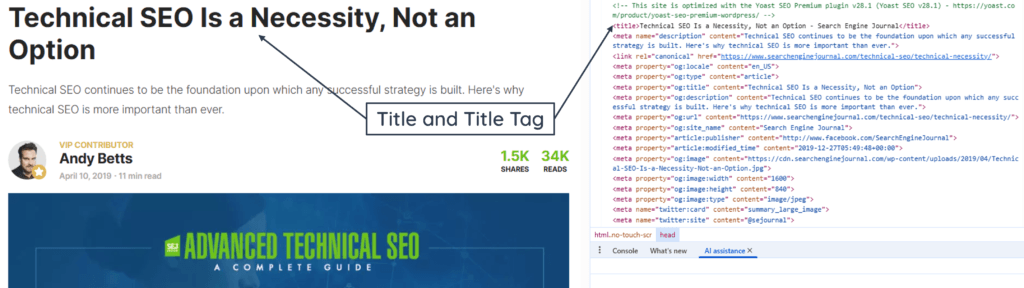
Method 3: Use an SEO Plugin
SEO plugins such as Rank Math, Yoast SEO, and All in One SEO allow title tags to be reviewed and edited within WordPress. The title can usually be reviewed and edited in the plugin’s search appearance or snippet preview section.
This method is particularly useful in WordPress because it shows how the title may appear in search results without requiring access to the page’s HTML code.
How to Write an Effective Titles
An effective title should clearly describe the page, reflect the primary topic, and give searchers a compelling reason to click without becoming vague, repetitive, or overly optimized. Here are some important points to consider when writing titles:
- Character Length: Keep titles concise. Titles of approximately 50 to 60 characters often display well, although truncation depends on pixel width, device size, and the words used.
- Analyze SERPs: Review relevant search results before finalizing the title to understand the dominant search intent, content format, and terminology.
- Keyword Placement: Place the primary target keyword near the beginning when it fits naturally and accurately represents the page.
- Unique Titles: Give every important indexable page a distinct title that accurately identifies its content and differentiates it from other pages.
- Brand Inclusion: Add the brand name at the end when appropriate, usually separated by a dash or vertical bar, such as Keyword | Brand Name.
- Avoid Keyword Stuffing and Clickbait: Do not repeat the same keyword unnecessarily or use exaggerated claims that the page cannot support. Titles should remain accurate, natural, and trustworthy.
- Avoid Generic or Outdated Titles: Avoid generic titles like “Home” or “Article” and remove outdated dates unless they remain essential to the page’s subject.
- Match Search Intent: Write compelling, human-friendly titles that accurately promise what the reader will find on the page.
- Use Numbers and Adjectives: Numbers and relevant adjectives can make a title more specific and informative. Terms such as complete, practical, essential, or step-by-step should be used only when they accurately describe the content. Avoid adding them simply to make the title appear more compelling.
Examples of Good Titles
Good titles clearly identify the page topic, match search intent, use relevant keywords naturally, and communicate a specific reason to visit the page. Examples include:
- Keyword Research for Beginners: A Step-by-Step Guide
- How to Increase Organic Traffic: 12 Practical Strategies
- 9 Best SEO Tools for Small Businesses, Tested in 2026
Title Tag HTML Example
Here is how the title tag looks inside a standard HTML document structure:
<!DOCTYPE html>

<html lang="en">

<head>

    <meta charset="UTF-8">

    <title>10 Best Coffee Makers of 2026 | TechReviews</title>

</head>

<body>

    <h1>Our Top Coffee Maker Picks</h1>

    <p>Welcome to our annual review...</p>

</body>

</html>