Key Takeaways
- Web accessibility enables people with permanent, temporary, or situational disabilities to perceive, navigate, understand, and interact with digital experiences.
- WCAG 2.2 organizes accessibility around four principles: Perceivable, Operable, Understandable, and Robust, with conformance levels A, AA, and AAA.
- Effective practices include semantic HTML, keyboard navigation, visible focus indicators, sufficient contrast, captions, descriptive links, and clear form messages.
- Accessibility compliance is not a documented direct Google ranking factor, but many accessible practices also improve usability, structure, and machine-readable content.
Web accessibility is the practice of designing and developing websites, applications, content, and digital interfaces so that people with disabilities can perceive, understand, navigate, and interact with them effectively. It applies to visual, auditory, physical, speech, cognitive, learning, and neurological disabilities.
Accessible design generally benefits everyone, but it is especially important for people who face permanent, temporary, or situational limitations. A person recovering from surgery may temporarily be unable to use a mouse, someone in a noisy environment may depend on captions, and a person using a small screen or slow connection may benefit from clearer layouts and lightweight content.
People with disabilities may browse the web using technologies such as screen readers, screen magnifiers, refreshable Braille displays, speech recognition software, alternative keyboards, and specialized input devices.

WCAG
The main international standard for web accessibility is the Web Content Accessibility Guidelines (WCAG). WCAG 2.2, the latest W3C Recommendation in the WCAG 2 series, provides testable success criteria for making digital content more accessible.
Digital Access for People With Disabilities and Other Limitations
Web accessibility requirements vary because people interact with websites in very different ways. Good accessibility therefore focuses on removing unnecessary barriers rather than designing for one particular type of user.
- Visual Disabilities: Blindness, low vision, color-vision deficiencies, and other visual impairments can make text, images, color-coded information, and small interface elements difficult or impossible to perceive.
- Auditory Disabilities: Deafness or hearing loss can make videos, podcasts, alerts, and other audio content inaccessible when captions, transcripts, or equivalent alternatives are missing.
- Motor and Physical Disabilities: Reduced dexterity, tremors, paralysis, limited hand movement, or other physical limitations can make interfaces that depend heavily on precise mouse movements difficult to operate.
- Cognitive, Learning, and Neurological Disabilities: Conditions that affect attention, reading, memory, comprehension, or information processing can make complicated navigation, inconsistent interfaces, and dense content harder to understand.
- Temporary Limitations: A broken arm, eye injury, recovery from surgery, medication effects, or temporarily lost glasses can create accessibility needs even when the limitation is short-lived.
- Situational Limitations: Captions can help in noisy surroundings, strong contrast can improve visibility in bright sunlight, and clear interfaces are useful when browsing on small screens or unusual devices.
- Technology and Connection Limitations: Accessible and lightweight pages can also work better on slow connections, limited-bandwidth networks, older hardware, smart TVs, gaming controllers, and alternative input devices.
W3C emphasizes that accessible digital technology can benefit people with and without disabilities because barriers can result from permanent disabilities, temporary circumstances, or the surrounding environment.
WCAG 2.2 and the Four Principles of Web Accessibility
The Web Content Accessibility Guidelines (WCAG) provide a framework for making web content more accessible. WCAG 2.2 organizes its requirements around four foundational principles commonly abbreviated as POUR: Perceivable, Operable, Understandable, and Robust. Success criteria are categorized into three conformance levels: A, AA, and AAA.
A, AA, and AAA
WCAG defines three conformance levels: A, AA, and AAA. Level A is the minimum conformance level, Level AA includes all Level A and AA requirements, and Level AAA includes all Level A, AA, and AAA requirements. W3C does not recommend requiring Level AAA for the entire site because some content cannot satisfy every AAA success criterion.
Perceivable
Content should be presented in ways users can perceive through one or more senses. This web accessibility principle covers practices that include providing:
- text alternatives for images;
- captions and other alternatives for multimedia;
- content that can adapt to different presentations;
- sufficient contrast and distinguishability.
For example, useful alt text can help a screen reader communicate the purpose or content of an informative image to someone who cannot see it.
Operable
Users should be able to navigate and operate the interface without relying on interactions they cannot perform. Websites should offer keyboard accessibility, sufficient time to complete tasks, seizure and physical-reaction safety, clear navigation, and alternatives to difficult gestures or input methods.
Links, menus, buttons, and form controls should be usable with a keyboard rather than requiring a mouse.
Understandable
Information and interface behavior should be clear, predictable, and easy to interpret. Web pages should have readable content, consistent navigation, clear instructions, and useful error messages.
For example, if a form field is completed incorrectly, the interface should explain what went wrong and how to correct it rather than showing only a red border.
Robust
Content should remain compatible with different browsers, user agents, and assistive technologies as technologies evolve.
Robust implementation relies on practices such as semantic HTML, valid accessible names, appropriate roles, and correctly communicated states and values. W3C notes that assistive technologies depend on content being programmatically determined, meaning that a content element’s structure, role, relationships, or purpose can be identified by software from the underlying markup.
Why Web Accessibility Is Important
Web accessibility is primarily about ensuring that digital information and services can be used by as many people as possible. Several of its benefits also improve general usability and website quality.
- Inclusivity and Equal Access: Accessible websites allow more people to participate in education, commerce, communication, employment, and other online activities.
- Larger Potential Audience: Removing unnecessary barriers makes content and services usable by people with a wider range of abilities, devices, and circumstances.
- Better Navigation and Usability: Logical headings, keyboard-friendly interfaces, descriptive links, clear forms, and predictable navigation can make websites easier for everyone to use.
- Better Mobile and Situational Use: Strong contrast, responsive layouts, captions, clear controls, and understandable content can improve usability on small screens and in difficult environments.
- Overlap With SEO Best Practices: Web accessibility and SEO often benefit from some of the same practices, including semantic HTML, descriptive alt text, understandable headings, crawlable text, transcripts, and descriptive anchor text. Google specifically uses alt text and surrounding page content to understand images.
However, WCAG compliance itself is not a documented direct Google ranking factor. Accessibility should not be presented as an automatic ranking mechanism; instead, many accessible practices also improve structure, usability, and machine-readable content.
How to Improve Web Accessibility
Web accessibility improvements should cover both the content people consume and the interfaces they use to reach and interact with that content.
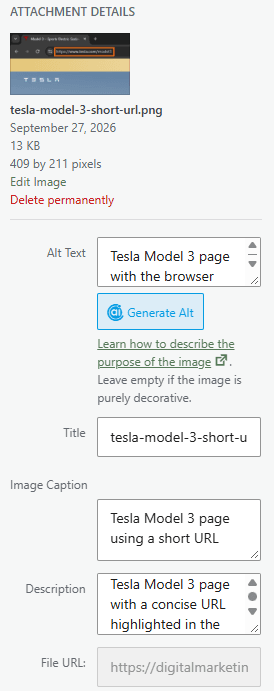
1. Write Appropriate Alt Text
Informative images should include concise alternative text explaining their relevant content or purpose. Decorative images generally should use an empty alt="" attribute so assistive technologies can ignore them.
2. Maintain Sufficient Color Contrast
Text should remain readable against its background. Under WCAG 2.2 Level AA, normal text generally requires a contrast ratio of at least 4.5:1, while large text requires at least 3:1.
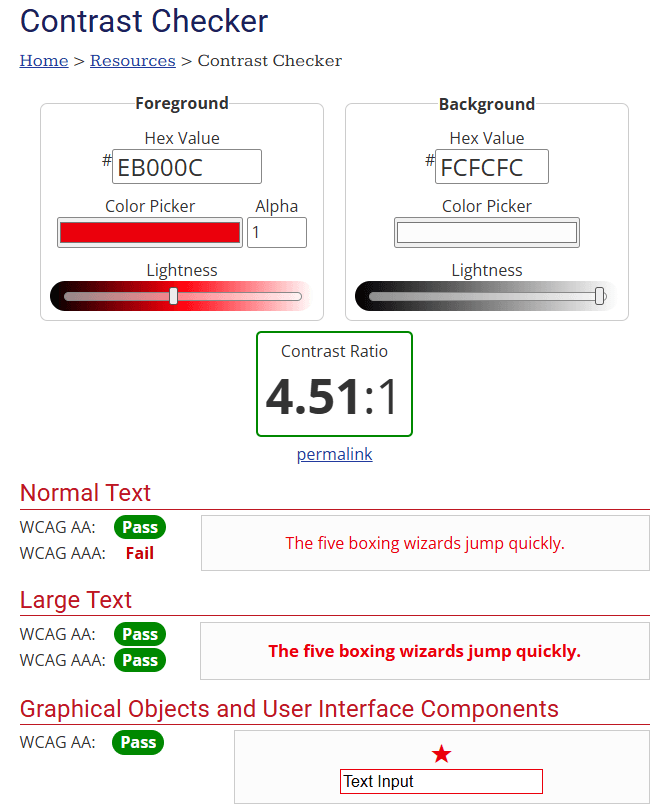
Important information should also not rely on color alone—for example, a form error should not be communicated solely by changing a field from black to red.
3. Enable Full Keyboard Navigation
Links, buttons, menus, dialogs, forms, and other interactive controls should remain usable without a mouse.
A simple practical test is to navigate a page using the Tab, Shift + Tab, Enter, Space, and arrow keys where appropriate.
4. Keep Focus Indicators Visible
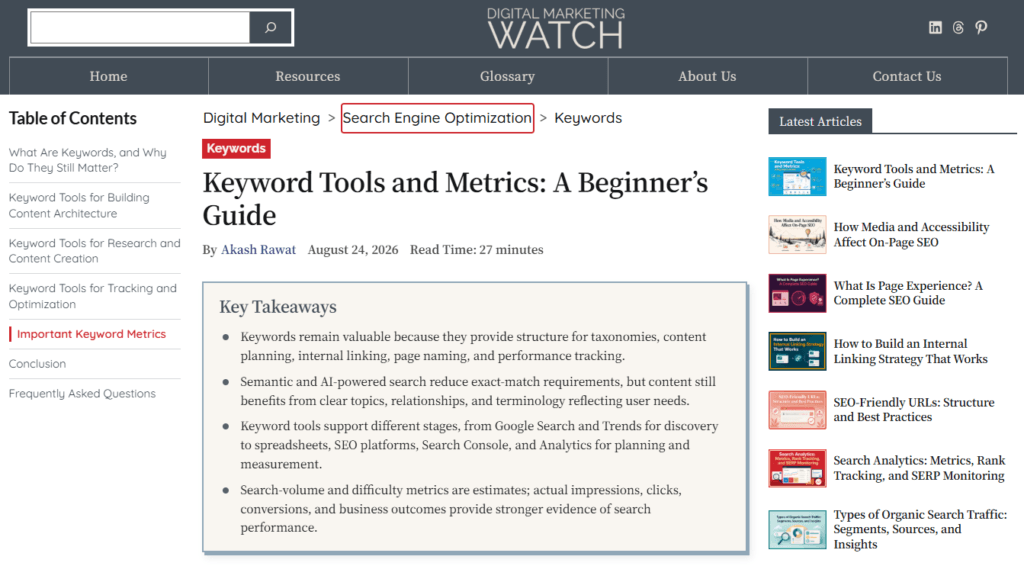
Keyboard users need to know which element currently has focus. Avoid removing the browser’s default focus outline unless an equally clear or better replacement is provided.
5. Use Semantic HTML
Meaningful HTML elements provide useful structure to browsers and assistive technologies.
For example:
<header>
<nav>
<main>
<article>
<footer>
These elements are generally preferable to constructing an entire layout from generic <div> elements when a semantic element accurately describes the content.
6. Provide Captions and Transcripts
Videos containing meaningful speech should provide synchronized captions. Audio recordings and podcasts can also benefit from transcripts, allowing people who cannot hear the audio to access the information in another form.
Captions include relevant speech and other important audio information needed to understand the content.

7. Create Clear Form Labels and Error Messages
Every important form field should have an understandable label. When something goes wrong, the message should identify the specific problem and explain how to fix it.
For example, “Enter an email address in the format name@example.com” is more useful than a generic “Invalid input” message.
8. Use Descriptive Link Text
Anchor text should ideally explain where a link leads. For example, descriptive anchor text such as ‘Read the content audit guide’ is preferable to vague wording such as ‘Click here’.
Descriptive links are easier to understand when encountered independently and also provide clearer context for search engines.
9. Declare the Page Language
The page’s primary language should be identified in the HTML:
<html lang="en">WCAG requires the default human language of a webpage to be programmatically determinable at Level A.
10. Avoid Important Text Embedded Only in Images
Critical information such as product prices, event dates, instructions, headings, or contact details should normally remain available as real HTML text rather than existing only inside an image.
At Level AA, WCAG requires text to be used instead of images of text when the desired presentation can be achieved through web technologies, except where the image is customizable or a particular presentation is essential.
11. Organize Content Clearly
Use logical heading levels, concise paragraphs, descriptive labels, lists where appropriate, and predictable navigation. Clear organization benefits screen-reader users, people with cognitive or learning disabilities, mobile visitors, and readers who simply need to scan a page quickly.
Frequently Asked Questions
How can live web pages be tested for web accessibility for free?
Free tools include Lighthouse in Chrome DevTools, WAVE, axe DevTools, and Accessibility Insights. In Chrome, press F12 or Ctrl + Shift + I, open Lighthouse, select the accessibility category, and run the audit.
Who benefits from web accessibility?
People with disabilities are among the primary beneficiaries of web accessibility, but accessible design can also help people with temporary injuries, situational limitations, age-related changes, small-screen devices, slow internet connections, and alternative input methods.
Are websites built with React or Next.js automatically inaccessible?
A framework does not automatically make a website accessible or inaccessible. Web accessibility depends on the resulting HTML, semantic structure, keyboard behavior, focus management, forms, ARIA implementation, media alternatives, and interactive components.
Does web accessibility directly affect organic SEO rankings?
There is no documented Google ranking factor based specifically on WCAG compliance or an accessibility score. However, several web accessibility practices—including semantic structure, descriptive alt text, useful link text, and crawlable content—also support good SEO and usability.
What is the difference between WCAG 2.1 and WCAG 2.2?
WCAG 2.2 adds nine success criteria compared with WCAG 2.1, including requirements related to focus visibility, dragging movements, target size, consistent help, redundant entry, and accessible authentication. WCAG 2.2 became a W3C Recommendation on October 5, 2023.
Do all images require alt text?
HTML images should have an appropriate alt attribute, but not every image requires descriptive alt text. Informative images need meaningful text alternatives, while purely decorative images should generally use alt="" so assistive technologies can skip them.