Key Takeaways
- Indexing analyzes, organizes, and stores webpage information so search engines can potentially retrieve it for relevant queries.
- Crawling, indexing, and ranking are distinct stages; inclusion in an index makes a page eligible for consideration, not guaranteed visibility or traffic.
- Search engines evaluate content, metadata, links, structured data, rendering, and canonical signals when determining whether pages belong in the index.
- XML sitemaps, internal links, Search Console, and structured data can support discovery and understanding, but none guarantees indexing.
Indexing is the process through which a search engine analyzes, organizes, and stores information about webpages in a large searchable database called an index. Once a page is indexed, its information can potentially be retrieved when someone enters a relevant search query, although inclusion in the index does not guarantee that the page will rank or receive traffic.
Search engines generally work through three broad stages:
- Crawling: Search engine crawlers discover URLs through links, XML sitemaps, previously known pages, and other sources. They then request and download accessible page content so it can be processed.
- Indexing: The search engine analyzes the page’s text, images, links, metadata, structured data, and other signals. It may then store information about the page in its index if the page is considered suitable for inclusion.
- Ranking and Serving: When someone performs a search, ranking systems evaluate relevant indexed pages and other information to determine what should appear in the results. Being indexed makes a page eligible for consideration, but it does not guarantee a particular ranking.
Google describes Search using the same broad stages of crawling, indexing, and serving search results and notes that not every page makes it through every stage. For a page to be technically eligible for indexing in Google Search, Google says Googlebot must not be blocked from crawling it, the page must return an HTTP 200 success status, and it must contain indexable content. Meeting these requirements does not guarantee indexing, but failing any of them can keep the page out of the search index.
How Search Engine Indexing Works
Indexing involves much more than saving a copy of a webpage. Search engines process different parts of a page so they can understand what it contains, which URL should represent it, and whether it belongs in the index.
Parsing the Page
After retrieving a page, the search engine can parse its HTML. Parsing means breaking the document into understandable parts, such as its title, headings, paragraphs, links, images, metadata, and structured data.
It is similar to examining a book and identifying its title, chapters, paragraphs, illustrations, and references before adding information about it to a library catalog.
Rendering and JavaScript
Some webpage content is available directly in the HTML, while other content may depend on JavaScript. Search engines such as Google can render a page by processing its scripts and loading content more like a web browser, allowing them to access information that may not be present in the initial HTML.
Google describes JavaScript processing as involving crawling, rendering, and indexing. Rendering may happen after the initial crawl, so JavaScript-dependent content can sometimes take longer for search engines to process than content already available in the HTML.
Content and Semantic Analysis
The search engine analyzes the page to understand its main content and subject. This can involve text, headings, images, links, language, structured information, and relationships between words and concepts.
For example, a page discussing keyword research, search volume, search intent, and keyword difficulty provides contextual signals that help search systems understand its broader subject.
Canonicalization and Duplicate Processing
Search engines often discover several URLs containing identical or very similar content. During canonicalization, Google groups duplicate or very similar pages and chooses a representative URL, called the canonical URL.
A website can indicate its preferred version using methods such as a canonical tag, redirects, and consistent sitemap URLs. However, Google treats a declared canonical as a hint rather than an absolute rule and may select another URL when its signals indicate that another version is more appropriate.
Mobile-First Indexing
Google uses the mobile version of a site’s content for indexing and ranking, a system known as mobile-first indexing. It completed its broad transition to mobile-first indexing in 2023. Since July 5, 2024, Google has crawled and indexed sites for Search using Googlebot Smartphone, although Googlebot Desktop may still appear for certain Search features.
Important text, links, structured data, images, metadata, and other useful content should therefore remain accessible on the mobile version.
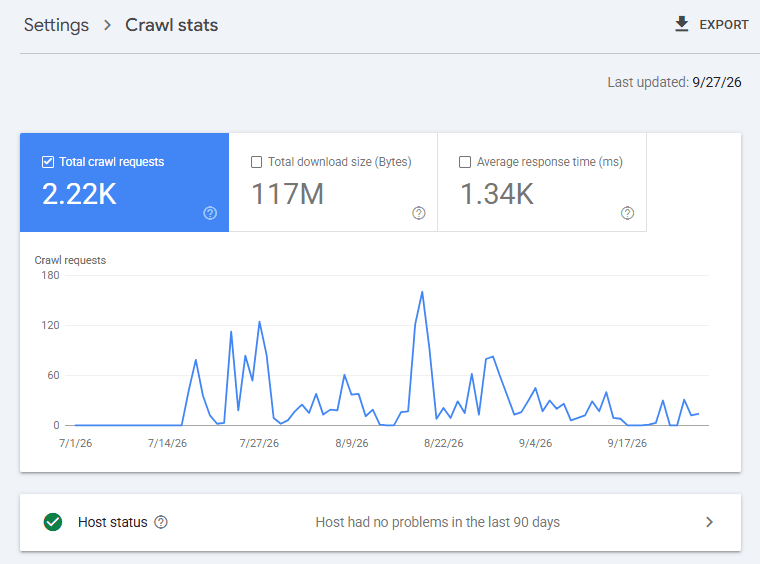
Crawl Budget and Indexing
Crawl budget refers to the amount of crawling Google can and wants to perform on a particular site. It can affect how quickly URLs are discovered or revisited, but crawling does not automatically lead to indexing.
Google states that crawl-budget management is primarily relevant to very large or rapidly changing websites; most smaller websites generally do not need to focus heavily on it.
Why a Page May Fail to Index
A page can be discovered or even crawled without ultimately being indexed. Common reasons include:
- A
noindexdirective - Robots.txt restrictions that prevent crawling
- Duplicate content or another URL being selected as canonical
404,410, or server-side5xxresponses- Soft 404s
- Redirect loops or incorrect redirects
- JavaScript or rendering problems
- Thin, duplicate, or insufficiently useful content
- Weak internal linking or an orphan page
- A newly published URL that has not yet been discovered or processed
Google explicitly notes that not every crawled page is necessarily indexed because pages are evaluated and consolidated before inclusion.
How to Help Search Engines Discover and Index Pages
There is no method that can guarantee indexing, but several practices can make important pages easier for search engines to discover, understand, and process.
1. XML Sitemaps
An XML sitemap lists important URLs that a website wants search engines to discover. Keeping the sitemap current can help search engines find new and updated pages, although sitemap submission does not guarantee indexing.
2. Internal Linking
Important pages should be linked from other crawlable pages on the website. Internal links provide discovery paths, help prevent orphan pages, and give search engines additional context through surrounding content and anchor text.
3. Structured Data and JSON-LD
JSON-LD is a structured-data format that can explicitly describe entities and properties such as authors, organizations, products, ratings, and events.
For example:
<script type="application/ld+json">
{
  "@context": "https://schema.org",
  "@type": "Article",
  "headline": "What Is Indexing?"
}
</script>
Structured data is not a URL-submission or indexing mechanism, but it can help search engines interpret explicitly described information about a page. It is not required for normal indexing and does not guarantee that a page will be indexed.
4. Google Search Console
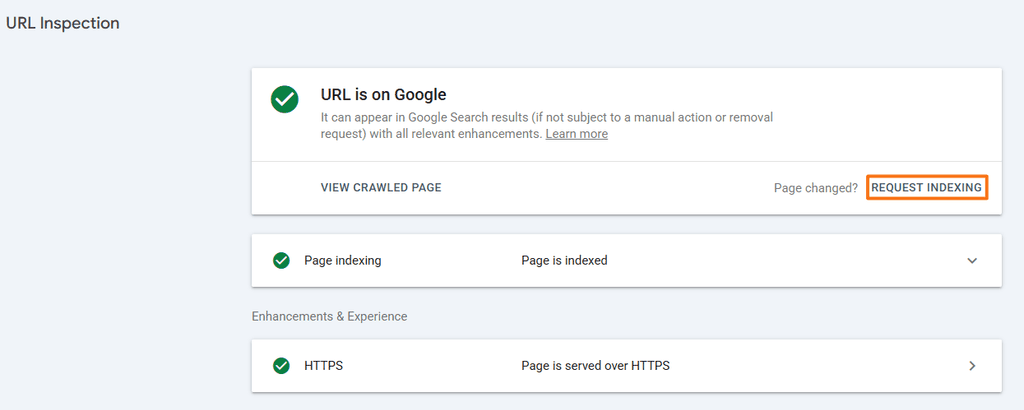
Google Search Console’s URL Inspection tool can show information about a URL’s crawl and indexing status. Website owners can also test a live URL and request indexing after publishing or substantially updating an important page.
5. Google Indexing API
Google’s Indexing API is not a general URL-submission tool. Google currently restricts it to pages containing JobPosting or BroadcastEvent markup embedded in a VideoObject.
Ordinary blog posts, glossary entries, product pages, and other standard webpages should use normal discovery methods such as internal links, sitemaps, and Search Console.
6. IndexNow
IndexNow allows websites to notify participating search engines when URLs are added, changed, or deleted rather than waiting entirely for ordinary crawler discovery.
Bing and Yandex support the protocol, but both make clear that submitting a URL through IndexNow does not guarantee that it will be indexed.
Indexing Across Major Search Engines
Yahoo confirms that its algorithmic search results are provided by Microsoft Bing. DuckDuckGo states that it maintains DuckDuckBot and its own indexes, while most traditional links and images are sourced from Bing.
How to Check Indexing Status
A quick Google check is the site:search operator: site:https://www.yourwebsite.com
It can help identify pages Google is showing from a domain, but it should not be treated as an exact count of indexed pages.
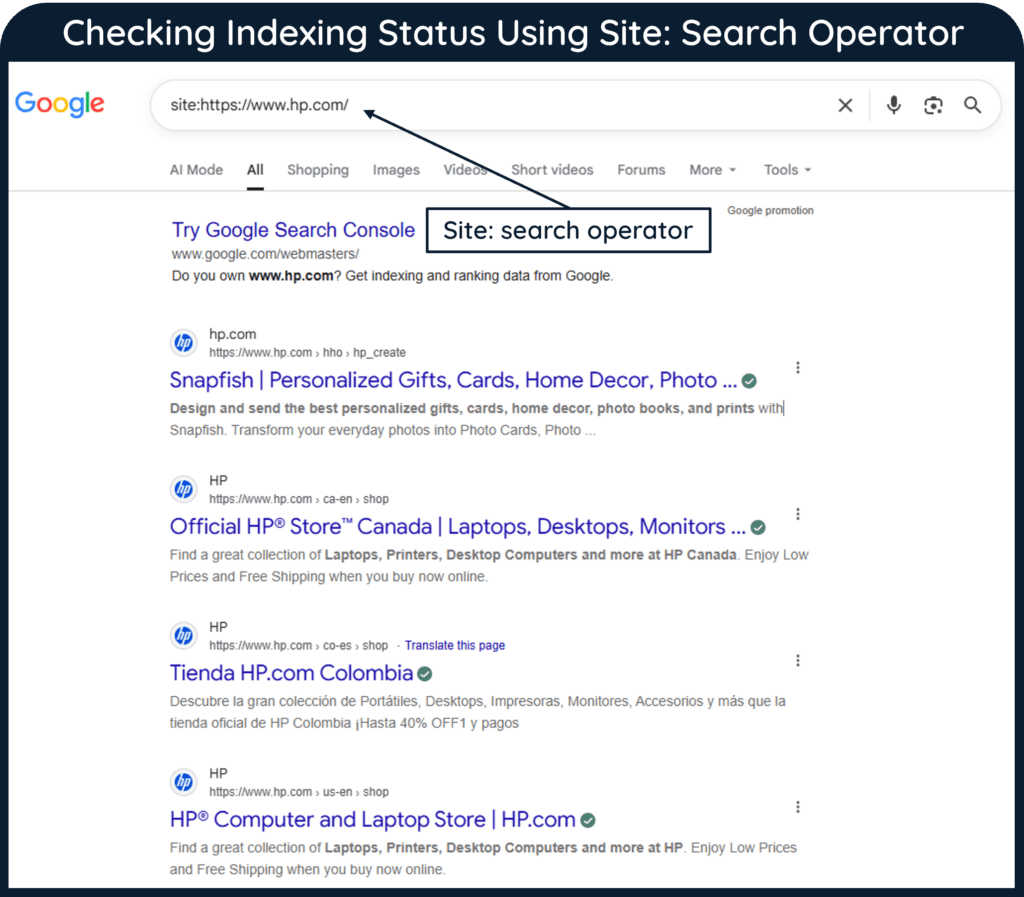
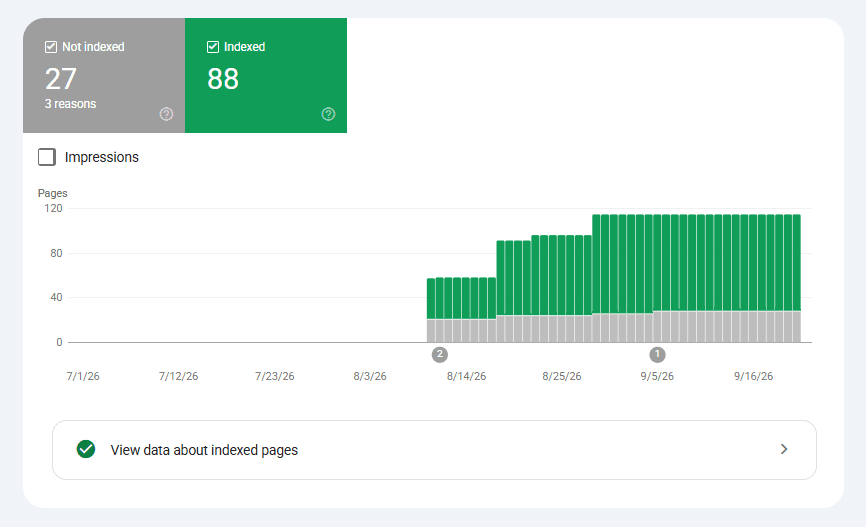
site: Search Operator (Source: Google)For a more reliable diagnosis, use Google Search Console. URL Inspection can show whether an individual page is indexed, its canonical information, crawl details, and possible indexing problems. Bing provides similar URL and site-level information through Bing Webmaster Tools.
Preventing or Restricting Indexing
If a page should not appear in search results, different controls serve different purposes. For an HTML page, a robots meta directive can be used: <meta name="robots" content="noindex">
An X-Robots-Tag can apply similar rules through HTTP headers, including to non-HTML resources such as PDF files. This lets a website tell search engines whether a file or page should be indexed even when there is no HTML <meta> tag available to carry that instruction.
Confidential material should be password-protected or otherwise access-restricted rather than relying on noindex. Google specifically recommends access controls for private content.
robots.txt is different: it primarily controls crawling. Google advises against using robots.txt as the main mechanism for preventing ordinary webpages from being indexed. It instead suggests using noindex or access controls to block indexing.
Indexing: Mistakes to Avoid
Common indexing mistakes include:
- Accidentally leaving a
noindexdirective on an important page - Blocking a page in
robots.txtwhen Google needs to crawl it to see anoindexdirective - Pointing a canonical tag to the wrong URL
- Submitting noncanonical URLs in XML sitemaps
- Creating orphan pages with no useful internal links
- Using incorrect HTTP status codes
- Creating redirect loops or unnecessarily long redirect chains
- Assuming XML sitemap submission guarantees indexing
- Using Google’s Indexing API for unsupported page types
- Treating a
site:search as an exact count of indexed pages
Frequently Asked Questions
Does Google index every page it crawls?
No. A page may be crawled but excluded from the index because of canonicalization, technical directives, content assessment, errors, or other processing decisions.
How long does Google take to index a page?
There is no fixed indexing time. Google says crawling and indexing depend on many factors and does not guarantee when, or even whether, a particular URL will be indexed.
Does submitting an XML sitemap guarantee indexing?
No. A sitemap helps search engines discover important URLs, but inclusion in a sitemap does not require the search engine to index them.
Can a page blocked by robots.txt still appear in Google?
Yes. Robots.txt prevents crawling rather than serving as a general indexing-control mechanism. If Google discovers a blocked URL through other sources, the URL can sometimes still appear in search results even though Google cannot crawl its page content.