Key Takeaways
- JSON-LD is a machine-readable format for describing entities, properties, and relationships through linked structured data.
- Schema.org provides the vocabulary, JSON-LD provides the writing format, and the resulting markup is structured data.
- JSON-LD helps search engines understand page content explicitly and may support eligibility for certain rich results, but it does not guarantee enhanced appearances or rankings.
- Markup should accurately represent visible page content, use supported properties, and be validated for syntax, completeness, and feature eligibility.
JSON-LD stands for JavaScript Object Notation for Linked Data. It is a machine-readable format commonly used to add structured data to webpages so that search engines and other systems can understand specific information, entities, and relationships more explicitly.
A normal webpage may tell readers that Jane Doe wrote an article, a product costs $79, or a local business is located in Chicago. JSON-LD can express those same facts in a predictable structure by identifying Jane Doe as a Person, the price as a property of a Product, or the address as belonging to a LocalBusiness.
JSON-LD does not determine how the webpage looks. It is normally placed inside a <script type="application/ld+json"> element and exists primarily for machine processing.
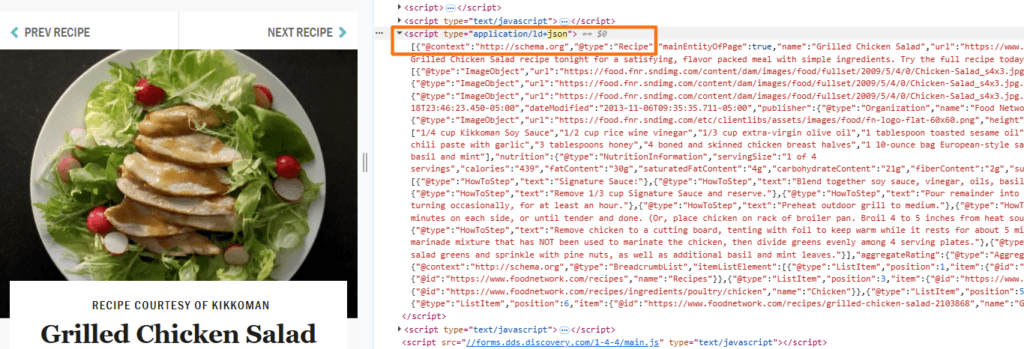
Google uses properly implemented structured data to understand page content and determine eligibility for certain rich results, although valid markup does not guarantee that an enhanced search result will appear.
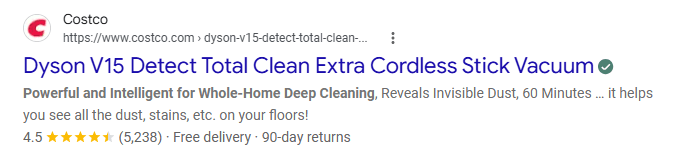
JSON-LD, Microdata, and RDFa
Google supports all three formats for structured data and generally recommends JSON-LD because it is easier to implement and maintain. Microdata and RDFa add structured-data attributes within HTML elements, while JSON-LD normally keeps the markup in a separate script block that can appear in the <head> or <body> of the page.
JSON-LD, Structured Data, Schema, and Schema.org
JSON-LD, structured data, schema, and Schema.org are closely related concepts, but they do not mean the same thing.
JSON-LD
JSON-LD is a format used to write linked structured data. It provides the syntax used to describe entities, properties, and relationships in a machine-readable form.
JSON and XML
JSON (JavaScript Object Notation) is a general-purpose format for storing and exchanging structured data, while JSON-LD extends JSON with conventions such as @context and @type to describe linked entities and relationships. XML (Extensible Markup Language) is another structured data format that uses nested tags instead of JSON’s key-value syntax and is commonly used for purposes such as XML sitemaps and data exchange.
Data exchange refers to transferring information between applications, servers, databases, or other systems in a format they can consistently read and process. JSON and XML are widely used for tasks such as sending API responses, transferring configuration or product data, synchronizing information between services, and sharing structured records between different software systems.
Structured Data
Structured data is information organized according to a standardized format so that machines can identify what individual pieces of information represent. For example, the words Perfect Chocolate Chip Cookies appearing in a paragraph are simply text. Structured data can explicitly identify those words as the name of a Recipe.
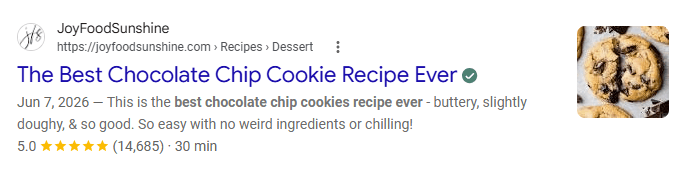
Schema
A schema is a vocabulary or framework that defines the types of entities that can be described and the properties associated with them. Common types include: Person, Organization, Article, Product, Recipe, and Event.
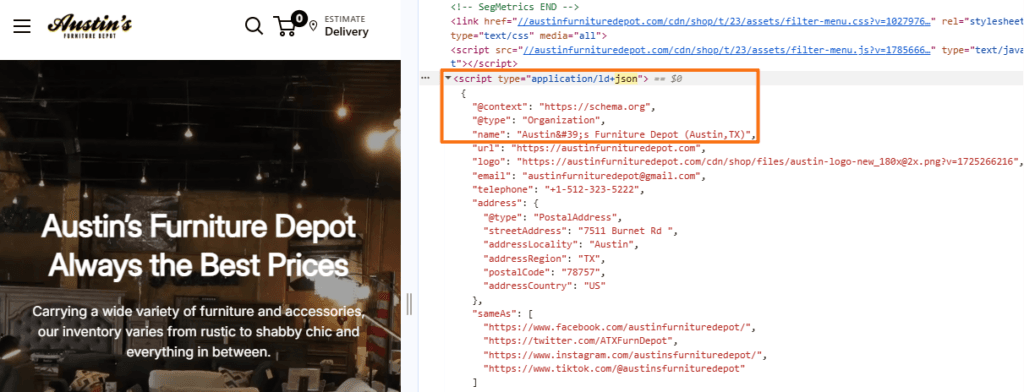
Organization schema in Chrome DevTools (Source: Austin’s Furniture Depot)Note
Google uses supported structured data for rich results and other search presentation features. Product, Recipe, Article, Event, and JobPosting markup can support eligible search appearances, while Organization markup can help Google understand business identity and influence details such as logos and knowledge-panel information.
Schema.org
Schema.org provides a widely used vocabulary for describing entities and their properties on the web. A Recipe, for example, can have properties such as name, author, prepTime, and recipeYield.
Search engines may support only particular Schema.org types and properties for specific search features. Therefore, the existence of a type on Schema.org does not automatically mean that Google offers a corresponding rich result.
A useful way to remember the relationship is:
How JSON-LD Helps Search Engines and SEO
Search engine results pages now extend far beyond traditional blue links. Depending on the query, results can include products, recipes, events, job listings, reviews, images, videos, carousels, knowledge features, AI-generated experiences, and other specialized elements.
JSON-LD helps primarily by making important information more explicit to machines.
- Provides Clear Entity Information: JSON-LD can identify an organization, person, product, article, event, recipe, or another entity and describe important properties associated with it.
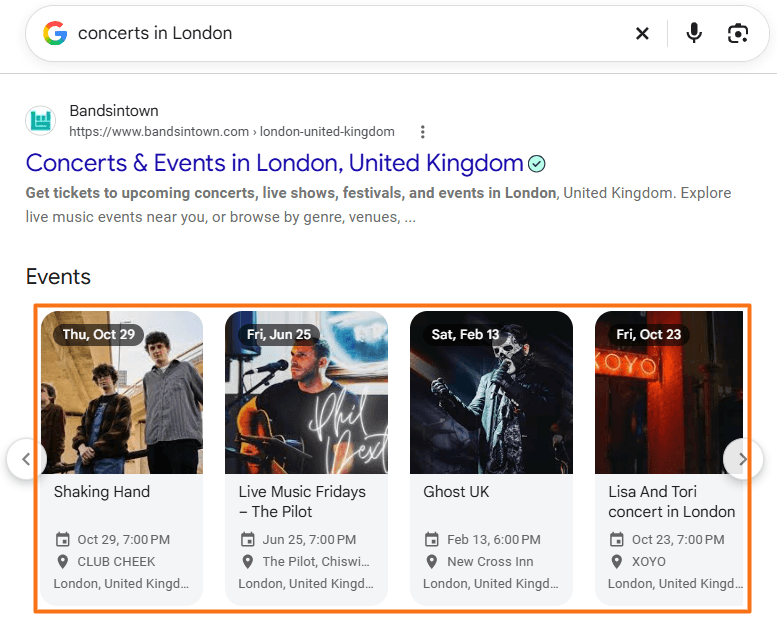
- Supports Search Feature Eligibility: Google uses supported structured data to determine whether qualifying pages may appear with certain enhanced search features. These include structured-data implementations for products, recipes, articles, events, jobs, organizations, and other supported content types.
- Clarifies Organizations and Authors: Structured data can identify an organization’s name, logo, URL, contact information, and other details. Article markup can similarly establish relationships involving articles and their authors or publishers. Google’s
Organizationdocumentation specifically recommends providing applicable identity and administrative information. - Communicates Commercial Information:
Productstructured data can describe information such as prices, availability, ratings, shipping details, and other product properties where applicable.
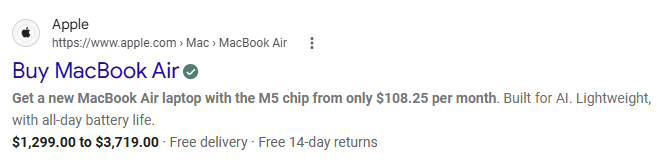
- Reduces Reliance on Inference: Search systems can still understand ordinary webpage text, but structured data explicitly labels certain facts and relationships instead of requiring every connection to be inferred from surrounding content.
JSON-LD does not directly create Knowledge Panels, Featured Snippets, People Also Ask results, Related Searches, voice-search answers, or AI Overviews. Google also states that no special Schema.org markup is required for AI Overviews or AI Mode; normal SEO fundamentals and accurate structured data remain applicable.
Common JSON-LD Use Cases
JSON-LD can describe many different types of entities and content, but the appropriate schema depends on what the page actually represents.
ProductLocalBusinessArticle / NewsArticleJobPostingRecipeOrganizationEventCourseStructured data should always describe information that genuinely appears on or represents the page. Do not mark up content that is hidden, misleading, or unrelated to the page’s main content.
A Real-World Example of JSON-LD
Consider a webpage containing a chocolate chip cookie recipe. Its JSON-LD might begin like this:
<script type="application/ld+json">
{
  "@context": "https://schema.org",
  "@type": "Recipe",
  "name": "Perfect Chocolate Chip Cookies",
  "author": {
    "@type": "Person",
    "name": "Jane Doe"
  },
  "prepTime": "PT15M",
  "cookTime": "PT10M",
  "recipeYield": "24 cookies"
}
</script>
The code converts important information about the recipe into clearly labeled properties. Here, <script type="application/ld+json"> identifies the block as JSON-LD structured data, @context specifies the vocabulary being used, which in this case is Schema.org, while @type identifies the main entity as a Recipe. Similarly, name identifies the recipe’s name, author connects another entity to the recipe, and @type: "Person" identifies Jane Doe as a person rather than simply a text string.
This example demonstrates how JSON-LD can represent relationships between entities. The recipe is one entity, Jane Doe is another entity, and the author property establishes the relationship between them.
However, valid JSON-LD syntax alone does not make a recipe eligible for every Google recipe feature. Google maintains specific required and recommended properties for individual structured-data features.
How to Add JSON-LD to a Website
JSON-LD can be written manually, generated by a CMS, or created automatically by plugins, themes, and applications.
WordPress
WordPress websites commonly generate JSON-LD through SEO or schema plugins such as Rank Math, Yoast, or dedicated structured-data plugins. These tools can automatically create markup from information already stored in WordPress, such as the article title, author, publication date, organization, and featured image.
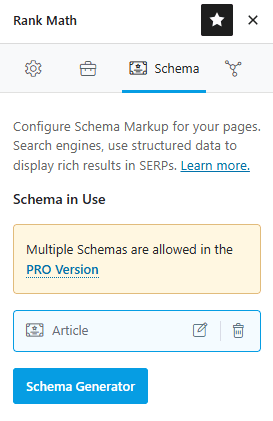
Custom markup can also be added through a code-snippet plugin, theme templates, WordPress hooks, custom fields, or manually inserted <script> blocks.
Wix
Wix automatically provides structured data for several supported page types and also allows custom JSON-LD to be added manually.
For a standard page, the current process is:
Shopify
Shopify themes can provide structured data through their Liquid theme files. Shopify’s Theme Store requirements include rich product markup for product pages. Structured-data applications can also generate or extend schema without requiring manual Liquid editing.
When custom markup is necessary, it can be added through relevant Liquid templates or theme sections using an application/ld+json script.
How to Check and Validate JSON-LD
JSON-LD should be tested after implementation because a script can look correct visually while containing syntax errors, unsupported properties, or incomplete information.
Google Rich Results Test
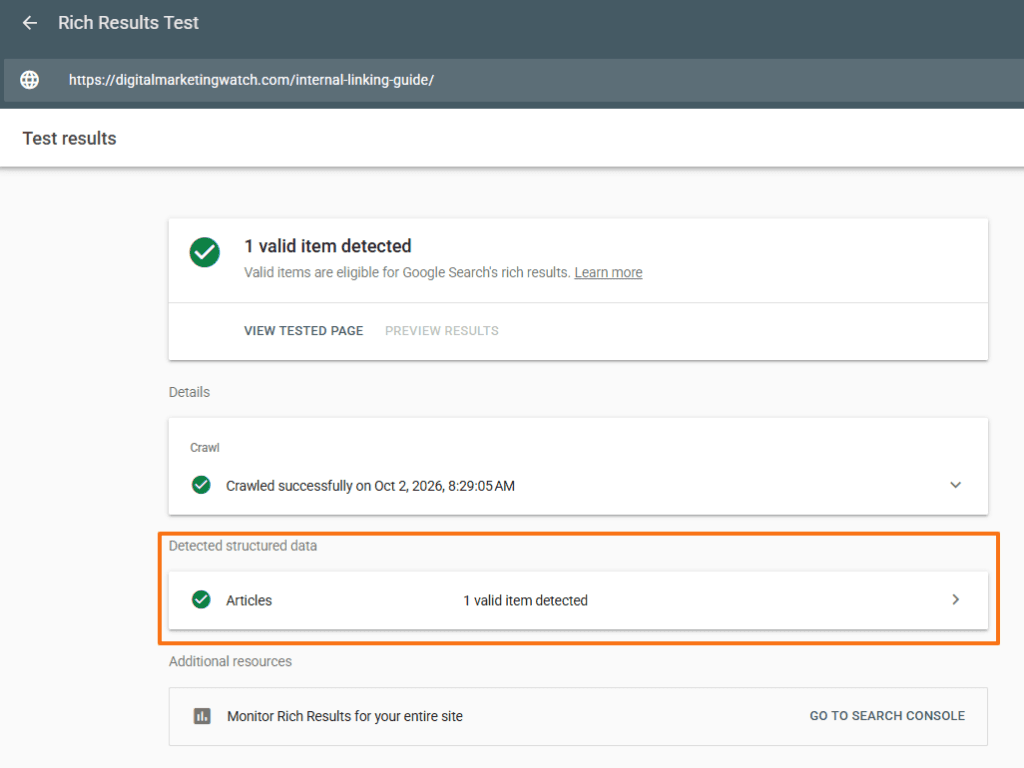
Open Google’s Rich Results Test, enter the live URL or paste the code, and run the test. The tool identifies which Google-supported rich-result types it detects and highlights relevant errors and warnings. It can also test dynamically loaded structured data.
A successful result means the markup meets the applicable technical requirements detected by the test. However, it does not guarantee that Google will show a rich result.
Schema Markup Validator
The Schema.org Markup Validator provides broader validation beyond Google’s supported rich-result features.
Paste either a webpage URL or the markup itself into the validator. It can extract and inspect JSON-LD, RDFa, and Microdata, display the structured-data graph, and identify syntax problems.
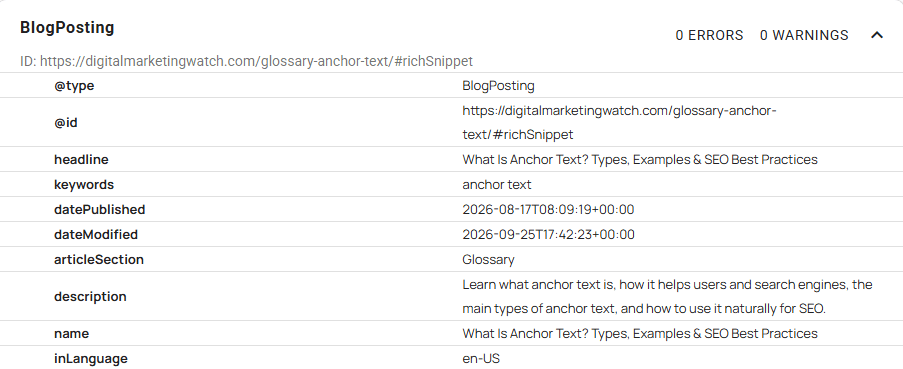
This makes the two tools complementary:
- Rich Results Test → Google Search feature eligibility
- Schema Markup Validator → broader Schema.org validation
Google Structured Data Markup Helper
Google’s Structured Data Markup Helper lets users select a supported content type, load a webpage or HTML, and visually tag page elements with structured-data properties. After tagging, the tool can generate markup that can be reviewed and added to the page.
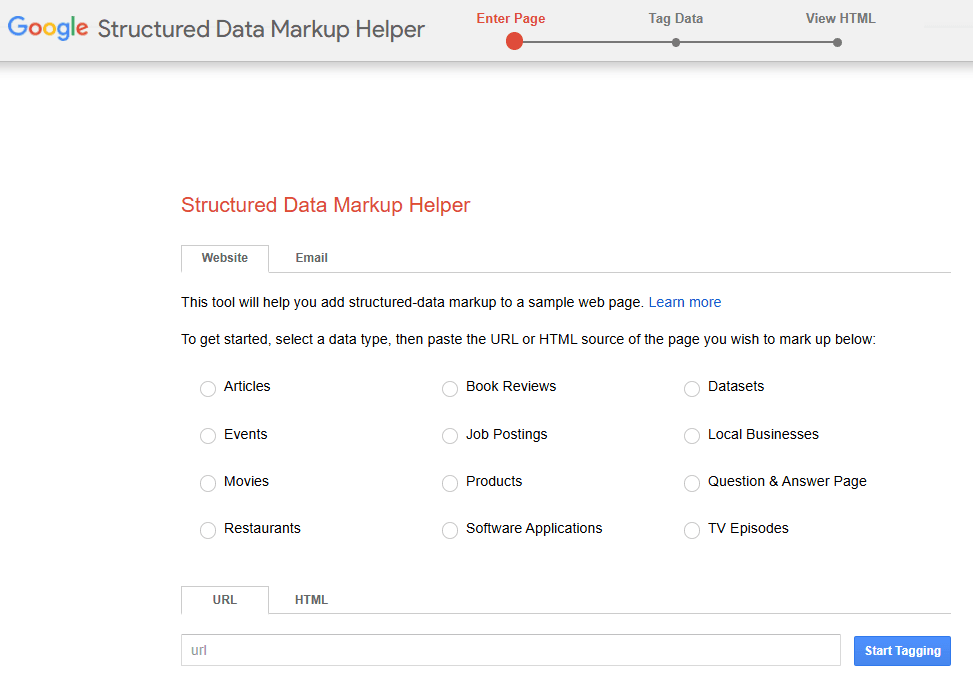
Inspect the Page Code
Structured data can also be checked directly in the browser.
In Chrome:
- Open the page and press Ctrl + Shift + I or F12.
- Open the Elements panel.
- Press Ctrl + F.
- Search for
application/ld+json,@type, or a known schema type such asArticle.
Another method is to press Ctrl + U → Ctrl + F and search for application/ld+json.
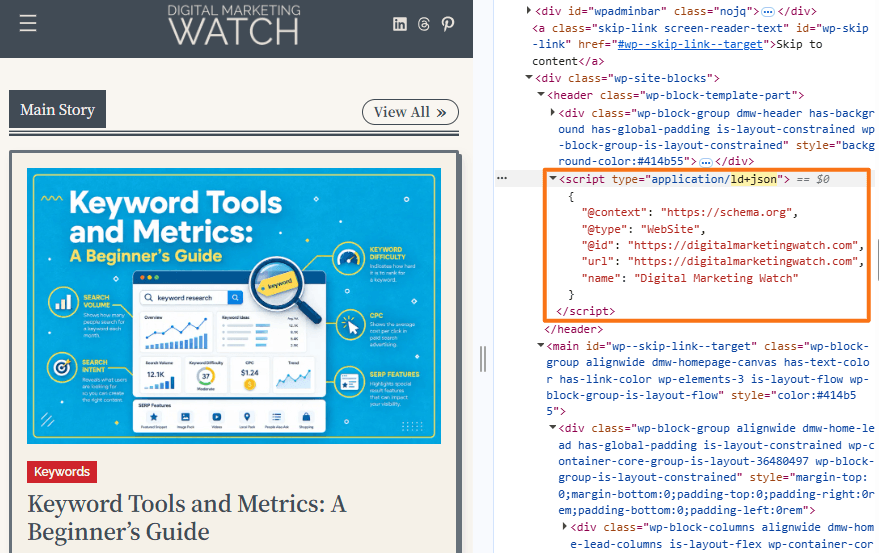
Ctrl + U displays the original page source, while DevTools can inspect the rendered page. This distinction matters because structured data injected later through JavaScript may appear in the rendered DOM even when it is absent from the original HTML source. Google can process dynamically injected JSON-LD when it is implemented correctly.
Frequently Asked Questions
Where should I place the JSON-LD script on my webpage?
JSON-LD can be placed inside either the <head> or <body> of the HTML document. Google supports both locations, provided the markup is accessible, valid, and accurately represents the page content.
Will adding JSON-LD structured data directly improve my keyword rankings?
No, a direct ranking boost is not guaranteed simply from adding JSON-LD. Structured data can help Google understand particular information and make qualifying content eligible for supported rich results, but valid markup does not automatically produce better rankings or enhanced search appearances.
Can a single webpage host multiple different JSON-LD schemas?
Yes, a page can describe multiple relevant entities, such as an Article, its Person author, the publishing Organization, and a BreadcrumbList. The markup should accurately represent the page and make relationships between connected entities clear. Google can understand multiple structured-data items on the same page either as separate blocks or nested items. When two entities are related, @id can be used to connect them explicitly.
Do I need to manually code JSON-LD for every page if I use a CMS like WordPress or Shopify?
Usually not, as CMS platforms, themes, SEO plugins, and structured-data applications can generate much of the required markup automatically from existing page information. Important pages should still be tested to identify inaccurate, duplicated, incomplete, or conflicting structured data.