Key Takeaways
- Lazy loading delays offscreen, non-critical resources until they approach the viewport, reducing initial work and unnecessary downloads.
- Critical above-the-fold content, especially the anticipated LCP image, should load immediately rather than being lazy-loaded.
- Below-the-fold images, videos, iframes, maps, galleries, and social embeds are typically suitable candidates for lazy loading.
- Native loading="lazy" supports straightforward implementation, while JavaScript and Intersection Observer provide greater control for complex components.
- Proper implementation can improve loading performance, reduce bandwidth usage, and support mobile experiences, but benefits are mainly indirect for SEO.
Lazy loading is a web performance technique that defers the loading of resources not required for the initial page view. The part of a page visible immediately after it opens is commonly called above the fold, while content farther down the page is below the fold.
Critical above-the-fold resources should generally not be lazy-loaded, especially an image or media element that is likely to become the Largest Contentful Paint (LCP) element. Lazy loading is mainly intended for resources that are initially outside the visible portion of a webpage and do not need to load immediately. Google similarly recommends against applying lazy loading to content likely to be immediately visible.

A simple restaurant analogy helps explain how lazy loading works. Imagine walking into a restaurant. Instead of bringing the appetizer, main course, side dishes, and dessert to the table at the same time, the waiter brings each course when it is needed. This keeps the table from becoming unnecessarily crowded. Lazy loading follows a similar principle: resources needed for the visible part of the page can load normally, while non-critical resources farther down the page are delayed until they are needed.
The HTML loading="lazy" attribute tells the browser that an image or iframe does not need to load immediately. Instead, the browser can wait until the resource is close to the visible part of the page, helping reduce unnecessary work during the initial page load. For example:
<img src="photo.jpg" loading="lazy" alt="Example image">Here, loading="lazy" tells the browser to delay loading photo.jpg until the image is close to coming into view.
When implemented correctly, this approach can reduce initial data transfer, improve loading performance, and prevent visitors from downloading resources they may never see.
How Lazy Loading Works
Without lazy loading, a browser may begin requesting images, embeds, and other resources as it discovers them in the page, even when some are far below the visible viewport. A long article containing numerous large images can therefore initiate many unnecessary requests during its initial load.
With lazy loading, eligible resources are deferred until the browser determines that they are close enough to the viewport to be needed. The browser does not necessarily wait until the exact moment an image becomes visible; it can begin fetching the resource in advance so that it is ready as the reader approaches it.
What Should and Should Not Be Lazy-Loaded?
The most important lazy-loading decision is not whether the technique should be used, but where it should be used.
Below-the-fold images, video embeds, iframes, maps, galleries, social media embeds, and other heavy resources are usually good candidates because they are not required when the page first appears. If a visitor never scrolls far enough to reach them, some of those resources may never need to be downloaded.
Scripts and Fonts
Scripts and fonts require a slightly different approach. They are generally optimized using techniques such as deferred loading, asynchronous loading, conditional loading, preloading, or font-display strategies rather than simply adding loading="lazy".
Above-the-fold content is different. Hero images, important interface elements, visible product images, and especially an image expected to become the LCP element should normally load immediately.
For the most important LCP image, loading="eager" or simply omitting lazy loading may be appropriate. In some implementations, fetchpriority="high" can also tell the browser that the image deserves high fetching priority.
The distinction also depends on the viewport. An image below the fold on a large desktop screen may appear closer to the initial viewport on a mobile device, so responsive layouts should be tested rather than assuming one loading strategy fits every screen.
Benefits of Lazy Loading
Lazy loading is particularly valuable on pages containing many images, videos, embeds, or other heavy resources. Its benefits are primarily related to performance, bandwidth, and user experience.
Faster Initial Page Loading: Delaying non-critical resources reduces the amount of work required during the initial page load. This allows the browser to concentrate on the text, images, styles, and other resources visitors need immediately.
Better Core Web Vitals When Used Correctly: Lazy loading can reduce competition for critical resources and support better loading performance. However, the LCP image should not be lazy-loaded because delaying it can worsen the LCP score.
Reduced Bandwidth Usage: Suppose a long article contains 20 large images, but a visitor reads only the first two paragraphs before leaving. With effective lazy loading, images much farther down the page may never be requested. Native lazy loading can therefore reduce unnecessary data transfer and bandwidth usage when users do not reach deferred resources.
Reduced Resource Delivery: Fewer unnecessary requests can reduce data transferred by the server or CDN and may lower resource usage and delivery costs. These are primarily performance and resource-efficiency benefits rather than direct ranking signals. Any SEO benefit is mainly indirect through faster loading and a better user experience.
Better Mobile Experience: Lazy loading can be especially useful for visitors using slower mobile connections or limited data plans because their devices avoid downloading offscreen resources that may never be viewed.
How to Implement Lazy Loading
Modern websites have several ways to implement lazy loading, ranging from a simple HTML attribute to platform-specific performance systems.
Native HTML Lazy Loading
For an image, the browser-native implementation is straightforward:
<img
  src="product-photo.jpg"
  alt="Product description"
  loading="lazy"
/>
An iframe can use the same principle:
<iframe
  src="https://example.com/embed"
  loading="lazy"
  title="Embedded content">
</iframe>
The loading="lazy" value tells the browser that downloading the resource can be deferred, while loading="eager" requests immediate loading. Native browser lazy loading is usually a good starting point because the browser decides when an offscreen resource is close enough to fetch.
JavaScript and Intersection Observer
Custom JavaScript can be useful when lazy loading involves more than simply delaying an image. The Intersection Observer API can detect when an element approaches the viewport and trigger actions such as loading media, replacing placeholders, or initializing complex components.
WordPress
WordPress introduced default image lazy loading in WordPress 5.5 and expanded the feature to supported iframes in WordPress 5.7. Later versions refined the logic to avoid indiscriminately lazy-loading media likely to appear in the initial viewport.
For many WordPress websites, core functionality may therefore handle basic lazy loading automatically. Optimization plugins can provide additional controls.
For example, WP Rocket includes lazy-loading controls for images, CSS background images, and iframes or embedded videos in its Media settings. It also allows specific resources to be excluded when they should load immediately.
LiteSpeed Cache also includes lazy-loading controls for images and iframes under its Media settings, along with placeholders and exclusion options. In WordPress, go to LiteSpeed Cache → Page Optimization → Media Settings to enable or configure image lazy loading.
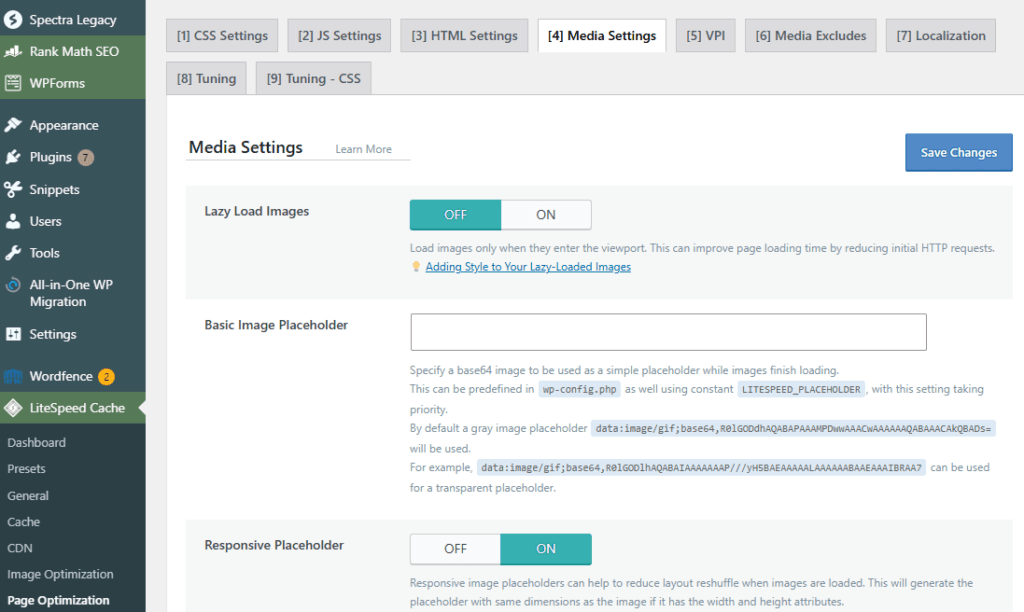
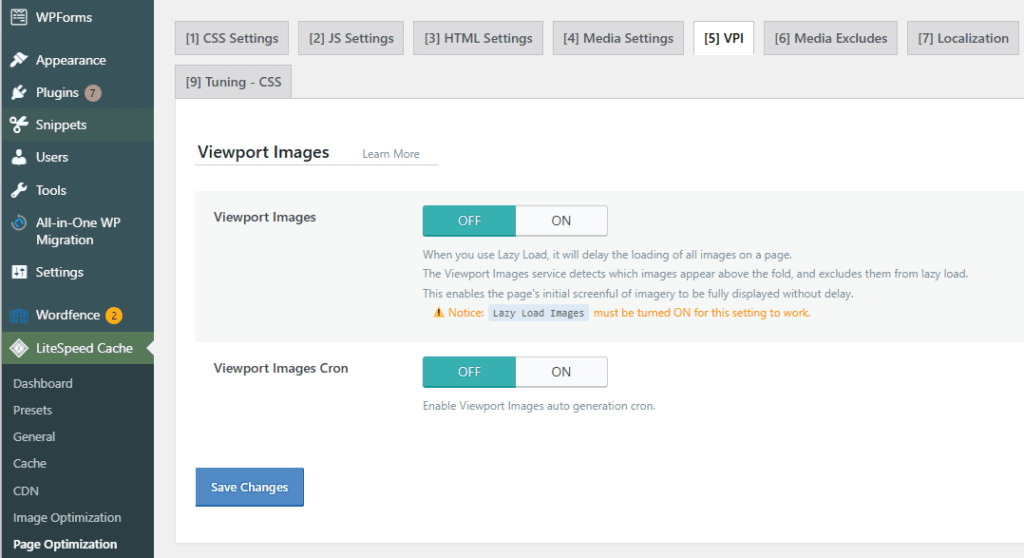
For above-the-fold image handling, open the adjacent VPI tab, where LiteSpeed Cache provides its Viewport Images settings.
Smush is another option and provides controls for images, iframes, placeholders, loading effects, and exclusions. Its documentation recommends using only one lazy-loading system at a time because overlapping implementations can cause conflicts or broken images.
Wix
Wix enables lazy loading for supported images and videos as part of its built-in performance system. Wix also recommends keeping critical above-the-fold content lightweight.
Shopify
Shopify themes can implement lazy loading through theme code and Shopify’s image tools. Shopify recommends eagerly loading images visible in the initial viewport and applying lazy loading to images farther down the page rather than assuming every image should be deferred.
How to Check Whether Lazy Loading Is Working
Browser developer tools provide one of the simplest ways to check the implementation.
- Open the webpage, right-click, and select Inspect.
- Open the Network tab.
- Filter requests by
Imgor the relevant resource type. - Refresh the page without scrolling.
- Slowly scroll down the page.
- Watch whether additional offscreen images or resources begin loading as their sections approach the viewport.
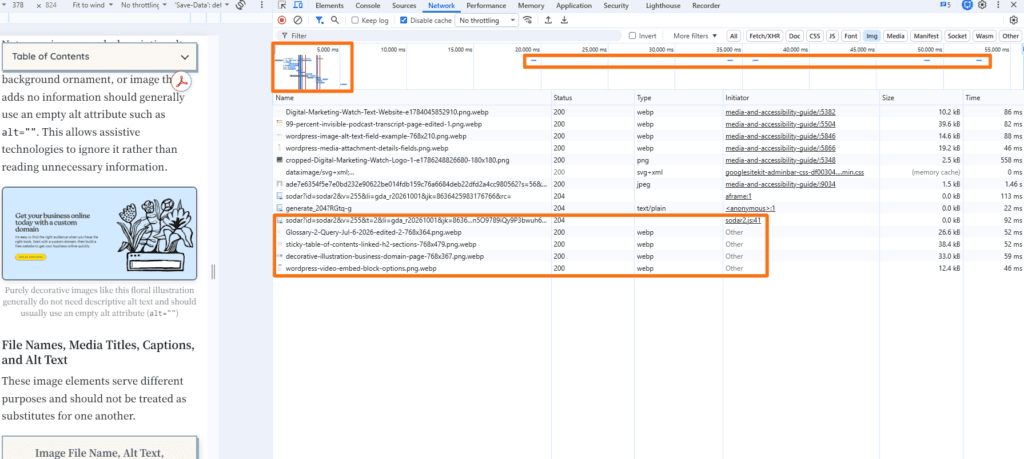
Img filter showing image requests loaded during the initial page load and additional images requested later as the page is scrolled, illustrating lazy loadingThis method shows actual network behavior rather than relying only on the page’s HTML.
Inspect the HTML
The Elements panel can also be used to inspect a below-the-fold image or iframe. Native lazy loading may appear as: loading="lazy"
Finding the attribute confirms that the markup requests lazy loading, although it does not prove that the page’s overall loading strategy is optimal.
Use PageSpeed Insights or Lighthouse
PageSpeed Insights and Lighthouse can help identify loading problems involving LCP images, oversized resources, offscreen images, and resource prioritization. Testing should include both mobile and desktop layouts.
For SEO-sensitive implementations, Google’s URL Inspection tool provides another useful check. Google recommends examining rendered HTML to confirm that lazy-loaded content becomes available to its rendering systems.
Frequently Asked Questions
Can lazy loading hurt a website’s page speed scores?
Yes, lazy loading can slow down a page when it is applied to an important above-the-fold image or the LCP element because the browser may delay fetching a resource that should have been prioritized. Below-the-fold resources are generally better candidates for lazy loading.
Does lazy loading stop Google from indexing images?
Not when it is implemented correctly. Google recommends ensuring that relevant lazy-loaded content becomes available when it enters the viewport and warns against implementations that require user actions such as clicking or scrolling before Google can access the content.
What is the difference between loading="lazy" and loading="eager"?
loading="lazy" allows the browser to defer loading a resource until it approaches the viewport. loading="eager" tells the browser to load it immediately, regardless of whether it is currently visible.
Does lazy loading save mobile user data?
Yes, if a visitor never reaches a lazy-loaded resource, the browser may never need to download it. This can reduce unnecessary data transfer, especially on long or media-heavy pages.
Does native WordPress lazy loading conflict with optimization plugins like WP Rocket?
Not necessarily. However, using multiple independent lazy-loading systems at the same time can cause duplicate processing or compatibility issues. The resulting markup and page performance should therefore be tested after enabling an optimization plugin.
Does lazy loading affect user experience?
Yes, proper lazy loading can make pages feel faster and reduce unnecessary downloads. Poor implementation can have the opposite effect by making images appear too late, causing distracting placeholders, or delaying content that visitors expect to see immediately.