Key Takeaways
- Content decay is the gradual loss of a page’s visibility, traffic, relevance, or usefulness as surrounding conditions change.
- Decay can involve outdated information, shifting search intent, language drift, technical problems, or competition from overlapping pages.
- Traffic declines require diagnosis because seasonality, algorithm changes, SERP features, technical issues, and analytics problems can create similar patterns.
- Effective responses address the specific cause through meaningful updates, intent alignment, consolidation, redirects, technical repairs, stronger internal linking, or pruning.
Content decay is the gradual decline in a webpage’s organic search visibility, traffic, relevance, or usefulness as the information, search intent, competitive landscape, or technical condition surrounding the page changes over time. A page that once performed well may therefore begin losing clicks or rankings even though its URL and core topic remain unchanged.
Content does not decay at the same rate. A breaking-news article may lose relevance within days, while search interest in a movie review can decline after the release period. On the other hand, evergreen guide such as how to tie a knot can remain useful for years. Software comparisons, prices, laws, statistics, product recommendations, and fast-changing industries generally require more frequent review.
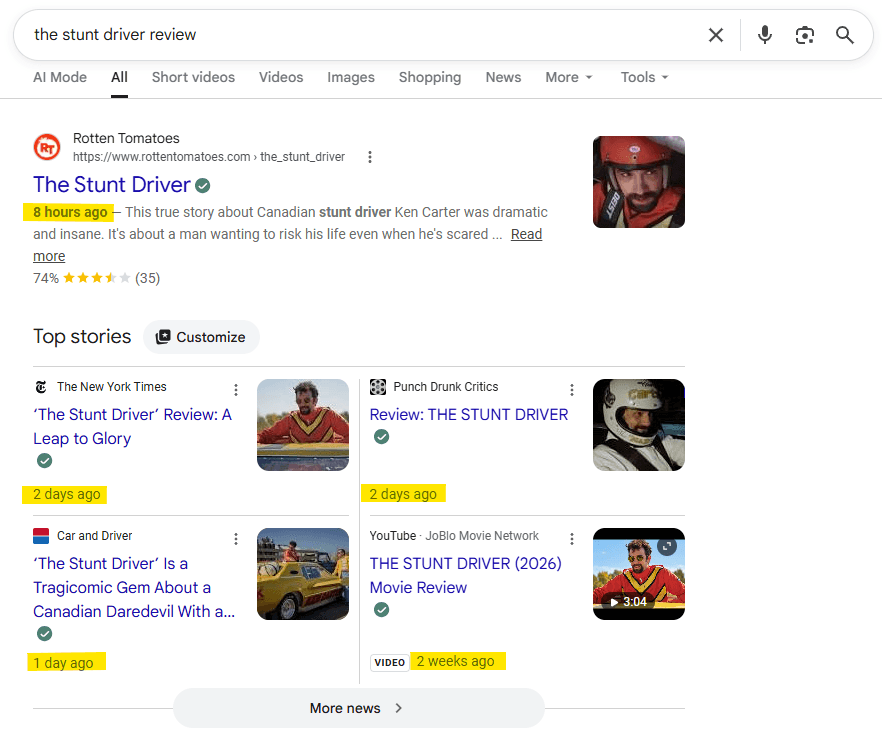
Google has various “query deserves freshness” systems designed to favor fresher information when a query calls for it. For example, a recent event may trigger current reporting, while an established evergreen subject may not require newly published information.
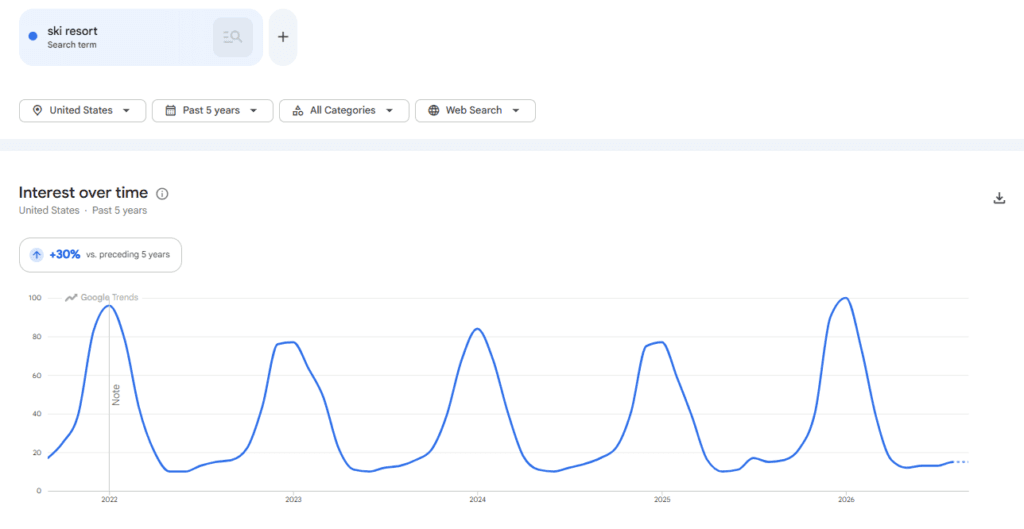
A decline in traffic does not automatically indicate content decay. Seasonality, reduced search demand, algorithm changes, new SERP features, technical problems, or analytics issues can produce similar patterns. Content decay should therefore be diagnosed rather than assumed.
Ways in Which Content Can Decay
Content can lose value in several different ways. The categories below are practical audit categories rather than official Google classifications.
Topical Decay or Obsolescence
The information itself becomes outdated. A page titled Top Marketing Software for 2023 may contain discontinued products, old prices, or features that no longer exist. Historical articles can also become misleading when they describe an old algorithm, regulation, or technology as if it were still current.
Search Intent Decay
The meaning of a keyword may remain similar while the type of result searchers expect changes.
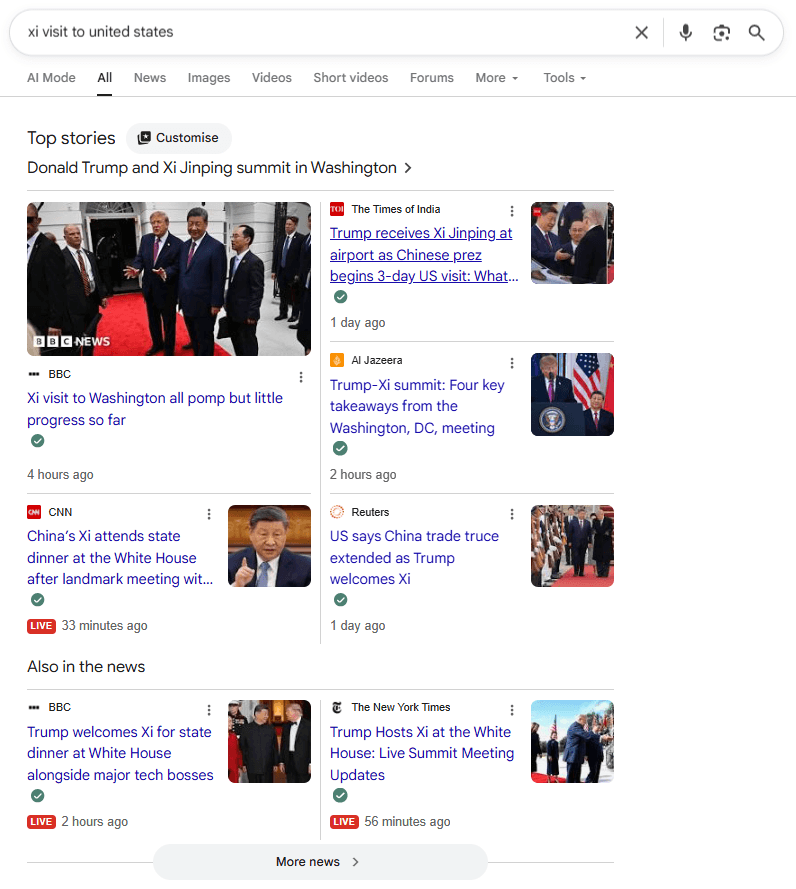
For example, a query that once returned mainly informational articles may later favor product comparisons, videos, shopping results, local listings, or AI-generated answers. A well-written text guide can therefore lose visibility if it no longer matches the dominant search intent.
Language and Topic Drift
Industries develop new terminology, products, entities, and ways of describing existing concepts. Older content may use language that was once standard but no longer reflects how readers or searchers discuss the subject.
This change can happen quickly in technology or take many years in stable fields.
Structural and Technical Decay
Pages can gradually accumulate technical problems such as broken outbound links, missing images, outdated embeds, and redirect chains. They may also develop weak or broken internal links, obsolete structured data, and poor mobile performance.
The information may remain useful while the page around it becomes increasingly difficult to use or maintain.
Keyword Cannibalization
As more content is published, a newer page may begin competing with an older page for substantially the same search intent. Cannibalization is not literally decay of the older text, but it can produce the same visible symptom: a previously successful URL steadily losing impressions, clicks, or rankings.
How to Identify Content Decay
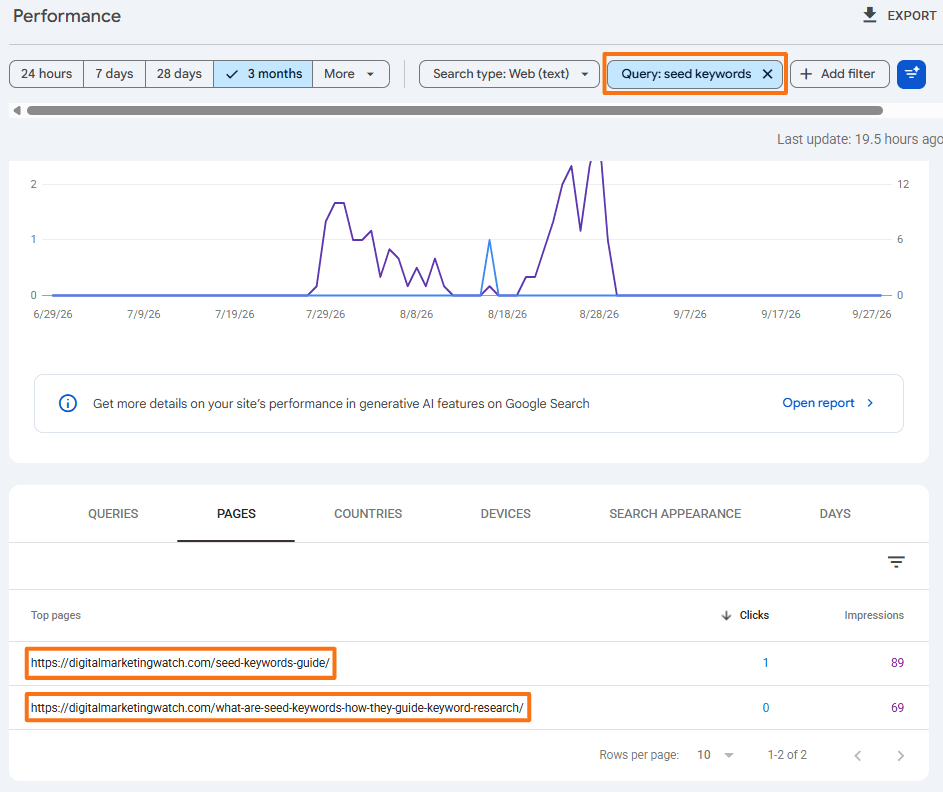
Identifying decay requires both performance data and editorial investigation. A falling graph reveals that something changed, but it does not explain why.
1. Compare Performance Periods in Google Search Console
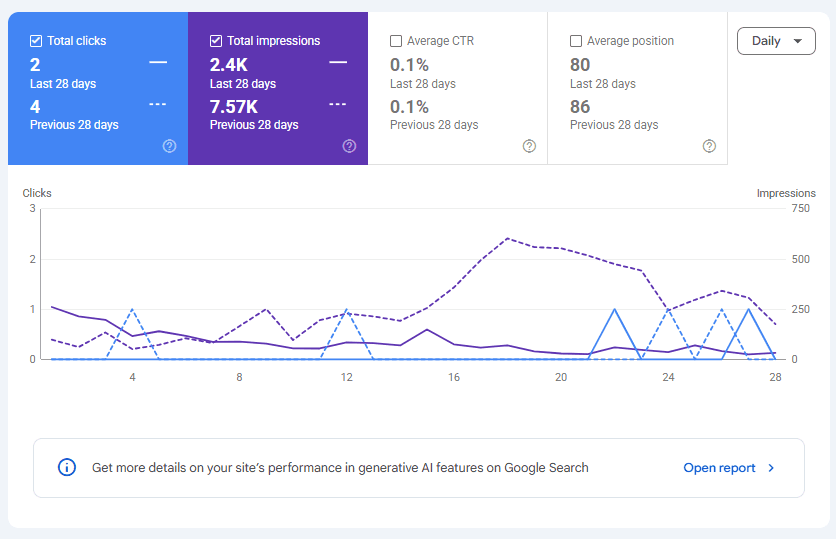
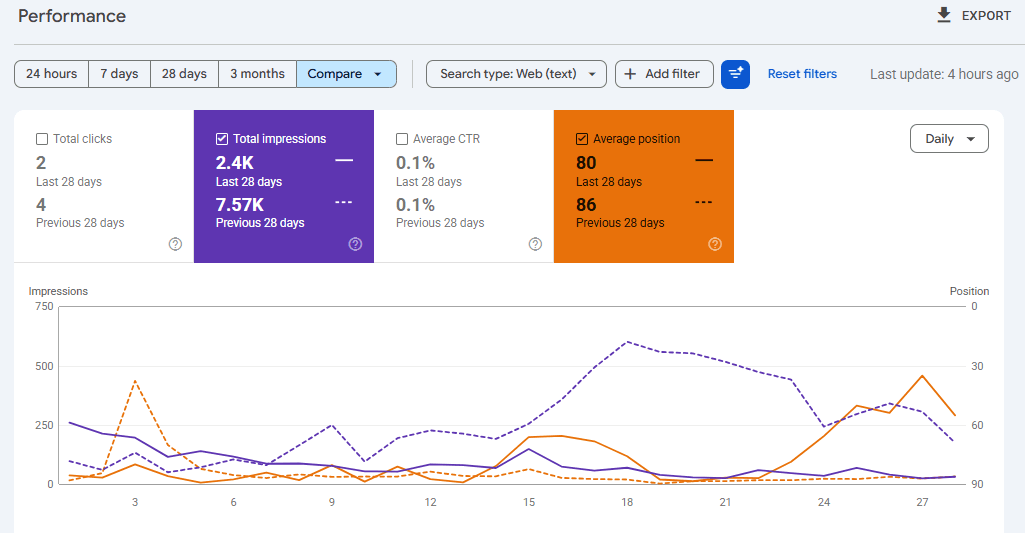
Google Search Console can help track how a page performs in Google Search over time by showing changes in clicks, impressions, CTR, and average position. To compare performance periods in Search Console, open the Performance report, select the Date filter, and choose Compare.
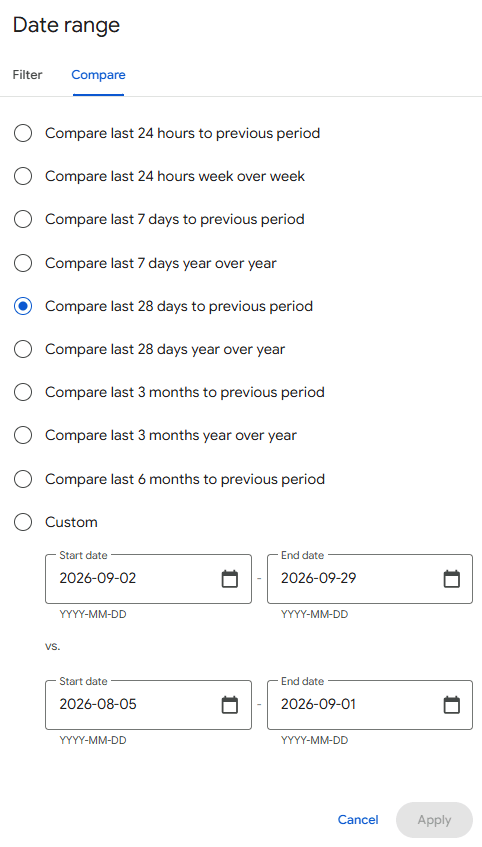
Comparing the last 28 days with the previous 28 days can work well for many pages. For strongly seasonal content, compare equivalent periods year over year instead.
2. Look for Sustained Downward Trends
Review clicks, impressions, click-through rate (CTR), average position, and the important queries driving visibility to each page.
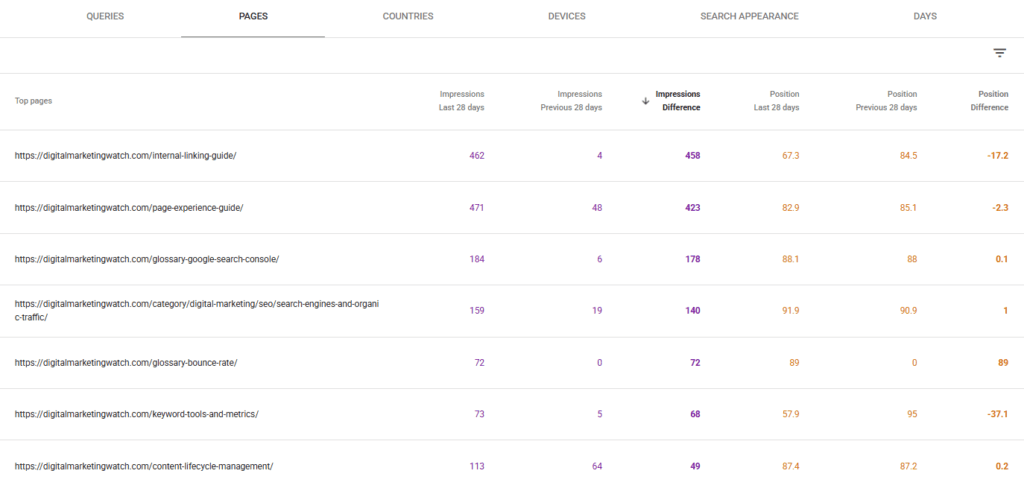
Use Google Trends when necessary to check whether declining impressions reflect lower overall search demand or normal seasonality rather than a problem with the page itself.
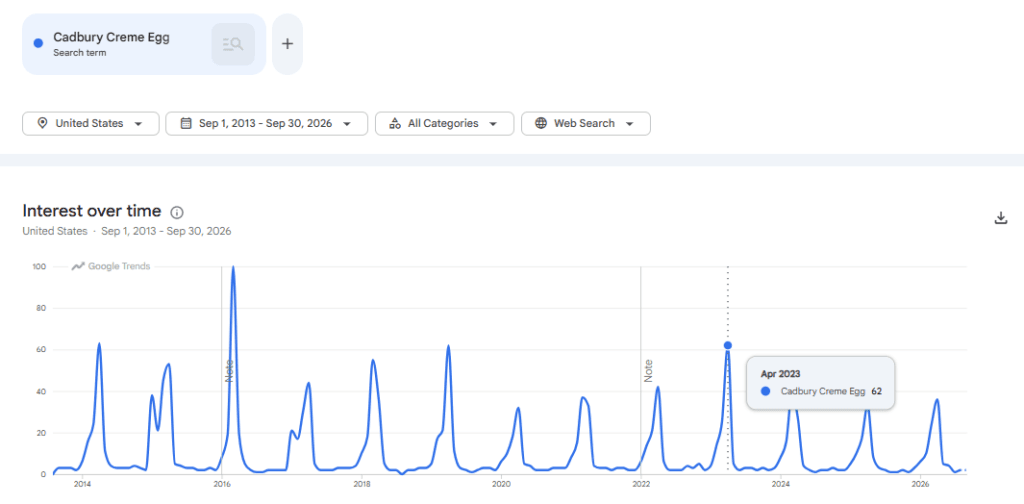
Google recommends focusing more on trends in clicks and impressions than relying heavily on average position alone.
These patterns are signals for investigation, not automatic diagnoses.
3. Recheck the Current SERP
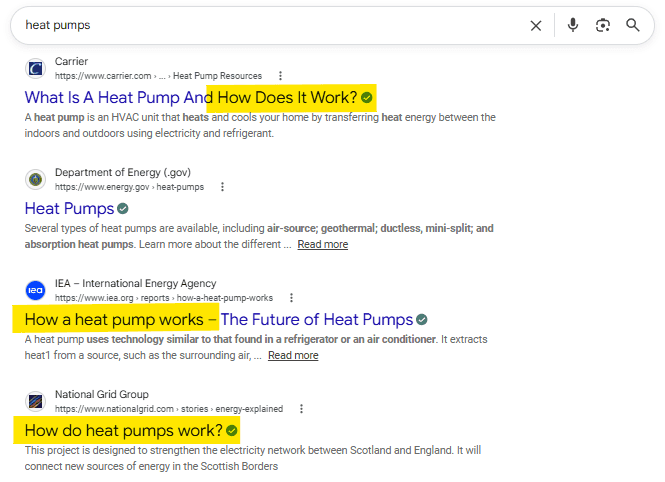
Search the important queries again and compare the present results with what the page provides. Check whether competitors now offer newer information, whether different content formats dominate, and whether the intent appears to have shifted.
4. Check Internal and Technical Signals
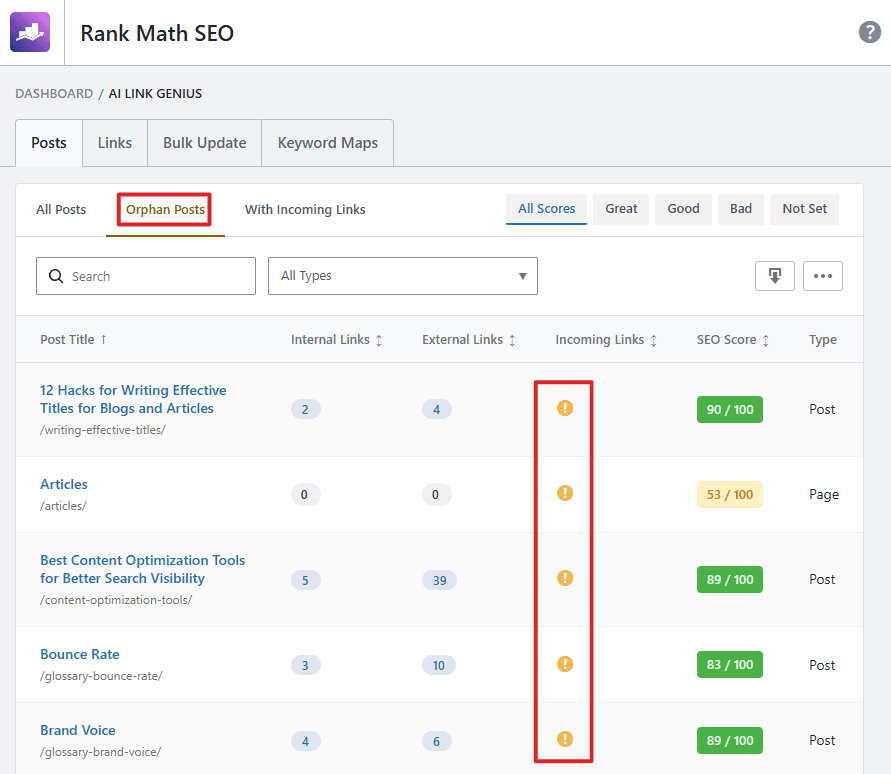
Use a crawler, CMS, or SEO tools to review incoming internal links, orphan-page status, redirects, broken links, indexability, metadata, and page performance.
5. Track Important Facts and Changes
Analytics cannot detect that a factual statement has become obsolete. Website search and a content database can help locate references to changed laws, court rulings, software features, prices, products, statistics, or industry terminology.
How to Prevent Content Decay
Preventing decay does not mean repeatedly changing every article. The better approach is to know which content is most likely to change and when it was last genuinely reviewed.
Maintain a Content Inventory
Use Notion, Excel, Google Sheets, or another content-tracking system to track important pages.
Last Reviewed/Updated is more useful than simply recording a publication date. A review may confirm that an evergreen page is still accurate and needs no changes.
Prioritize Pages by Decay Risk
Review volatile subjects more frequently than stable evergreen information. Examples include:
- News → Very Frequently: Google Core Update News, OpenAI Product Launches
- Software, Pricing, Laws, Statistics → Regularly: Best SEO Tools, Google Ads Pricing Guide
- Evergreen Fundamentals → Less Frequently: What Is SEO?, How to Write a Meta Description
Monitor Search Performance
Regularly check important URLs rather than waiting for a dramatic traffic loss. Search Console supports period comparisons and weekly or monthly views that can make long-term trends easier to distinguish from ordinary daily fluctuations.
How to Reverse Content Decay
Content should not be refreshed merely to change its publication date. First identify what has actually become outdated, weaker, or misaligned, and then fix that specific problem.
- Refresh Outdated Information: Replace obsolete facts, statistics, screenshots, product details, recommendations, and broken external links. Revise introductions and titles only when the current topic or intent justifies the change.
- Expand Missing Topical Coverage: Compare the page with current reader needs and competing results. Add useful questions, entities, examples, explanations, or subtopics that are genuinely missing rather than increasing word count for its own sake.
- Fix Search Intent Misalignment: If the current SERP favors comparisons, products, videos, local results, or another format, determine whether the page can realistically satisfy that need. Sometimes updating the existing format is not enough.
- Resolve Cannibalization: When two pages satisfy substantially the same intent, consolidate useful material where appropriate. If one URL is replaced by a clearly equivalent page, a permanent
301redirect can signal that the destination should become canonical. - Repair Technical and On-Page Problems: Fix broken links, missing images, missing or inaccurate alt text, outdated metadata, structured data issues, mobile problems, loading issues, and unnecessary redirects.
- Strengthen Internal Linking: Add useful links from related newer or stronger pages and update internal links that still point through redirects or to deleted URLs.
- Restore Editorial Quality: Recheck factual accuracy, sourcing, grammar, readability, headings, examples, repetition, and alignment with the current search intent.
A concise action framework can help:
Search performance is not static. User needs, competing content, SERP features, and the wider web continue to change, so the impact of content improvements should be evaluated over time rather than judged immediately after an update.
Frequently Asked Questions
How long does it take for new content to start decaying?
There is no standard timeframe. News can become outdated within hours or days, while stable evergreen information may remain useful for years. The rate depends on the subject, competition, search intent, and how quickly the underlying information changes.
Will changing the publication date to the current year fix content decay?
No, changing a date without meaningful improvements does not correct outdated facts, weak intent alignment, technical problems, or declining content quality. Dates should be updated when content has genuinely been reviewed or substantially refreshed.
How often should a website be audited for content decay?
There is no universal schedule. Fast-changing topics may need monthly or quarterly monitoring, while stable evergreen pages can be reviewed less frequently. Search performance and the volatility of the subject should determine priority.
Does content decay affect a website’s overall topical authority?
A large number of inaccurate, outdated, duplicated, or poorly connected pages can weaken the overall usefulness and coherence of a topic area. However, “topical authority” is not a single published Google score or site-wide metric, and one declining page does not automatically weaken an entire website.