Googlebot is the web crawler Google Search uses to discover and retrieve webpages from across the internet. Crawling is the process of automatically visiting URLs, downloading their content, and following links to discover additional pages. Google can find URLs through links, XML sitemaps, and pages it already knows about.
Crawling is only the beginning of the search process. A page that Googlebot crawls may then be rendered and evaluated for indexing, but crawling does not guarantee that a page will be indexed or rank in search results.
Googlebot also does not crawl every website at the same frequency. Google determines how much crawling a site can support and how much crawling it currently needs. Google says that for most sites Googlebot should not access the site more than once every few seconds on average, although actual activity can vary.
Google uses two main versions of its main search crawler: Googlebot Smartphone and Googlebot Desktop. Google completed its move to mobile-first indexing, and almost all sites are now crawled and indexed primarily with Googlebot Smartphone. However, Googlebot Desktop may still appear for certain Search features.
Googlebot is only one of many web crawlers. Search engines and AI platforms operate their own bots for search indexing, content retrieval, model development, or other purposes.
| Crawler | Organization | Primary Purpose |
|---|---|---|
| Bingbot | Microsoft | Bing Search crawling |
| Slurp | Yahoo | Yahoo crawling and services |
| YandexBot | Yandex | Yandex Search |
| Baiduspider | Baidu | Baidu Search |
| DuckDuckBot | DuckDuckGo | Search-related crawling |
| Applebot | Apple | Apple search features |
| OAI-SearchBot | OpenAI | ChatGPT search discovery |
| GPTBot | OpenAI | Potential model-training content |
| Claude-SearchBot | Anthropic | Claude search |
| ClaudeBot | Anthropic | Model-development crawling |
| PerplexityBot | Perplexity | Perplexity search indexing |
These bots do not necessarily perform the same job. OpenAI, for example, distinguishes OAI-SearchBot from GPTBot, while Anthropic separately identifies Claude-SearchBot and ClaudeBot. Perplexity similarly describes PerplexityBot as a search crawler rather than a crawler for training foundation models. Yahoo continues to identify Slurp as its web crawler, although its algorithmic search results are provided by Microsoft Bing.
How Often Does Googlebot Crawl a Website?
There is no fixed Googlebot crawling schedule. A frequently updated news website may be revisited much more often than a small site whose pages rarely change.
The amount Google can and wants to crawl is commonly described as a site’s crawl budget. Google’s current guidance explains it through two main components: crawl capacity limit and crawl demand.
- Crawl Capacity Limit: Google tries to crawl without overloading the website. Crawl health affects this limit: fast, stable server responses can support more crawling, while slower responses,
5xxerrors, or429responses can reduce it. - Crawl Demand: Google considers factors such as the number of known URLs, content updates, page quality and relevance, URL popularity, and how stale its existing copy may be.
Crawl budget is mainly an advanced concern for very large or rapidly changing websites. Google says smaller sites whose new pages are crawled promptly generally only need to maintain an accurate sitemap and monitor indexing.
Google’s Crawling Ecosystem
Google does not rely on a single crawler for everything. The search engine lists different crawlers and fetchers designed for particular Google products and content types.
| Google Crawler | Main Purpose |
|---|---|
| Googlebot Smartphone | Primary Search crawler for mobile-first indexing |
| Googlebot Desktop | Desktop crawling for certain Search uses |
| Googlebot-Image | Images and image-related Search features |
| Googlebot-Video | Video-related Search features |
| Googlebot-News | Controls crawling for Google News |
| Storebot-Google | Google Shopping; mobile and desktop variants |
| Google-InspectionTool | URL Inspection and Search testing tools |
| GoogleOther | General-purpose crawling for various Google products and R&D |
Googlebot Smartphone and Desktop both obey the Googlebot robots.txt user-agent token, so they cannot be given separate robots.txt rules.
How Google Search Works
A simplified view of how Google’s crawling and indexing systems work can be understood through four connected stages:
1. Discovery
Google starts with URLs it already knows and discovers additional URLs through crawlable links, XML sitemaps, redirects, and other sources. Newly discovered URLs can be added to its crawl queue.
2. Fetching
When a URL is selected for crawling, Googlebot makes an HTTP request to the server. It retrieves the HTML and may separately request resources such as CSS, JavaScript, and images that are required to process the page.
3. Rendering
Google Search can execute JavaScript and render webpages using an evergreen version of Chromium. For JavaScript-based pages, Google processes crawling, rendering, and indexing in separate stages.
Rendering can also expose additional links and content that were not available in the initial HTML response.
4. Indexing
After processing the page, Google’s indexing systems analyze eligible content and decide whether and how it should be stored in Google’s index. A successfully crawled page is therefore not automatically indexed.
The Crawler
Googlebot fits into this process primarily during discovery and fetching. It follows crawlable links, crawls URLs discovered through sources such as XML sitemaps, and requests webpages and supporting resources from web servers. The content it retrieves can then be passed to Google’s rendering and indexing systems for further processing and evaluation. It is a critical part of Google Search as content generally needs to be discovered and crawled before Google can fully process it for indexing.
Technical Details and Limitations
Googlebot has several practical limits:
| Detail | Googlebot Behavior |
|---|---|
| Supported web file fetch | First 2 MB for supported file types |
| PDF fetch | First 64 MB |
| Rendering | Evergreen Chromium |
| Main protocols | HTTP/1.1 and HTTP/2 |
| Other supported protocols | FTP and FTPS, although rarely used |
| Crawl infrastructure | Distributed across many data centers |
| Main request origin | Primarily US IP addresses |
For rendering, resources such as CSS and JavaScript are fetched separately and have their own applicable size limits. Google’s crawlers do not crawl the web from a single location. Instead, Google uses distributed crawling infrastructure across multiple regions.
How to Check and Encourage Timely Crawling by Googlebot
Website owners cannot force Google to crawl or index a page immediately, but they can make discovery and crawling easier.
- XML Sitemap: Keep important canonical URLs in the sitemap and submit it through Google Search Console → Sitemaps. Check the report for processing errors and whether Google can read the sitemap.
- URL Inspection: Enter an individual URL in the URL Inspection search bar at the top of Google Search Console. Check its crawl and indexing status, test the live URL if necessary, and use Request Indexing for important new or substantially updated pages.
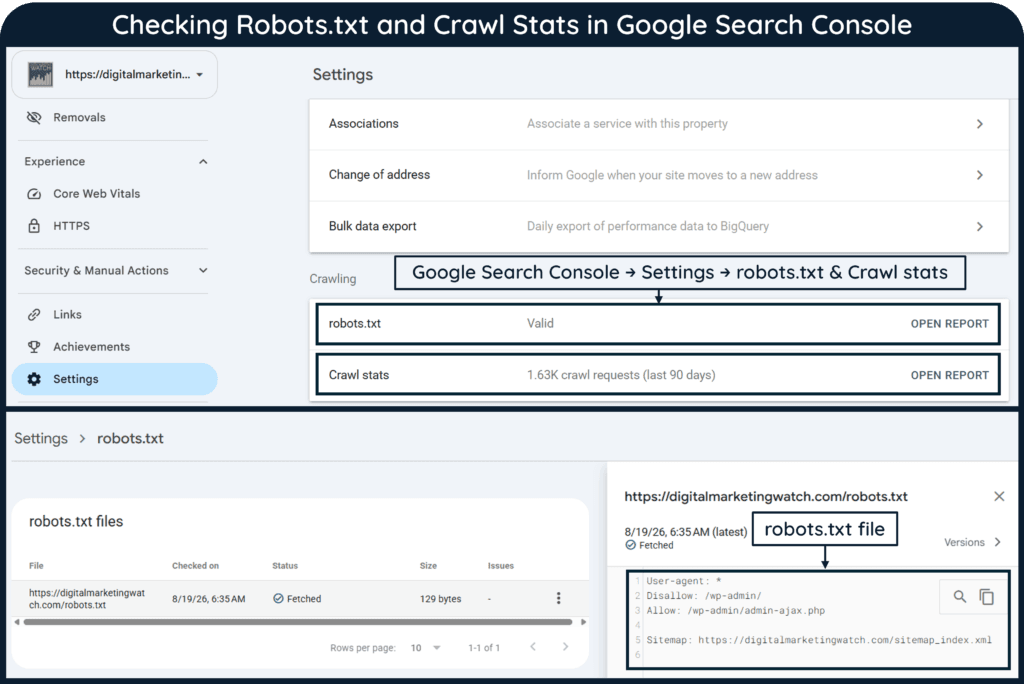
- Crawl Stats and Server Logs: Check Google Search Console → Settings → Crawl stats for crawl volume, Googlebot type, responses, host health, and server response times. For deeper URL-level analysis, examine web-server access logs. On Hostinger, use hPanel → Website Dashboard → Analytics → Access logs; on cPanel, use Metrics → Raw Access. Dedicated tools such as Screaming Frog Log File Analyser can help analyze downloaded logs.
- Crawling and Indexing Directives: Check robots.txt for accidental crawl blocks and remove unintended
noindexdirectives from pages that should appear in Search. Google Search Console also provides a robots.txt report under the property’s Settings area. - Website and Content Optimization: Use crawlable internal links, avoid important orphan pages, maintain a logical site architecture, and reduce unnecessary duplicate or thin URLs. This helps Googlebot discover important content efficiently and reduces wasted crawling.
- Verify Googlebot Traffic: A
Googlebotuser-agent string can be spoofed. If suspicious requests appear in server logs, Google provides methods for verifying whether the requests genuinely come from its crawlers.
For many URLs, Google recommends submitting a sitemap rather than repeatedly using Request Indexing.
How to Control Googlebot Crawling and Indexing
Crawling and indexing should be treated separately. A directive that prevents crawling does not necessarily guarantee removal from Google’s index.
Robots.txt
A robots.txt file can allow or disallow Googlebot from crawling particular URL paths. However, blocking a URL in robots.txt is not a reliable way to remove that URL from Google’s search results.
Meta Robots
Use a noindex robots directive when a crawlable HTML page should not appear in Google Search. Google must be able to access the page to see the directive.
X-Robots-Tag
The X-Robots-Tag provides similar indexing controls through the HTTP response header. It is particularly useful for non-HTML resources such as PDFs, images, or other files.
Search Console Removals
Google Search Console’s Removals tool can temporarily hide a URL from search results, generally for about six months. It does not stop Googlebot from crawling the URL. Permanent removal requires another method, such as noindex, returning an appropriate 404 or 410 response, removing the content, or restricting access.
Confidential files should be protected with authentication or password access rather than relying on robots.txt.
| Method | Primary Purpose |
|---|---|
robots.txt | Controls crawling |
Robots noindex | Prevents indexing |
X-Robots-Tag | Controls indexing through HTTP headers |
rel="nofollow" | Indicates that Google should generally not follow or associate with a link |
| Password protection | Restricts access to private content |
| Search Console Removals | Temporarily hides URLs from Search |
Frequently Asked Questions
How often does Googlebot crawl a website?
There is no fixed schedule. Crawl frequency varies according to factors such as site size, updates, crawl demand, server health, URL popularity, and Google’s existing knowledge of the URLs.
Does Google use Googlebot Smartphone or Googlebot Desktop?
Google primarily uses Googlebot Smartphone for Search crawling and indexing. Googlebot Desktop can still be used for some specific Search features.
Can I force Googlebot to crawl a page?
No. You can request indexing through Google Search Console or submit URLs through an XML sitemap, but neither method guarantees immediate crawling or indexing.
Does robots.txt prevent a page from being indexed?
Not necessarily. Robots.txt primarily prevents crawling. If Google cannot crawl a URL, it cannot see a noindex directive placed on that page.
How can I tell whether Google’s bots have crawled my website?
Use Google Search Console’s URL Inspection and Crawl Stats reports or examine server logs. URL Inspection can show the last crawl date and whether the page was crawled with a mobile or desktop user agent.