Key Takeaways
- A meta description, supplied through a page’s HTML metadata, concisely summarizes the page without normally appearing in the visible content.
- Google may use the description for a search snippet, but it can also generate alternative snippet text from page content to better match a specific query.
- Although meta descriptions are not direct ranking signals, relevant and persuasive wording can clarify the page’s value, reflect search intent, and encourage clicks.
- Effective meta descriptions are page-specific, natural, informative, and appropriately action-oriented.
- Avoid keyword stuffing, unsupported claims, duplicate descriptions, and unnecessarily long meta descriptions.
A meta description is a concise summary of a webpage supplied through the HTML <meta name="description"> element. Search engines may use it when generating the descriptive snippet shown below the title link in search results. While Google does not use the meta description as a direct ranking signal, a strong description can encourage clicks by clearly explaining the page’s value to searchers.
A meta description is the description supplied in the page’s HTML, while a search snippet is the descriptive text that a search engine actually displays. The two may be identical, but they are not the same thing. Google primarily generates snippets from page content and may use the meta description when it provides a better description for the particular search.
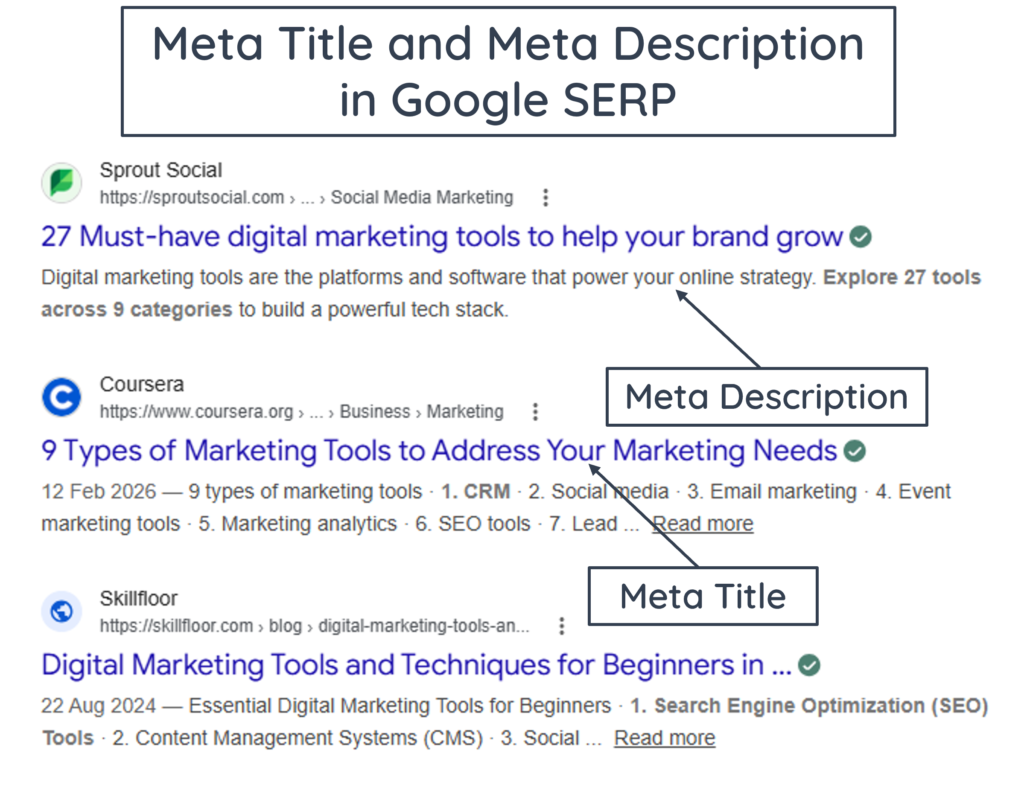
Google frequently chooses not to display a page’s specified meta description and may instead generate a snippet because search snippets are designed to reflect the specific query. Studies have reported different rewrite rates: a Semrush meta description study found a rate of approximately 72%, an Ahrefs rewrite study reported 62.78%, and an analysis of 30,000 keywords recorded rates of 68% on desktop and 71% on mobile.
A meta description is placed inside the <head> section of HTML through a <meta> element. It is machine-readable metadata and does not normally appear within the visible page content. The <head> section can also contain the page’s <title>, stylesheet information, scripts, and other metadata.
<!DOCTYPE html>

<html lang="en">

<head>

    <meta charset="UTF-8">

    <meta name="viewport" content="width=device-width, initial-scale=1.0">

    <title>Best Run Tracking Apps of 2026</title>

    <meta name="description" content="Discover the top-rated free run tracking apps of 2026. Compare GPS accuracy, training plans, and community features to support fitness goals.">

</head>

<body>

    <h1>Best Run Tracking Apps of 2026</h1>

    <p>Running is a practical way to improve fitness...</p>

</body>

</html>
Where Do Meta Descriptions Appear?
Meta descriptions are primarily associated with search results, but the underlying description can also be used by browsers, social platforms, and other systems that read a page’s metadata.
Search Engine Result Snippets
When a search is performed on Google, a standard text result may contain a visible URL, a clickable title link, and a descriptive snippet. The specified meta description may be used to generate that descriptive text.
Controlling Google Search Snippets
Website owners can control how much page content Google may show in search snippets. The nosnippet directive prevents a text snippet from appearing, while max-snippet:[number] sets the maximum number of characters Google may use for the text snippet. Similarly, the data-nosnippet attribute can prevent selected parts of a page from being used in the snippet.
The nosnippet and max-snippet directives are usually added through a robots <meta> tag inside the page’s <head>, for example <meta name="robots" content="nosnippet"> or <meta name="robots" content="max-snippet:150">. They can also be sent through an X-Robots-Tag HTTP header. The data-nosnippet attribute, <span data-nosnippet>...</span>, is added directly to an HTML element containing content that should be excluded.
These settings can be checked in the page source or browser Inspect tools, while HTTP-header directives can be checked in the Network panel. Google’s URL Inspection tool can also be used to view the crawled or tested HTML and HTTP headers when verifying these settings.
Social Media Shares
Social platforms and messaging services may generate a visual preview when a webpage link is shared. Platforms that support Open Graph metadata can use properties such as og:title, og:description, and og:image to create the preview. When dedicated social metadata is unavailable, some services may use other page metadata or content to generate fallback preview text.
How Metadata Descriptions Help with SEO
From an SEO perspective, a meta description can function like a short sales pitch for the webpage. Its job is to explain precisely what value the page offers, encouraging users who find the link on the search engine results page to click through to the website. Meta descriptions are not a direct ranking factor, but they are nonetheless important for SEO in the following ways:
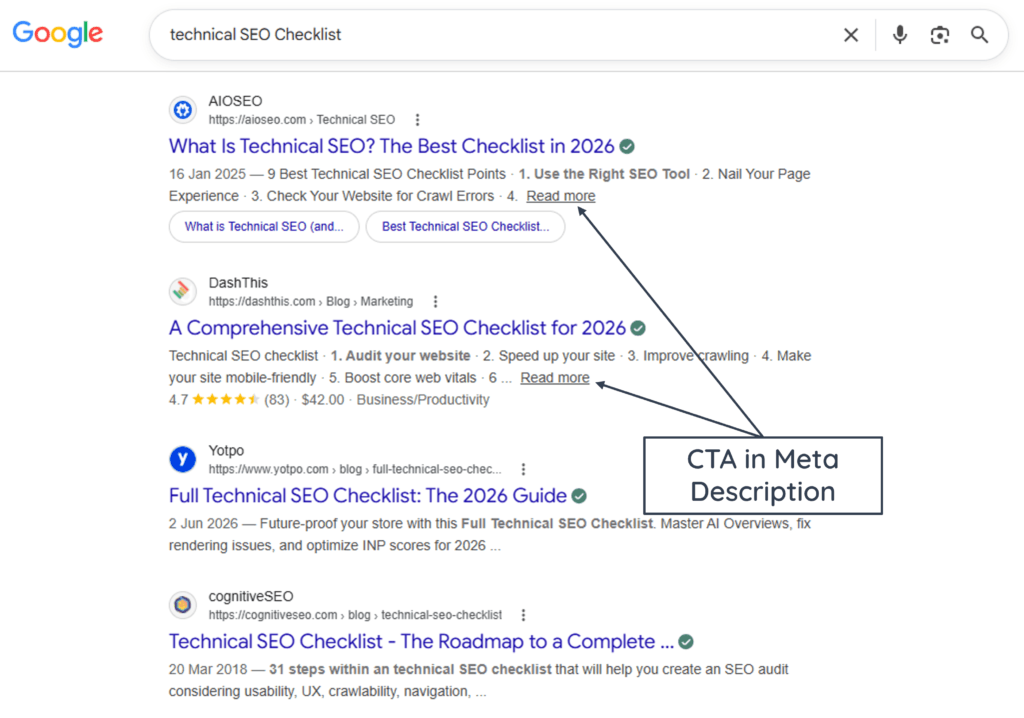
- Encourages Clicks: A relevant and persuasive description can help searchers understand why a page is useful and may encourage them to visit it when the description is displayed in the search snippet.
- Reflects Search Intent: A description that matches what a searcher wants can make the result more relevant. For example, a comparison page can mention the products, features, or criteria being compared.
- Clarifies the Next Step: Action-oriented wording such as “Buy,” “Compare,” or “Learn” may clarify what the page enables visitors to do when such language fits naturally.
How to Check Meta Descriptions
A meta description can be checked using four quick methods:
- Browser Inspect Element: Right-click a page, select Inspect, open the
<head>tag at the top of the code, and look for<meta name="description">. - SEO Extensions: Install free browser extensions like Detailed SEO Extension or SEO Minion to view descriptions instantly without touching code.
- Plugins: Plugins like Yoast SEO and Rank Math SEO allow users to check and edit meta descriptions.
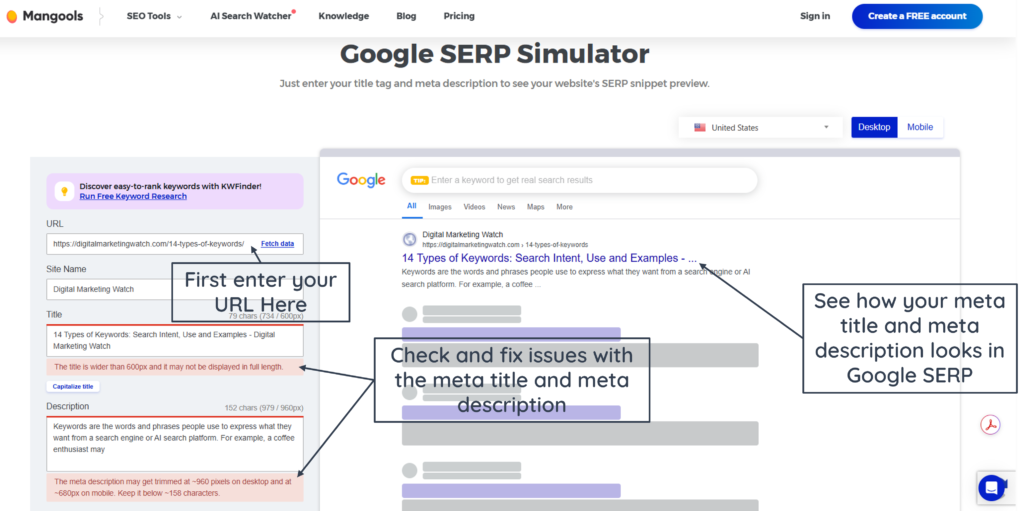
- Free SERP Simulators: Tools such as the To THE WEB SERP Simulator or Mangools SERP Simulator can provide an estimated preview of how a supplied title and meta description may appear in search results on desktop and mobile screens.
How to Generate and Edit Meta Descriptions
Meta descriptions can be written manually, generated with SEO tools or AI, and edited through a website’s CMS or page-level SEO settings.
Adding Meta Descriptions Through a CMS
With modern website builders, one does not need to hardcode HTML manually.
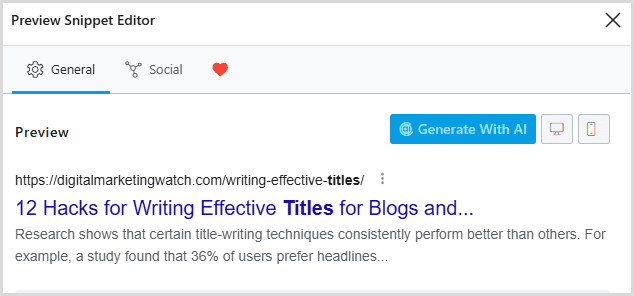
- WordPress: SEO plugins such as Yoast SEO and Rank Math provide fields within the editing interface for adding and previewing meta descriptions.
- Shopify, Wix, and Squarespace: These platforms provide SEO or search-appearance settings where page and product meta descriptions can be entered without manually editing HTML.
AI and Automation Assistance
- AI Generators: Tools like ChatGPT, Claude AI, or dedicated SEO copy assistants like Jasper or Copy.ai can help draft individual or multiple meta descriptions from keywords, page content, or structured inputs.
- CMS Automation Rules: For large websites (like an e-commerce platform with 20,000 product pages), developers write dynamic templates to auto-fill tags, such as: Buy [Product Name] online at the best price from [Brand Name].
Writing Effective Meta Descriptions
To write an effective meta description that stands out, the following practices are recommended:
- Ideal Length: Descriptions of approximately 120 to 160 characters (or under 990 pixels on desktop or 680 pixels on mobile) often provide enough space for a useful summary. However, Google has no fixed limit and may truncate the displayed snippet according to the device and available width.
- Target the Search Intent: Clearly resolve what the searcher wants (e.g., provide answers for informational queries, or shopping benefits for transactional queries).
- Incorporate the Primary Keyword: Include the primary keyword naturally when it accurately reflects the page and helps the description match the searcher’s language.
- Strictly Avoid Keyword Stuffing: It is important to write naturally and avoid stuffing keywords. Stringing together repetitive keywords (e.g., “We sell coffee, cheap coffee, espresso coffee, local coffee”) looks spammy and ruins trust.
- Use Actionable CTAs: Phrases such as Shop the sale, Compare options, or Learn how can clarify the next step when they naturally match the page’s purpose.
- Use Page-Specific Descriptions: Do not duplicate descriptions across the website. Important indexable pages should have descriptions that accurately distinguish their content. Large websites may use well-designed programmatic templates where manual descriptions are impractical.
- Avoid Superlatives and Spammy Language: Avoid unsupported promotional language like “The absolute greatest best ever” or all-caps spam text that can make the description appear unclear or untrustworthy.
Examples of Impactful Meta Descriptions
Well-written meta descriptions summarize the page clearly, match search intent, and give users a compelling reason to click.
Example 1: E-Commerce/Transactional Page
“Shop genuine leather hiking boots at OutdoorPro. Explore water-resistant construction, durable hiking soles, and free shipping on orders over $100. Buy your pair today!“
Example 2: Educational/Informational Blog Post
“Master the basics of macroeconomics with our complete beginner’s guide. Learn supply curves, fiscal policy, and inflation cycles with simple real-world examples.“
Example 3: Local Business Page
“Need reliable emergency plumbing repairs in North London? ElitePlumbers offers 24/7 leak fixes, drain cleaning, and upfront pricing. Call our team now for fast service.“
Frequently Asked Questions
How long should a meta description be?
There is no fixed length that guarantees Google will display a meta description in full. A concise description that communicates the page’s purpose clearly is usually preferable to writing toward a strict character count.
Does Google always use the meta description in search results?
No. Google may use the supplied meta description, but it can also generate a different snippet from the page content when that text appears more relevant to a user’s query.
Do meta descriptions affect search rankings?
Meta descriptions are not direct Google ranking signals. However, a clear and relevant description can help users understand what a page offers and may encourage more qualified clicks from search results.