Metadata, HTML tags and page code may sound highly technical to bloggers, business owners and content creators who do not work as developers. However, a basic understanding of how these elements work can make on-page SEO much easier to manage.
Google emphasizes that unique, descriptive titles and high-quality meta descriptions are essential for helping search engines accurately represent your site in search results. It also outlines strict parameters for acceptable header attributes.
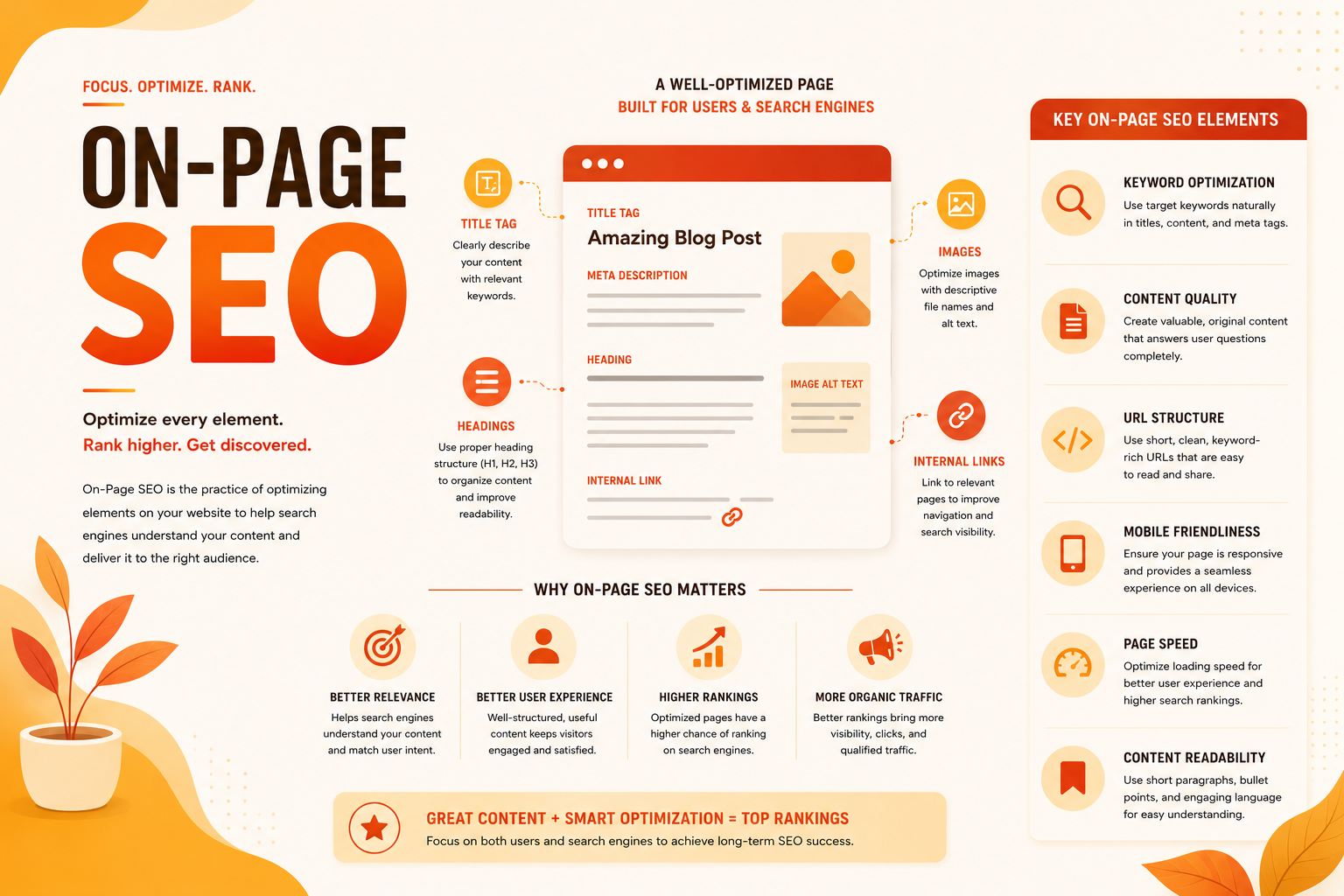
SEO experts generally treat titles, descriptions, headings, links, URLs and image information as controllable on-page elements, but they do not suggest that adding keywords mechanically to every field guarantees rankings. Ahrefs describes on-page SEO as optimizing webpages so that they perform better in traditional search and AI visibility, while emphasizing search intent, titles, descriptions, headings and internal links as part of that work.
HTTP Archive Almanac’s chapter on SEO states that titles, meta descriptions and headings continue to communicate page meaning and intent, while media attributes support clarity and accessibility. The Web Almanac’s accessibility research also describes a coherent heading structure as resembling a table of contents that helps users, search engines and assistive technologies understand page organization.
A webpage may appear to contain ordinary text, images, colours, links and headings, but these visible elements are created and organized through code. HTML gives the page its structure, while other technologies such as CSS and JavaScript control its design and behaviour.
Knowing the purpose of common HTML elements can help you understand what is happening behind the page you see. For example, headings are marked with heading tags, links are created through anchor elements, images use attributes such as src and alt, and metadata provides information about the page to browsers, search engines and social platforms. At the same time, many website-building platforms and WordPress plugins manage much of this code automatically, which means you can usually work visually without writing HTML yourself.
However, it must be noted that automatic tools are not always perfect. For example, a page may have a missing or a less-than-optimal meta description, an incorrect heading structure, a broken canonical reference or duplicate metadata without the website owner realizing it. A basic technical understanding can therefore help you identify and fix smaller problems within minutes, instead of waiting for a developer or assuming that every SEO issue requires advanced technical knowledge.
Most of the elements discussed in this article belong to on-page SEO because they help describe structure and present individual webpages. However, there is some overlap with technical SEO. Canonical tags, robots directives and structured data, for example, are often discussed under technical SEO because they affect crawling, indexing and how search engines process a page. At the same time, they are also part of a webpage metadata, an essential element of on-page SEO. This overlap is normal, as on-page and technical SEO are closely connected rather than strictly separate disciplines.
This article explains these technical ideas only at a beginner-friendly level. It is intended for people who build websites through platforms such as WordPress, Wix or Shopify, as well as bloggers, content creators, small-business owners and anyone developing a practical understanding of SEO. You will not need coding experience as the examples are designed to show what the code means rather than teach full web development.
More importantly, learning these basics provides a larger picture of how web documents, webpages, browsers and Google work together. Once you understand how a page communicates its title, structure, links, images and instructions through HTML and metadata, you can optimize your content with greater confidence. Therefore, the goal is not to make SEO more technical than necessary, but to make the technical side feel understandable, useful and manageable.
Table of Contents
- Webpage and HTML
- Metadata and HTML Elements?
- Important Metadata for On-Page SEO
- Important HTML Elements for On-Page SEO
- How Metadata and HTML Elements Improve SEO and Drive Website Traffic
- Practical On-Page Metadata and HTML Checklist
- Conclusion
- Frequently Asked Questions
Webpage and HTML
A webpage may appear to contain ordinary words, headings, photographs, buttons, colours and links, but a browser does not receive the finished page in the same way that a reader sees it. Instead, it receives coded instructions that describe what the content is, how it is arranged and, with the help of other technologies, how it should appear and behave.
HTML, HTML Tags and HTML Elements
HTML, or HyperText Markup Language, provides the basic structure and meaning of the page. Similarly, CSS usually controls visual details such as fonts, colours, spacing and layouts, while JavaScript control’s the webpage’s interactive behaviour. MDN Web Docs describes HTML as the basic building block of the web because it defines the meaning and structure of web content.
For example, a browser does not automatically know that “On-Page SEO Checklist” is a main section heading. The publisher identifies it through HTML code such as:
<h2>On-Page SEO Checklist</h2>
Similarly, an image can be placed on the page with an <img> element, a link can be created with an <a> element, and a paragraph can be identified with a <p> element. These pieces of code are commonly called HTML tags, although it is useful to distinguish a tag from a complete HTML element.
For example:
<p>SEO helps improve a website’s visibility in organic search results.</p>
Here, <p> and </p> are the opening and closing tags, while the tags and enclosed text together form the paragraph element. HTML elements are therefore the structural building blocks from which webpages are created.
Metadata and Meta Tag
The terms meta, metadata, meta tag, HTML meta tag and HTML elements are closely related, which is why they frequently confuse bloggers, content creators and non-technical website owners. In this context, “meta” generally means information about something else. Metadata, or “data about data”, is therefore information that describes the webpage, rather than the specific elements of a webpage such as images, lists, paragraphs or other visual or textual elements in a webpage. A meta description, for example, provides a summary of a page, while robots metadata can tell a search engine whether the page should be indexed or whether a search snippet may be shown.
A meta tag is one method of delivering that metadata inside the webpage’s HTML. For example:
<meta name=”description” content=”Learn what SEO is, how it works and why it matters for websites.”>
Here, the descriptive summary is the metadata, while the <meta> code is the meta tag used to deliver it.
Metadata is often placed in the <head> section of the HTML document, which contains information and resources used by browsers, search engines and other systems. The visible article normally appears inside the <body>. In simple terms, metadata is the information itself, and meta tags are code used to communicate that information.
For example, to deliver metadata related to the webpage’s language and author name, we need meta tags to encode the information:
<html lang=”en”>
<meta name=”author” content=”John Doe”>
Metatags and metadata also help search engine crawlers and web browsers understand and describe the page. Because search engine crawlers cannot “look” at a webpage the way humans do, meta tags translate the purpose of the page into machine-readable commands. For example,
Code: <meta name=”description” content=”Learn what SEO is, how search engines rank pages, and how optimization can improve organic traffic.”>
Purpose: Tell Google exactly what summary text to display under your clickable title on the SERP.
Code: <meta name=”robots” content=”noindex, nofollow”>
Purpose: Tell Googlebot, “Do not show this specific page in search results, and do not follow any links on it” (useful for private thank-you pages or admin logins).
Code: <meta name=”viewport” content=”width=device-width, initial-scale=1.0″>
Purpose: Force web browsers like Safari or Chrome to automatically scale the website layout to fit a mobile screen, preventing users from having to pinch and zoom.
Unravelling HTML Tags, HTML Elements, Meta Tags and Metadata
We may be now driven to think that if metadata is information about the webpage, then the page’s target keyword or estimate reading time should also constitute the metadata about the page. Technically, however, they are not metadata, as they are often stored in the CMS or SEO plugin and not encoded through meta tags.
The <meta> element or meta tag represents metadata that cannot be supplied through other metadata-related elements such as <title>, <link>, <style>, <script> and <base>. In other words, metadata is not limited to <meta> tags. For example, the page title is defined in the <title> element, the preferred page URL can be declared through a canonical <link> element, and structured data is often provided through a <script> element containing JSON-LD. A canonical <link> element , while structured data.
These all communicate descriptive information about the document, even though none uses the <meta> element.
Title: Identify the title of the webpage.
<title>What Is SEO? A Beginner’s Guide to Search Engine Optimization</title>
Canonical: Identify the preferred URL for duplicate or similar pages.
<link rel=”canonical” href=”https://www.example.com/what-is-seo/”>
Script: Provide standardized machine-readable details that help search engines understand the page and its entities.
<script type=”application/ld+json”>
{
“@context”: “https://schema.org”,
“@type”: “Article”,
“headline”: “What Is SEO? A Beginner’s Guide to Search Engine Optimization”,
“author”: {
“@type”: “Person”,
“name”: “John”
},
“publisher”: {
“@type”: “Organization”,
“name”: “Marketing Reviews”
}
}
</script>
The <h1>, <p>, <a> and <img> tags are HTML tags, but they are not meta tags because they structure or embed the page’s main content.
Meanwhile, the <meta name=”description”> tag is both an HTML tag and a meta tag. This distinction may seem minor but understanding it prevents the common mistake of referring to every SEO-related HTML element as metadata or calling the title element a “meta tag.”
This leads to three useful rules:
- All meta tags are HTML tags, but not all HTML tags are meta tags.
- Metadata is the information itself, while meta tags are code used to deliver some of that information.
- All meta tags provide metadata, but not all metadata is delivered through meta tags.
Similarly, title tags (<title>) and canonical tags (<link rel=”canonical”>) are vital pieces of metadata, but technically they are not meta tags because they do not use the word “meta” in the HTML code. Here, it is also important to note that the <title> element appears inside the <head> section and provides metadata about the page. However, it is not a <meta> tag; it is a separate HTML element written with opening and closing <title> tags.
A simplified page may look like this:
Metadata, HTML Elements and Search Engines
Search engines do not award rankings merely because a page contains these tags. However, accurate metadata and meaningful HTML can help crawlers discover the correct URL, understand the page’s subject and structure, interpret its links and images, and generate clearer search-result presentations.
Google describes SEO as helping search engines understand content while also helping users decide whether they should visit a website through search results. Therefore, metadata and HTML elements should not be treated as decorative fields completed only to satisfy an SEO plugin. They form part of the technical language through which a website communicates with browsers, search engines, social platforms, accessibility tools and, increasingly, systems that extract and summarize web content.
What Metadata and HTML Elements Tell Search Engines About the Page
In on-page SEO, metadata and HTML elements serve as the structural framework that bridges the gap between what human visitors see and what search engine crawlers understand. Optimizing these backend elements is a foundational requirement for modern search engine visibility.
Metadata and HTML elements overlap because metadata is frequently delivered through HTML. However, their principal roles differ: metadata describes or controls the document, while body-level HTML generally structures the content readers consume.
| Aspect | Metadata | HTML Elements |
| Primary role | Describes or controls the document | Structures and presents page content |
| Typical location | Mainly inside <head> | Mainly inside <body> |
| Visibility | Usually not visible in the article | Usually visible to readers |
| Examples | Description, robots, canonical, Open Graph | H1–H6, paragraphs, links, images, lists |
| SEO function | Search appearance, crawling, indexing and duplication control | Relevance, hierarchy, accessibility and internal linking |
| Common mistake | Missing, duplicated or conflicting directives | Using visual formatting instead of semantic elements |
Metadata is descriptive or administrative information about a webpage, including its title, summary, preferred URL, indexing instructions, language, social-sharing details and structured information about entities such as the author, organization or product. In web architecture, it consists of hidden code snippets embedded in the <head> section of an HTML document. They do not appear on the live web page but explicitly instruct web browsers and search engine crawlers on how to read, process, and display the page.
HTML elements identify the meaning and role of the page’s content. Unlike metadata, standard HTML elements structure and format the visible content that human visitors interact with on the page. For example, headings create a hierarchy, paragraphs contain prose, anchor elements create links, image elements embed visuals, lists group related items and semantic elements such as <main>, <article> and <nav> identify different regions of the page. Correctly written HTML can define meaning in a machine-readable form, which MDN Web Docs notes is important for accessibility, search engine optimization and the built-in functions provided by browsers.
Technical Breakdown: How They Work Under the Hood
When a search engine bot, such as Googlebot or Bingbot, discovers a URL, it parses the raw HTML code sequentially:
- Header Processing: The bot first reads the <head> tag. This provides directives regarding character encoding (<meta charset=”utf-8″>), mobile responsiveness configuration, and access controls for indexation.
- Semantic Structure Parsing: Moving to the <body> tag, the crawler analyzes the structural tags. It measures semantic hierarchy to understand the relationship between a primary topic and its subtopics.
- Resource and Link Attribution: Search engines may also evaluate attributes attached to HTML elements. These include rel=”canonical” for identifying a preferred URL, rel=”nofollow” for qualifying links, href for link destinations, alt for image descriptions, and lang or hreflang for language information.
How Metadata and HTML Elements Fit into a Webpage
An HTML document is broadly divided into a <head> containing machine-readable page information and a <body> containing the document content presented to users.
1. The <head> Section: The Technical Blueprint
The <head> contains metadata and supporting resources that describe or configure the document, including the page title, meta tags, links, scripts and stylesheets.
Meta tags are HTML elements placed in the <head> to communicate information or instructions to browsers, search engines and other systems. However, saying that the entire <head> is “hidden background” is slightly imprecise: its contents are generally not displayed as the main webpage content, although the <title> can appear in the browser tab and some resources placed there directly affect how the page is rendered.
Examples include:
- Meta description: <meta name=”description” content=”Learn what SEO is and how it improves search visibility.”>
- Robots directive: <meta name=”robots” content=”noindex”>
- Open Graph title: <meta property=”og:title” content=”What Is SEO?”>
The robots meta tag can control whether an HTML page is indexed and how it may appear in Google Search.
2. The <body> Section: The Visible Content Structure
The <body> contains the document’s main content, including headings, paragraphs, images, links, lists, tables and other elements that users normally read or interact with.
Calling these “standard HTML elements” is correct, although not every element in the <body> is necessarily visible; scripts, hidden elements and machine-readable markup can also appear there. A more accurate description is that body elements primarily structure the page content presented to users.
Examples include:
- Main heading: <h1>What Is SEO?</h1>
- Image: <img src=”what-is-seo.webp” alt=”Diagram explaining how SEO works”>
- Paragraph: <p>SEO helps improve a website’s visibility in organic search results.</p>
3. The Bridge: The <title> Element
The <title> element sits inside the <head> and supplies metadata about the document, but it is technically a distinct HTML element rather than a <meta> tag because it uses <title>…</title> instead of the <meta …> syntax.
<title>What Is SEO? A Beginner’s Guide</title>
It therefore acts as a useful bridge between metadata and visible presentation: it describes the document, may contribute to the title link shown by search engines, and appears to users in the browser tab.
Important Metadata for On-Page SEO
Title Element
<title>Metadata and HTML Elements for On-Page SEO</title>
The title element identifies the document’s title and may be used as the prominent title link displayed in search results. The title tag is technically not a meta tag but contains metadata. It should be unique, accurate and closely aligned with the visible H1. Although 50–60 characters is a sensible editorial target for many pages, Google does not specify a fixed character limit because display truncation depends on available width.
Google may also generate a different title from the visible heading, prominent page text, og:title (open graph title for social sharing), anchor text or other sources when it considers another description more representative.
Meta Description
<meta
name=”description”
content=”Learn how metadata and HTML elements support on-page SEO.”
>
A meta description summarizes the page and may be used as its search-result snippet. The description is primarily a search-presentation element rather than a guaranteed ranking factor. Google can instead select text from the page when that text answers a particular query more effectively. It describes a useful meta description as a relevant summary or “pitch” that helps users determine whether the result contains what they need.
Robots Metadata
<meta name=”robots” content=”index, follow”>
Robots directives control indexing and other aspects of search-result presentation. Common instructions include index, follow, noindex, nofollow, nosnippet, max-snippet and max-image-preview. These directives must be used carefully because an accidental noindex can remove an otherwise valuable page from search results. Google also supports equivalent page-level instructions through the X-Robots-Tag HTTP header for non-HTML resources like images, PDFs, and videos.
Canonical Link Element
<link rel=”canonical” href=”https://example.com/preferred-page/”>
The canonical element identifies the preferred URL among duplicate or substantially similar alternatives. It can help consolidate signals when the same content is accessible through tracking parameters, sorting options, print versions or multiple URL formats. However, the canonical is a signal rather than an absolute command, and it should agree with internal links, redirects and sitemap URLs.
Social Metadata
Open Graph and similar social tags control how titles, descriptions, images and URLs appear when content is shared. They are primarily relevant to social presentation and referral traffic rather than conventional rankings, although Google lists og:title as one possible source for generating a search title link.
Structured Data
Structured data expresses page information in a standardized machine-readable format, often through JSON-LD. For an article, it may identify the headline, author, publisher, dates and images. Google states that it uses structured data to understand page content and the people, organizations, products or other entities described within it.
Structured data can make a page eligible for certain enhanced search appearances, but it does not guarantee a rich result and must match the visible content.
Technical Document Metadata
The following elements are not keyword-optimization fields, but they contribute to reliable page rendering and document quality:
<meta charset=”utf-8″>
<meta name=”viewport” content=”width=device-width, initial-scale=1″>
<html lang=”en”>
Character encoding helps browsers interpret text correctly, the viewport declaration supports responsive mobile presentation, and the lang attribute identifies the page’s primary language for browsers and assistive technologies.
Important HTML Elements for On-Page SEO
H1–H6 Heading Elements
<h1>What is Search Engine Optimization</h1>
<h2>SEO Best Practices</h2>
<h3>Using Keywords Optimally</h3>
Heading elements identify the page’s main title and divide its content into logically related sections. The <h1> represents the highest heading level, while <h2> through <h6> create progressively deeper subsections. MDN Web Docs explains that headings provide semantic structure and can help browsers and assistive technologies construct an outline of the document.
For most articles, one clear H1 is the safest editorial practice, followed by H2s for major sections and H3s or H4s for supporting points. Although HTML technically permits more than one H1, multiple primary headings can make the page hierarchy less clear. Bloggers should also avoid selecting heading levels merely to obtain a particular font size because CSS, rather than heading markup, should control visual styling.
From the SEO perspective, it is important that the main title and section headings should describe their content accurately. Google identifies page titles and headings as prominent places where relevant keywords can help users and search systems understand a page.
Paragraphs and Text Emphasis
Proper semantic markup helps browsers, accessibility tools and other systems distinguish headings, paragraphs and emphasized statements. For example:
<p>Search engine optimization improves a website’s visibility in organic search results.</p>
<p><strong>SEO can help businesses attract relevant website traffic without paying for every click.</strong></p>
<p>Effective SEO requires <em>consistent improvement</em> rather than a one-time change.</p>
Here, <p> creates each paragraph, <strong> marks the most important statement, and <em> adds emphasis to the phrase “consistent improvement.”
In other words, the <p> element contains the paragraph, while <strong> identifies information of strong importance and <em> adds meaningful emphasis. These elements should be used according to their purpose rather than only for appearance.
A frequent publishing mistake is to build paragraphs using repeated line breaks or to use bold text as a substitute for headings. In such cases, the page may look acceptable, but its underlying structure becomes less meaningful.
Internal and External Links
<a href=”https://www.example.com/what-is-seo/”>
Learn more about SEO
</a>
In this example: <a> creates the hyperlink, href contains the destination URL and https://www.example.com/what-is-seo/ is the page being linked to. At the same time, “Learn more about SEO” is the anchor text readers click.
In other words, the anchor text describes the destination, while internal links help readers reach related pages and help search engines discover content and understand relationships within the website.
Anchor text should be concise, descriptive and relevant to the linked page. Phrases such as “click here” can work when the surrounding context is clear, but descriptive anchors such as “technical SEO audit checklist” generally communicate more information. Google recommends logical site structures and relevant internal-link anchor text, particularly for pages a website considers important.
Links should normally contain a valid href attribute. Paid placements should use rel=”sponsored”, user-generated links may require rel=”ugc”, and nofollow should be reserved for situations where a publisher does not want to associate normally with the destination.
Sponsored link
<a href=”https://www.example-seo-tool.com/” rel=”sponsored”>
Try this SEO tool for keyword research
</a>
Use rel=”sponsored” when the link is part of an advertisement, paid placement, sponsorship or affiliate arrangement.
User-generated link
<a href=”https://www.example.com/seo-discussion/” rel=”ugc”>
Read this user-submitted discussion about what SEO is
</a>
Use rel=”ugc” for links added through comments, forums, community posts or other user-generated content.
Nofollow link
<a href=”https://www.example.com/unverified-seo-resource/” rel=”nofollow”>
View this unverified explanation of what SEO is
</a>
Use rel=”nofollow” when you want to link to a page but do not want to associate with or endorse it normally.
Image Elements and Alt Text
<img
src=”https://www.example.com/images/what-is-seo.webp”
alt=”Diagram explaining how SEO improves website visibility in search results”
width=”1200″
height=”800″
>
In this example src gives the image location, alt supplies a text alternative and describes the image for accessibility and search engines, while width and height define the image dimensions.
Meaningful images should have concise alt text explaining their content or function, while decorative images should normally use an empty attribute, alt=””, so assistive technologies can ignore them. Google specifically recommends useful alt text and notes that it may function as anchor text when an image links to another page.
Image width and height should be declared where possible to reduce unexpected layout movement. Similarly, <figure> and <figcaption> can connect an image with a visible caption when the caption adds explanation rather than merely repeating the alt text.
Lists and Tables
<ul>
<li>Keyword research</li>
<li>High-quality content</li>
<li>On-page SEO</li>
</ul>
This example creates an unordered list in which <ul> starts and ends the unordered list and <li> identifies each individual list item. The browser normally displays the items with bullet points.
Lists should use <ul> when order is unimportant and <ol> when the sequence matters. They help readers scan processes, requirements and grouped ideas, although excessively long lists can make an article feel mechanical.
Tables should be reserved for genuine comparisons or structured data, not for controlling a page’s layout. A properly constructed table should use headings, scopes and, where useful, a descriptive caption. This allows readers and assistive technologies to understand relationships between rows and columns.
Semantic Page-Structure Elements
Semantic HTML elements, such as <header>, <nav>, <main>, <article>, <section>, <aside> and <footer>, identify the purpose of major page regions. <main> contains the page’s dominant content, <article> contains a self-contained publication, <nav> identifies navigation, and <aside> holds supplementary material.
These elements make the document clearer, more maintainable and more accessible than a page built entirely from generic <div> elements.
How Metadata and HTML Elements Improve SEO and Drive Website Traffic
Metadata and HTML elements do not create organic traffic by themselves, and they cannot compensate for unhelpful content, weak authority or poor search intent alignment. Their role is to help valuable pages become easier to discover, understand, index, present and use.
First, crawlable links and logical HTML structures help search engines find pages and move through the website. Secondly, titles, headings, descriptive anchor text and alt text provide contextual clues about topics and relationships. Thirdly, robots directives and canonical elements help publishers control indexing and consolidate duplicate URLs. Finally, titles, descriptions, structured data and images can influence how a page is presented in search results.
The traffic pathway can therefore be summarized as follows:
Accurate metadata and semantic HTML → improved discovery and interpretation → clearer indexing and search presentation → more relevant impressions and qualified clicks.
A strong title can make the result immediately understandable, while an accurate meta description can reassure the user that the page answers the query. Similarly, effective internal links expose supporting content to both visitors and crawlers, while image markup may improve eligibility for image-search visibility. Structured data can also provide explicit clues that help Google understand content and, for supported types, determine eligibility for richer search presentations.
However, website owners should avoid treating every HTML element as a direct ranking factor. For example, a meta description can influence clicks without directly controlling rankings, while semantic HTML may improve accessibility and clarity without producing an immediate position increase. It is therefore important to evaluate these elements according to the function they perform rather than expecting automatic ranking gains from inserting keywords.
Core Business Value for Site Owners & Creators
Optimizing metadata and HTML code provides immediate benefits across three main areas:
[Proper Metadata/HTML] ➔ [Accurate Search Indexing] ➔ [Compelling SERP Snippets] ➔ [Higher Organic CTR & Traffic]
- Improves Page Context: Clear data hierarchy helps search engine algorithms categorize your business services, products, or articles accurately.
- Drives Click-Through Rates (CTR): Your title and description serve as a digital billboard. Compelling copy encourages searchers to choose your link over competitors.
- Controls Brand Display: Correctly configured Open Graph (OG) and meta tags prevent platforms like Google, Facebook, and LinkedIn from auto-generating broken or unattractive content previews.
Practical On-Page Metadata and HTML Checklist
The following checklist helps website owners review the most important metadata and HTML elements on each page before publishing. Although many of these elements are generated automatically by themes or SEO plugins, checking them manually can prevent indexing problems, unclear page structures and missed opportunities to improve search visibility.
| Element | Recommended check |
| Title element | Unique, descriptive, current and aligned with page intent |
| Meta description | Accurate, persuasive and distinct from other pages |
| H1 | One clear primary heading matching the page topic |
| H2–H4 structure | Logical order without using headings only for styling |
| Canonical | Points to the correct preferred, indexable URL |
| Robots metadata | No accidental noindex, nofollow or snippet restrictions |
| Internal links | Crawlable, relevant and connected to important supporting pages |
| Anchor text | Descriptive, natural and not repeatedly keyword-stuffed |
| Images | Useful filenames, dimensions and compressed formats |
| Alt text | Describes meaningful images; decorative images use empty alt text |
| Structured data | Valid, relevant and consistent with visible content |
| Social metadata | Correct title, description, image and canonical sharing URL |
| Semantic HTML | Uses main, article, nav, section and footer appropriately |
| Tables and lists | Marked up structurally rather than visually simulated |
| Language and viewport | Correct lang, character encoding and responsive viewport |
| Plugin output | No duplicate titles, descriptions, canonicals or schema blocks |
Website owners should perform these checks when publishing a page and then review them periodically through a crawler, source-code inspection, browser developer tools and Google Search Console. Audits should pay particular attention to template-level problems because one faulty WordPress template or SEO-plugin setting can generate the same error across hundreds of pages.
Conclusion
Metadata and HTML elements form the technical language that explains a webpage to browsers, search engines, social platforms and accessibility tools. Metadata describes the page or controls how it is processed, while HTML elements provide meaningful structure to its visible content.
All in all, their SEO value comes from accuracy, consistency and relevance rather than from adding as many tags as possible. A well-written title, clear heading hierarchy, correct canonical, sensible robots directives, descriptive links and accessible image markup help ensure that useful content can be discovered and interpreted correctly. Therefore, bloggers and businesses should treat metadata and HTML as part of everyday publishing quality, not merely as technical settings left entirely to themes and plugins.
Frequently Asked Questions
Is a title tag the same as an H1 heading?
No. The title element appears inside the HTML <head> and may supply the search-result title and browser-tab label, while the H1 is the main visible heading within the page content. They should normally be closely aligned, although they do not need to be identical.
Is the title element technically a meta tag?
No. Although marketers commonly call it a “meta title,” <title> is a separate HTML element. It provides document metadata, but it is not written with the <meta> tag.
Are metadata and meta tags the same thing?
Not exactly. Metadata is the information that describes the page, while meta tags are one method of delivering that information. Canonical links, title elements and JSON-LD can also provide metadata without using <meta>.
Does the meta description improve Google rankings?
Google does not treat the meta description as a straightforward ranking factor. However, a relevant description may improve how users understand the result and can encourage more qualified clicks when Google chooses to display it.
Can a webpage have more than one H1?
HTML permits multiple H1 elements, but most publishers benefit from using one clear primary H1. A single main heading makes the content hierarchy easier for editors, visitors and assistive technologies to understand.
Should every image have keyword-rich alt text?
No. Alt text should describe the image’s meaning or function, not serve as a place for keyword stuffing. Decorative images should usually have empty alt text, while meaningful images should receive concise and contextual descriptions.
Can an incorrect canonical tag harm SEO?
Yes. A canonical pointing to the wrong page can encourage search engines to consolidate signals under an unintended URL. Canonicals should point to accessible, indexable pages and remain consistent with internal links and sitemaps.
Do WordPress SEO plugins manage all metadata automatically?
They can generate titles, descriptions, canonicals, robots directives and schema, but automated output still requires review. Templates can produce duplicate metadata, incorrect canonicals or unsuitable schema across many pages, so important pages and archive types should be audited manually.