



A website can have valuable content and strong backlinks, but technical issues can prevent search engines from properly discovering, understanding, and ranking its pages. The foundation of successful SEO depends on ensuring that a website is accessible, fast, secure, and easy for search engines to crawl. Technical SEO focuses on improving the behind-the-scenes elements that influence how search engines interact with a website.
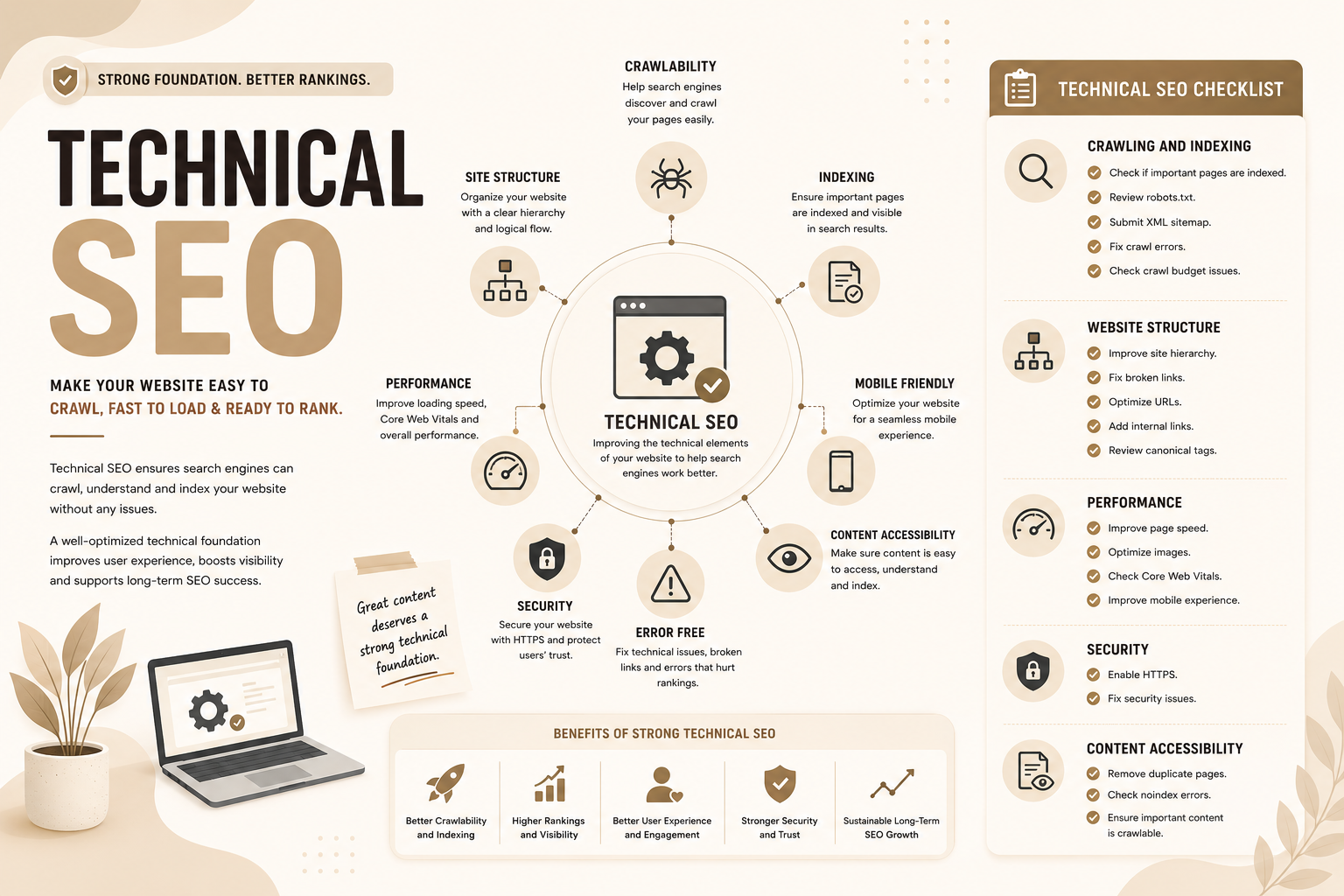
It includes areas such as website structure, page speed, mobile optimization, indexing, crawlability, site security, structured data, and fixing technical errors. By creating a strong technical foundation, websites can improve user experience, help search engines process content more effectively, and increase their chances of achieving better rankings. A well-optimized technical setup supports long-term SEO performance and ensures that valuable content reaches the right audience.
Table of Contents
- What Is Technical SEO?
- How Search Engines Crawl, Index, and Understand Websites
- Technical SEO Components
- Canonical Tags, XML Sitemaps and Robots.txt
- Website Performance, Page Speed, and Core Web Vitals
- Mobile SEO, HTTPS, Structured Data, and Modern Technical SEO Elements
- Technical SEO Audit: Checklist, Tools, and Common Issues
- Conclusion
- Frequently Asked Questions
What Is Technical SEO?
Technical SEO refers to the process of improving the technical foundation of a website so that search engines can crawl, understand, index, and rank its pages effectively.
In simple words:
Technical SEO makes your website easier for search engines to access and easier for users to use.
While content SEO focuses on creating valuable information and On-Page SEO focuses on optimizing individual pages, Technical SEO focuses on the infrastructure behind the website.
It includes areas such as:
- Website crawling
- Indexing
- Site speed
- Mobile optimization
- Website security
- XML sitemaps
- Robots.txt
- Structured data
- Website architecture
- Technical errors
A website can have excellent content, but if search engines cannot properly access or understand that content, rankings may suffer.
Technical SEO Analogy: Building a Strong Foundation
Think of a website like a physical store.
Your products, services, and content are what customers see inside the store.
This is similar to your website content.
But before customers can buy anything, the store needs:
- Proper entrances
- Clear pathways
- Good lighting
- Organized shelves
- A safe environment
Technical SEO works like the foundation and infrastructure of that store.
It ensures:
- Search engines can enter your website
- Pages are organized properly
- Visitors have a smooth experience
- Important information can be found easily
Why Technical SEO Matters?
Search engines want to provide the best possible results to users.
A website with technical problems may create issues such as:
- Pages not appearing in search results
- Slow loading times
- Poor mobile experience
- Crawling problems
- Duplicate content confusion
Technical SEO helps businesses improve:
- Search visibility
- Website performance
- User experience
- Organic traffic potential
For example:
A blog may contain the best answer for a search query, but if Google cannot crawl or index the page, users may never find it.
How Search Engines Crawl, Index, and Understand Websites
Before a website can rank, search engines need to discover (crawl) and understand (index) it.
Website Crawling: How Search Engines Discover Pages
Crawling is the process where search engines discover webpages.
Search engines use automated programs called:
- Crawlers
- Bots
- Spiders
Google uses Googlebot to explore websites.
These bots follow links and collect information about pages.
They discover:
- New pages
- Updated content
- Website changes
- New links
How Search Engines Find Your Pages
Search engines discover pages through:
Internal Links
Links between pages on your own website help crawlers find content.
Example:
A blog about SEO links to a technical SEO guide.
Google can follow that link and discover the page.
External Links
Links from other websites can also help search engines discover your content.
XML Sitemaps
A sitemap provides search engines with a list of important website pages.
What Is Crawl Budget?
Crawl budget refers to the amount of time and resources a search engine allocates to crawling a website during a specific period.
For small websites, crawl budget usually is not a major concern.
However, large websites with thousands or millions of pages need to manage it carefully.
Examples:
- Ecommerce websites
- News websites
- Marketplace websites
If search engines spend time crawling unnecessary pages, important pages may receive less attention.
Ways to improve crawl efficiency include:
- Removing duplicate pages
- Improving site structure
- Fixing broken links
- Using proper robots.txt rules
- Managing low-value pages
Website Indexing: How Search Engines Store Information
After crawling a page, search engines decide whether to add it to their index.
The index is a massive database containing information about webpages.
When a page is indexed, search engines analyze:
- Content
- Keywords
- Topic
- Images
- Links
- Structure
- Quality signals
A page must be indexed before it can appear in search results.
Common Crawling and Indexing Problems
Websites may face issues such as:
Blocked Pages
Search engines may be prevented from accessing pages.
Duplicate Content
Multiple similar pages can confuse search engines.
Poor Internal Linking
Important pages may not be discovered.
Noindex Errors
A page may accidentally contain instructions preventing indexing.
Technical SEO Components: The Key Areas You Need to Optimize
Technical SEO includes several areas that help websites perform better.
The major components include:
- Website architecture
- Crawling and indexing
- Performance optimization
- Security
- Mobile usability
- Structured data
Website Architecture
Website architecture refers to how pages are organized.
A good structure helps:
- Users navigate easily
- Search engines understand relationships between pages
Example:
A marketing website may have:
Marketing
→ SEO
→ Technical SEO
→ Technical SEO Audit Guide
This creates a logical hierarchy.
A well-organized website helps both users and search engines understand content.
Example:
Homepage
↓
Services
↓
SEO Services
↓
Technical SEO Service
This helps search engines understand importance and relationships.
Website Performance
Website performance affects both rankings and user experience.
Important areas include:
- Page speed
- Loading performance
- Server response time
- Image optimization
A slow website can increase bounce rates because users leave before interacting.
URL Structure
Good URLs are:
- Short
- Descriptive
- Easy to understand
Example:
Good:
example.com/technical-seo-guide
Poor:
example.com/page?id=45892
Security
Security is an important part of technical SEO.
HTTPS protects communication between users and websites.
Benefits include:
- User trust
- Data protection
- Better website credibility
Internal Linking
Internal links connect pages within your website.
Benefits include:
- Helping users discover content
- Helping search engines crawl pages
- Passing authority between pages
Example:
A technical SEO article may link to:
- SEO audit guide
- On-page SEO guide
- Website performance guide
Canonical Tag, XML Sitemaps and Robots.txt
Canonical tags, XML sitemaps and robots.txt are important technical SEO files that communicate with search engines.
Canonical Tags
Canonical tags help search engines understand the preferred version of a page when similar versions exist.
Example:
An ecommerce website may have multiple URLs for the same product.
Canonical tags help avoid duplicate content problems.
What Is an XML Sitemap?
An XML sitemap is a file that lists important pages on your website.
It helps search engines discover:
- New pages
- Updated pages
- Important content
A sitemap is especially useful for:
- Large websites
- New websites
- Websites with complex structures
What Is Robots.txt?
Robots.txt is a file that provides instructions to search engine crawlers.
It can tell crawlers:
- Which areas they can access
- Which areas they should avoid
Example:
A website may block crawling of:
- Admin pages
- Private areas
- Duplicate sections
Noindex Tags
A noindex tag tells search engines not to include a page in search results.
Useful for:
- Thank-you pages
- Internal search pages
- Duplicate pages
Common Sitemap and Robots.txt Mistakes
Avoid:
- Blocking important pages
- Adding incorrect URLs
- Forgetting to update sitemaps
- Accidentally preventing indexing
Website Performance, Page Speed, and Core Web Vitals
Website performance is a major part of modern technical SEO.
Users expect websites to load quickly.
Slow websites can reduce:
- Engagement
- Conversions
- User satisfaction
What Are Core Web Vitals?
Core Web Vitals are performance measurements used to evaluate user experience.
The main metrics are:
Largest Contentful Paint (LCP)
Measures how quickly the main content loads.
A faster LCP means users see useful content sooner.
Interaction to Next Paint (INP)
Measures how quickly a page responds to user interactions.
Example:
Clicking a button and seeing a response.
Cumulative Layout Shift (CLS)
Measures unexpected movement of page elements.
Example:
A button moving while a user tries to click it.
How to Improve Website Loading Speed
Ways to improve speed include:
- Compressing images
- Using better hosting
- Removing unnecessary scripts
- Optimizing code
- Using caching
Mobile SEO, HTTPS, Structured Data, and Modern Technical SEO Elements
Modern websites must work well across devices and search experiences.
Mobile Friendliness
Most users search from mobile devices.
A mobile-friendly website should have:
- Responsive design
- Readable text
- Easy navigation
- Fast loading
HTTPS
HTTPS provides a secure connection between users and websites.
It helps:
- Protect user data
- Build trust
- Improve security
Structured Data and Schema Markup
Structured data helps search engines understand content better.
Schema markup can provide additional information about:
- Products
- Reviews
- Events
- Articles
- Businesses
This can improve visibility through rich results.
JavaScript SEO
Modern websites often use JavaScript to create interactive experiences.
However, search engines need to properly access JavaScript-based content.
Problems can occur when:
- Content loads only after user actions
- Important information is hidden
- Rendering fails
JavaScript SEO ensures important content remains accessible.
Technical SEO Audit: Checklist, Tools, and Common Issues
A technical SEO audit helps identify website problems that may affect rankings.
Technical SEO Checklist
Crawling and Indexing
- Check if important pages are indexed to ensure that valuable website pages can appear in search engine results.
- Review robots.txt to make sure search engines are not blocked from accessing important sections of your website.
- Submit an XML sitemap to help search engines discover and understand the structure of your website more efficiently.
- Fix crawl errors by identifying and resolving issues that prevent search engines from accessing or processing your pages.
- Check crawl budget issues to ensure search engines are spending their resources efficiently on the most important pages.
Website Structure
- Improve site hierarchy by creating a clear and logical structure that helps both users and search engines navigate your website.
- Fix broken links to prevent poor user experience and ensure search engines can properly move between pages.
- Optimize URLs by creating short, descriptive, and search-friendly URLs that clearly communicate page topics.
- Add internal links to connect related pages and help distribute authority throughout your website.
- Review canonical tags to prevent duplicate content issues and guide search engines toward the preferred version of a page.
Performance
- Improve page speed to provide faster loading times and create a better experience for users and search engines.
- Optimize images by reducing file sizes, using proper formats, and adding relevant image information to improve performance.
- Check Core Web Vitals to measure important user experience factors such as loading speed, responsiveness, and visual stability.
- Improve mobile experience by ensuring your website works smoothly and displays properly across different devices.
Security
- Enable HTTPS to protect user data, improve website security, and build trust with visitors and search engines.
- Fix security issues by regularly monitoring vulnerabilities, outdated software, and potential risks affecting your website.
Content Accessibility
- Remove duplicate pages to avoid content confusion and help search engines identify the most valuable version of your content.
- Check noindex errors to ensure important pages are not accidentally hidden from search engine results.
- Ensure important content is crawlable so search engines can access, understand, and index your most valuable information.
Technical SEO Tools
Useful tools include:
Google Search Console
Helps monitor:
- Indexing
- Search performance
- Technical issues
Google PageSpeed Insights
Analyzes:
- Speed
- Core Web Vitals
- Performance issues
Screaming Frog
Useful for:
- Technical audits
- Broken links
- Metadata checks
Semrush and Ahrefs
Useful for:
- Site audits
- SEO monitoring
- Competitor analysis
Common Technical SEO Issues
Some common problems include:
1. Crawlability & Indexation
Accidental Disallows: Misconfigurations in your robots.txt file can accidentally block search engine crawlers (like Googlebot) from reaching your most important pages.
Noindex Directives: Leaving noindex meta tags on live pages prevents them from showing up on search engine results pages (SERPs).
XML Sitemap Errors: Missing, outdated, or unsubmitted XML sitemaps make it harder for search engines to discover your new content.
Orphan Pages: Pages lacking any internal links are invisible to crawlers and never get indexed.
2. Architecture & Duplication
Missing or Incorrect Canonical Tags: Without proper rel=canonical tags, duplicate content on parameters or sorting URLs dilutes your search rankings across multiple competing pages.
Excessive Redirect Chains: Redirect chains (e.g., Page A -> Page B -> Page C -> Page D) waste “crawl budget” and slow down indexing.Broken Links & 404 Errors: Dead internal links frustrate users and block search bots from navigating your website.
3. Performance & Experience
Slow Page Speed (Core Web Vitals): Poor metrics like slow Largest Contentful Paint (LCP) or high Cumulative Layout Shift (CLS) lead to higher bounce rates and lower mobile rankings.Non-Responsive Design: With mobile-first indexing, sites that do not format correctly on mobile devices or have tap targets that are too small suffer direct ranking penalties.Mixed HTTP/HTTPS Content: If your site isn’t fully secure (e.g., images loading over HTTP on an HTTPS site), it hurts user trust and causes minor ranking drops.
4. Metadata & Markup
Missing/Duplicate Meta Tags: Overly long, short, or missing Title Tags and Meta Descriptions ruin click-through rates.
Lack of Structured Data: Missing schema markup prevents your site from standing out on SERPs with rich snippets and appearing in AI-driven search answers
Conclusion
Technical SEO is the foundation that allows search engines and users to access, understand, and interact with your website.
A website with great content still needs strong technical health to perform well.
The key areas of Technical SEO include:
- Crawling
- Indexing
- Site structure
- Speed
- Mobile optimization
- Security
- Structured data
As search evolves with AI-powered experiences, technical SEO will continue becoming more important because websites need to provide accurate, accessible, and well-structured information for both traditional search engines and new AI-driven search systems.
Technical SEO is not about making a website complicated.
It is about making a website easier for everyone to use.
Frequently Asked Questions
What is Technical SEO?
Technical SEO is the process of improving the technical foundation of a website so search engines can crawl, index, and rank it effectively.
Is Technical SEO hard?
Technical SEO can involve advanced concepts, but the basics are manageable for beginners. Many improvements involve simple fixes like improving speed, fixing broken links, and improving website structure.
What are the main components of Technical SEO?
Main components include:
- Crawling
- Indexing
- Site architecture
- Speed optimization
- Mobile SEO
- Security
- Structured data
How do I optimize webpages for Technical SEO?
Improve:
- Page speed
- Mobile experience
- URL structure
- Internal linking
- Crawl accessibility
- Technical errors
What are Core Web Vitals?
Core Web Vitals are performance metrics that measure user experience, including loading speed, responsiveness, and visual stability.
How do I perform a Technical SEO audit?
A Technical SEO audit involves checking:
- Crawling
- Indexing
- Speed
- Mobile usability
- Website structure
- Technical errors
What are the best Technical SEO tools?
Popular tools include:
- Google Search Console
- Google PageSpeed Insights
- Screaming Frog
- Semrush
- Ahrefs
How can I increase my website loading speed?
Improve loading speed by:
- Optimizing images
- Improving hosting
- Removing unnecessary scripts
- Using caching
- Improving code efficiency
What is an XML sitemap?
An XML sitemap is a file that helps search engines discover important pages on a website.
What is robots.txt?
Robots.txt is a file that gives instructions to search engine crawlers about which areas of a website they can or cannot access.