12 Hacks for Writing Effective Titles for Blogs and Articles
Key Takeaways
- Effective titles accurately describe content, incorporate relevant keywords naturally, and encourage clicks without relying on clickbait.
- SERP research reveals search intent, competing formats, user phrasing, and how Google displays titles based on pixel width.
- SEO titles should prioritize important words or keywords early, remain concise, and differ from potentially longer, more creative H1 headings.
- Clear, unique, benefit-driven titles that address specific problems or natural questions give readers stronger reasons to click.
A well-written title is often the first thing readers notice before deciding whether to click on your content. Whether it appears as a title link on a search engine results page (SERP), a <title> element in the HTML, or as an H1 heading on your webpage, the title plays a major role in attracting visitors and setting expectations.
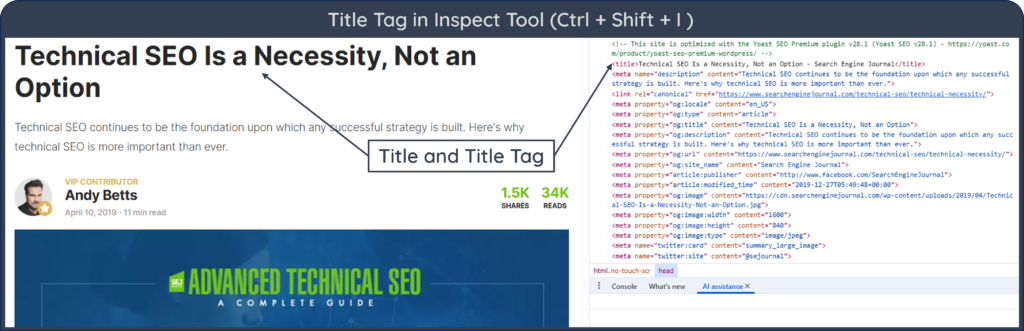
Writing an effective title is a core part of on-page SEO. Titles should accurately describe the content, include relevant keywords and encourage users to learn more without resorting to clickbait.
Meta Title and Title Tag
The term “meta title” is widely used in SEO for title tag, but technically the page title is created with the HTML <title> element, not a <meta> tag. The title therefore provides information about the document, but it is not a meta tag and should not be confused with metadata delivered through <meta> elements, such as the meta description or robots directives.
The SEO title (meta title) and H1 heading for a web page can be different, provided both accurately describe the page and remain closely aligned with its main topic. For example, a webpage about email marketing might use this title element:
<title>Email Marketing Guide: Strategy, Tools, and Best Practices</title>
Here:
⇒ Title element: <title>Email Marketing Guide: Strategy, Tools, and Best Practices</title> — It is complete HTML element, comprising of the opening tag, title text, and closing tag.
⇒ Opening tag: <title> — Used at the start of the title element.
⇒ Closing tag: </title> — Used at the end of the title element.
⇒ Title: Email Marketing Guide: Strategy, Tools, and Best Practices — It is the text inside the title element. It is often called the page title, SEO title, or meta title in SEO.
⇒ Title tag: In SEO, title tag usually refers to the complete title element. However, in strict HTML terminology, <title> and </title> are the individual tags, while the complete structure is the title element.
The text inside the element, Email Marketing Guide: Strategy, Tools, and Best Practices, is the page title that can appear in the browser tab and may be used by search engines when generating a title link.
The page’s visible H1 heading can be different, for example: <h1>How to Build an Effective Email Marketing Strategy</h1>
Research shows that certain title-writing techniques consistently perform better than others. For example, a headline-preference study by Conductor found that 36% of respondents preferred number-based headlines among the five formats tested.
Similarly, a Backlinko analysis of four million Google search results found that titles between 40 and 60 characters had the highest CTR in its dataset.
Table of Contents
12 Title Hacks
The following best practices will help you create titles that are both optimized for search and appealing to readers.
1. Research the Search Engine Results Page (SERP) Before Writing
Before writing a title, search your primary keyword on Google and carefully examine the first page of results. Reviewing current search results can provide useful clues about dominant search intent, common page formats and how competing pages position their titles.
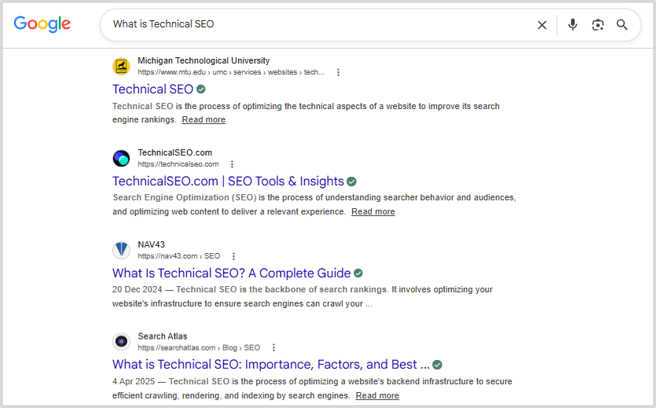
Also pay attention to how titles actually appear in search results. Google displays titles based on available pixel width rather than a strict character count, meaning longer titles may be truncated even if they contain fewer than 60 characters. Thus, studying the SERP gives you valuable insight into both user intent and the type of titles Google prefers to display.
2. Use Numbers to Promise Structured Content
Numbers immediately make a title more organized and easier to understand. This way, readers know exactly what to expect, whether it’s 5 Tips, 10 Best Tools, or 12 Ways. More importantly, numbered titles also create the impression that the content is structured, actionable, and easy to scan. For example, 7 Proven Ways to Improve Email Open Rates.
3. Keep SEO Titles Within Google’s Display Limits
Although there is no official character limit, keeping your SEO title around 50–60 characters usually prevents unnecessary truncation in search results. More importantly, Google truncates title links according to the available display width, which is usually measured as pixel width, not as the number of characters. For example, narrow letters such as i occupy much less space than wider letters like W or M. Two titles with exactly the same character count may therefore display differently in search results.
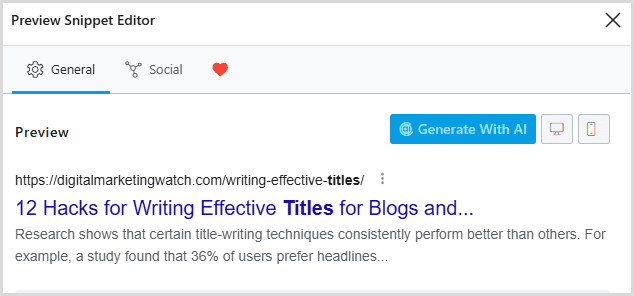
Most SEO plugins, including Yoast SEO, Rank Math, and SEOPress, provide SERP previews that estimate how a title may appear in search results.
4. Make the First Few Words Count
Readers often decide within seconds whether a result matches their search. For that reason, place the most important information in the beginning so that readers can quickly understand the subject of the page. Also, in case Google shortens your title or readers quickly scan search results, the primary message remains visible.
For example, instead of writing Everything You Need to Know About Learning Technical SEO as a Beginner, consider Technical SEO Guide for Beginners: Everything You Need to Know.
5. Place the Primary Keyword Near the Beginning
Include the primary keyword naturally within the title, preferably toward the beginning whenever possible. This immediately signals relevance to both readers and search engines. For example, if your target keyword is Blog Titles, you can use Blog Titles: 12 Best Practices for Better SEO as your title. At the same time, it is important to avoid forcing keywords into awkward phrases.
6. Understand the Difference Between an H1 Heading and a Meta Title
Many beginners assume that the page title and meta title are exactly the same. While they can be identical, they serve different purposes and can even be different.
The H1 heading is the main headline visitors see after opening your page. It introduces the article and can be longer, more descriptive, or slightly more creative.
The <title> element, also called the title tag, is an HTML element primarily used by search engines and browsers. It usually appears as the clickable blue link on the search engine results page (SERP) and should remain concise for maximum visibility.
<title> Element)
Understanding this distinction allows you to write engaging on-page headlines while still creating concise, search-friendly titles that support click-through rates.
7. Keep Your H1 Creative and Optimize the Title Separately
One common mistake is forcing your on-page H1 heading to fit within Google’s search result limits. Since visitors see the H1 after opening your page, it can be slightly longer, more descriptive, or even more engaging than the SEO title.
To make the most of both the H1 heading and the title tag, you can use an SEO plugin such as Yoast SEO, Rank Math, or SEOPress to write a dedicated SEO title that describes the page clearly in browsers and search results. This gives you the flexibility to create an informative H1 for readers while maintaining a concise, keyword-focused title for better visibility in search results.
For example:
- H1: Everything You Need to Know About Writing Better Blog Titles for Higher Search Rankings
- Title: How to Write Better Blog Titles for SEO
This way, you can improve both user experience and search appearance.
8. Remove Unnecessary Words to Save Valuable Space
Every word should earn its place, especially when writing titles. Therefore, remove redundant phrases, unnecessary repetition and boilerplate when a title becomes too long. Keep articles, conjunctions and prepositions when they are needed for natural meaning. Small adjustments like these help you include more meaningful keywords without exceeding Google’s display limits.
9. Write Titles that Answer Search Queries Clearly
Most people search Google to solve a problem or answer a question. Your title should immediately reassure them that your article provides exactly what they are looking for.
Before finalizing a title, perform a quick search using your target keyword. Look at Google’s suggestions, the “People Also Ask” section and the titles of top-ranking organic pages. These reveal how users phrase their searches and what information they expect to find.
Instead of writing vague titles such as Understanding Website Optimization, consider How to Optimize Your Website for Better SEO Rankings.
10. Address a Specific Problem or Pain Point
Readers are more likely to click when they believe your article solves a real problem. Rather than simply describing a topic, explain the benefit they will receive after reading your content.
Compare these examples:
- Email Marketing Tips
- 10 Email Marketing Tips to Increase Open Rates
- How to Reduce Email Unsubscribe Rates in 7 Simple Steps
The second and third titles promise a clear outcome, making them more relevant to readers with a specific goal.
11. Make Every Title Unique
Each important page should have a distinctive title that accurately describes its content. Repeated or boilerplate titles make pages harder for users to distinguish and give search engines less useful information when generating title links.
Uniqueness also applies to competing search results. You don’t need to copy the wording of pages already ranking on Google. Instead, identify what is missing and present your content from a slightly different angle while still matching search intent.
For example, if several pages use SEO Tips for Beginners, you could write 15 Practical SEO Tips Every Beginner Can Apply Today.
The objective here is not to be different for the sake of it, but to provide a clearer and more compelling reason for users to click.
12. Ask Questions That Match Natural Searches
Many informational searches are naturally phrased as complete questions, particularly when users want direct explanations. Question-based titles can align well with these search patterns.
Examples include:
- How Do Titles Affect SEO?
- Why Is My Website Not Ranking on Google?
- What Is the Difference Between an H1 and a Title Tag?
Question titles can work well when the query itself is naturally phrased as a question, particularly for educational content, beginner guides and frequently asked questions.
Examples of Effective Blog and Article Titles
These examples demonstrate a common pattern: they are clear, specific, benefit-driven, and closely aligned with what users are likely to search for.
Frequently Asked Questions
How long should a blog title be?
There is no fixed Google character limit, but most blog titles perform well when they are descriptive without being unnecessarily long. Many publishers use roughly 50–60 characters as an editorial target, but Google may shorten title links according to the available display width.
Should every blog title include the primary keyword?
Yes, whenever it fits naturally. Including the primary keyword helps search engines understand the page’s topic while also reassuring users that your content matches their search intent. Avoid forcing keywords into awkward phrases.
What is the difference between a blog title and a title tag?
A blog title is usually the H1 heading displayed on your webpage, while the <title> element (title tag or meta title) is the title shown on search engine results pages. They can be identical, but many websites use a more concise title while keeping the H1 slightly longer and more descriptive.
Can I update a title after publishing an article?
Yes. Updating titles is a common SEO practice, especially if a page has a low click-through rate or targets new search intent. Google Search Console can help identify pages with high impressions but relatively low CTR. These pages may be candidates for title testing, provided ranking position, query intent and SERP features are also considered.
Are catchy titles better than clear titles?
Not necessarily. A catchy title may attract attention initially, but clarity usually produces better long-term results. Readers should immediately understand what the article offers. A clear, honest title that solves a specific problem is more effective than one relying solely on curiosity or exaggerated language.