Key Takeaways
- Open Graph is a metadata protocol that gives platforms explicit information for representing webpages in shared link previews.
- Core properties include og:title, og:type, og:image, and og:url, with additional tags supporting descriptions, site names, locales, and image details.
- Open Graph improves preview control, branding consistency, and potentially referral traffic, but each platform ultimately controls the displayed result.
- Open Graph primarily affects social-sharing presentation rather than rankings, although Google may use properties such as og:title for search-result title links.
Open Graph is a metadata protocol originally introduced by Facebook in 2010 that allows webpages to provide structured information about how their content should be represented when shared on social platforms, messaging services, and other applications. It was launched at Facebook’s F8 conference as a way to represent webpages as richer objects within a social graph.
Without Open Graph metadata, a platform may have to infer a page’s title, description, and representative image from other information it finds. This can produce an unsuitable image, missing text, or an inconsistent link preview. Open Graph provides explicit information that platforms can use when building the preview, although each service ultimately controls how the shared link is displayed.
Open Graph metadata is added as <meta> elements inside the <head> section of a webpage’s HTML. Open Graph primarily describes how a webpage should be represented when it is shared, while Schema.org markup describes entities and properties for machine interpretation and supported search features.
Twitter Cards
Many platforms and applications can use Open Graph metadata when generating link previews. Sites can also provide Twitter Card metadata, such as <meta name="twitter:card" content="summary_large_image">, for X-specific link previews. Websites commonly provide Open Graph properties alongside Twitter Card properties when more control over X previews is required.
Important Open Graph Tags
The Open Graph specification defines four basic properties for representing an object: og:title, og:type, og:image, and og:url. Additional properties can provide descriptions, site names, locales, image dimensions, and other information.
og:title
og:title specifies the title that represents the page when its Open Graph information is used.
<meta property="og:title"
content="10 Best Running Shoes for Marathons">
The social title can match the page’s normal title or be customized for sharing, depending on the publishing system and platform.
og:type
og:type identifies the type of object represented by the page. Common values include website, article, book, and video.movie.
The selected type can also determine which additional Open Graph properties are appropriate.
<meta property="og:type" content="article">og:image
og:image provides the URL of an image representing the page. Because the image commonly occupies a large part of a social preview, selecting a clear and relevant visual can influence how recognizable and informative the shared link appears.
<meta property="og:image"
content="https://example.com/images/running-shoes.jpg">
The protocol also supports properties such as og:image:width, og:image:height, and og:image:alt. The specification recommends providing og:image:alt when an Open Graph image is specified.
og:url
og:url identifies the canonical URL that represents the Open Graph object.
<meta property="og:url"
content="https://example.com/running-shoes/">
The Open Graph specification describes this URL as the object’s permanent identifier within the graph.
Other Useful Open Graph Tags
og:descriptionprovides a short description of the page. The Open Graph specification describes it as a one- or two-sentence description but does not impose a universal character limit.og:site_nameidentifies the overall website or publication name.og:localeidentifies the content locale using a format such asen_USoren_GB.
A more complete implementation might look like this:
<head>
  <meta property="og:title"
        content="10 Best Running Shoes for Marathons">

  <meta property="og:type"
        content="article">

  <meta property="og:image"
        content="https://example.com/running-shoes.jpg">

  <meta property="og:image:alt"
        content="Several marathon running shoes">

  <meta property="og:url"
        content="https://example.com/running-shoes/">

  <meta property="og:description"
        content="A guide to choosing running shoes for marathon training.">

  <meta property="og:site_name"
        content="Example Running">

  <meta name="twitter:card"
        content="summary_large_image">
</head>
Open Graph Image Size and Best Practices
The Open Graph protocol itself does not specify one universal image size. Individual platforms decide how preview images are displayed and may crop, resize, or reject images according to their own requirements.
A landscape image of approximately 1.91:1 is a practical choice for many social-sharing contexts. LinkedIn currently describes a 1.91:1 preview frame at 1200 × 627 pixels, although LinkedIn can vary the layout used for organic link previews.
For general cross-platform use, an image around 1200 × 630 pixels is therefore a reasonable working size, but it should not be described as an Open Graph requirement.
Useful practices include:
- choosing a clear image directly related to the page;
- keeping important text, faces, or logos away from the extreme edges in case a platform crops the image;
- compressing files sufficiently for efficient fetching;
- providing an absolute, publicly accessible image URL;
- adding
og:image:alt; - supplying image width and height where useful.
File-size and minimum-dimension rules vary between platforms, so figures such as “8 MB maximum” or “600 × 315 minimum” should not be treated as universal Open Graph specifications.
Why Open Graph Is Important
Open Graph primarily improves the presentation and predictability of shared links rather than organic search rankings.
Improves Social Preview Control
Explicit metadata gives platforms preferred information for the preview title, description, image, URL, and content type. Without it, the service may select information from elsewhere on the page.
The final preview is still controlled by the platform. Wix, for example, notes that social networks apply their own criteria and are not guaranteed to use every configured Open Graph value.
Supports Consistent Branding
A dedicated og:image, title, and description can help maintain a recognizable visual identity when articles, products, or landing pages are shared. This is more reliable than depending on a platform to choose an arbitrary page image automatically.
Can Support Referral Traffic
A clear and informative link preview can make shared content easier to understand before it is opened and may encourage more clicks. The effect on click-through rate varies by platform, topic, audience, and presentation, so Open Graph metadata does not guarantee additional traffic.
Open Graph and SEO
Open Graph tags are primarily social-sharing metadata. Google documents og:title as one source it may use when generating title links, but it does not document Open Graph metadata as a standalone ranking signal. Missing Open Graph properties therefore do not automatically cause lower organic rankings.
However, some Open Graph information can be useful to Google in other ways. Google added og:title as one of the possible sources it may use when generating title links in Search, for example. This affects search-result presentation rather than providing an Open Graph ranking boost.
How to Add and Edit Open Graph Tags
Open Graph tags can be written manually, but modern CMS platforms and SEO plugins often generate them automatically.
WordPress
WordPress sites can use SEO plugins such as Rank Math or Yoast SEO to manage social metadata without manually editing HTML.
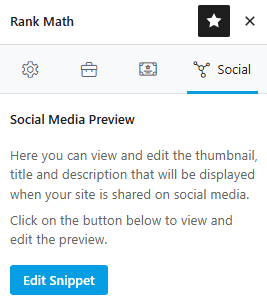
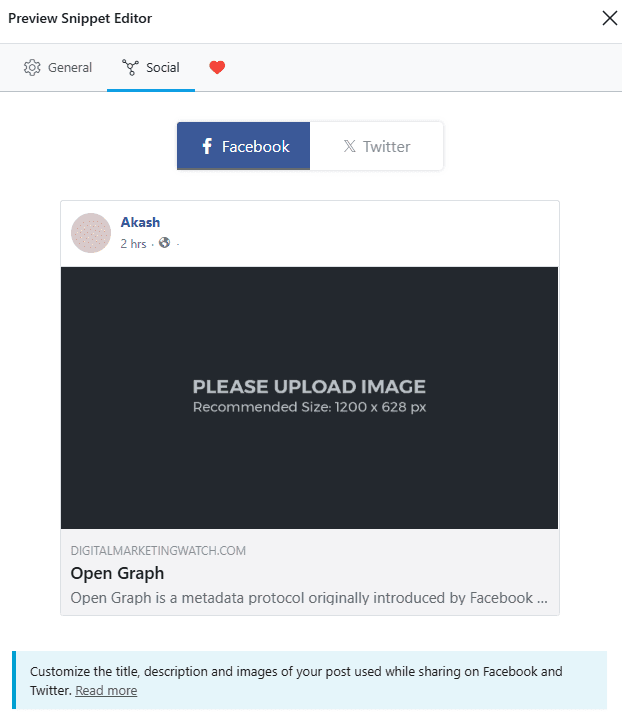
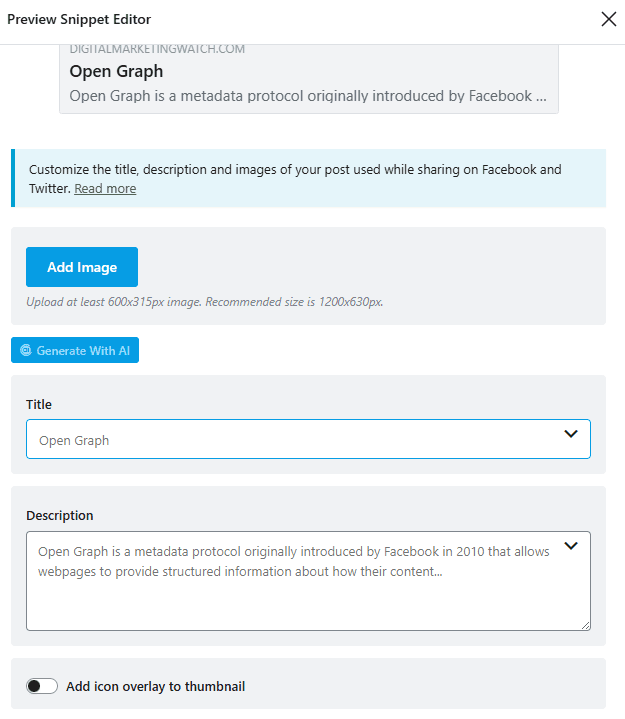
With Rank Math, the post or page editor includes a Social tab where Facebook preview information such as the title, description, and image can be customized. Rank Math then outputs the corresponding Open Graph metadata.
Shopify
Shopify automatically handles much of the social metadata for its themes. Free Shopify themes use featured images for products, collections, and blog posts, while a store-level social sharing image can act as a fallback where no featured image is available.
The default social image can be managed through the store’s Online Store preferences and social sharing settings, although theme-specific settings may also affect the image Shopify supplies.
Wix
Wix provides dedicated Social Share settings for og:title, og:description, and og:image. Current dashboard controls are available through the site’s SEO settings, and page-specific settings can also be edited from the Wix editor.
Squarespace
Squarespace provides an Alternate Social Sharing Image within page settings. Current page settings include a Social section where a page-specific image and preview can be managed.
Custom Websites
On a custom-built site, Open Graph properties can be added directly between the opening <head> and closing </head> tags of each relevant HTML document or generated programmatically through the site’s templates.
How to Check and Troubleshoot Open Graph Tags
Open Graph tags can first be checked in the page source. Searching the HTML for terms such as og:title, og:image, og:description, and og:url confirms whether the properties are being delivered. Platform-specific preview tools are also useful.
Meta Sharing Debugger can fetch a URL and show the information Meta detected. After the metadata changes, using Scrape Again requests a fresh fetch of the URL rather than relying on the previously stored preview information.
LinkedIn Post Inspector can be used to inspect and refresh LinkedIn’s information for a shared URL. This is particularly useful when an older image or title continues to appear.
Third-party tools such as OpenGraph.xyz, OpenGraph.to, and DebugBear’s Open Graph Checker can also inspect metadata and simulate link previews. These are useful diagnostic tools, but they cannot guarantee that every social network will render a preview identically.
Frequently Asked Questions
What is the ideal image size for Open Graph previews?
Open Graph has no universal required image dimensions. A landscape image around 1200 × 630 pixels with an approximately 1.91:1 aspect ratio is a practical cross-platform choice, while individual platforms may publish their own requirements. LinkedIn currently recommends 1200 × 627 pixels for URL preview images.
Why is an updated Open Graph image not showing on social media?
The platform may still have an older image or metadata stored in its own cache. First confirm that the webpage is serving the new og:image, then use an available platform debugging or inspection tool to request a fresh fetch of the URL.
Will missing Open Graph tags hurt Google rankings?
No. Open Graph metadata is primarily used for link presentation and is not a requirement for ranking in Google Search. Google may use individual Open Graph properties such as og:title when generating certain search-result elements, but this is not the same as a ranking boost.
What happens if Open Graph tags are omitted?
A platform may try to infer a title, description, or image from other page metadata or visible content. The resulting preview may therefore be less predictable and may not use the preferred branding or imagery.
Is manual coding required for WordPress or Shopify?
Usually not. WordPress SEO plugins can generate Open Graph tags from social settings, while Shopify themes and platform settings handle much of the metadata automatically. Manual HTML is generally needed only when a custom implementation or additional control is required.