Key Takeaways
- Schema markup adds machine-readable Schema.org labels to webpage code, clarifying entities, properties, and relationships for search engines.
- It can support rich-result eligibility, entity identification, and more informative listings, but does not directly improve rankings or guarantee enhancements.
- Schema markup may aid content interpretation for AI systems, but no special markup is required for Google AI Overviews or AI Mode.
- Implementation requires matching visible page information, choosing supported types, and validating markup with relevant testing and monitoring tools.
Schema markup is structured data added to a webpage’s code using the Schema.org vocabulary to describe entities, their properties, and relationships. It acts as a digital labeling system and provides search engines with standardized, machine-readable information about what the content represents.
Schema markup can be implemented in several formats, most commonly JSON-LD, Microdata, and RDFa. Google generally recommends JSON-LD because it is easier to add, manage, and update without altering the page’s content markup.
Structured Data and Schema.org
Structured data organizes information by matching each item with a clear label and value. It works like a spreadsheet, where details such as a book’s title, author, and price are placed in separate fields and then added to a webpage’s code.
Austin, TX 78701, US
Search engine crawlers and AI models can infer meaning from text, but they may not always identify the exact relationships between different pieces of information. Without structured data, a crawler might see “$199” on a page and guess if it is a product price, a donation goal, or another amount. Structured data reduces this ambiguity by providing search engines with clear, machine-readable labels.
Schema markup adds these structured facts to a webpage so that search engines can identify the meaning and purpose of its content more accurately.
As a collaborative project founded by Google, Microsoft, Yahoo, and Yandex, Schema.org is a shared vocabulary that provides standard types and properties for describing information such as articles, products, organizations, local businesses, events, recipes, and people. Schema markup uses this public dictionary to add structured data to a page.
How Schema Works
Schema markup works by adding Schema.org types and properties to a webpage’s HTML in a supported structured data format. Rather than relying only on search engines to infer meaning from the visible text, schema markup explicitly labels important information in the page code. Search engines can read these labels to identify what the content represents and understand important details about it.
Schema markup can be implemented through JSON-LD, Microdata, or RDFa. In JSON-LD, a script block uses Schema.org types and properties to describe the entities and information represented on a page. For example, it can identify content as an article, product, or organization and specify details such as its name, author, price, or address. Google generally recommends JSON-LD as it is easy to implement and maintain.
Code Example: Local Business Schema (JSON-LD)
<script type="application/ld+json">

{

  "@context": "https://schema.org",

  "@type": "AutoRepair",

  "name": "Apex Auto Repairs",

  "image": "https://example.com/images/apex-auto-repairs.jpg",

  "telephone": "+1-512-555-0147",

  "priceRange": "$$",

  "address": {

    "@type": "PostalAddress",

    "streetAddress": "1250 West Main Street",

    "addressLocality": "Austin",

    "addressRegion": "TX",

    "postalCode": "78701",

    "addressCountry": "US"

  }

}

</script>
This JSON-LD script can be placed in the page <head> or <body> without changing the visible content for readers. However, the information described in the markup should generally match content that is also visible on the page.
What This Example Does
The code identifies Apex Auto Repairs as a physical auto repair business in Austin, Texas. It provides machine-readable details such as the business name, image, telephone number, price range, and postal address.
The markup helps search engines connect the business with its correct type, contact information, and geographic location. It may help search engines better understand the business in search and mapping systems, but it does not guarantee higher local rankings or enhanced search results.
SEO Benefits of Schema Markup
Schema markup can help search engines understand a webpage more clearly and make its content eligible for enhanced search features. It helps:
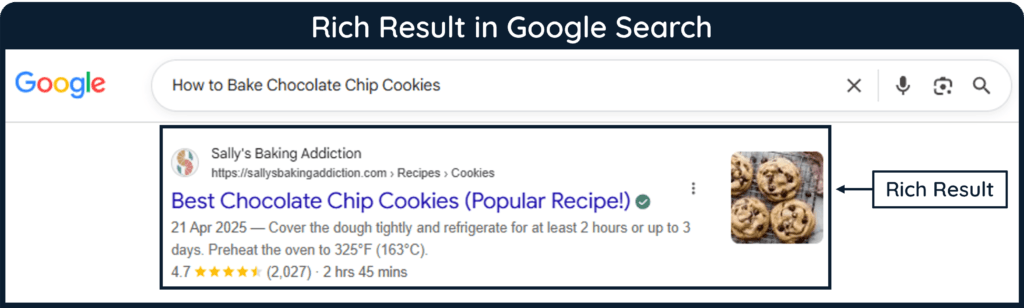
- Support Rich Results: Schema markup makes eligible content available for enhanced search appearances such as review information, product prices, event details, and larger images.
- Improve Organic CTR: Rich results can make listings more informative and noticeable, which may improve click-through rates, although results vary by website and search feature.
- Support Entity Identification: Schema markup helps search engines connect authors, organizations, products, and other entities through consistent machine-readable information.
- Support Relevant Search Experiences: It can help Google classify page content and use it for relevant supported search features.
- Improve Engagement: More relevant search visibility may attract interested users, which might help them discover more engaging content.
Schema markup is not a direct ranking factor, and valid markup does not guarantee higher rankings or rich results. Its primary SEO value is helping Google understand page content and making eligible pages available for supported search features.
Does Schema Markup Help with AI Visibility?
Schema markup provides clear, machine-readable information about entities, properties, and relationships. This structure may support accurate content interpretation, but it cannot be confirmed that generative search systems rely heavily on schema markup or that it directly increases citation probability.
In other words, schema markup does not guarantee citations or higher AI visibility. More importantly, Google has stated that no special Schema.org markup is required for AI Overviews or AI Mode.
Common Schema Types
Schema.org provides many types for describing webpage content, but Google supports rich results for only selected types. Correct markup can make content eligible for enhanced search features, although Google does not guarantee that a rich result will appear.
- Organization: Describes an organization’s name, logo, address, contact information, and identifiers. This information can help Google distinguish the organization and may influence its displayed logo or Knowledge Panel.
- Article: Identifies articles, news reports, and blog posts and can specify information such as the headline, author, publication date, modification date, and featured image.
- Local Business: Provides details such as a business’s address, telephone number, operating hours, geographic coordinates, and departments.
- Review and Aggregate Rating: Describes individual reviews or combined ratings and may make eligible content appear with review stars and rating information. Special restrictions apply to reviews published by organizations about themselves.
- Product Snippet and Merchant Listing: Describes product information such as price, availability, ratings, shipping details, and return policies, which may appear in richer product results.
- Event: Identifies an event’s name, date, location, attendance format, and ticketing information. Eligible pages may appear in Google’s event search experience.
- Breadcrumb: Shows the position of a page within a website’s hierarchy, such as Home > Laptops > Gaming, and may display this navigational path in search results.
- Movie: Describes details such as a movie’s title, director, and image. Eligible movie lists may appear in a Google Search carousel.
- Job Posting: Provides information about an available position, including the employer, location, salary, employment type, and remote-work details. It can make the listing eligible for Google’s job-search experience.
- Video: Describes a video’s title, description, thumbnail, duration, and upload date. Supported markup may also help Google identify video key moments.
- HowTo: Remains a valid Schema.org type for describing step-by-step instructions, tools, supplies, and estimated costs. However, Google no longer displays HowTo rich results.
Are FAQs and Tables of Contents Also Schema Markup?
- FAQs: FAQPage remains an official Schema.org type for describing pages containing questions and answers. However, Google stopped showing FAQ rich results in May 2026, so this markup no longer creates FAQ enhancements in Google Search.
- Tables of Contents: A standard article table of contents does not have a dedicated Google rich-result schema type and is normally created with HTML anchor links such as
<a href="#section">. Schema.org does provide HyperToc for complex media objects such as videos and audio files, but it is not the usual markup for an article table of contents.
Schema.org Type vs. Google Rich Result
A schema type can remain valid in Schema.org even if Google no longer uses it for a rich result. For example, FAQPage and HowTo remain Schema.org types, but Google no longer displays FAQ or HowTo rich results.
Implementation, Testing, and Validation
Proper implementation, testing, and monitoring help ensure that schema markup is valid, readable, and eligible for supported search features.
How to Generate and Add Schema Manually
Schema markup can be written manually in JSON-LD by following the vocabulary on Schema.org and the requirements in Google’s structured data guides. Schema.org explains the available types and properties, while Google specifies which markup it supports for particular search features.
Tools for Easier Implementation
- Google Structured Data Markup Helper: The free Markup Helper allows a webpage URL or HTML code to be entered and visible elements, such as names, prices, and publication dates, to be labeled. It then generates an example containing JSON-LD or Microdata that must be reviewed and added to the website.
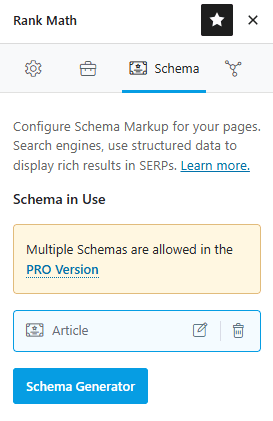
- WordPress Plugins: Plugins such as Rank Math SEO, Yoast SEO, and Schema Pro can generate and add structured data based on information entered into their settings or schema fields. Available schema types and customization options depend on the plugin and plan.
- AI Assistants: Tools such as ChatGPT or Claude can draft JSON-LD from visible webpage information. However, AI-generated markup may contain incorrect types, unsupported properties, or invented details, so it should always be reviewed against Schema.org and Google’s guidelines before publication.
Verifying and Tracking Code Issues
Verifying and tracking code issues helps identify implementation errors, monitor their impact, and confirm that technical fixes are working as intended.
- Instant Validation: Google’s Rich Results Test checks whether a page is eligible for Google-supported rich results and identifies critical errors or recommended-property warnings. The Schema Markup Validator checks general Schema.org markup, including JSON-LD, Microdata, and RDFa, and identifies syntax problems.
- Google Search Console Monitoring: After publication, supported markup can be monitored through the rich-result reports in Google Search Console. These reports show valid and invalid structured data items, identify critical and noncritical issues, and allow fixes to be validated. A separate report appears for each supported rich-result type that Google detects on the property. Because reports contain sample URLs rather than every affected page, the Rich Results Test can validate a specific page, while the URL Inspection tool can show information about Google’s indexed version.
Frequently Asked Questions
Does schema markup improve Google rankings directly?
No. Schema markup is not a direct ranking factor, but it can help search engines understand page content more clearly and may make eligible pages available for enhanced search features.
Does adding schema markup guarantee a rich result?
No. Correct structured data can make a page eligible for certain rich results, but Google decides whether an enhanced result is shown based on factors such as relevance, quality, and search context.
Which schema markup format should I use?
JSON-LD is usually the preferred option because it keeps structured data separate from visible HTML and is easier to maintain. Microdata and RDFa are also valid formats when implemented correctly.