Technical SEO: Crawling, Indexing and Website Performance
Key Takeaways
- Technical SEO improves the technical foundation required for search engines to discover, render, process, and index webpages efficiently.
- Crawlability and indexing are distinct: search engines may access a page without storing it or selecting it for search results.
- Canonical tags, XML sitemaps, and robots.txt serve different purposes and should provide consistent, nonconflicting signals.
- Performance, mobile usability, HTTPS, structured data, and JavaScript accessibility support both search visibility and user experience.
Technical SEO improves the underlying structure and performance of a website so search engines can efficiently access, process, understand, and index its content. It is a subset of search engine optimization that helps optimize a website for speed, security, mobile-compatibility and accessibility.
For example, a marketing website may publish an excellent guide, but technical issues can limit its organic visibility. A noindex directive can prevent the page from appearing in Google Search, while crawl blocks and broken internal-link paths can make discovery and processing more difficult. Similarly, a page that loads slowly or does not work properly on mobile devices may frustrate visitors even after they find it.
Technical SEO therefore supports both search visibility and user experience. However, it does not replace useful content, relevant backlinks or effective on-page optimization. Google Search Central explains that meeting the minimum technical search requirements makes a page eligible for indexing, but it does not guarantee that the page will be indexed or ranked.
Table of Contents
What Is Technical SEO?
Technical SEO focuses on the systems and infrastructure that allow webpages to be accessed, processed and displayed in search results. It covers areas such as crawlability, indexing, website architecture, redirects, mobile presentation, page performance, security and structured data.
A useful analogy is a physical store. Content represents the products, while technical SEO represents the roads, entrances, lighting and signs that allow customers to find and use the store. Valuable products cannot produce results when the entrance is blocked or the building is difficult to navigate.
Search Engine Land defines technical SEO as optimizing website infrastructure so that search engines can crawl, render, index and serve content correctly. However, technical SEO should support the website’s real audience rather than become a collection of isolated scores and automated warnings.
Technical SEO vs. On-Page and Off-Page SEO
Technical SEO, on-page SEO, and off-page SEO address different parts of how a website performs in search, but they work together rather than as isolated disciplines. Understanding the distinction helps clarify where a particular optimization task belongs and how it contributes to broader SEO performance.
The categories overlap in some cases. For example, internal links support user navigation while also giving search crawlers additional paths to find and understand important pages. In short, successful SEO requires useful pages, a dependable technical foundation, and credible external recognition.
How Search Engines Crawl, Index, and Understand Websites
For Google Search, a page generally needs to be discovered and crawled, considered for indexing, and then selected for a relevant query before it can appear in search results.
Website Crawling
Crawling is the process through which automated programs discover URLs and access their content. Search engines may find pages through internal links, external links, previously known URLs and XML sitemaps.
A clear internal-linking structure is therefore important. An article linked from a category archive and several related pages is generally easier to discover than an orphan page with no incoming internal links.
What Is Crawl Budget?
Crawl budget describes the set of URLs that a search engine can and wants to crawl on a website. Google suggests that its crawl budget guidance is intended primarily for websites with very large URL inventories, frequently updated content or substantial numbers of discovered but unindexed pages. For most smaller sites, maintaining an accurate sitemap and reviewing indexing reports is usually sufficient.
Large ecommerce, news and marketplace websites can improve crawl efficiency by reducing duplicate URLs, fixing redirect chains, returning correct status codes and keeping server performance stable.
Website Indexing
Indexing occurs when a search engine processes a page and considers storing information about it in its index. During this stage, the system may analyze the page’s text, images, links, metadata and relationship with similar URLs.
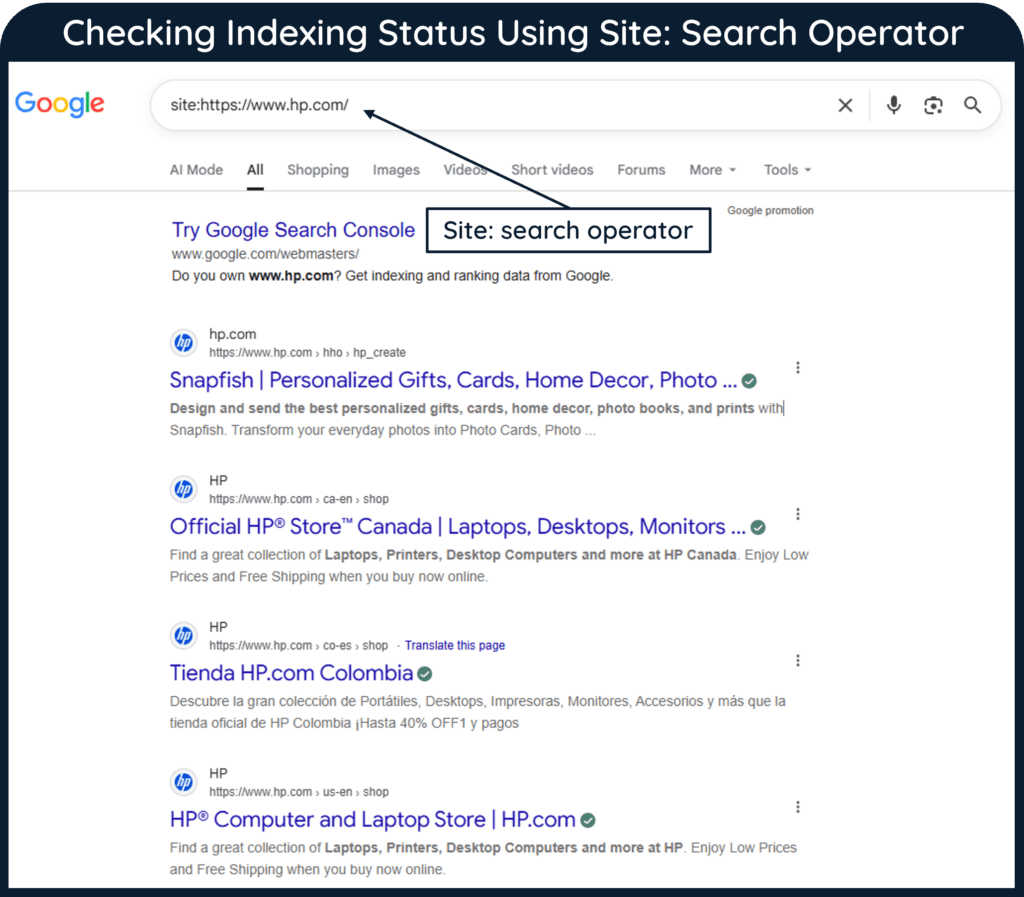
However, crawling does not guarantee indexing. A page may be excluded because it contains duplicate or low-value information, has a noindex directive, returns an error or is considered a secondary version of another URL.
JavaScript Rendering
Modern websites frequently use JavaScript to display content, navigation or product information. It is therefore important to make sure that essential text and links are available when the page loads and can be seen by search engines, rather than appearing only after a visitor clicks a button, opens a menu or performs another action.
The URL Inspection tool in Google Search Console can show how Google rendered a page and whether important content was accessible. In other words, developers should evaluate what crawlers receive, not merely what appears in a normal browser session.
Technical SEO Components
Technical SEO consists of several connected components.
Website Architecture and Internal Links
A logical hierarchy helps visitors and search engines move from broad pages to more specific content.
For example:
Important pages should normally be reachable through crawlable links. Excessively deep pages, orphan URLs and inconsistent navigation can make discovery more difficult.
HTTP Status Codes and Redirects
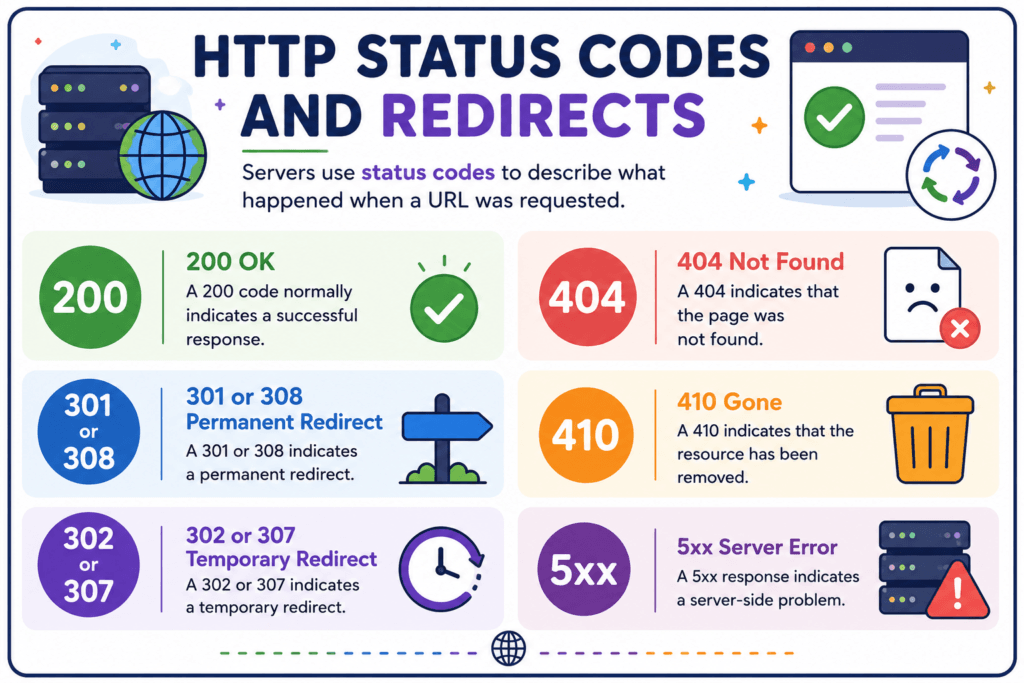
Servers use status codes to describe what happened when a URL was requested.
- A
200code normally indicates a successful response. - A
301or308indicates a permanent redirect. - A
302or307indicates a temporary redirect. - A
404indicates that the page was not found. - A
410indicates that the resource has been removed. - A
5xxresponse indicates a server-side problem.
Permanent redirects should normally point directly to the final destination. Long chains create unnecessary requests and can slow crawling and navigation.
Duplicate Content and URL Parameters
Duplicate content can appear through tracking parameters, filters, printer versions, HTTP and HTTPS variations or inconsistent trailing slashes. Search engines may consolidate these URLs, but conflicting technical signals can make the preferred version unclear.
It is therefore important to use consistent internal links, redirects and canonical signals so that the preferred version remains clear.
Image and Media Optimization
Large images can increase loading time, while poorly implemented videos or embeds can delay important content. Hence, images should have appropriate dimensions, efficient formats and descriptive alt text.
Lazy loading can improve performance for off-screen media. However, primary content should not depend on user interaction before search engines can access it.
Canonical Tags, XML Sitemaps and Robots.txt
Canonical tags, sitemaps and robots.txt files perform different functions and should not be used interchangeably.
Canonical Tags
A canonical tag identifies the preferred URL among duplicate or highly similar pages.
For example, several product-filter URLs may display almost the same content. A canonical tag can point them toward the main product-category URL.
However, canonical tags are signals rather than absolute commands. Redirects and rel="canonical" are strong signals, while inclusion in a sitemap is weaker. It is better to use consistent canonicals, internal links and sitemap URLs rather than sending conflicting instructions. Google Search Central’s documentation on canonical URL also recommends self-referencing canonicals on preferred pages.
XML Sitemaps
An XML sitemap provides search engines with a structured list of URLs that the site considers important for crawling and discovery.
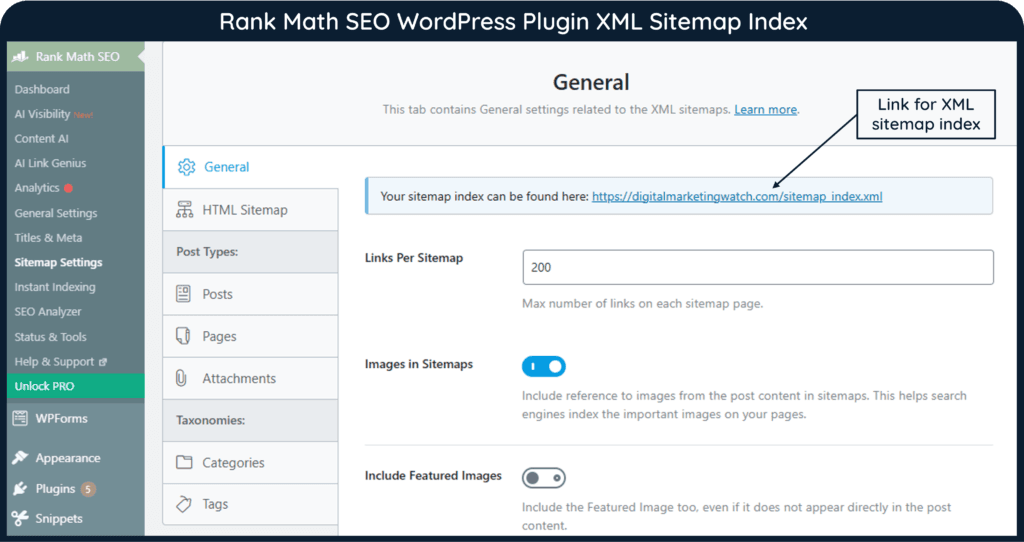
Sitemaps are particularly useful for new websites, large sites, media-heavy websites and pages with limited external links. However, a sitemap does not guarantee crawling, indexing or rankings. It simply provides additional discovery information.
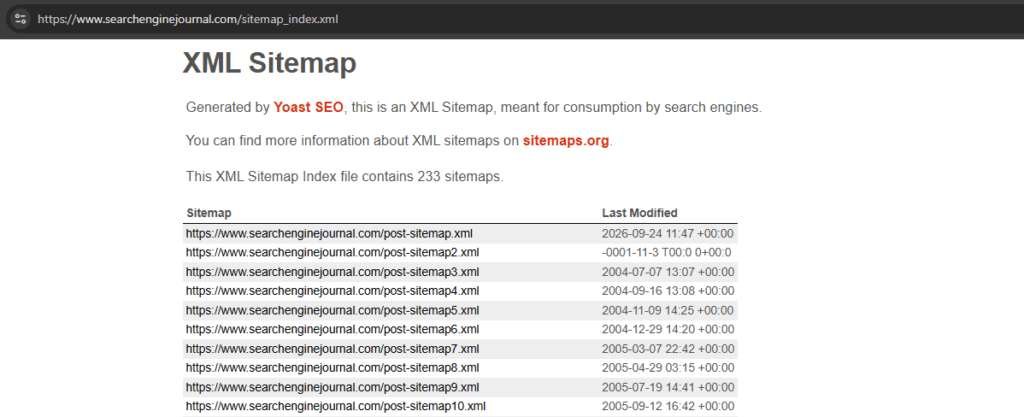
The sitemap should contain canonical, indexable URLs and should be updated when important pages are added, changed or removed.
Robots.txt
The robots.txt file controls which URLs particular crawlers are permitted to access. It is mainly a crawl-management tool.
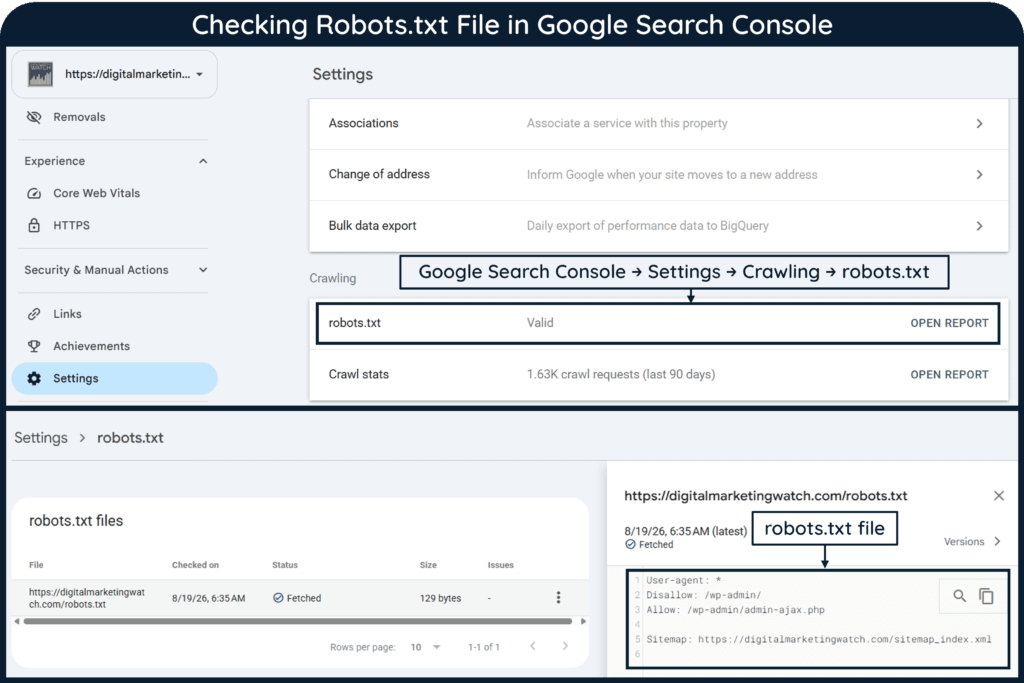
It should not be used as the primary method for preventing a webpage from appearing in search. A blocked URL can sometimes still be indexed without its content when other pages link to it.
To prevent indexing, use an appropriate noindex directive while allowing the crawler to access the page, or protect sensitive content with authentication. Google Search Central’s robots.txt guidance makes this distinction explicit.
Website Performance and Core Web Vitals
Website performance affects how quickly visitors can access and interact with a page. Slow loading, delayed responses and unexpected layout movement can reduce usability and conversions.
Core Web Vitals
Core Web Vitals measure three aspects of real-world page experience:
The recommended values should be met at the 75th percentile of page loads on mobile and desktop devices.
However, a perfect score does not guarantee rankings. Performance should be improved because it helps real visitors, not merely because an auditing tool displays a warning.
Common improvements include:
- Compressing and correctly sizing images.
- Removing unnecessary scripts and plugins.
- Improving server response times.
- Using browser and page caching.
- Reducing render-blocking resources.
- Reserving space for images and advertisements.
- Using a content delivery network where appropriate.
Field data should be prioritized when available because it reflects actual user experiences. Laboratory tools remain useful for diagnosing possible causes.
Mobile SEO, HTTPS, Structured Data, and Modern Technical SEO Elements
Mobile usability, secure HTTPS connections, and structured data have become important parts of modern technical SEO because they influence how search engines access, interpret, and present webpages. Together with newer technical considerations such as rendering, performance, and crawl efficiency, they help create a website that is easier for both users and search systems to navigate and understand.
Mobile SEO
Google uses the mobile version of a website’s content for indexing and ranking. It recommends making websites mobile-friendly and ensuring that mobile pages contain the same essential content, metadata, internal links and structured data as their desktop versions.
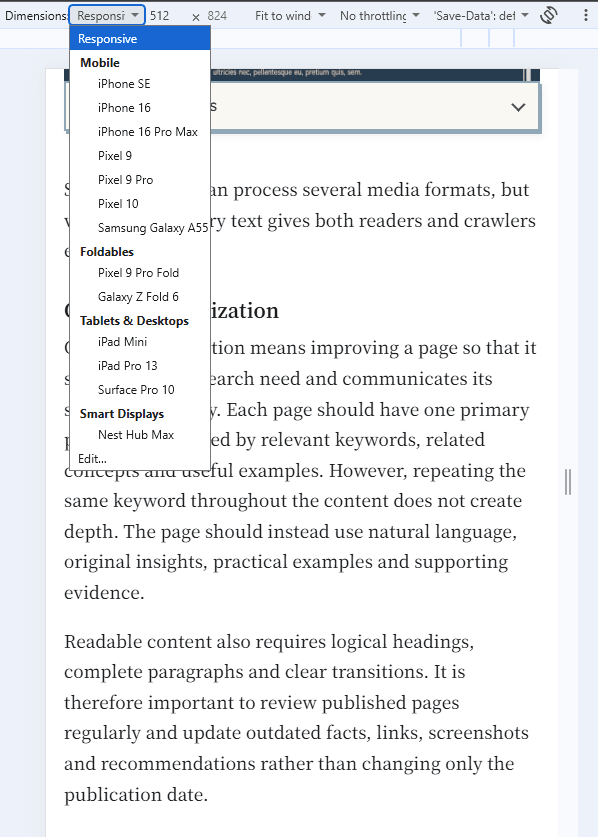
Responsive design is usually easier to maintain because the same URL and HTML can adapt to different screen sizes. However, the page should still be tested for readable text, suitable tap targets, working menus and usable forms.
HTTPS and Website Security
HTTPS encrypts information exchanged between a website and its visitors. It protects login details, form submissions and other data from interception.
Every important resource should load securely. Mixed-content warnings can occur when an HTTPS page loads images, scripts or stylesheets over an insecure HTTP connection.
Structured Data
Structured data provides machine-readable information about entities and page content. Suitable markup can help a page become eligible for supported search features such as product, recipe or event rich results.
However, structured data does not guarantee a rich result. The markup must match visible page information, follow the relevant guidelines and remain technically valid. Google’s document on structured data recommends validating implementation with the Rich Results Test.
Modern Technical SEO
Technical SEO increasingly includes JavaScript rendering, international targeting, faceted navigation, log-file analysis and content accessibility for AI-powered search experiences.
Bing Webmaster Tools now reports visibility across areas including ordinary web results, images, news and chat responses. However, the same foundation still applies: important pages must remain crawlable, indexable, accurately structured and available through reliable URLs.
Technical SEO Audit: Checklist, Tools, and Common Issues
A technical SEO audit identifies problems that may prevent search engines and visitors from using a website effectively. The purpose is not to collect the largest possible number of warnings, but to prioritize issues according to their effect on important pages.
Technical SEO Checklist
- Confirm that important pages are indexed and eligible to appear in search.
- Review robots.txt rules to ensure that essential sections are not blocked.
- Check that important indexable pages do not contain accidental
noindexdirectives. - Submit a current XML sitemap containing canonical and indexable URLs.
- Verify that important pages can be reached through internal links.
- Remove or connect orphan pages according to their value.
- Review canonical tags for missing, conflicting or incorrect URLs.
- Fix broken internal links and unnecessary redirect chains.
- Return appropriate status codes for removed, redirected and active pages.
- Check for duplicate URLs created by filters, parameters or inconsistent formats.
- Confirm that mobile and desktop pages contain equivalent primary content.
- Test whether search engines can render important JavaScript content.
- Review Core Web Vitals and page-speed problems affecting important templates.
- Compress oversized images and remove unnecessary scripts.
- Confirm that the entire website and its resources use HTTPS.
- Validate structured data against visible page information.
- Review server errors, crawl statistics and indexing reports.
- Test important URLs after migrations, redesigns or plugin changes.
- Monitor technical health regularly rather than waiting for rankings to decline.
Useful Technical SEO Tools
Google Search Console can show indexing, crawl, enhancement and performance information. PageSpeed Insights and Chrome DevTools help diagnose performance, while the Rich Results Test checks supported structured data.
Bing Webmaster Tools provides crawl, indexing and search-performance reports. Crawlers such as Screaming Frog, Sitebulb, Ahrefs and Semrush can identify redirects, broken links, duplicate metadata, canonical conflicts and orphan-page risks.
However, tools cannot determine business priority automatically. A warning affecting one obsolete page is generally less important than a crawling problem affecting an entire product or article template.
Common Technical SEO Issues
Frequent problems include accidental crawling blocks, incorrect canonicals, outdated sitemaps, redirect chains, broken links, mobile-content differences, oversized resources, invalid structured data and server errors.
Another common mistake is changing several technical systems simultaneously without testing. It is therefore better to back up the website, document the existing configuration and monitor indexing after major changes.
Conclusion
Technical SEO creates the foundation that allows valuable content to be discovered, processed and delivered efficiently. It covers crawling, indexing, architecture, canonicalization, performance, mobile presentation, security and structured data.
However, technical perfection alone cannot create useful content or earn authority. To sum up, the strongest websites combine reliable infrastructure with relevant information and a clear user experience.
Frequently Asked Questions
What is technical SEO?
Technical SEO is the process of improving website infrastructure so that search engines can crawl, render and index pages effectively. It also supports performance, security, mobile usability and structured data.
What are the main components of technical SEO?
The main components include crawling, indexing, website architecture, redirects, canonical tags, XML sitemaps, robots.txt, page speed, mobile SEO, HTTPS, structured data and JavaScript rendering.
How do I optimize webpages for technical SEO?
Ensure that the page is crawlable, indexable, internally linked and served through a reliable URL. It should also work on mobile devices, load efficiently and return the correct status code.
What are Core Web Vitals?
Core Web Vitals are performance metrics measuring loading speed, responsiveness and visual stability. The current metrics are Largest Contentful Paint, Interaction to Next Paint and Cumulative Layout Shift.
Does an XML sitemap guarantee indexing?
No. A sitemap helps search engines discover important URLs, but it does not guarantee that every submitted page will be crawled, indexed or ranked.
Can robots.txt prevent indexing?
Not reliably. Robots.txt blocks crawling, but a blocked URL may still appear in search results without a snippet. Use noindex on an accessible page or authentication when the content must remain out of search.
How do I perform a technical SEO audit?
Review crawling, indexing, site architecture, status codes, canonical tags, sitemaps, mobile pages, performance, HTTPS and structured data. Prioritize issues affecting important templates and revenue-generating pages.
What are the best technical SEO tools?
Useful tools include Google Search Console, Bing Webmaster Tools, PageSpeed Insights, Chrome DevTools, Rich Results Test, Screaming Frog, Sitebulb, Semrush and Ahrefs.