Key Takeaways
- An orphan page has no crawlable internal links pointing to it, although it may remain live, indexable, and discoverable through other sources.
- Sitemaps, external backlinks, and historical discovery can expose orphan pages, but none restores their missing connection to the site’s internal architecture.
- Orphan pages can weaken discovery, internal-link signals, contextual understanding, and user access, though they are not automatically penalized or unable to rank.
- Identify potential orphans by comparing crawled URLs with sitemaps, Search Console data, CMS records, or URL inventories.
An orphan page is a webpage that is not linked internally from any other page on the website. The page may still be live, accessible through its URL, and eligible for indexing, but it is disconnected from the site’s normal internal-link structure.
For example, an e-commerce store may create a landing page for a summer sale. When the campaign ends, the homepage banner and menu link are removed, but the landing page remains published. If no other page on the site links to it, the landing page becomes an orphan page.
Orphan pages are not automatically broken, deleted, noindexed, or invisible to search engines. Google may still discover them through an XML sitemap, an external backlink, or because the URL was crawled previously. The main problem is the absence of a normal internal path connecting the page with related content.
Internal linking matters because Google uses links both to discover pages and as signals for understanding their relevance. Google recommends that every important page have at least one internal link from another page on the site.
Why Do Orphan Pages Exist?
Orphan pages often appear unintentionally as websites grow, navigation changes, campaigns end, content is migrated, or existing pages are reorganized. They are especially easy to create on large sites where hundreds or thousands of URLs may change over time.
- Poor Internal Linking: A useful page is published but never linked from related articles, categories, topic hubs, product pages, or navigation.
- Old Campaigns and Landing Pages: Promotional links disappear after a campaign ends while the original landing page remains live.
- Site Redesigns and Migrations: Menus, categories, templates, or site structures change and previously linked pages lose their incoming links.
- Content Cleanup: Articles that once linked to a page may be deleted, redirected, consolidated, or substantially rewritten.
- Architectural Oversights: CMS settings, product filters, search functions, or unusual publishing workflows may create URLs without normal navigational paths.
- Large Content Inventories: Older pages can simply become difficult to track as the number of published URLs increases.
A page does not become orphaned simply because it is old or rarely updated. It becomes an orphan when no crawlable internal link points to it.
How Do Search Engines Find Orphan Pages?
Having no internal links does not necessarily make a page invisible to search engines. A crawler may learn about the URL through sources outside the site’s current internal-link structure.
XML Sitemaps
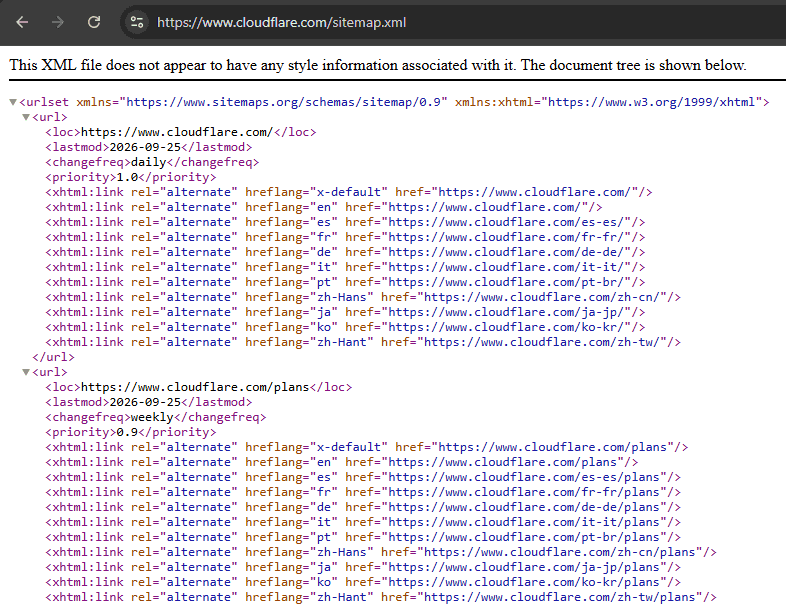
An XML sitemap provides search engines with URLs that the site considers important. This can help Google discover a page even if no current internal link leads to it.
However, sitemap inclusion does not guarantee crawling or indexing. Google describes sitemaps as useful suggestions to Googlebot rather than requirements that Google must crawl.
External Backlinks
Another website may link directly to an orphan page. Search-engine crawlers can follow that backlink and discover the URL even though the page has no incoming links from its own site.
A valuable external backlink can therefore help with discovery and link signals, but it does not repair the missing relationship between the page and the site’s internal architecture.
Historical Discovery
A page may previously have been linked from a menu, article, category, or campaign page. Removing those internal links does not cause Google to immediately forget a URL it already knows.
Google may continue to revisit previously discovered URLs, which is why an orphan page can remain indexed long after its internal links disappear.
How Do Orphan Pages Affect SEO?
Orphan pages can create SEO problems because they lack the internal connections that help search engines discover content, understand relationships between pages, and determine which pages appear important within a website. The actual effect depends on the page, its backlinks, indexing status, content quality, and other signals.
Harder Discovery and Indexing
A page that is neither internally linked nor included in a sitemap may be difficult for search engines to discover. Even if a URL is discovered through another source, discovery itself does not guarantee crawling or indexing. Google recommends providing standard crawlable links and maintaining sitemaps to help its systems find important URLs.
Weaker Internal Link Signals
Internal links provide both navigational and contextual information. They help search engines understand how pages relate to one another and can pass signals through the site’s structure.
Google states that links are used to find new pages to crawl and as a signal when determining page relevance. An orphan page receives none of these incoming internal-link connections.
Crawl Inefficiency
An orphan page does not automatically waste crawl budget. Crawl-budget problems are primarily important on large or rapidly changing websites.
However, a site containing large numbers of obsolete, duplicate, low-value, or unnecessary URLs can use crawler resources inefficiently. Google recommends keeping sitemaps current, removing unnecessary URLs properly, and avoiding other sources of wasted crawling.
Poor User Discovery
Visitors normally discover content through menus, category pages, breadcrumbs, topic hubs, related articles, and contextual links. An orphan page has no incoming internal path, so useful content can remain difficult for visitors to find unless they arrive from search, an external website, or a direct URL.
How to Find and Fix Orphan Pages
Finding orphan pages requires more than running a normal website crawl. A crawler follows internal links, so a truly orphaned page may never appear in ordinary crawl results. A reliable approach is to compare the crawl against one or more independent lists of URLs.
How to Find Orphan Pages
Run a Website Crawl
Use an SEO crawler or site-audit tool to create a list of URLs reachable through internal links. Tools such as Screaming Frog, Sitebulb, Semrush, and Ahrefs can map the crawlable internal structure.
The resulting list shows what the crawler can reach, rather than automatically showing every URL that exists.
Note
SEO tools may define orphan URLs slightly differently. Some identify pages with zero incoming internal links, while crawler-based tools may identify URLs that cannot be reached through the normal internal crawl path.
Compare the Crawl With the XML Sitemap
Export the URLs listed in the XML sitemap, then check which of them also appear in the website crawl.
A URL appearing in the sitemap but missing from the internal crawl is a potential orphan page. It should be checked to confirm that no internal links point to it.
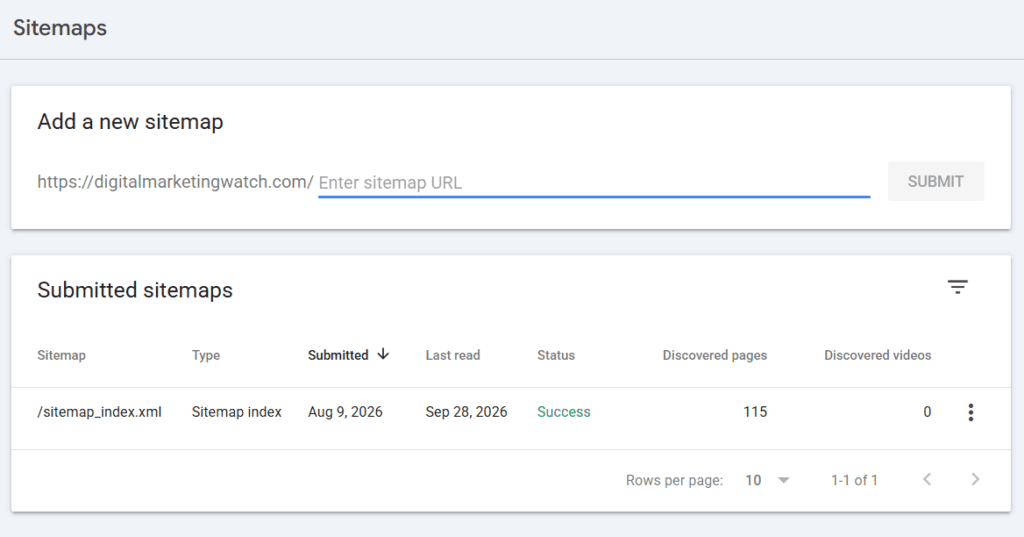
Compare With Google Search Console Data
Google Search Console can reveal URLs that Google already knows about through indexing and search data. Some auditing tools can connect to Search Console APIs and compare these URLs against those discovered during a crawl.
Search Console does not provide a dedicated “Orphan Pages” report. Orphan status is found by comparing different URL datasets.
Use WordPress or CMS Tools
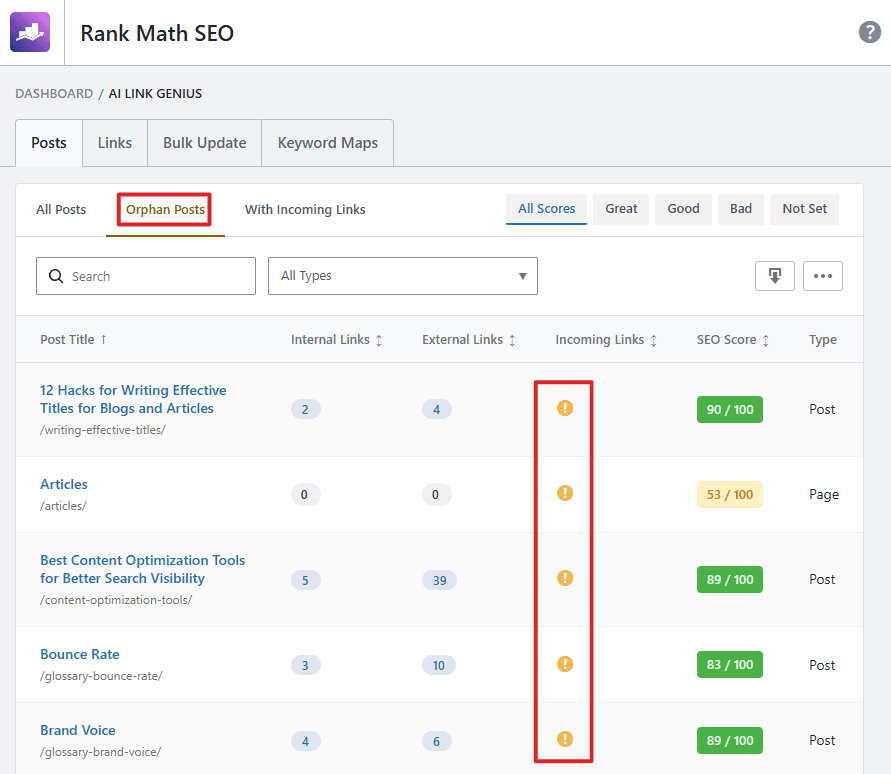
Some CMS tools can identify pages receiving no internal links.
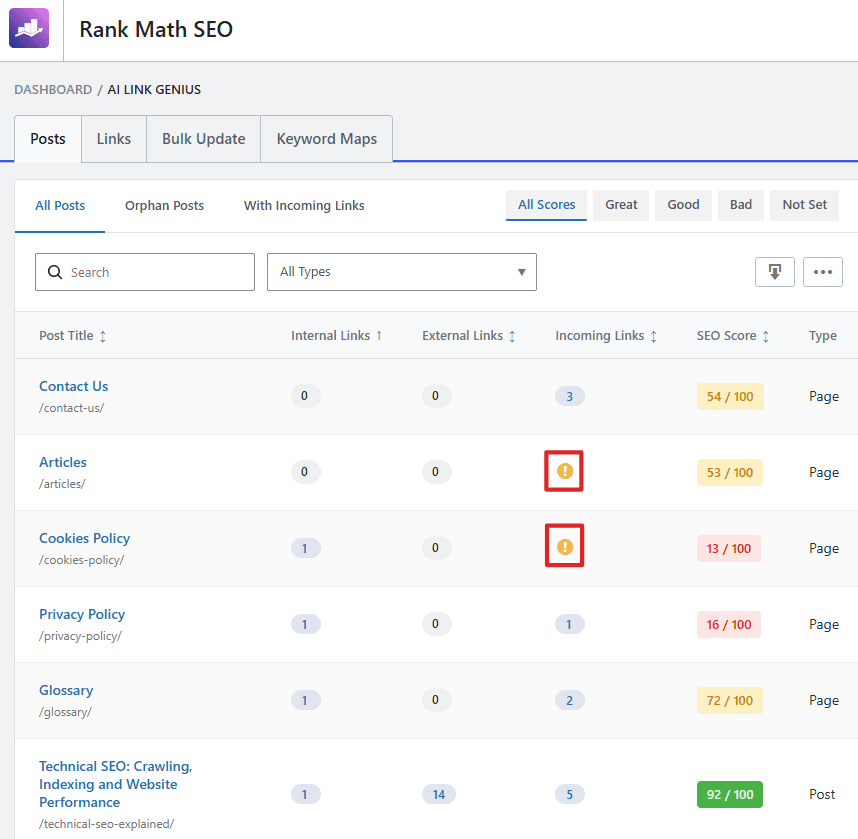
For WordPress, Rank Math PRO’s AI Link Genius includes an Orphan Posts filter. Rank Math defines these as posts with zero incoming links from other posts on the site and allows them to be reviewed from the Posts section.
Maintain a URL Inventory
For smaller websites, a spreadsheet or content database containing important published URLs can provide another independent reference. Comparing that list against crawl results makes it easier to identify pages that have disappeared from the site’s link structure.
/running-shoes/blog/how-to-choose-running-shoes/best-trail-running-shoes/blog/running-shoe-size-guideHow to Fix Orphan Pages
The correct fix depends on whether the page is still useful and should remain accessible.
404
or
410Valuable and Important Pages: Integrate Them
Add contextual links from relevant articles, topic hubs, categories, product pages, or navigation where appropriate.
The objective is not merely to add one technical link to remove the “orphan” label. The page should be connected from places that help both visitors and search engines understand where it belongs within the site’s subject structure.
Outdated or Duplicate Pages: Merge and Redirect
If another page now serves the same purpose, useful content can be consolidated into the stronger page and the obsolete URL redirected to the closest relevant replacement.
Avoid redirecting an orphan page to an unrelated page merely to remove it from an audit. Redirects should lead to genuinely equivalent or appropriate destinations.
Obsolete or Unwanted Pages: Remove Them
If a page has no continuing value and no suitable replacement exists, remove it and return a genuine 404 (Not Found) or 410 (Gone) status code.
Google’s removed-page guidance recommends a 404 or 410 when content has permanently disappeared and no replacement exists. If a clear replacement does exist, a permanent redirect is generally more appropriate.
Frequently Asked Questions
Can an orphan page still rank well on Google?
Yes, an orphan page can still rank if Google discovers it through a sitemap, external backlink, or another source and the page is relevant and otherwise strong. However, it lacks the internal-link context and signals available to properly integrated pages.
Are orphan pages an official Google penalty?
No, Google does not describe orphan pages as a specific penalty. The main concerns involve discovery, crawling, internal-link signals, site structure, and the difficulty users may have reaching the page through normal navigation.
Should an orphan page with high-quality backlinks be left alone?
Not necessarily, because a useful orphan page can often benefit from relevant internal links that connect it properly to the rest of the website without removing its backlinks or existing search value.
Are orphan pages the same as dead-end pages?
No, an orphan page has no incoming internal links, while a dead-end page has no useful outgoing internal links. A webpage can be an orphan, a dead end, both, or neither.
How often should orphan pages be checked?
There is no required schedule for checking orphan pages. Audits are particularly useful after site migrations, redesigns, navigation changes, content pruning, or large publishing projects. Large sites may benefit from monthly or quarterly reviews, while smaller stable sites can check less frequently.