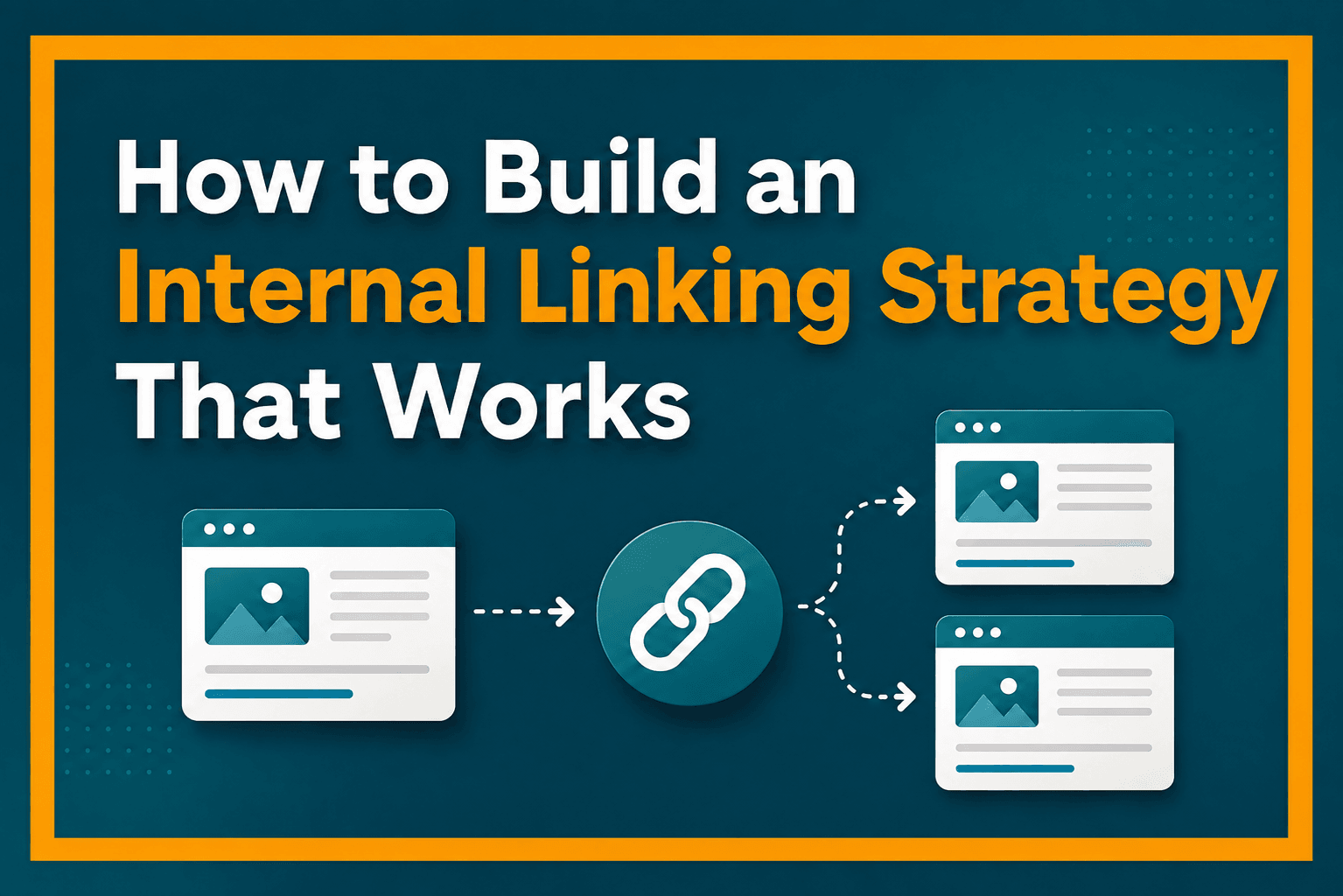
How to Build an Internal Linking Strategy That Works
Key Takeaways
- Internal linking should create meaningful pathways between related pages, not maximize link counts or mechanically repeat keywords.
- Crawlable internal links help search engines discover pages, interpret site architecture, and identify important content, while sitemaps provide only a complementary discovery route.
- Effective strategies connect pillar pages, cluster content, and relevant next steps in both directions using descriptive, contextual anchor text.
- Audits should identify orphaned, broken, redirected, deeply buried, or weakly connected pages and update links as content and URLs change.
Internal linking connects pages within the same website so that readers and search engines can move from one piece of content to another. A well-planned system does more than add links wherever a related keyword appears. It creates meaningful pathways between pages, supports site architecture, helps important content remain discoverable, and guides readers toward useful next steps.
Internal links help search engines find new pages and provide signals about page relevance. Google recommends that every page considered important should receive a link from at least one other page on the site.
An effective internal linking strategy therefore combines site structure with editorial judgment. The goal of internal linking is not to maximize the number of links. It is to connect the right pages with relevant, descriptive anchor text and help readers easily navigate the website.
Table of Contents
What Is Internal Linking and How Does It Work?
An internal link is a hyperlink from one page on a website to another page on the same website. For example, an SEO guide might link to a separate article about keyword research, or a product category page might link to individual product pages.
An external link, by contrast, sends the visitor to a page on another website. Both have useful roles, but internal links are particularly important for connecting a site’s own content.
How Internal Links Help Users and Search Engines
Internal links create an internal web of connections between pages, giving both users and search engines clear pathways through a website. By following these links, search engines can discover pages, understand how content is related, and identify which pages appear more important within the site’s structure. Google, for example, analyzes how pages link to one another. Its ranking systems guide confirms that PageRank remains part of Google’s core ranking systems.
In practical SEO discussions, the value or reputation passed through links is often called link equity or, informally, link juice. However, this should not be treated as a precise amount of authority that a site owner can manually calculate or distribute.
Internal linking can strengthen the pathways leading to important pages and clarify how those pages relate to the rest of the site. This also helps communicate the website’s architecture, especially to search engines.
Consider a stationery website organized as Office Supplies → Desk Organizers → Drawer Dividers. The Office Supplies page can link to Desk Organizers, which can then link to Drawer Dividers and other product pages. Conversely, relevant product or supporting pages can also link back to their broader categories. This creates a logical hierarchy in which broader pages lead to narrower pages and related pages reinforce one another instead of existing as isolated URLs.
This makes internal linking central to on-page SEO because many of the signals and pathways it creates are controlled directly within the website. These include anchor text, contextual links, navigation, breadcrumbs, related-content links, and the way pages are arranged within the site hierarchy.
A well-connected article can lead readers to definitions, supporting guides, deeper explanations, products, or the next logical stage of their journey. In other words, a sound internal web helps both people and crawlers understand where they are, what is related, and where they can go next. Better navigation can also encourage readers to explore more relevant content and remain engaged with the site, although individual engagement metrics should not automatically be treated as direct Google ranking factors.
Page Discovery and XML Sitemaps
Internal links are also an important discovery mechanism. Google says it primarily discovers new pages through links from pages it already knows about. An important page with no crawlable internal links may therefore be harder to discover through the site’s normal link structure.
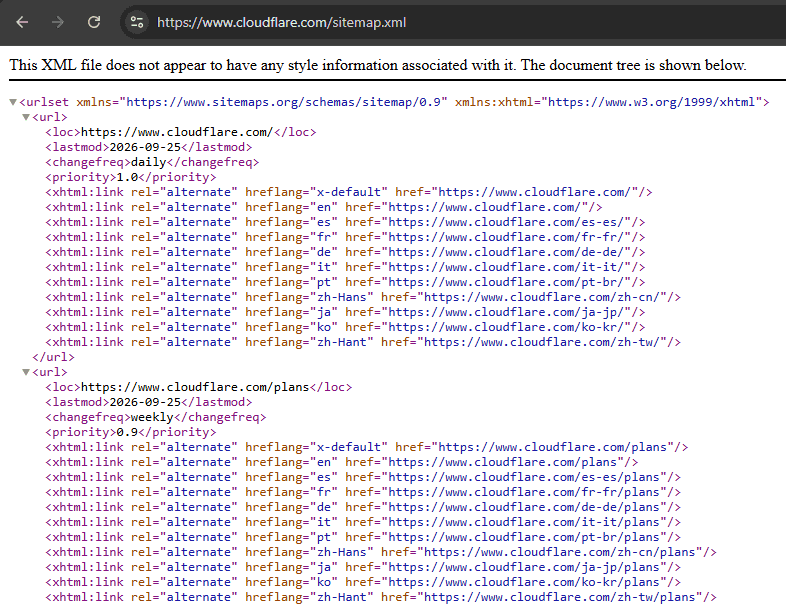
An XML sitemap provides another discovery route by listing URLs the website considers important, but a sitemap complements internal linking rather than replacing it. Google explains that submitting a sitemap is only a hint and does not guarantee that Google will download the sitemap or crawl its URLs. Moreover, inclusion in a sitemap also does not guarantee indexing.
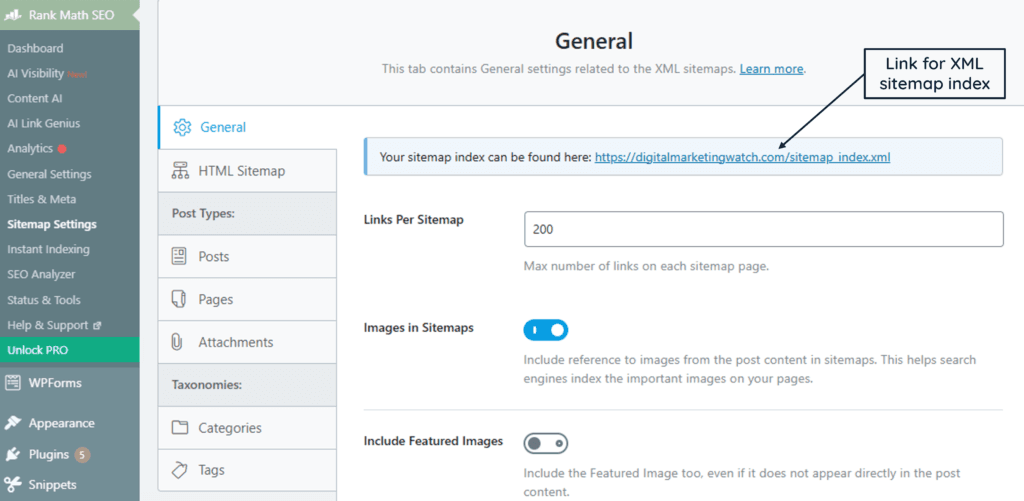
For a WordPress site using the Rank Math plugin, the sitemap can be managed under Rank Math SEO → Sitemap Settings. Rank Math normally provides the sitemap index at https://example.com/sitemap_index.xml, which can be opened directly in a browser to confirm that it loads and contains the expected child sitemaps.
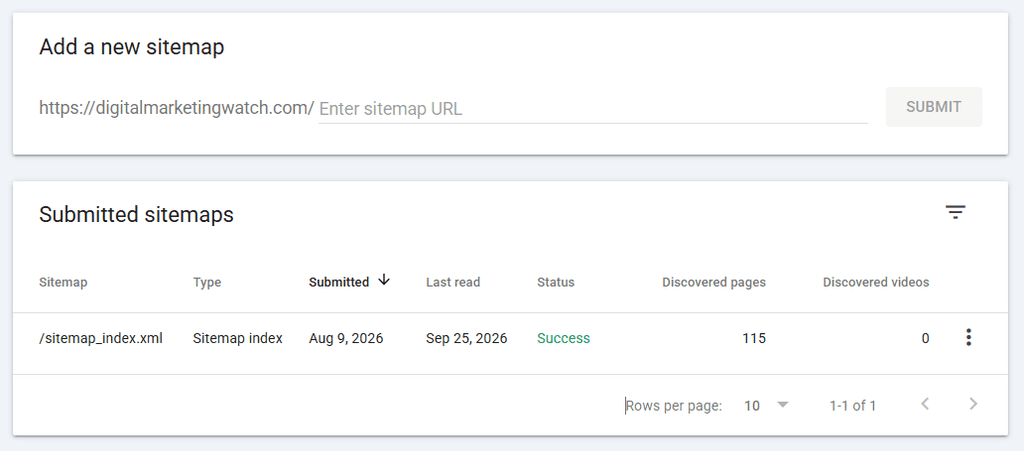
The same sitemap_index.xml can then be submitted through Google Search Console → Sitemaps, where Google reports whether it was successfully processed and identifies certain sitemap errors.
In short, internal linking should be viewed as the website’s internal network rather than a collection of individual hyperlinks. The clearer, more useful, and better maintained that network becomes, the easier it is for users to navigate the site and for search engines to discover pages and interpret the site’s structure. This makes internal linking important not only to on-page SEO, but to the broader organization and search engine optimization.
Make Internal Links Crawlable
Search engines need to be able to follow internal links reliably. Google recommends using standard HTML links with an <a> element and an href attribute, such as <a href="/technical-seo/">Technical SEO</a>. JavaScript-powered navigation should still expose crawlable links rather than relying only on script-based interactions or clickable <div> elements that do not provide a normal link destination. Google explains that when an image is used as a link, its alt text can serve as anchor text.
Most CMS platforms generate standard link markup automatically, so website owners usually do not need to write the HTML manually when adding ordinary internal links.
Types of Internal Links
Internal links can be grouped into several types based on where they appear and how they help users and search engines move through a website.
Contextual internal links appear naturally within the main content of a page. For example, a paragraph discussing search intent might link to a detailed guide explaining informational, navigational, commercial, and transactional intent.
Navigational internal links help visitors move through broader sections of a website. Main menus, category navigation, resource directories, and similar elements fall into this group.
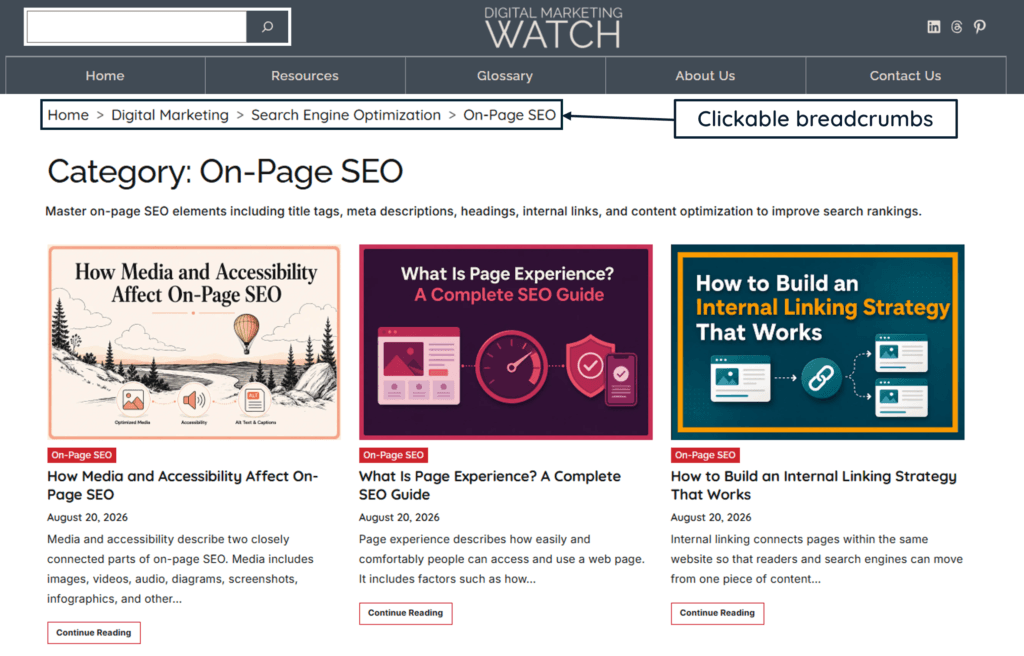
Breadcrumb links show a page’s position within the site’s hierarchy. A breadcrumb such as Home → SEO → On-Page SEO → Internal Linking allows readers to move upward through broader sections of the site.
Sitewide internal links appear consistently across many or all pages of a website, commonly in headers, footers, sidebars, or other shared template areas. Examples include links to the homepage, main categories, contact page, About page, or other important sections that visitors may need from anywhere on the site.
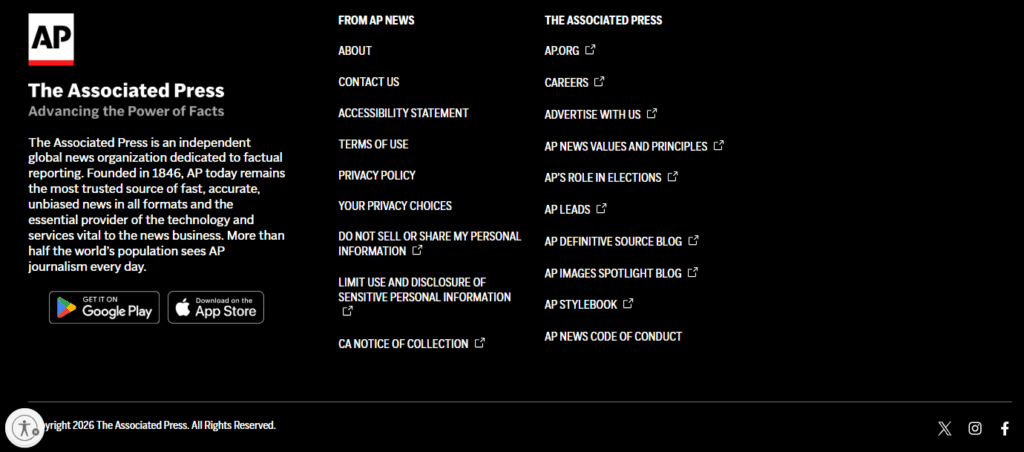
These link types serve different purposes. Contextual links establish relationships between specific ideas, while navigational and breadcrumb links provide predictable routes through the site’s structure. Sitewide links ensure that important destinations remain accessible across large portions of the website.
Internal Links and Site Architecture
Internal linking becomes more useful when it reflects the way content is organized. A website may contain hundreds or thousands of pages, but those pages should not exist as an unstructured collection. Taxonomy, hierarchy, and internal links work together to create understandable relationships.
Taxonomy and Site Hierarchy
Website taxonomy is the system used to classify content into meaningful groups. A digital marketing website, for example, might organize content under SEO, paid advertising, social media marketing, and email marketing.
A site hierarchy describes how broader and more specific pages relate to one another. SEO may be a broad section, while On-Page SEO, Technical SEO, and Local SEO sit beneath it as more focused areas.
Internal links reinforce this organization by connecting broader sections with their more specific pages. Category navigation, for example, may reveal the formal structure, while contextual links connect related ideas within and across those sections.
Internal Linking and Website Architecture
A website’s complete architecture is not usually visible to readers as a formal structure. Instead, it is communicated through navigation menus, breadcrumbs, category relationships, and internal links between relevant pages. Website owners should therefore make these connections clear and consistent so that both users and search engines can understand how important sections and pages fit together.
Pillar and Cluster Internal Linking
A pillar page covers a broad subject, while cluster pages examine narrower parts of that subject. Internal linking should work in both directions rather than turning the pillar page into a one-way directory.
For example, an On-Page SEO pillar page might link to detailed articles about title tags, headings, internal links, URL structure, image optimization, and meta descriptions. Each supporting article can then link back to the On-Page SEO pillar where the broader context is useful.
This structure does not require every page in a cluster to link to every other page. Links should exist because the relationship makes sense, not because pages share the same category.
Internal Linking and Crawl Depth
Crawl depth generally describes how many link steps separate a page from the starting point of a crawl, commonly the homepage. A page reached directly from the homepage has a shallower path than one that requires several successive clicks.
There is no universal rule stating how many clicks away from the homepage every page should be. However, important pages should not become unnecessarily difficult for users or crawlers to reach, and they should receive crawlable links from other relevant pages.
Internal Links for Page Sections
Internal links do not always have to lead to another page. A # fragment can link directly to a specific section of the same page, such as example.com/seo-guide#internal-linking.
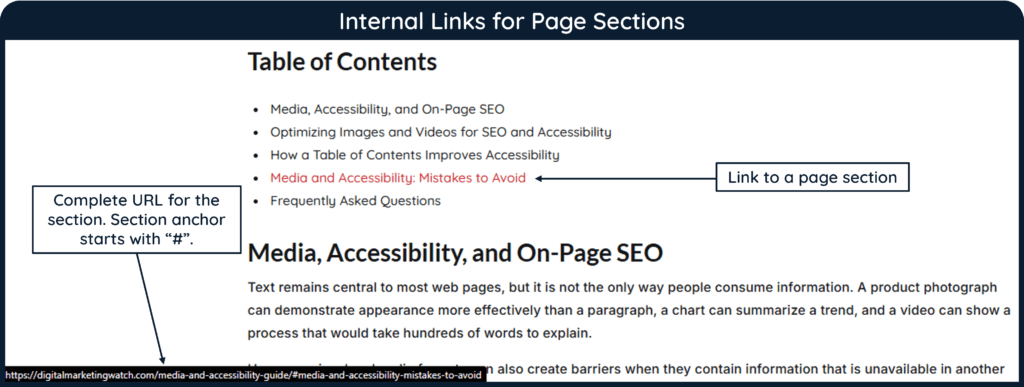
To add an internal link to a section within the same page using WordPress, simply select the destination heading, open Advanced → HTML Anchor, and enter an anchor such as internal-linking. Then link the relevant text or table of contents entry to #internal-linking. These jump links can make long articles easier to navigate.
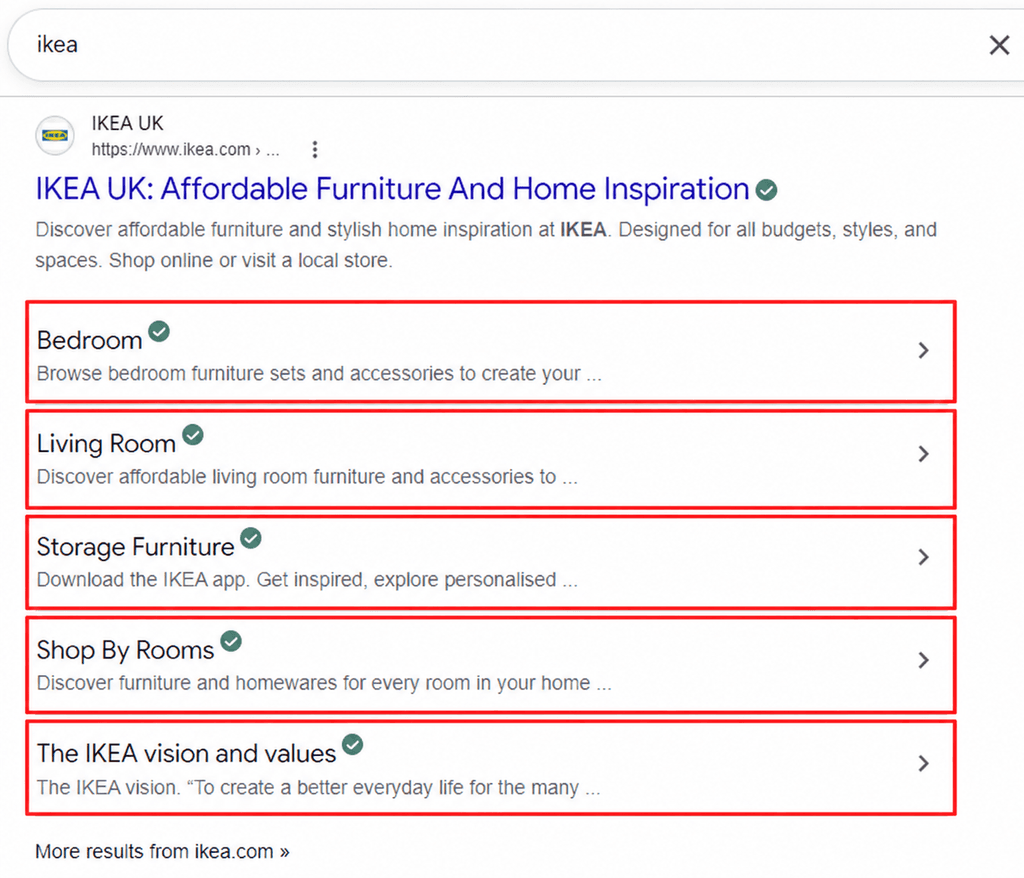
Google may use headings or anchors within a page as sitelinks in some search results, although Google determines automatically whether those sitelinks appear.
How Many Internal Links Should a Page Have?
Google explicitly states that there is no magical ideal number for internal links per page. Therefore, internal links should be added according to relevance, usefulness, and page context rather than an arbitrary target.
A 5,000-word pillar article may reasonably contain more internal links than a 700-word glossary entry. A resource directory may contain many more links than either.
The better questions are whether each link is relevant, whether the page remains readable, and whether important destinations are receiving useful links.
How to Build an Internal Linking Strategy
An internal linking strategy should answer three basic questions: Which pages matter most? Which pages are related? Where would a link genuinely help the reader?
The process becomes easier when internal linking is treated as part of content production rather than as a cleanup task performed months later.
Identify Priority Pages and Map Content Relationships
Start by identifying pages that play important roles within the site. These might include pillar articles, major category pages, high-value commercial pages, important evergreen guides, or pages that support key business goals.
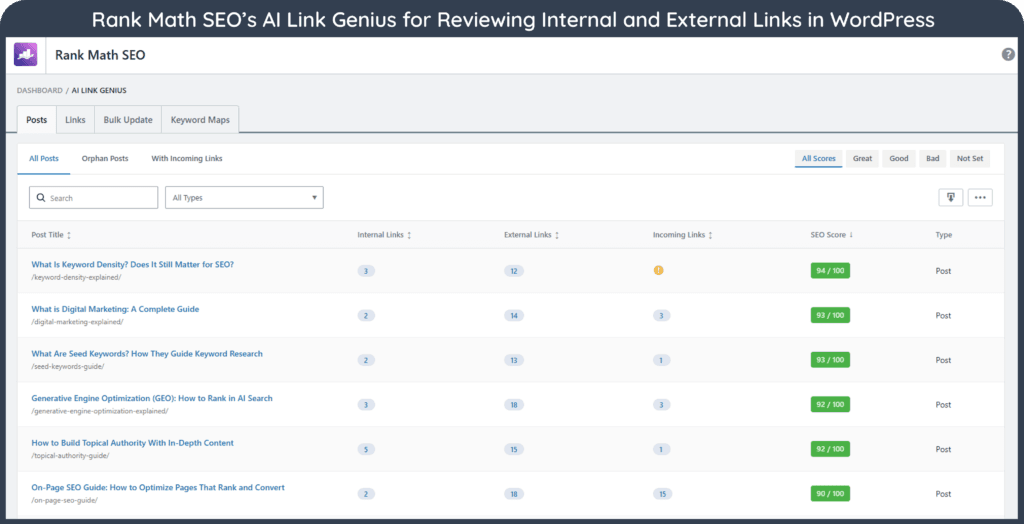
The next step is to map how related content connects. A keyword research pillar, for example, may have supporting pages on search volume, keyword difficulty, long-tail keywords, search intent, keyword clustering, and competitor keyword analysis.
A useful topic map should therefore answer:
- Which broader page provides context for this article? A supporting article should normally have a logical route back to its relevant pillar or broader resource.
- Which narrower pages expand ideas introduced here? Pillar pages should give readers useful pathways to detailed supporting content.
- Which related pages solve the reader’s likely next question? Links between supporting articles can be useful when the relationship is direct and meaningful.
- Which priority pages are currently difficult to reach? Pages that matter to the site should not depend on obscure navigation paths or isolated links.
This mapping can be maintained in a spreadsheet, content database, editorial system, or site crawler. The format matters less than consistently recording the relationships.
Link New Content and Existing Content in Both Directions
Publishing a new article creates at least two internal linking tasks.
First, the new article should link to useful existing content. A new guide to keyword density, for instance, might naturally reference keyword research, on-page SEO, search intent, and content optimization.
Second, relevant older pages should be reviewed for opportunities to link to the new article. This step is frequently overlooked. Without it, new content may receive links only from pages published afterward.
In other words, internal linking should work both forward and backward through the publishing history of the site.
A practical publishing workflow can include the following checks:
- Add contextual links from the new page to useful existing resources rather than adding links merely to reach a target count.
- Identify several older pages where the new resource genuinely expands an idea already discussed.
- Check whether the new article belongs beneath a pillar page and make sure the relationship is represented in both directions where useful.
- Review navigation, category pages, related-content modules, or resource directories when the new page should also appear in those areas.
Use Descriptive Anchor Text
Anchor text is the visible text that a reader clicks. It should give a reasonable indication of what the destination contains.
For example:
Weak: Learn more [here].
Better: Learn how [search intent works].
Google recommends anchor text that is descriptive, reasonably concise, and relevant to both the source page and the destination page. It also advises writing naturally rather than forcing related keywords into every link.
The same principle also benefits accessibility. Meaningful link text helps users understand a link’s purpose and decide whether they want to follow it.
Therefore, exact-match anchor text is not something that needs to be mechanically repeated. A page about internal linking might reasonably receive anchors such as internal linking, internal linking strategy, linking related pages, or internal link audit, depending on the surrounding sentence.
Place Links Where They Have Context
Placement matters because an internal link is more useful when the reader understands why it is there.
A contextual link should usually appear near the idea it supports. If a paragraph discusses changing URL slugs, that is a natural place to link to a guide about URL redirects or SEO-friendly URLs.
Links do not need to appear only near the beginning of an article. Useful opportunities may occur throughout the page. However, a link should not be inserted into an unrelated paragraph simply because the destination page needs more internal links.
Google specifically emphasizes the importance of surrounding context. In other words, the words before and after an internal link should help readers understand why the link is relevant and what they can expect after clicking it.
Google also discourages placing several links directly next to one another because this leaves little explanatory text around each link and can make them harder to distinguish. For example, do not write:
A clearer version would be:
Use Internal Links to Support Navigation and the User Journey
Internal linking should reflect what a reader may logically want next.
Someone reading a beginner article titled What Is SEO? may next need a guide explaining how search engines work. A reader already studying technical SEO may instead benefit from an XML sitemap or robots.txt guide.
Commercial journeys can work similarly. An informational article may lead naturally to a comparison page, product category, service explanation, calculator, template, or other useful next step when that connection fits the reader’s intent.
This does not mean every page needs to push visitors toward a conversion. It means links should help people continue their journey rather than forcing them to return to the navigation menu or search for related material manually.
Find Orphan Pages and Weakly Connected Content
An orphan page is a page that cannot be reached by following the site’s normal internal links from the crawl starting point. Such pages may still be known to search engines through a sitemap, an external link, or previous crawling. They may also appear in analytics or Search Console data, which can help website owners identify them during an audit.
Google advises that every page considered important should receive a link from at least one other page on the site.
Not every orphan URL needs to be linked. An obsolete page, temporary landing page, or URL that should not remain indexable may require removal, redirection, or another technical decision instead.
Check Redirects and Update Links After URL Changes
Internal links should ideally point to the current destination rather than repeatedly passing through old URLs.
Suppose /seo/internal-links-guide changes to /seo/internal-linking. A permanent redirect may correctly send users from the old URL to the new one, but existing internal links should still be updated where practical.
This also reduces unnecessary redirect chains. URL changes should therefore trigger a review of contextual links, navigation, breadcrumbs, related-content modules, canonicals, and other places where the old address may remain.
Maintain Internal Links as Content Grows
Internal linking is not a one-time project because every new page creates additional relationships and linking opportunities across the website.
A sustainable maintenance process can include:
- Reviewing internal-link opportunities whenever a new article is published and updating relevant older content at the same time.
- Revisiting major pillar pages periodically as new supporting articles are added or existing pages are consolidated.
- Checking pages that have been redirected, deleted, merged, or substantially repurposed so that old internal links do not become misleading or inefficient.
- Periodically reviewing pages receiving very few internal links, especially when those pages remain strategically important.
This approach keeps the internal link structure aligned with the website’s actual content rather than the structure it had months or years earlier.
How to Perform an Internal Link Audit
An internal link audit examines how pages connect across the site and identifies structural, technical, and editorial problems.
For a small website, many issues can be checked manually. Once a site contains hundreds or thousands of URLs, a crawler becomes much more useful because it can reconstruct the link relationships at scale.
What Should an Internal Link Audit Check?
A crawler such as SEO Spider can identify broken links, redirects, crawl depth, internal-link relationships, and other structural issues across many pages. Its orphan-page workflow can also combine crawl information with sitemap, analytics, and Search Console data to identify URLs that are not discovered through normal internal links.
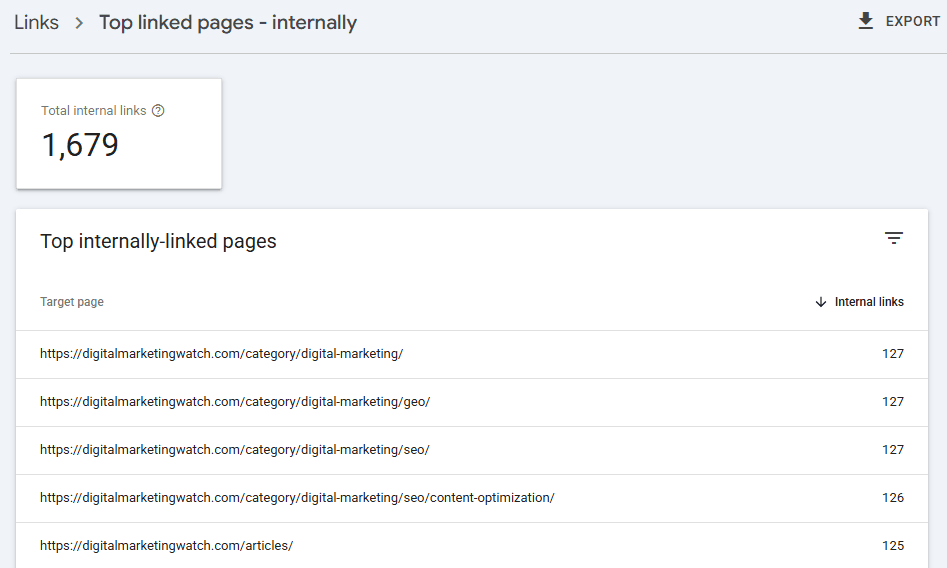
Similarly, Google Search Console’s Links report can show which pages receive the most internal links and which pages link to a selected URL. However, the documentation notes that the report is not a comprehensive list of every link and may omit URLs or combine duplicate data. It should therefore support an audit rather than replace a full site crawl.
Users who also monitor Bing can use Bing Webmaster Tools’ Site Explorer, which provides another view of the site structure and can help identify crawling issues while reviewing internal links.
A practical audit can finish with four questions:
- Can every important page be reached through normal internal links?
- Do important pages receive links from contextually relevant sources?
- Do internal links point directly to working and current URLs wherever possible?
- Does the anchor text help readers understand what they will find after clicking?
If these questions can be answered clearly, the internal linking system is usually easier to maintain and considerably more useful than one built around arbitrary link counts.
Frequently Asked Questions
What is internal linking?
Internal linking is the practice of linking one page of a website to another page on the same website. These links help users navigate related content and give search engines crawlable pathways between pages.
Why are internal links important for SEO?
Internal links help search engines discover pages and understand relationships between content. They also help users navigate a website and find relevant information without relying entirely on menus or search functions.
What is the difference between internal and external links?
Internal links point to another page on the same website, while external links point to a different website. Both can provide useful context, but they serve different navigational purposes.
What are contextual internal links?
Contextual internal links appear within the main content of a page and connect an idea being discussed with another relevant resource. They are particularly useful when the destination provides additional explanation or a logical next step.
Can a link point to a section on the same page?
Yes. A link containing a # fragment, such as example.com/seo-guide#internal-linking, can take readers directly to a specific section of the same page. In WordPress, this can be created by adding an HTML Anchor to the destination heading and linking to that anchor. These jump links are useful for tables of contents, glossary pages, and long articles.
How should anchor text be used for internal links?
Anchor text should be descriptive, concise, natural, and relevant to the destination. It is not important to use the same exact-match keyword every time.
How many internal links should a page have?
There is no fixed ideal number. The appropriate number depends on the page’s length, purpose, structure, and how many genuinely useful related resources exist.
Where should internal links be placed?
Internal links should appear where they are contextually useful. A link placed close to a relevant explanation is usually more helpful to readers than one inserted into an unrelated sentence merely to increase the link count.
What is crawl depth?
Crawl depth describes how many link steps separate a page from the starting point of a crawl. Important pages should generally remain reasonably accessible through the site’s internal navigation rather than becoming deeply buried.
What is an orphan page?
An orphan page is a URL that cannot be discovered through the normal internal-link path from the crawl starting point. It may still exist in a sitemap or appear in search data, so multiple data sources may be needed to identify orphan pages reliably.
Should old articles be updated with links to new content?
Yes, when the new content adds useful information for readers of the older page. Updating existing content is an important part of ensuring that new articles receive relevant internal links soon after publication.
Should internal links be updated after a URL change?
Yes. Even when the old URL redirects correctly, important internal links should generally be updated to point directly to the new destination.
Can too many internal links hurt SEO?
There is no universal number at which a page suddenly has too many internal links. However, excessive or irrelevant links can make content harder to read and reduce the usefulness of the page’s navigation.
How often should an internal link audit be performed?
There is no mandatory schedule. Large or frequently updated websites may benefit from regular audits, while smaller sites may review internal links after major publishing periods, redesigns, migrations, URL changes, or content consolidation.