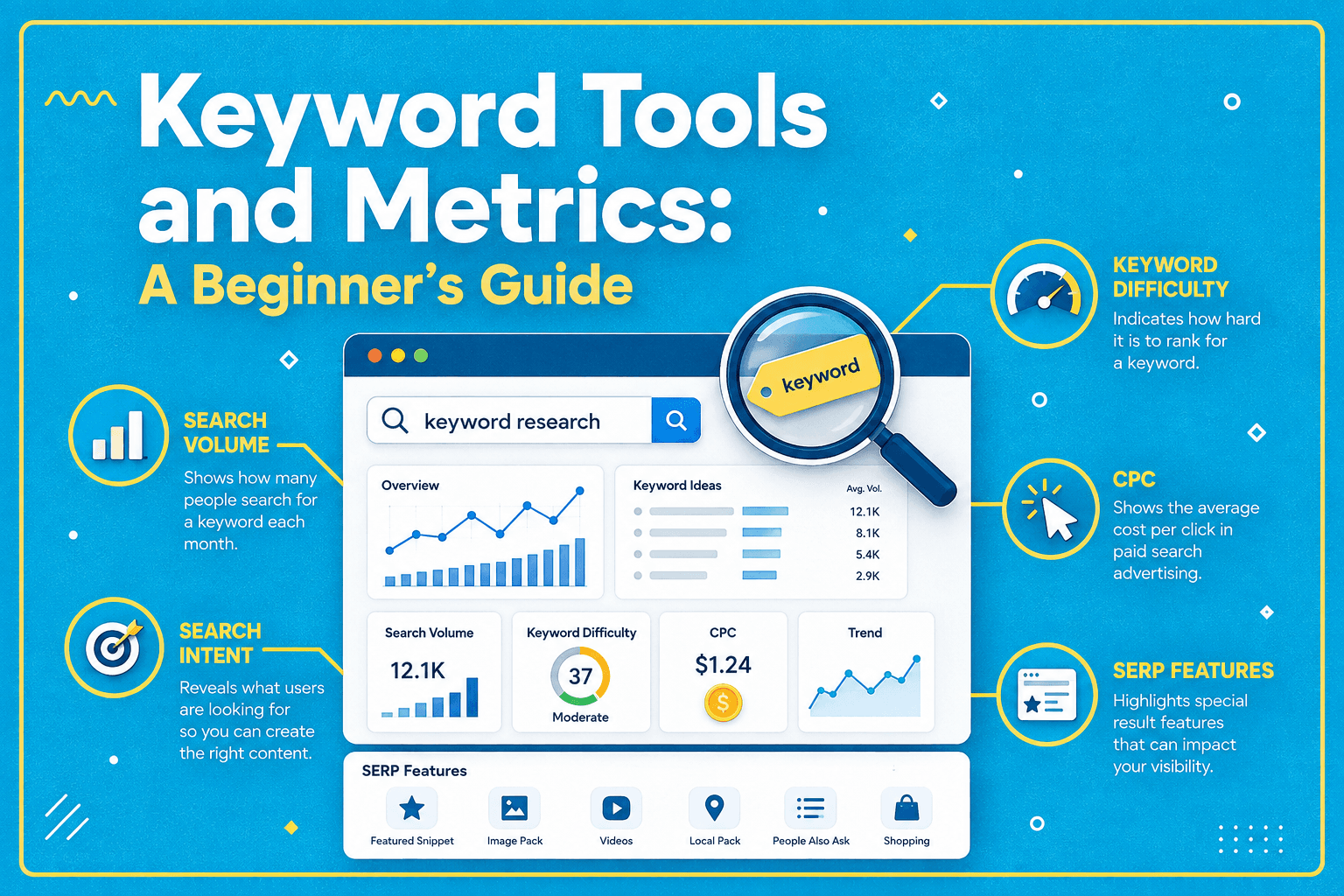
Keyword Tools and Metrics: A Beginner’s Guide
Key Takeaways
- Keywords remain valuable because they provide structure for taxonomies, content planning, internal linking, page naming, and performance tracking.
- Semantic and AI-powered search reduce exact-match requirements, but content still benefits from clear topics, relationships, and terminology reflecting user needs.
- Keyword tools support different stages, from Google Search and Trends for discovery to spreadsheets, SEO platforms, Search Console, and Analytics for planning and measurement.
- Search-volume and difficulty metrics are estimates; actual impressions, clicks, conversions, and business outcomes provide stronger evidence of search performance.
Keywords are words or phrases that represent the topics people search for and the subjects that webpages, products, videos, and other content address. They can be short terms such as stationery, more specific phrases such as desk organizers, or detailed queries such as best desk organizers for a small home office.
In search engine optimization, keywords have lost the kind of prominence they held 10 or 15 years ago, when SEO discussions often revolved around exact-match keywords, keyword frequency, and keyword placement. Search has changed considerably since then. Technologies based on natural language processing and semantic understanding allow search engines to interpret words in context rather than relying exclusively on exact phrase matches. Google’s language-understanding systems, for example, include technologies designed to understand how words and concepts relate to one another.
AI-powered search is pushing this change further. People can now ask long, conversational, and multi-part questions rather than reducing every need to a few carefully chosen search terms. Google reported that queries in AI Mode are now about three times longer than traditional searches, with sessions also leading to follow-up questions.
Yet keywords are far from becoming irrelevant. In many ways, they remain indispensable for a different reason: keywords give content structure.
They help organize a website into understandable topics, categories, subcategories, pages, products, and supporting articles. They also make it easier to plan coverage, remember what has already been published, create internal links, assign URLs, track rankings, and understand how people are finding a website.
This is where keyword tools and metrics become useful. A keyword tool is not simply a piece of software that displays search volume. In many ways, Google Search itself can be a keyword tool. The same goes for Google Trends, Excel, Notion, ChatGPT, Rank Math, Google Search Console, and specialized SEO platforms such as Ahrefs and Semrush.
Table of Contents
What Are Keywords, and Why Do They Still Matter?
A keyword provides a concise way to describe a subject. Consider keyword density. Those two words immediately identify the subject of an article. The same is true of search intent, technical SEO, email automation, desk organizers, or watercolor paper.
This becomes especially important when a website begins to grow. If every idea were stored only as a long question, remembering how hundreds or thousands of pages relate to one another would become difficult. A short, meaningful keyword or topic label provides an anchor around which related content can be organized.
This is particularly useful for managing internal links, which involves linking many pages with each other, sometimes retrospectively as new content is published. It may sound like a small operational advantage, but it becomes increasingly important as a website grows.
Keywords as Building Blocks
Suppose a business wants to create an ecommerce website selling stationery. The broad seed term might be stationery.
This single concept can be expanded into major categories such as office supplies, paper and notebooks, writing instruments, art and craft supplies, school and student supplies, and gifting and cards.
The first category, office supplies, can be expanded into:
- Office Supplies → Desk Organizers → Trays / Cup Holders / Drawer Dividers
- Office Supplies → Filing and Storage → Binders / Folders / Expanding Files / Box Storage
- Office Supplies → Mailing and Shipping → Envelopes / Bubble Mailers / Packing Tape / Labels
- Office Supplies → Desktop Tools → Staplers / Punchers / Scissors / Paper Cutters / Paperclips
The same process can continue through the other major categories until the structure reaches individual product types and products.
The illustrative example below shows how internal links can then connect a broad category to progressively more specific pages.
The result is no longer merely a list of keywords. It is a complete taxonomy that organizes related information into hierarchical groups. For an ecommerce business, those groups can become departments, categories, subcategories, product collections, product pages, buying guides, and supporting informational content. For blogs and other content-driven websites, the same approach can organize information into hubs, categories, topic clusters, subtopics, articles, and supporting resources.
This way, keywords help provide the vocabulary for building that structure.
From Keyword to Website Architecture
Once a useful hierarchy has been created, the terms can influence many parts of the website. For example, desk organizers might become:
- an ecommerce category;
- a category-page title;
- part of a URL slug;
- an internal-link destination;
- a navigation label;
- a buying-guide topic;
- a heading within an office-organization guide;
- the subject of product comparison tables;
- the topic of relevant images and captions;
- a term used in reporting and performance tracking.
Individual subtopics such as drawer dividers or desktop trays can then form their own commercial or informational pages where there is a genuine business and user need.
The key point is that keywords should not dictate taxonomy mechanically. A website should not create hundreds of categories simply because a keyword tool returns hundreds of phrases. The structure needs to reflect the actual business, products, audience, and relationships between subjects.
In other words, keyword research supplies evidence and vocabulary, while information architecture supplies the logic.
Keywords in the Age of Semantic Search
Modern search engines do not require every possible keyword variation to appear explicitly on a page. Google explains that its systems try to understand content and return relevant information for a user’s query, while its Search Essentials still recommend using words people would use to find the content in prominent and descriptive locations.
That distinction is important. Semantic search reduces the need to write separate pages for trivial wording variations such as office desk organizers, desk organization products, and products for organizing desks.
If those phrases reflect essentially the same intent, one strong page may address the underlying concept naturally. In other words, keywords remain useful without requiring old-fashioned exact-match optimization.
The same principle applies to AI search. A person may ask:
That question may be much longer than desk organizers, but the underlying concepts still include desk organization, storage, stationery, office supplies, and related entities. This broader form of contextual retrieval is closely related to subjects such as semantic and vector search.
Hence, even as search is becoming more conversational, content still needs clear structure and relationships between topics. At the same time, keywords remain important because they help define that structure and provide the vocabulary that connects related concepts.
Keyword tools can support this structure, but they should not determine it mechanically.
Keyword Tools for Building Content Architecture
Once the purpose of keywords is clear, tools can make the process much faster. Different keyword tools and metrics are useful at different stages. There is no requirement to conduct the entire process inside one expensive SEO platform.
Google Search and Autocomplete
One of the simplest keyword tools is Google Search itself. Start typing a seed phrase into Google Search and Autocomplete may display predictions based on real searches and other contextual factors such as language, location, trending interest, and, in some cases, previous searches.
For the stationery example, entering desk organizers might reveal more specific concepts related to materials, uses, locations, or audience needs.
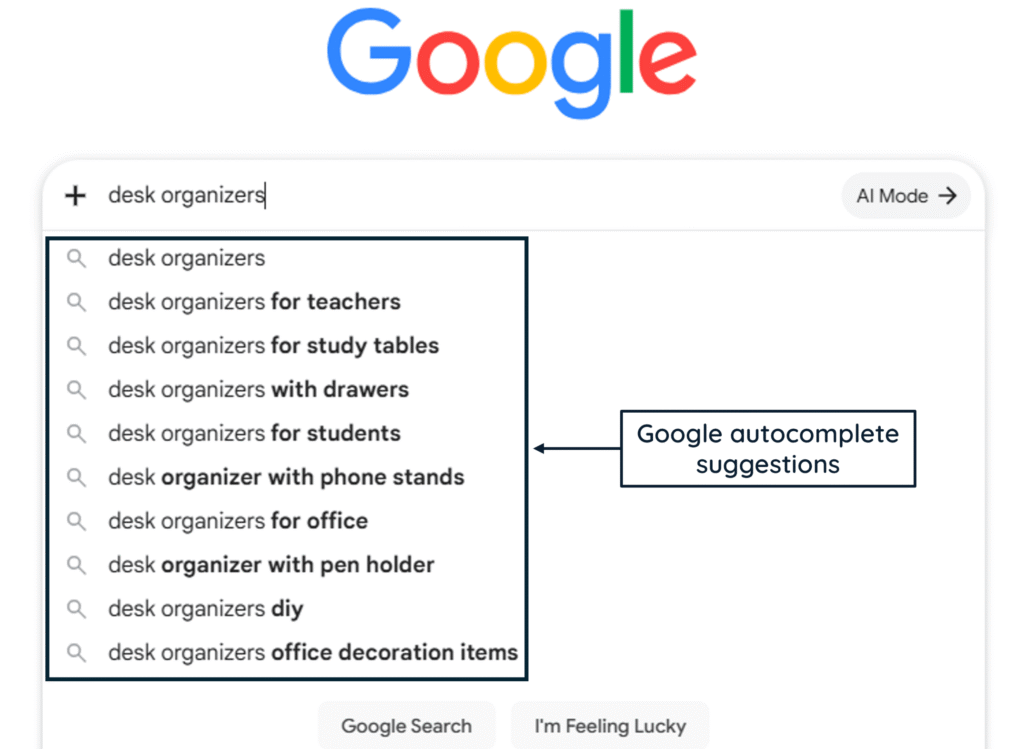
Autocomplete suggestions should not automatically become categories. These keyword tools are most useful as discovery aids rather than automatic category generators. They should instead be used as clues.
Take one term, search the term, inspect the results, and ask whether they represent:
- a distinct product group;
- a separate search intent;
- a useful subcategory;
- an informational topic;
- merely another way of expressing an existing concept.
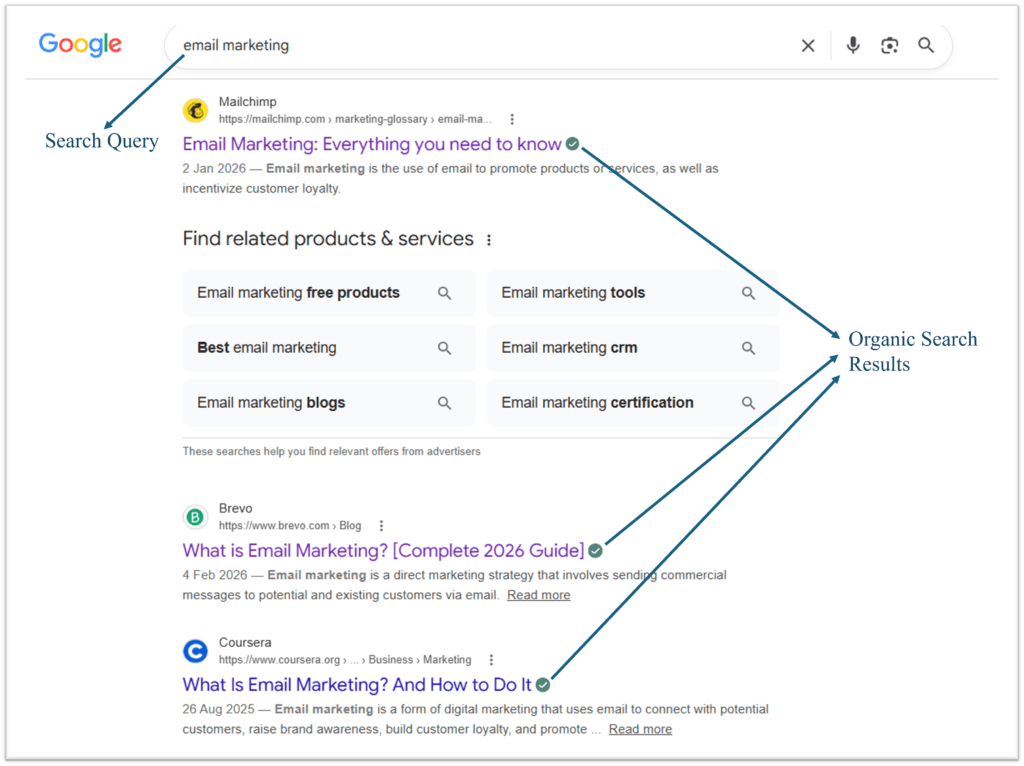
Google Search is also useful for examining the type of content already associated with a term. A results page dominated by product categories tells a different story from one dominated by instructional articles.
Google Trends
Google Trends is useful when several candidate terms describe similar concepts. It allows terms and topics to be compared across time periods and locations. Google also distinguishes between a search term and a topic, with topics potentially grouping conceptually related searches across languages.
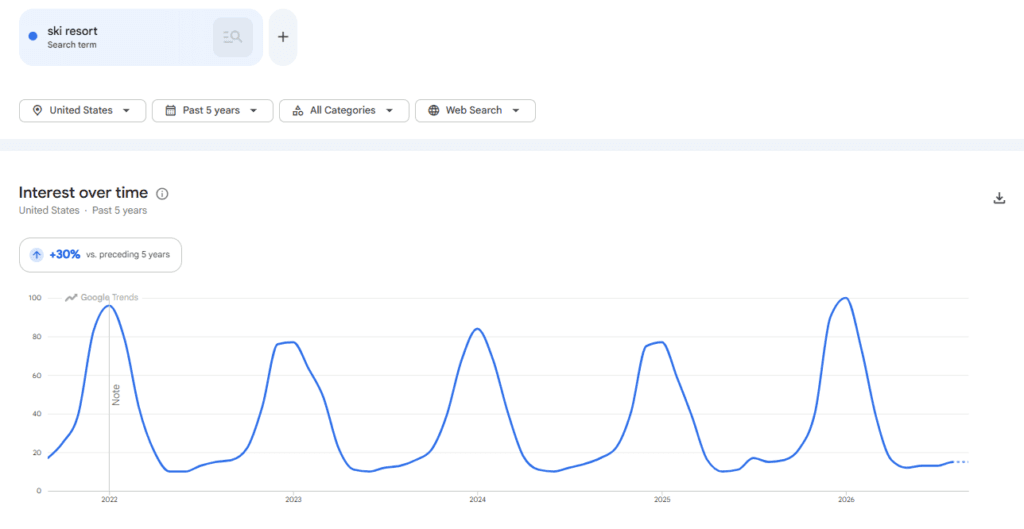
That makes Trends particularly useful for comparing terminology, identifying seasonal demand, observing rising or declining interest, comparing geographic differences, and deciding between competing labels.
However, Google Trends measures relative search interest, not conventional monthly keyword search volume. It should therefore complement other research rather than replace it.
Ahrefs Keyword Generator
You may use Ahrefs Keyword Generator to expand a seed keyword. For example, a seed such as stationery can generate related phrases and questions that can then be reviewed for potential categories, products, articles, and supporting subjects. Ahrefs currently provides several types of keyword ideas and accompanying search-volume estimates.
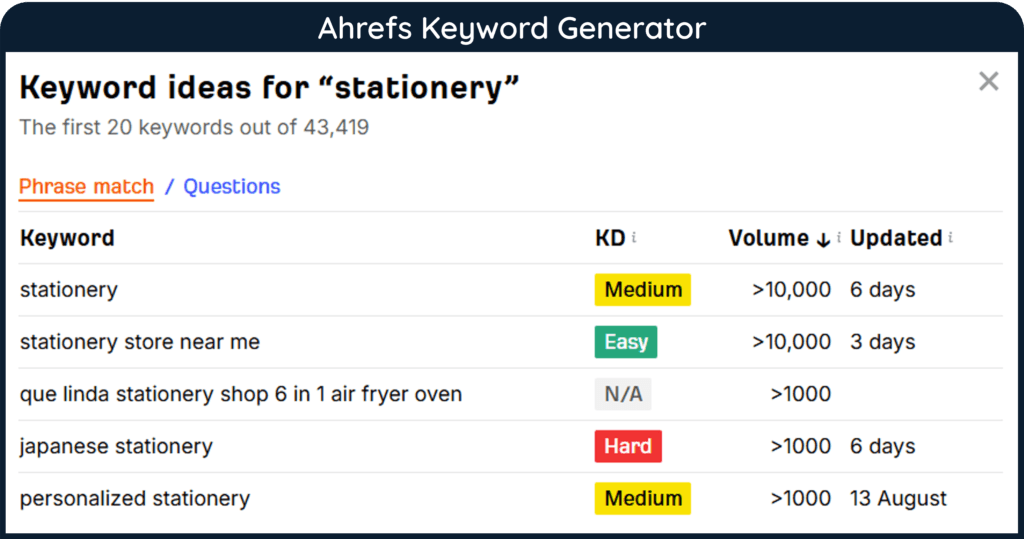
The useful part is not simply collecting hundreds of keywords. It is finding relationships among them.
Instead of keyword → keyword → keyword → keyword, the objective should be pillar → category → subcategory → page or product.
Excel and Google Sheets
A spreadsheet is one of the most useful keyword tools available. Microsoft Excel or Google Sheets can be used to create columns such as:
The spreadsheet transforms keyword research into a planning system.
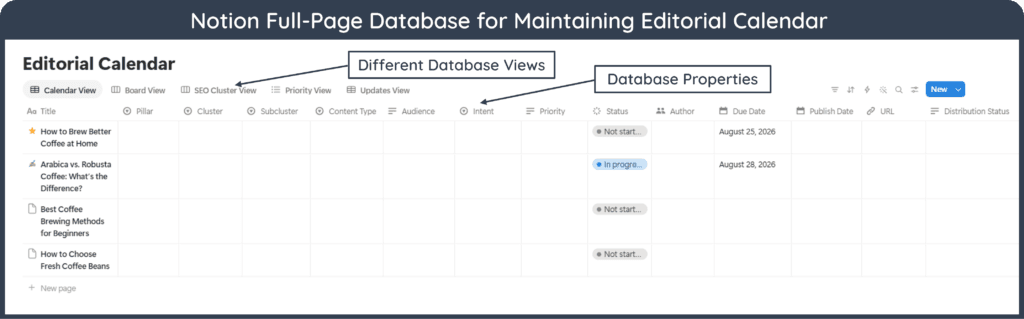
Notion
You may use Notion when keyword research becomes part of a larger content-management workflow.
A database can connect keywords with articles, categories, clusters, search intent, internal links, publication status, related entities, performance data, and update schedules.
This is useful when research is no longer a one-time activity and becomes part of an ongoing publishing and editorial system.
ChatGPT
ChatGPT can help brainstorm categories, group large keyword lists, suggest possible taxonomy structures, identify duplicate concepts, and explain relationships between terms.
Its value is primarily in reasoning, classification, expansion, and organization. For example, a raw list containing pen holder, desk tray, document organizer, drawer divider, and cable organizer could be grouped into possible subcategories using ChatGPT before the structure is checked against actual search results and business requirements.
Keyword Tools for Research and Content Creation
Once the architecture exists, keyword tools become more useful at the individual-page level. At the page level, keyword tools and metrics can help validate terminology, demand, intent, and coverage. Many of the tools used at this stage, including Google Search, Google Autocomplete, Google Trends, Notion, and ChatGPT, have already been discussed earlier under Keyword Tools for Building Content Architecture.
Here, the focus shifts from using them to understand the broader website structure to applying them to individual pages and their specific information needs.
Google Search
Before writing, search the primary topic manually on Google. As you go through the search results, look closely at the types of pages ranking, recurring subtopics, terminology, questions, comparison criteria, SERP features and competing content formats.
The example below shows that a strong content angle for the keyword “heat pumps” would be explaining how heat pumps work rather than directly creating product pages.
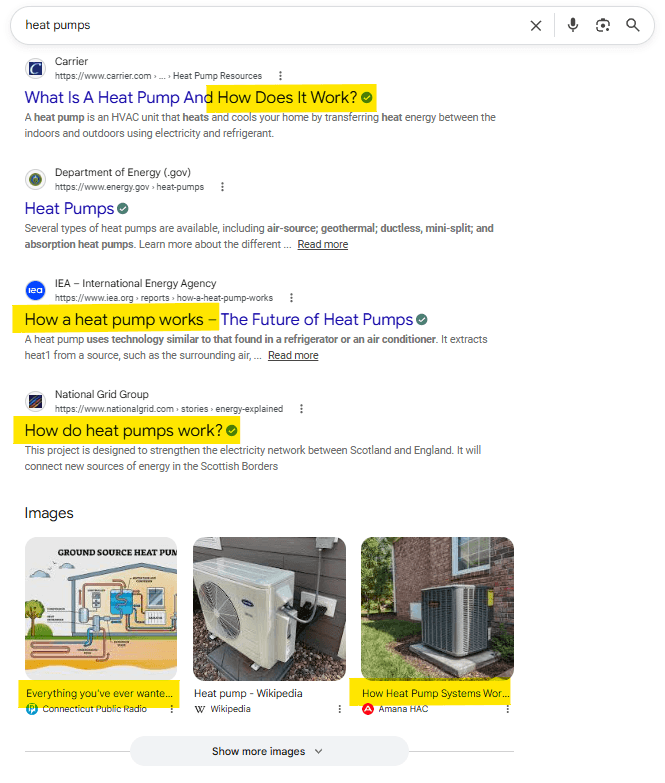
Google results should not simply be copied into an outline. They provide evidence about how the topic is currently being interpreted and what kinds of information users may expect. This evidence can then be combined with reliable sources and original analysis to shape a more complete and useful content structure.
Google Autocomplete
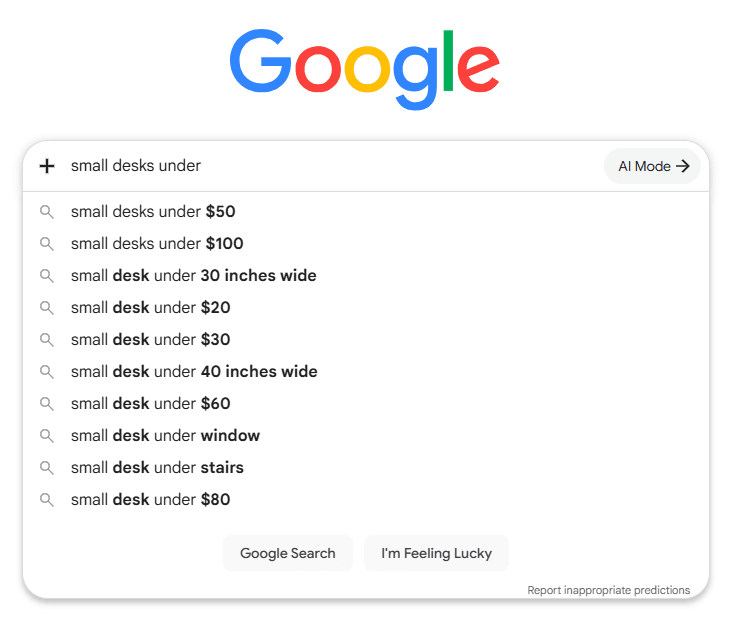
Autocomplete can reveal natural query variations, while other search features can expose related questions and concepts.
These are especially useful when a broad keyword hides several narrower problems. For example, research around desk organizers may reveal needs involving small desks, home offices, cables, stationery, drawers, paper storage, and minimalist setups. Those concepts can improve an article even when none needs to become a separate target keyword.
In this example shown below, price-based suggestions indicate that content about small desks could be organized around specific budget ranges.
Google Trends
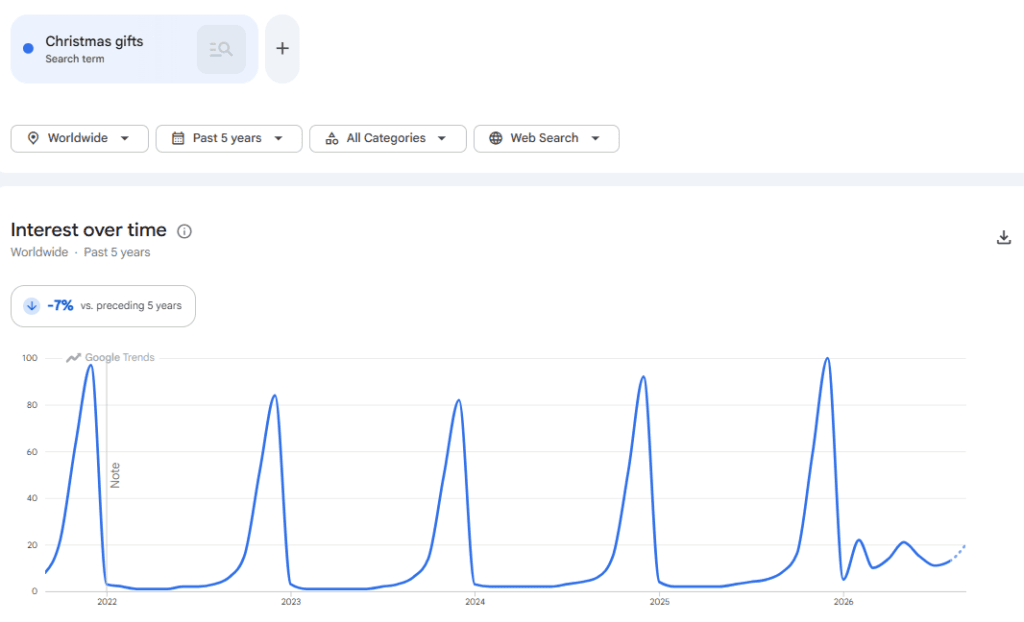
Trends can help writers avoid treating search behavior as static. A subject may be highly seasonal, emerging rapidly, or gradually declining. Comparing terms can also reveal which wording is currently more common within a particular market.
For example, Trends data for “school supplies” in the United States clearly shows a sharp rise in demand each year around August, reflecting a clear back-to-school seasonal pattern.
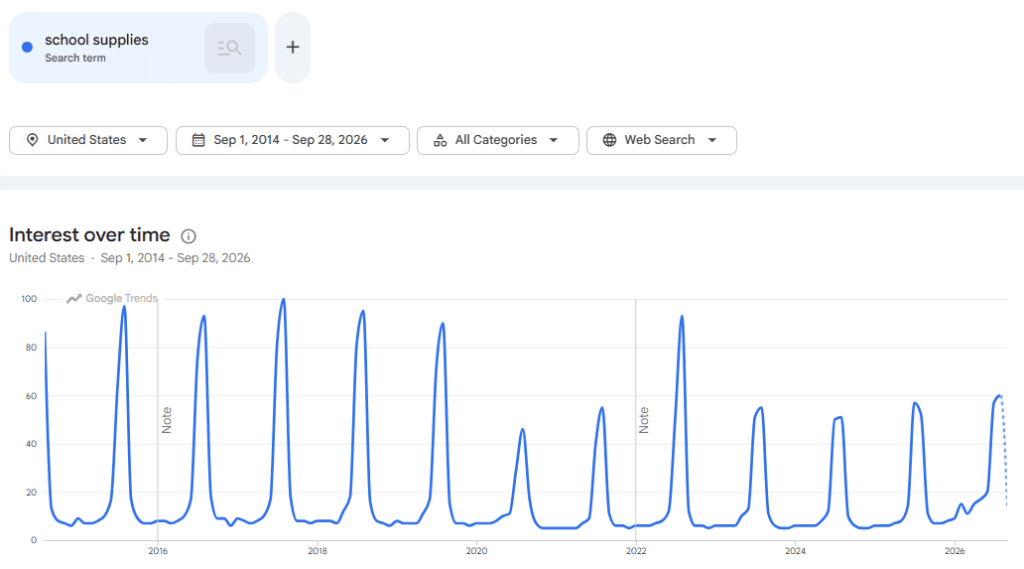
These trends are especially vital for product categories, events, seasonal content, technology, and changing terminology.
Google Keyword Planner
Google Keyword Planner can help discover related keywords, estimate average monthly searches, and provide advertising metrics such as bid ranges and competition. It can also organize keyword ideas and generate forecasts for planned Google Ads campaigns. Although useful for SEO research, its advertising metrics should not be confused with organic ranking difficulty.
Ahrefs, Semrush, and Moz
Specialized SEO platforms can provide broader keyword datasets and metrics. These commercial keyword tools and metrics can make research faster and easier to manage at scale.
Popular options include Ahrefs Keywords Explorer, Semrush Keyword Magic Tool, Moz Keyword Explorer, and Mangools KWFinder. These platforms can help discover related terms, analyze competing pages, inspect ranking difficulty, estimate search demand, and organize keyword groups.
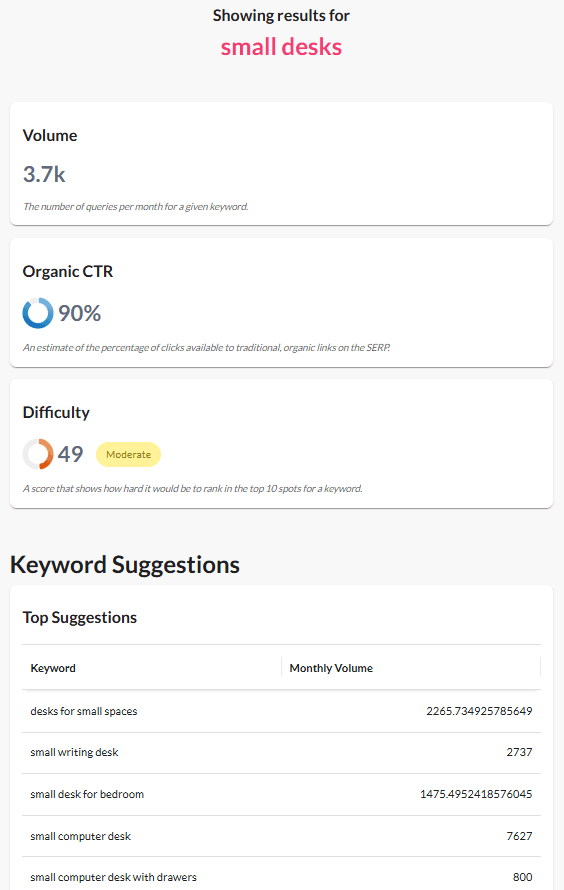
However, keyword databases are estimates built using each company’s own data sources and methodologies. Values from two tools may therefore differ. Hence, it is important to treat them as decision-support tools, not measurements of absolute truth.
Microsoft OneNote and Notion
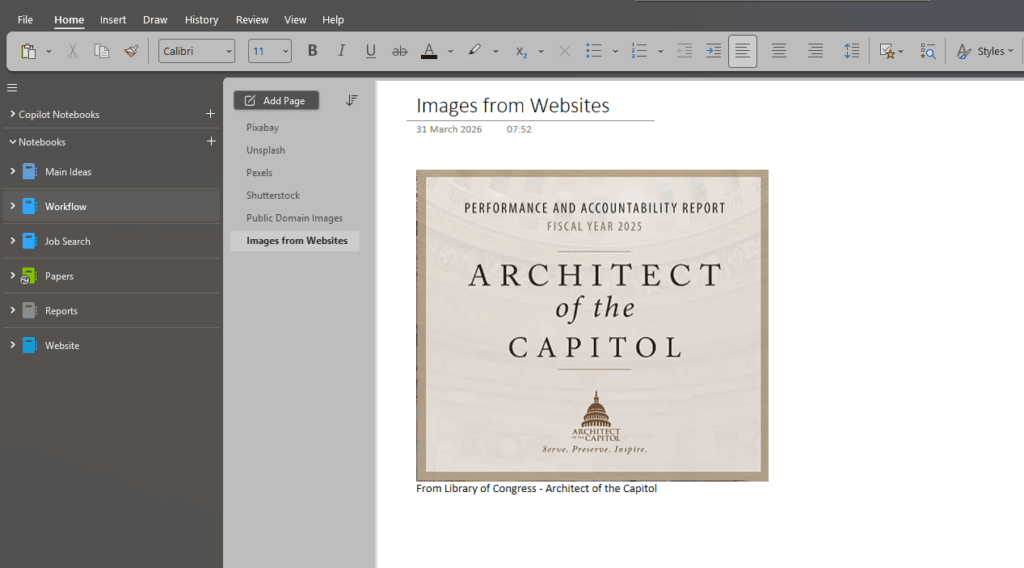
Not every research tool needs an SEO label as tools like Microsoft OneNote and Notion can be used to collect observations, examples, terminology, source links, questions, and ideas while researching.
These general-purpose note-taking and workspace tools that can act as a structured research hub during content development. That extra organizational step can substantially improve coverage and reduce repetitive research.
ChatGPT
ChatGPT can support content research by generating useful questions, organizing research notes, comparing closely related concepts, simplifying technical explanations, and identifying sections that may be missing. It can also help classify keywords by search intent and create initial topic groups that can later be refined through deeper research.
AI-generated suggestions still need judgment and verification. A plausible-looking keyword, statistic, or product claim should not be treated as factual simply because an AI system produced it.
Keyword Tools for Tracking and Optimization
Keyword work should not end when an article is published. At this stage, keyword tools and metrics become useful for tracking visibility, rankings, clicks, and other indicators of actual search performance.
Estimated keyword data can then gradually be supplemented or replaced by evidence showing how the page is actually performing.
Google Search Console
For organic search, Google Search Console is one of the most valuable tools available because it shows the actual queries through which a website receives Google Search visibility.
Its Performance reports include impressions, clicks, click-through rate, and average position.
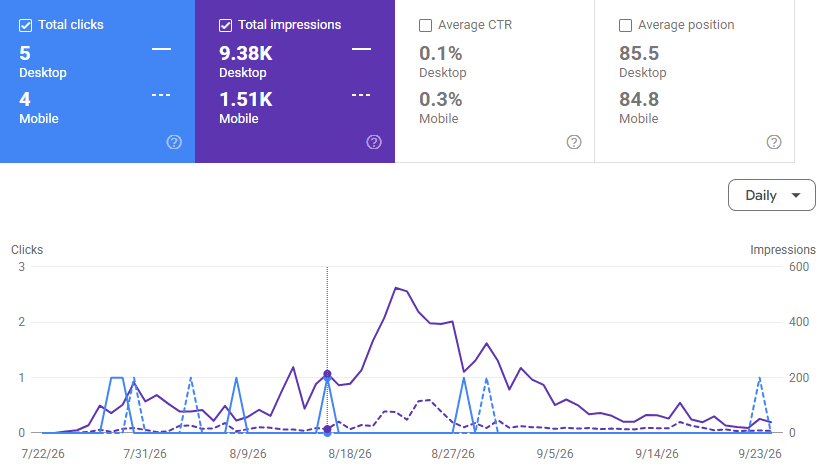
Google defines CTR as clicks divided by impressions, while average position is based on the topmost position of the property or page for each recorded impression, averaged across the impressions included in the report.
The Queries report can reveal something keyword tools cannot know before publication: actual searches for which Google is displaying the page, subject to Search Console’s privacy and reporting limitations.
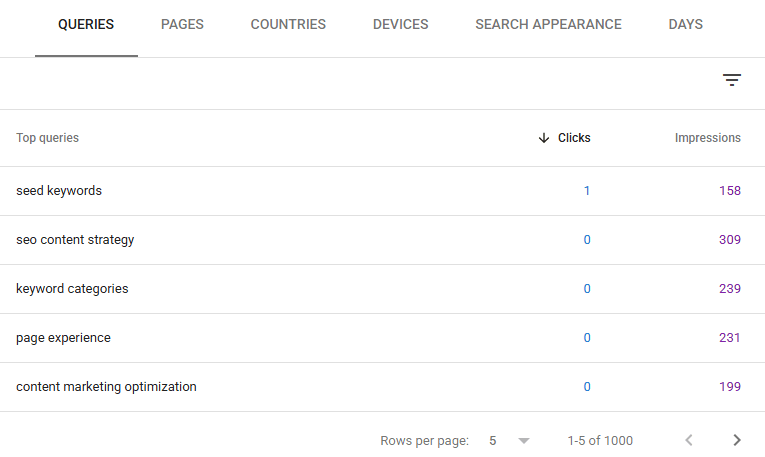
A page originally planned around desk organizers, for example, might begin receiving impressions for unexpected searches involving small office desk storage or organizing stationery without drawers.
Those queries can reveal additional subtopics, the terminology readers actually use, and gaps that existing content may not yet address. They can also uncover internal-linking opportunities and suggest useful follow-up articles for expanding topic coverage.
Google itself recommends examining trends in clicks and impressions rather than focusing excessively on average position alone.
Google Analytics
Search Console primarily explains Google Search visibility and clicks, while Analytics helps examine what happens when visitors reach the website.
The traffic acquisition reports can help analyze sessions by acquisition source and connect acquisition with subsequent engagement and behavior.
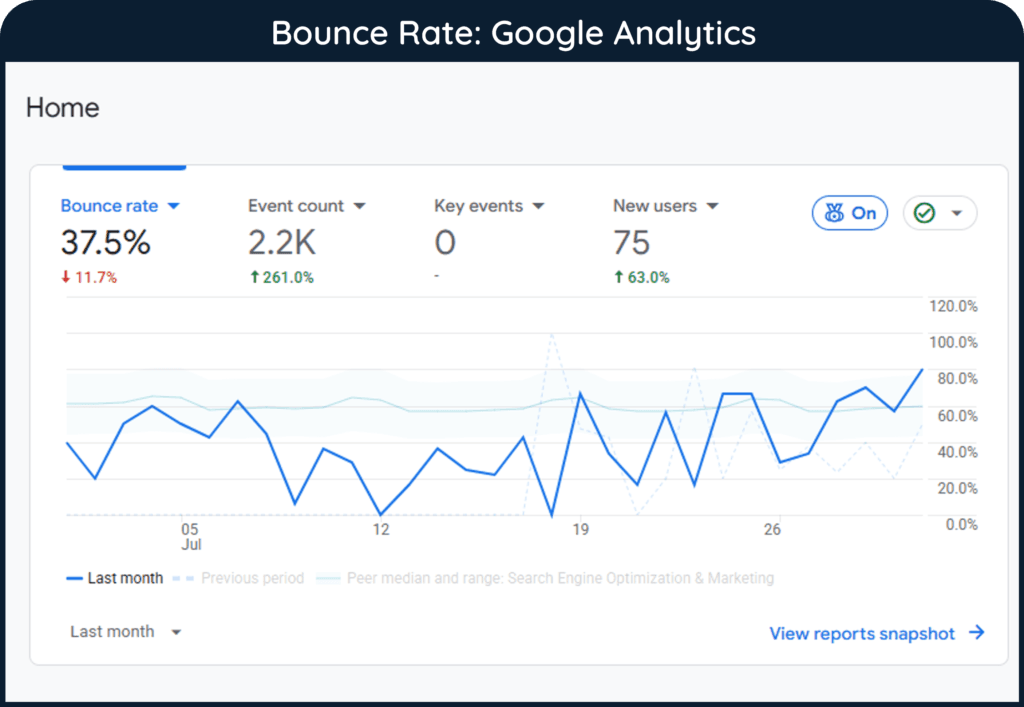
Together, Search Console and Analytics provide a much stronger picture than keyword rankings alone. A keyword can generate visibility without generating meaningful visits. A page can generate visits without contributing to business goals.
Measurement should eventually connect search demand with user behavior.
Rank Tracking Tools
Platforms such as Ahrefs and Semrush can monitor selected keywords over time. Rank tracking is useful when a business wants to follow a known set of commercially or strategically important terms.
However, modern pages can appear for many query variations. Tracking 20 manually selected keywords does not represent every search through which a page might be discovered.
Rank tracking and Search Console should therefore complement one another.
Excel and Notion
Tracking does not require an elaborate system at the beginning. A simple spreadsheet can record:
Notion can perform a similar role when the tracking data needs to connect with an editorial calendar, content inventory, internal-link database, or update workflow.
The best tracking system is the one that remains understandable and actually gets maintained.
Important Keyword Metrics
Keyword tools display many metrics. Therefore, it is easy for beginners to assume that every number carries equal importance.
But that is not the case. Some metrics estimate potential opportunity, while others measure actual performance. Understanding that difference is more important than memorizing dozens of numbers.
Note
Keyword-tool metrics are not universal measurements. Two platforms may report different search-volume or difficulty values for the same keyword because they use different datasets and calculation methods. Google Keyword Planner’s Competition metric also measures advertiser competition, not organic ranking difficulty. Compare metrics within the context of the tool that produced them rather than assuming similarly named scores are directly interchangeable.
Search Volume
Search volume estimates how often a keyword is searched within a specified period, usually expressed as an average monthly value. It can help compare relative demand between keywords.
However, search-volume figures from commercial tools are estimates. They should not be interpreted as an exact count of every search performed.
Volume also says nothing by itself about intent, business value, competition, conversion potential, or whether the keyword deserves its own page. A lower-volume keyword that closely matches a company’s products may be more valuable than a high-volume informational phrase.
Keyword Difficulty
Keyword difficulty is a third-party estimate of how difficult it may be to rank organically for a query.
There is no universal keyword-difficulty score. Each platform can calculate it differently. Ahrefs, for example, bases its current Keyword Difficulty metric primarily on the referring domains of pages ranking in the top 10 and reports the result on a 0–100 scale.
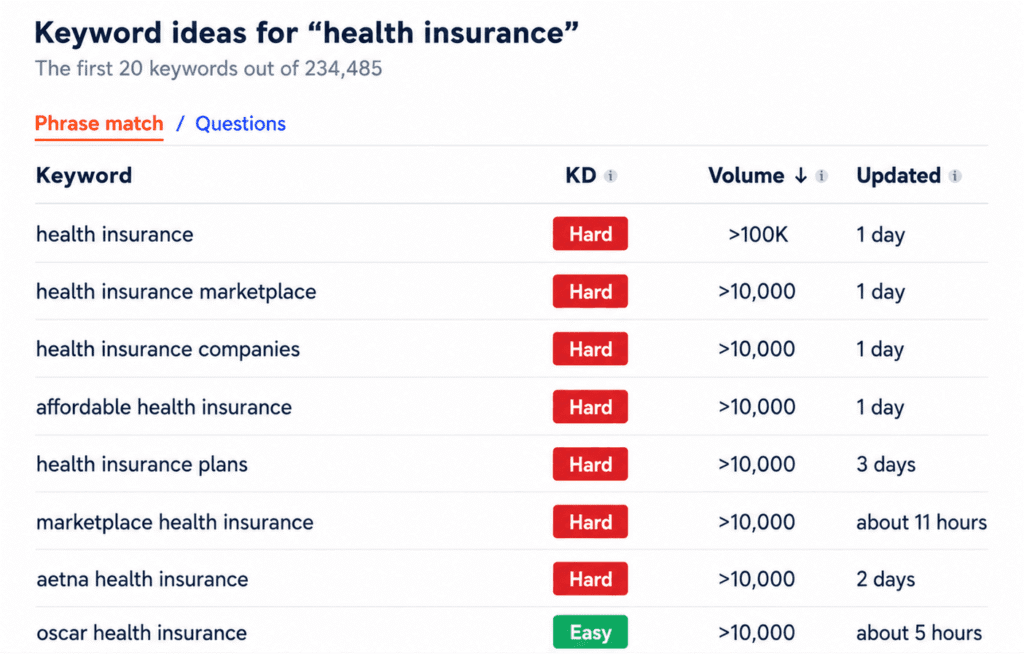
A KD score of 30 in one tool therefore should not automatically be compared with 30 in another.
Cost Per Click
Cost per click (CPC) represents the estimated or observed amount advertisers may pay for clicks in paid search environments.
SEO researchers sometimes use CPC as one clue to commercial value because advertisers may be willing to spend more in markets where a click can lead to valuable transactions. But high CPC does not automatically make a keyword a good organic target. Relevance to the business remains more important.
Traffic Potential
A page does not necessarily receive traffic only from its primary keyword. Strong pages can appear for many related searches.
Some SEO tools therefore estimate traffic potential, attempting to represent the broader organic traffic opportunity associated with ranking pages rather than relying solely on one keyword’s search volume.
This is useful when comparing topics where hundreds of related query variations may lead to the same page.
Trend and Seasonality
A monthly average can hide major changes in demand. For example, Christmas cards, school stationery, and Valentine’s Day gifts may behave very differently across the year.
Google Trends can show how relative search interest changes over time, helping researchers distinguish persistent demand from seasonal peaks or emerging trends.
Impressions
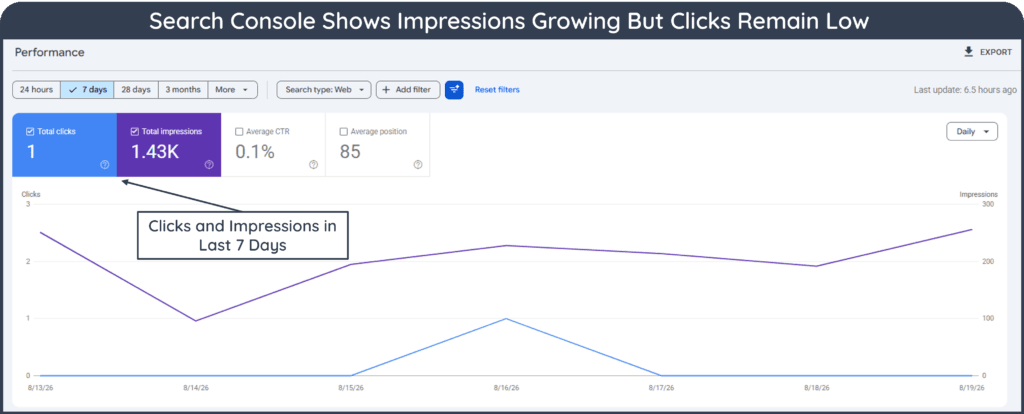
An impression in Search Console generally indicates that a link or content from the site was shown in Google under the applicable reporting rules. Impressions are useful because they can reveal visibility before substantial traffic arrives.
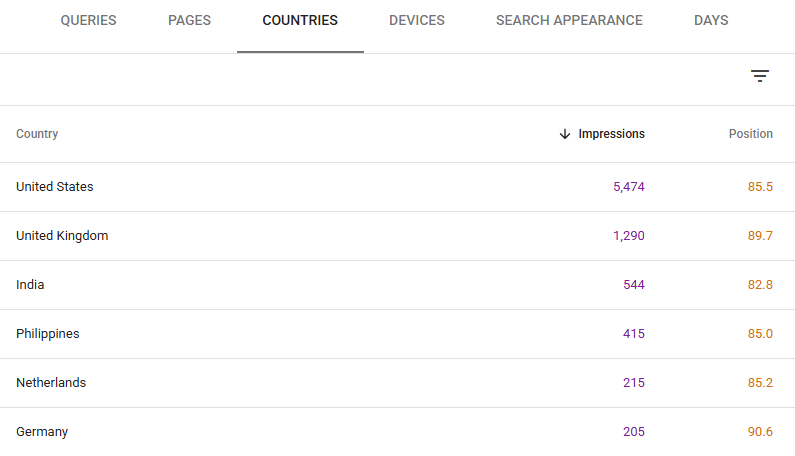
A growing number of impressions can reflect broader query coverage, more frequent visibility, increased search demand, or a combination of these factors.
Clicks
Clicks show how often users clicked from Google Search to the site under Search Console’s measurement rules. A keyword with many impressions but very few clicks deserves investigation.
Possible reasons might include:
- low ranking position;
- a weak title;
- an unhelpful snippet;
- strong competing results;
- SERP features answering the need directly;
- mismatch between the page and the query.
Click-Through Rate
Click-through rate measures the percentage of search impressions that result in a click:
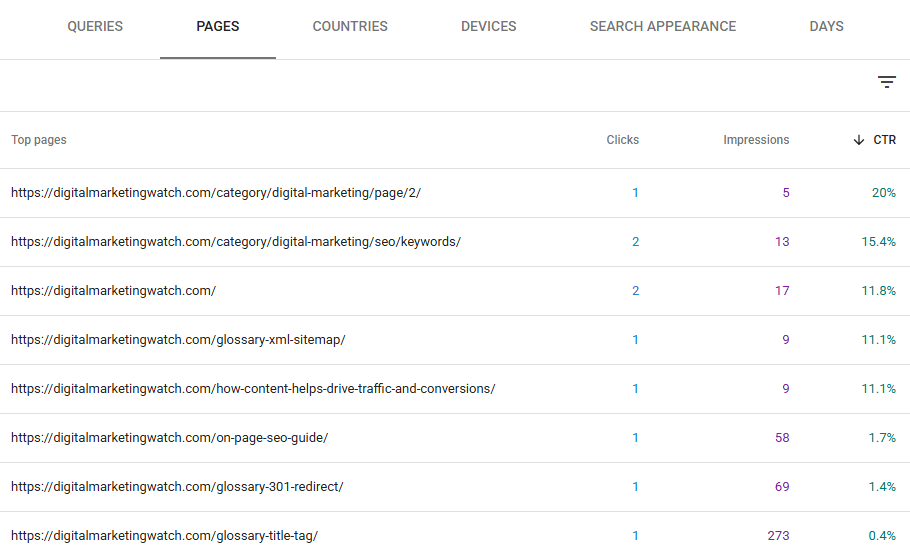
Google Search Console reports CTR for queries and pages using their recorded clicks and impressions. CTR should be interpreted alongside position, query intent, brand familiarity, device type, and SERP layout, since each can influence whether a searcher clicks a result.
Average Position
Search Console’s average position approximates the relative position of a site’s result across the impressions being measured. It is an average, not a permanent ranking number.
A page can appear in different positions for different users, queries, locations, devices, and times.
For that reason, position trends are generally more useful than obsessing over a single day’s number.
Conversions and Business Outcomes
The final metric is often the one beginners forget. For many businesses, traffic is not always the goal. For example, an ecommerce business may ultimately care about purchases, revenue, product inquiries, email signups, account registrations, and repeat customers.
Similarly, a publisher may care about readership, returning visitors, subscriptions, affiliate clicks, or other outcomes.
Keyword metrics help identify and measure opportunities, but business results determine whether those opportunities were valuable.
Conclusion
Keywords have changed, but they have not disappeared.
Search engines are much better at understanding language, concepts, context, and intent than they were when SEO depended heavily on exact-match optimization. AI-powered search is also allowing people to express increasingly complex information needs through longer, conversational queries.
That does not remove the need for structure.
Keywords provide a practical vocabulary for organizing websites, building taxonomies, planning categories, developing articles, naming pages, creating internal links, tracking coverage, and measuring search performance.
Different keyword tools and metrics support different stages of architecture, research, optimization, and measurement. For example, Google Search and Autocomplete can help explore and expand terminology. Similarly, Google Trends can reveal patterns in search interest, while Ahrefs, Semrush, Moz, and similar platforms can support broader keyword discovery and analysis. Excel, OneNote, and Notion can organize it. ChatGPT can assist with classification and reasoning. Rank Math can support on-page review. Search Console and Analytics can show what happens after publication.
The important skill is not learning how to use as many tools as possible, but knowing which question each tool can answer.
A keyword is ultimately much more useful when it becomes part of a coherent content architecture than when it remains one row in a spreadsheet.
Frequently Asked Questions
What is a keyword tool?
A keyword tool is any tool that helps discover, organize, evaluate, use, or track keywords and search queries. It can be a specialized SEO platform such as Ahrefs or Semrush, but Google Search, Google Trends, Excel, Notion, and Search Console can also function as keyword tools for different purposes.
Are keywords still important for SEO?
Yes. Modern search engines can understand meaning beyond exact-match phrases, but keywords remain useful for describing topics, organizing content, conducting research, creating internal links, and measuring search performance. Google also continues to recommend using words people search for in prominent and descriptive page locations.
Which keyword tool should a beginner use first?
A beginner can start with Google Search, Google Autocomplete, Google Trends, and a free keyword generator. As the website grows, tools such as Search Console, Analytics, Rank Math, Ahrefs, Semrush, spreadsheets, and content-management systems can support more specialized parts of the workflow.
Can ChatGPT be used for keyword research?
ChatGPT can help brainstorm keywords, classify terms, group related concepts, develop possible taxonomies, and organize research. It should not be treated as a source of live search-volume or ranking data unless the information is being retrieved from an appropriate current data source.
What is the difference between search volume and keyword difficulty?
Search volume estimates the level of search demand for a keyword, while keyword difficulty estimates how challenging it may be to rank organically for that term. Both are estimates, and neither should determine keyword selection without considering search intent, relevance, competition, and business value.
What keyword metrics should beginners track?
Useful metrics include search volume, keyword difficulty, trends, impressions, clicks, click-through rate, average position, traffic, and conversions. The most important metrics depend on whether the objective is visibility, traffic, leads, sales, or another business outcome.
Is Google Search Console a keyword tool?
Yes, although Google does not position it simply as a keyword-research platform. Search Console shows queries that have generated impressions and clicks for a website, making it particularly valuable for discovering actual search terms associated with published pages and evaluating their performance.
Do I need paid keyword tools?
No. A substantial amount of keyword research can be performed with free or existing tools such as Google Search, Google Trends, Search Console, Analytics, spreadsheets, and free keyword generators. Paid platforms become more useful when larger datasets, competitor research, historical information, rank tracking, and workflow efficiencies justify the cost.