Meta Titles and Meta Descriptions: 10 SEO Best Practices
Key Takeaways
- Meta titles and descriptions shape first impressions in search results, influencing relevance, click-through rates, and user expectations.
- Google truncates or rewrites metadata based on query, device, and pixel width, so recommended character ranges are practical rather than fixed limits.
- Effective metadata matches search intent, front-loads primary keywords, communicates specific benefits, and uses clear calls to action when appropriate.
- Unique, natural metadata can distinguish every page, highlight a useful selling point, and include brand names when space allows.
Meta titles and meta descriptions are often the first things people see before visiting your website. They appear as the clickable headline and summary on search engine results pages (SERPs), helping users decide whether your page is worth opening.
You may think of them as the cover and back-cover description of a book. These elements convince users to click your webpage’s link before they read the page’s content. Mastering this aspect of on-page SEO bridges the gap between ranking well on Google and actually earning a user’s click.
Writing effective metadata is more important than ever because search engines remain the largest source of website traffic, driving approximately 68% of all trackable web traffic and clearly outperforming social media and other channels combined.
A 2020 Portent study, reported by Search Engine Journal, found that Google rewrote meta descriptions for approximately 71% of mobile results and 68% of desktop results in its dataset. It is therefore important to write clear, relevant descriptions that closely match page content. Recently published research by Zyppy SEO also found that meta titles written between 51 and 55 characters have the lowest likelihood of being rewritten by Google, making concise titles a practical SEO best practice.
Although search engines sometimes rewrite metadata, well-written SEO meta titles and meta descriptions can improve click-through rates, communicate page relevance, and encourage users to choose your website over competing results.
Table of Contents
How to Write and Check Meta Titles and Meta Descriptions
Before optimizing your metadata, it is important to know where to edit and preview it. Most modern website builders and CMS platforms make this process straightforward.
Meta Title and Title Tag
Although the term “meta title” is widely used in SEO, the page title is technically defined by the HTML <title> element rather than a <meta> tag.
In WordPress, the easiest method is through an SEO plugin such as Yoast SEO, Rank Math or SEOPress. All these SEO plugins offer robust free versions, and each one of them allows you to check and customize your meta titles and meta descriptions completely for free.
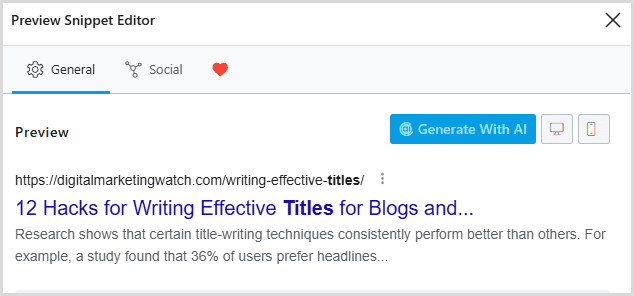
To check and customize your meta title and meta description for your article:
- Open your SEO plugin’s search appearance or snippet settings, which may appear in the editor sidebar or below the content editor
- Enter a custom SEO meta title.
- Write a custom meta description.
- View the built-in Google search preview.
- Adjust the length until there are no warnings.
These plugins also display character counts and often indicate whether your title or description is too short or too long.
You don’t need a separate plugin for Wix as it allows metadata editing directly from the page’s SEO settings. To edit your meta title and meta description, go to Page Settings → SEO Basics. After this:
- Enter your SEO title.
- Add the meta description.
- Preview how it may appear in Google.
- Publish the changes.
Character Count vs Pixel Width
Many beginners believe Google simply counts characters. However, Google does not apply a fixed character limit, and title links are truncated as needed to fit the available display width, which is measured as pixel width. For example, “WWWW” occupies much more space or has more pixel width than “iiii” even though both contain four characters.
Several SEO tools, including Yoast SEO, Rank Math, and online SERP preview tools, automatically estimate both character count and pixel width.
10 SEO Best Practices
1. Front-Load Your Primary Keyword
Users often scan only the first few words before deciding whether a result matches their search and intent. It is therefore important to make sure that your primary keyword appears near the beginning of the meta title.
For example, instead of using “Digital Marketing Guide: Everything You Need to Know about Influencer Marketing”, you may use “Influencer Marketing: Complete Guide for Beginners” as your blog title.
The second version immediately tells both readers and search engines what the page is about. More importantly, it also reduces the chance that your primary keyword gets truncated on smaller mobile screens.
2. Stay Within the Recommended Length
Long metadata often gets cut off with an ellipsis (…), hiding valuable information from searchers. It is therefore important to aim for practical editorial targets:
- 50–60 characters for meta titles
- 150–160 characters for meta descriptions
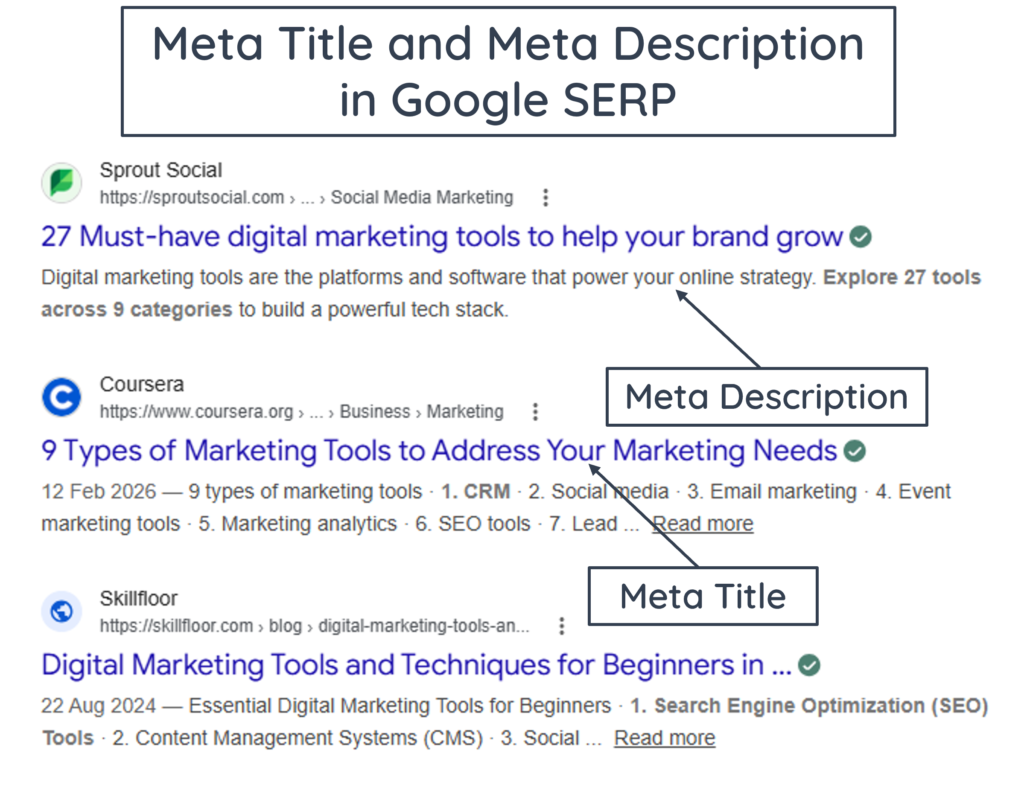
These are recommended ranges rather than strict counts as Google measures display width in pixels. If your title exceeds the available space, Google may truncate the title link. Therefore, staying within the recommended ranges can help reduce unnecessary truncation.
It is important to note here that Google may also generate different title text when its systems determine that another source better represents the page.
3. Optimize for Pixel Width, Not Just Character Count
A title with 58 narrow characters may fit perfectly, while another title with 55 wide characters may still be truncated. Therefore, optimizing pixel width helps preserve your complete message and reduces unnecessary rewriting by search engines.
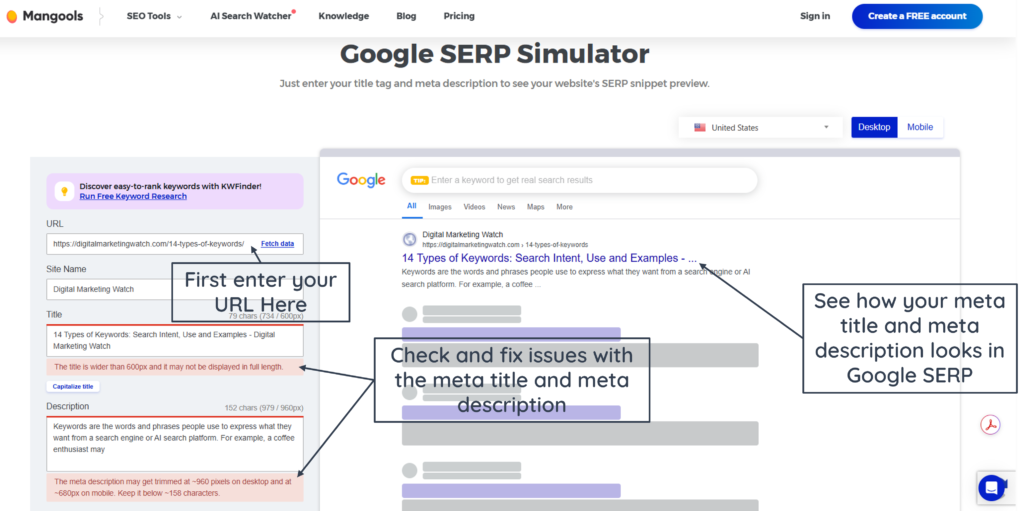
Many professional SEO tools measure pixel width instead of relying solely on character counts. You can use free SERP preview tools such as ToTheWeb SERP Preview Tool or Mangools SERP Simulator for real-time desktop and mobile previews before publishing. These tools simulate how your title and description will appear on both desktop and mobile search results.
4. Match the User’s Search Intent
Every search begins with a question, problem or goal. Your metadata should immediately communicate that your page provides the answer. For example, someone searching “How to improve website speed” expects educational content. For this, a good title would be “How to Improve Website Speed: 10 Practical Tips”.
Similarly, use your meta description to explain exactly what the reader will gain after clicking. For this, instead of writing a vague summary, describe the specific problem your article solves.
5. Add a Clear Call-to-Action (CTA) in Your Meta Description
A good meta description should not only explain the page but also encourage users to take action. To make the most of meta descriptions, you can think of them as short pitches for your content. After explaining the benefit, end with a simple call-to-action (CTA) that tells readers what to do or expect next. Here are two examples of meta descriptions with clear CTAs:
- Meta Description 1: Want to master SEO layout? Read the complete guide for practical on-page SEO recommendations.
- Meta Description 2: Planning your next website launch? Download the free checklist for on-page SEO before launching your website.
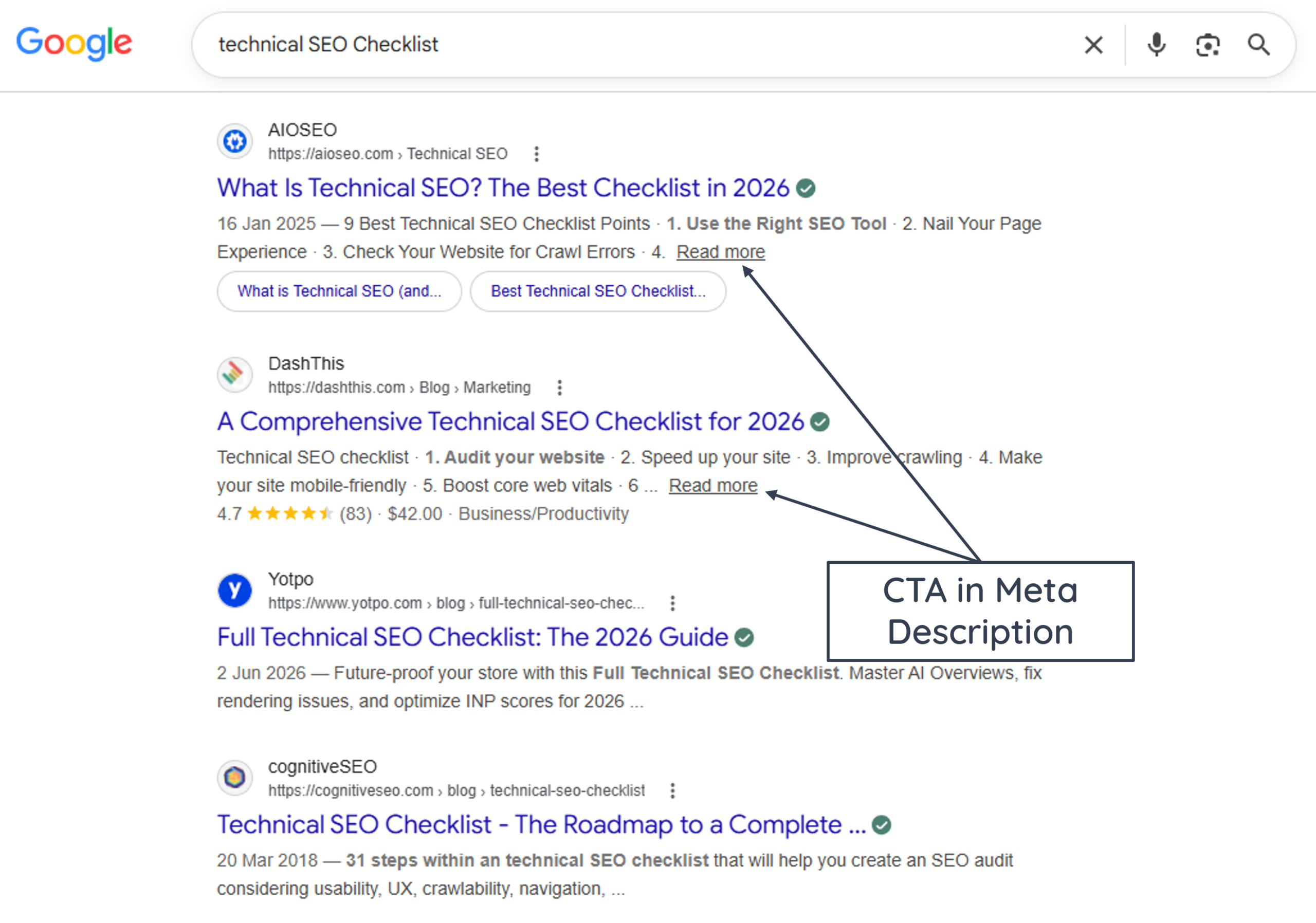
A clear CTA gives users one final reason to click your result instead of a competing page.
6. Use Numbers When They Add Useful Specificity
Numbers naturally attract attention because they promise organized, easy-to-read content. They also help users estimate the depth of an article before clicking. For example, “7 Email Marketing Tips That Increase Open Rates” offers more clarity than “Email Marketing Tips”.
You can be more creative when including numbers in your titles:
- Influencer Marketing 2026 Guide: Scale Your Brand
- Increasing CTR with 6 Creative Ideas
- Learn Influencer Marketing in 15 Days
In short, specific numbers can make a title clearer and more actionable by telling users how many steps, tips, tools, or examples they will find.
7. Write Unique Metadata for Every Page
Every page on your website should have its own unique meta title and meta description. Distinct titles and descriptions make pages easier for users to differentiate and provide search engines with more specific information about each page.
Unique metadata improves page relevance, helps search engines distinguish your content, and provides visitors with a clearer expectation of what each page offers.
8. Highlight Your Unique Selling Proposition (USP)
Before framing your custom meta title and meta description, ask yourself a simple question:
Why should someone click on my result instead of the other relevant results?
Your title or description should answer that question by highlighting a unique benefit. For this, you can use effective modifiers such as “Step-by-Step”, “Updated for 2026”, “Beginner-Friendly”, “Complete Guide”, “Free” or “Expert Tips”.
Small additions like these can significantly improve the attractiveness of your search listing without making it look overly promotional.
9. Write Naturally for Humans
Although keywords remain important, your metadata should never sound robotic or stuffed with keywords. Therefore, avoid writing titles like “SEO Meta Title SEO Description SEO Tips SEO Guide”. Instead, craft natural titles like “SEO Meta Titles & Descriptions: 10 Rules for Higher Click-Through Rates”
The same principle applies to descriptions. For meta descriptions, try to focus on readability first, then naturally include your primary keyword. Remember that the title and description are ultimately written for people, not search engines.
10. Add Your Brand Name When Space Allows
Many established websites include their brand name at the end of the meta title. In these cases, the main title is very short and separated from the brand name by using a vertical pipe (|) or dash (–):
- Email Marketing KPIs: Complete Guide | Email Hut
- SEO for Email Marketing Explained – Search & Intelligence Review
Including a familiar brand name can reinforce brand recognition for returning or brand-aware searchers. However, if adding the brand makes the title unnecessarily long, prioritize the page-specific information that helps users understand the result.
To check whether your brand name fits in the meta title, you can use free SERP simulators like Mangools Google SERP simulator.
Example and SERP Layout
Example Text
The following example is based on the 10 rules discussed above.
- Meta Title: What Are Marketing Leads? 4 Key Strategies for Growth (53 characters with spaces)
- Meta Description: Stop wasting time on dead-end prospects. Learn the exact difference between MQLs and SQLs, plus proven lead capture tactics that convert traffic into sales. (156 characters with spaces)
Search Result Layout
This example demonstrates how a well-written title and description can immediately communicate relevance, authority, and value while encouraging users to click.
Frequently Asked Questions
What is a meta title?
A meta title, more accurately called the SEO title or <title> element, defines the document title shown in browser tabs. It is an important source Google may use when generating the clickable title link in search results.
What is a meta description?
A meta description is a short HTML summary of a webpage that Google may use when generating the snippet shown below a search result’s title link. While it is not a direct ranking factor, a compelling description can encourage users to click your title link and visit your webpage.
What is the ideal length for meta titles and descriptions?
A good meta title is typically 50–60 characters, while a meta description is usually 150–160 characters. These are editorial recommendations rather than Google limits because search-result text is truncated according to the available display width rather than a fixed character count.
Does Google always use my meta description?
No. Google may rewrite or replace your meta description if it believes another section of your page better matches a user’s search query. However, writing clear and relevant descriptions may increase the likelihood of Google using your original version.
How can I add or check meta titles and meta descriptions in WordPress?
You can add or check meta titles and meta descriptions in WordPress through the Rank Math SEO plugin. For this, you need to click on the box that displays your Rank Math SEO score, and check “Preview” in the General tab.
Which tools can I use to optimize meta titles and descriptions?
Popular options include Yoast SEO, Rank Math, SEOPress, Google Search Console, SERP Preview Tools, and browser-based SEO extensions like Mangools Google SERP Simulator. SEO plugins and SERP simulators can help review title length, description length, and estimated search appearance. Google Search Console is useful after publication for evaluating impressions, clicks, CTR, queries, and average position.